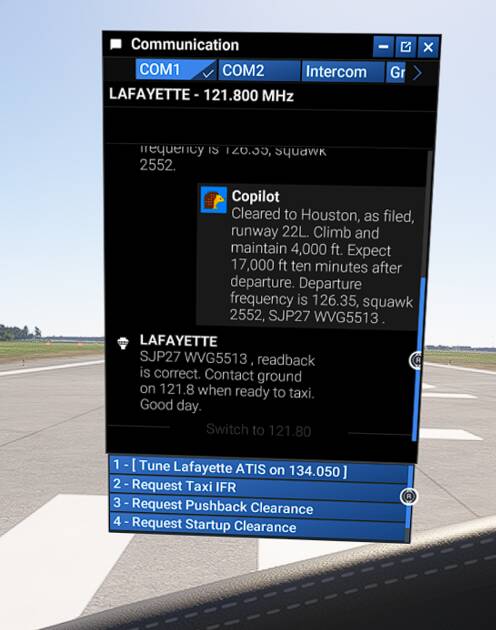
ATC Takeoff runway options blank in SU 4 1.6.18.0 beta

ISSUE DESCRIPTION

Description of the issue: the options to choose the takeoff runway are blank in the comm panel

FREQUENCY OF ISSUE

How often does this occur for you (Example: Just once, every time on sim load, intermittently)? Only tried it once

REPRODUCTION STEPS

Please list clear steps you took in order to help our test team reproduce the same issue:

  1. Choose an uncontrolled airport at the departure

  2. Open comm panel to select takeoff runwa

YOUR SETTINGS

If the issue still occurs with no mods and add-ons, please continue to report your issue. If not, please move this post to the User Support Hub.

What peripherals are you using:

[PC Only] Are you using Developer Mode or have you made any changes to it?

[PC, MSFS 2020 Only] Are you using DX11 or DX12?

[PC Only] What GPU (Graphics Card) do you use?

[PC Only] What other relevant PC specs can you share?

MEDIA

1 Like

Can replicate at 80FD:


2 Likes

Not only the takeoff runway options are blank. If you spawn at a controlled airport, some options can also be missing.

  • Spawn at a ramp at KMCO
  • Start the aircraft
  • Open the communication panel
  • Some options can be missing right away:

If not, click to tune ground, some options can be missing in the next window:

Seems an aleatory issue.

4 Likes

Cannot replicate. Here is KHSD, EGNC (uncontrolled) and EGNT…

I tried spawning C&D and at the runway and always okay. I’ll test more and update…

(Game Bar seems to cut off bottom part of screen capture but all options were visible to me!

So all it took was a reboot of the sim and I can replicate it!

Edit to add: just to clarify, I’d updated the sim via xbox app. Started the sim and then took the screen shots in my post above. They show no bug but I then rebooted the sim and the bug became apparent.

1 Like

I pretty much can confirm that this is also randomly happening on approach - a scenario in which that happens is if you approach an airport without tower and select the runway to land on: in this case also the runway information might not be in place which makes this “Schrödingers approach”

Confirmed on Xbox too.

Thank you for the bug report.

We have created an internal ticket to see if our team already has this logged, and if not they will attempt to reproduce the issue and create a new bug report. This item is now marked as feedback-logged. If there is an existing bug report or one is created, we will move this thread to bug-logged.

1 Like

Following recent updates, when I spawn on a runway I now get the ATC panel normally expected at the gate:

To effect a takeoff, I now have to log my flight, ask for taxi etc. before I can get takeoff clearance.

This is not quite the same as the OP, but the problem is related and needs to be solved at the same time.

Another of those niggling faults Asobo create which aren’t checked before release.

You should create a separate bug report for this as it is a different issue and may not get fixed as part of this thread…

Can’t seem to have any airport show runways in ATC Menu. This just started with last two Beta releases.

Anyone else have this before I submit a bug report?

Done as you suggested:

1 Like

I’m getting the same, blank options

I’m getting empty options on landing announcement when choosing the rwy.

I’m getting this with SU 4 1.6.19.0 as well. It seems to come up after each time you select an airport. This wasn’t happening during earlier SU 4 betas so is a fairly recent regression.

I have this issue too. This is a really annoying bug. Makes the game not playable if you want to use ATC. There is no workaround, you have to guess what would be the blank options. Which is really difficult when more than one is blank.

Even if no point in the 1.6.21.0 Release Notes, it seems to be fixed. Same test at 80FD:


1 Like

Yeah I think it’s been fixed in .21 too. Just confused why the poster previous to you thinks it’s broken when the post was made after .21 was released…

2 Likes

@DavA6 : issue seems to have been resolved in 1.6.21.0. Could you confirm if you are still experiencing or not the issue ?

It should be fixed then. I tried it just before the latest patch, and I had to switch back to SU3 due to other addon related issues. So I did not test the issue in .21.

1 Like