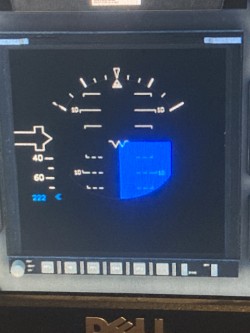
Hi. I have been flying the c17for a few months now without issue and have recently not been able to do so because my PFD is frozen as if in a test mode (black with attitude lines and numbers white, and speed bars and lines white , with lower right quadrant blue). I have tried quick flights, cold and dark starts with checklists carefully powering up, especially the 4 IRU’s with no change. I have cleared cache and streamed caches, removed and reloaded c17 in content manager, then uninstalled and reinstalled sim w no change. I always load IFR plan and send to ATC and avionics. Support points me to Miltech but no email or support contact. Other planes work without issue. I have read online that a recent miltech update may have contributed to this. Also, for consideration, I am running PC version w updated Nvidia game ready drivers for 3060 32Gb card. I am not running any 3rd party add ons. I do use steam valve VR, but this issue persists with standard display monitor. Any help would be appreciated. Until then I will wait for the next c17 update and hope it fixes the problem. This recent update did not help. I now have C17 version 1.3.2. I really hope to get back in the air soon! If this post is more appropriate in another category please let me know. I understand this and other SIM models are extremely complex and I am grateful for the effort to make this content available!
I have never flown the C-17, but I jumped in to see if I could figure out how to start it up. This is a pretty cool plane. I would need a lot of training to get this bird up.
Anyway, after powering up and getting avionics on, I’m not seeing the same issue. So I think we’ve established it’s not a global issue with the sim or the plane. It must be something local to your system.
Usually, things like you are seeing are due to some other add-on or component messing with the avionics displays. I’ve seen it so many times on so many different planes due to so many random add-ons, that it’s my primary assumption. The forum is littered with reports of blank displays, corrupt displays,etc… and in most cases it comes down to some other add-on that’s out of date, or interferes with the planes systems.
I know you said you removed add-ons. I would recommend you double and triple check everything in your content manager, and everything you’ve downloaded from the marketplace. Also, if you’re on PC, just completely rename your community folder so there’s zero chance some rogue item in there causing this for you.
Good luck. Here’s my cockpit after start-up:
OK thanks. I will give this a try. This is a great plane to fly when working!
Hi, were you ever able to figure this problem out? I’m having the same issue with the C-17 PFD in MSFS 2024. The aircraft loads hot and ready on the runway, and the other instruments appear to be working normally, but the PFD is still showing the same broken display you encountered.
I’ve tried just about everything: deleting rolling cache, clearing shader cache, removing Community folder add-ons, testing fresh flights, restarting, and even reinstalling MSFS 2024 through the Xbox app. The issue still hasn’t gone away.
Were you able to find a fix, or did it turn out to be a known aircraft/package bug?
Hi. Unfortunately no fix. Microsoft says go to 3rd party dev, 3rd party says it is a Microsoft issue or issue w my VRAM. Waiting for next update. The recent april update also broke my MSFS2020 cessna longitude pfd, mfd now only black screen. These inop panels work fine in msfs2024. I have spent a few hours wiping entire computer and have decided to wait for next update. Have to say the c17 is one of my favorite planes to fly and hope it has a fix soon. The c17 in msfs 2020 is no comparison my opinion. The displays do work in msfs2020 c17 but 2024 version is a massive step up when pfd bug is fixed.
