ISSUE DESCRIPTION
Description of the issue:
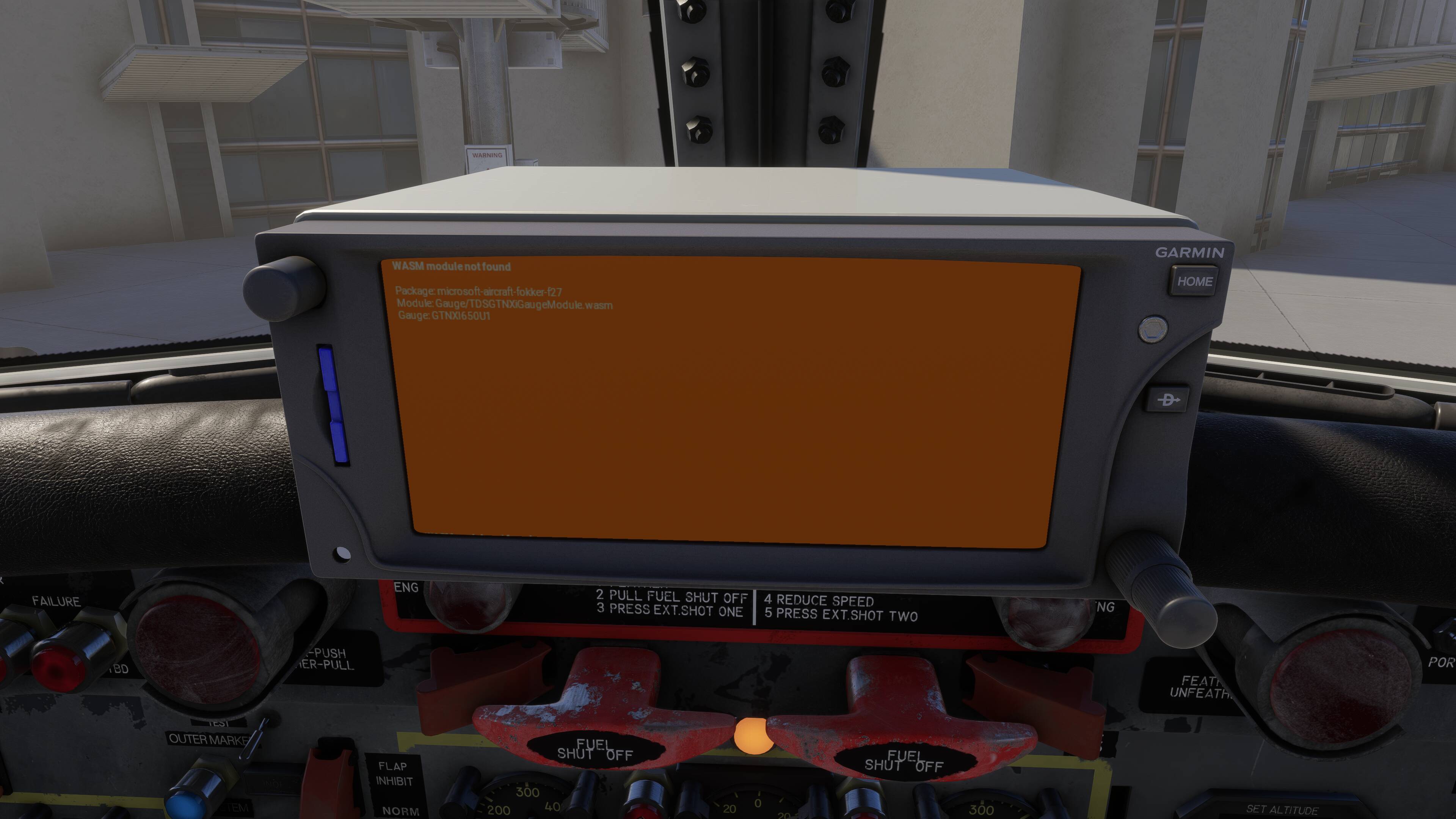
The WASM module for the TDS GTN650 appears to be missing. When selected, the Garmin module displays:
WASM module not found
Package: microsoft-aircraft-fokker-f27
Module: Gauge/TDSGTNXiGaugeModule.wasm
Gauge: GTNXI650U1
FREQUENCY OF ISSUE
How often does this occur for you (Example: Just once, every time on sim load, intermittently)?
Every time (3 out of 3 times so far) in SU5 v1.7.16.0.
Note: Although I’m in the SU5 Beta, this may not be Beta related, so I’m creating this report in the Bug Reporting Hub . If users on SU4 are not experiencing this issue, I’ll move to Sim Update 7 Beta | MSFS 2024 > Aircraft & Systems
REPRODUCTION STEPS
Please list clear steps you took in order to help our test team reproduce the same issue:
- In free flight, select the Fokker F27. Just for conveneience, select any airport parking spot, daylight hours, any weather.
- Start the flight, switch to cockpit view (no need to complete the walk-around checks).
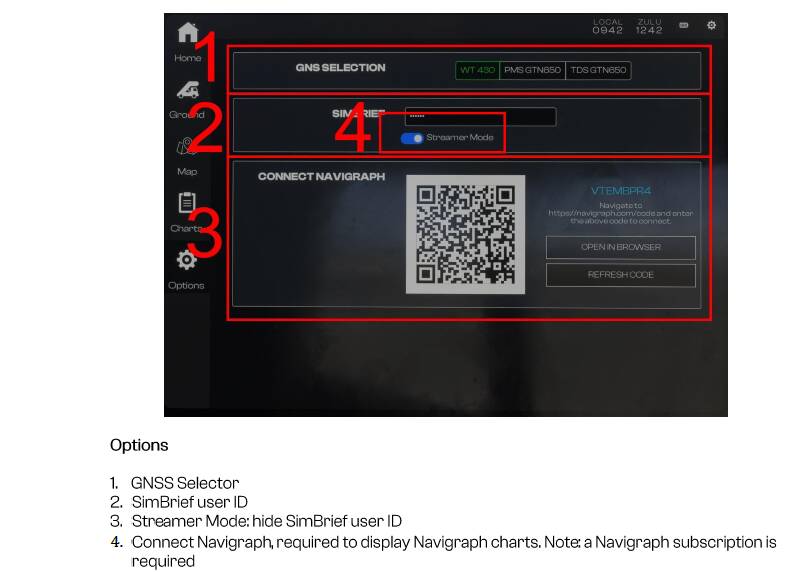
- In the EFB by the pilot-side window, select options, then in the GNSS Selection box, select the TDS GTN650.
- Notice the orange WASM error in the Garmin module above the two fuel shutoff valves (see screenshot).
YOUR SETTINGS
What peripherals are you using, if relevant:
N/A for this issue
[PC Only] Are you using Developer Mode or have you made any changes to it?
No/No
[PC, MSFS 2020 Only] Are you using DX11 or DX12?
N/A
[PC Only] What GPU (Graphics Card) do you use?
AMD Radeon RX 9070 XT (16GB) Driver v26.1.1
[PC Only] What other relevant PC specs can you share?
Expand to see my basic PC specs:
| Item | Setting |
|---|---|
| CPU | i7-12700K (no overclocking or undervolting) |
| RAM | 32 GB 5200 MHz DDR5 CL40 RAM |
| GPU | AMD Radeon RX 9070 XT (16GB) Driver v32.0.23017.1001 (Adrenalin v26.1.1) |
| Rebar BIOS Setting | On |
| Main monitor (MSFS) | 55" Hisense U7 4K TV @ 120Hz |
| Secondary monitors (EFB, L.N.Map, etc.) | Two 32" 1080p 1360 x 768 @ 60 Hz |
| Internet | Starlink, with max download speeds of ~ 350-400 Mbps |
| Peripherals | Microsoft USB Natural Keyboard, Microsoft USB Wireless Intellimouse Explorer, Turtle Beach VelocityOne Flight Yoke & Rudder. |
| OS | Windows 11 Pro 25 H2 v26200.7840 + all OS updates. |
| MSFS 2024 Edition | MS Store Aviator + all WUs & CUs |
| Current Build Version | SU5 v1.7.16.0 |
| Downloaded Core Content | None (i.e., all Streamed, including the Fokker F27) |