I needed to reconfigure my Grumman Albatross and am using Turtle Beach Velocity 1 controls. Previously, I had engines 1 and 2 using 2 throttle levers ( 0-100%). I would activate reverse thrust by pulling the throttle levers past their detent and then throttling up. Currently, I only need to pull the throttle back a little past halfway to get to idle. Pulling back more than that seems to put the engines in reverse thrust (or change the pitch of the propellers for reverse thrust). I can see this with an external view and watch which way the water spray is blowing. Reverse thrust seems to be a function of throttle position and not whether the detent has been activated. As I watch the movement of the throttles in the cockpit, they seem different now too. They used to travel front to back, get pulled down and then move forward again for increasing reverse thrust. Now, the movement is very different. I am able to successfully takeoff, fly and land both on land and water. The throttle lever configuration just seems different now than it did several months ago. Any thoughts?
@AirWolf2055 If you are using the Throttle Axis (0-100%) bindings, then I believe the idle detent position is set to 50% of the throttle’s total physical travel by default. That’s why your idle is at halfway right now.
You will need to go into your control options, select your first throttle binding, click the configuration icon to the right of it, and turn on “Device input curve override” and then select “Tweak action curve”.
That will bring up this screen…
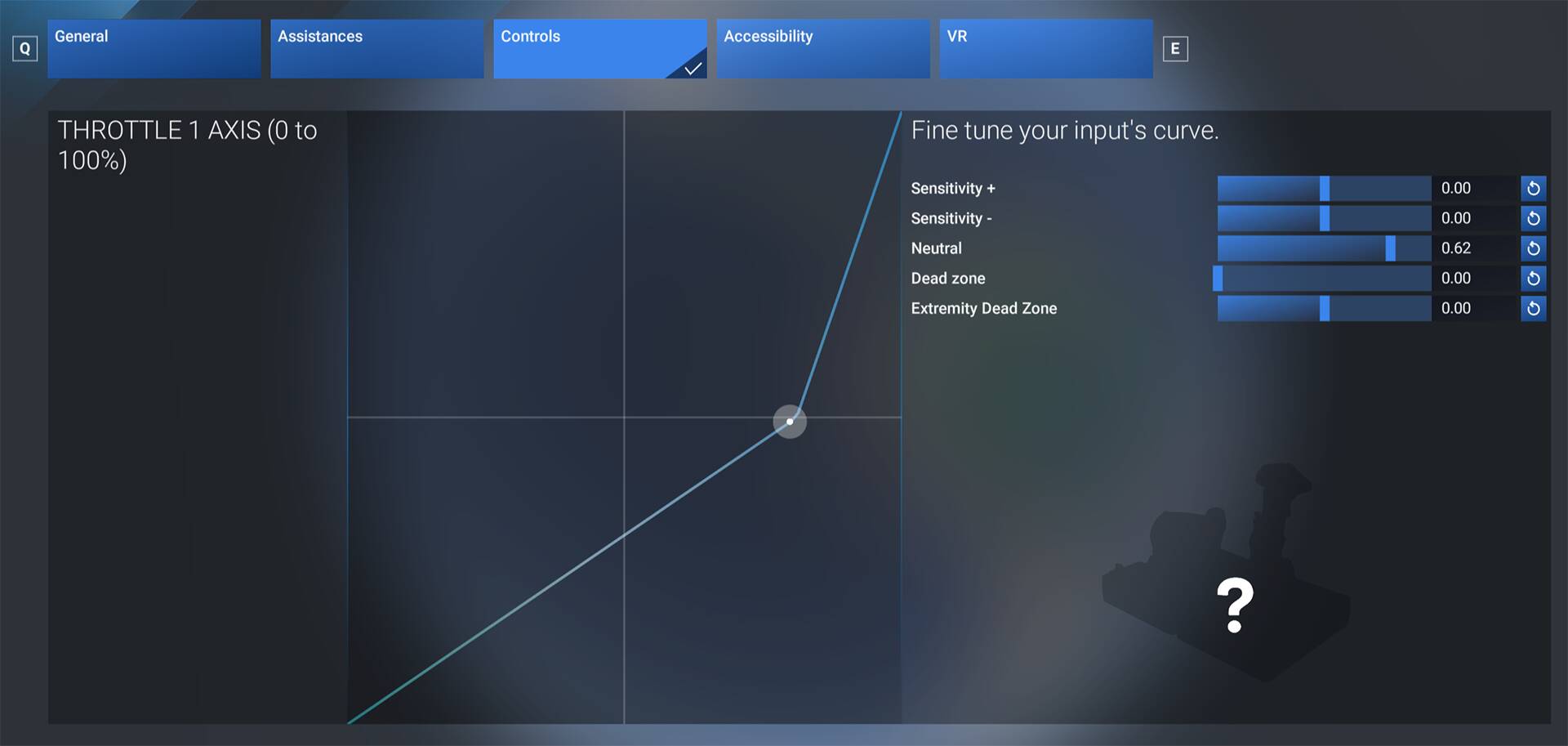
You will want to set your throttle to its physical idle position, then adjust the “Neutral” value slider until that point lays on the horizontal grid line as shown. It might need a little trial and error adjustment for your particular controller.
Repeat that process for your second throttle axis and you should be good to go.
Hope that helps!
Cheers.
Thanks for the reply. Question … will this change only apply to the Albatross or will it carry over to all aircraft? At this point, the throttle / detent work as expected on all other aircraft.
@AirWolf2055 It depends on which level you make the change at. You can create a profile for your throttle just for a single Albatross, or all Albatross versions, or all aircraft.
There are plenty of videos on youtube that will walk you through how that works.
Cheers!
I’ve seen that as I have done config for various levels when setting up a plane. I will dive deeper.
Thanks for your help.