Hello everyone,
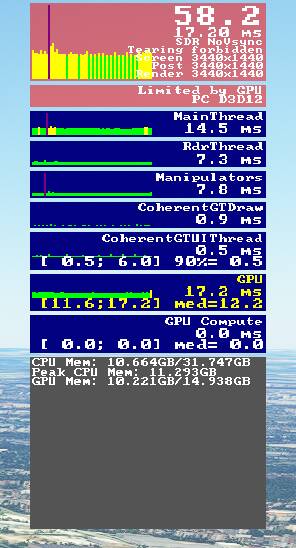
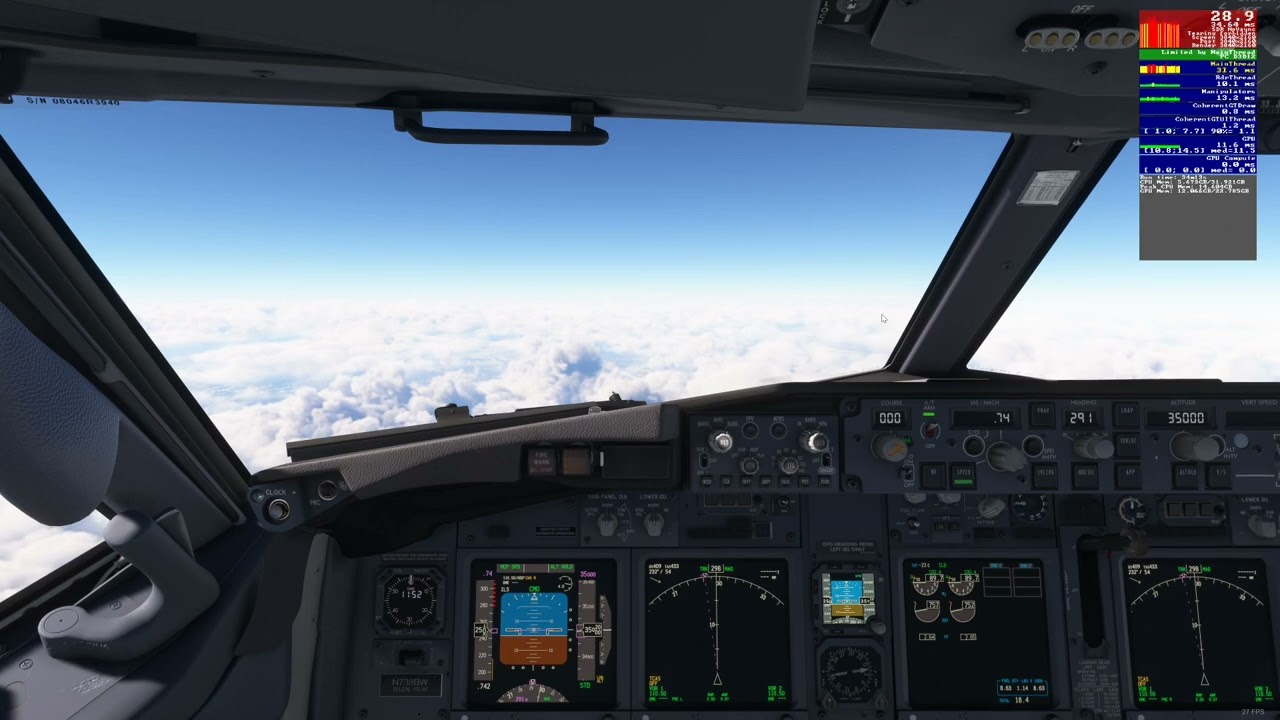
Using the FPS display on dev mode, I have discovered that I get a huge CPU “purple spike” (see image below) occasionally during flight. I would call it a micro-freeze or a big stutter, it’s quite noticeable when the gameplay is otherwise smooth at 60 FPS (it might span from 100 to 200 ms, tho it’s difficult to tell). It feels like the first stutters that you get a few seconds after entering a new flight.
It doesn’t seem to be related to any in-game graphics settings so far, tho the frequency of occurence seems to increase when the situation is intense (e.g. airliner on final next to a dense city), but it also happens during low load situations.
With default Ultra settings (with or without PG, and no traffic nor rolling cache) , it happens maybe once or twice per minute on a 13900k CPU .
I have butter smooth gameplay and by capping my FPS I am never limited by main thread, except during this brief spike in the mainthread and manipulators row, which I am unable to interpret.
No, I get this too. For me it seems to be related to new objects being drawn. On the ground I can repro it easily by taking up the drone, moving away from my aircraft until objects disappear due to LOD, then go back towards my aircraft; as new objects pop in, I’ll see spikes on the main thread. The more objects being drawn, the worse the spike is, also some objects seem worse than others. AI traffic is definitely the worst. As new AI is drawn, I get stutters.
For me, though, this happens mostly on the ground. When airports are being drawn in as I approach, I don’t usually see these spikes unless new AI traffic is being drawn there (AIG, in my case).
Also, how bad this is seems to relate to scenery complexity more generally. In more complex airports in more complex areas, it’s worse.
It’s maddening, and it seems to be worse since SU11 onwards, and worse again with SU12.
Windows and Nvidia are debloated, nothing particular running excepted Steam.. I also suspect this is caused by the sim loading a chunk of terrain and objects, but I wonder why it would be so brutal on the CPU, and not more gradual.
I know this topic is from nearly 12 months ago but I’m seeing this issue on my pc with a 14900k paired with a 4090. Did you manage to find any solution for the issue?
I have tried hell of a lot but can’t seem to find what is causing the issue. I am getting these spikes a lot at cruise altitude rather than on the ground. It’s kind of spoiling the gameplay because just like yourself, other than the spikes the performance is buttery smooth! Such a strange one. I get my spikes at consistent intervals every second or so. The FPS graph looks very similar to yours.
Any help or pointers in the right direction would be incredibly appreciated.
Hey there and sorry for bringing this back up, but I have the exact same problem since the beginning of msfs and never found any solution to fix it.
I think I nearly tried everything possible for me, but as of now I am out of new ideas.
Maybe someone of you guys found a possible fix and want to share it.
I benchmarked my frametimes and CPU usage and everytime a “lag” happens, my GPU frametime goes to 0, then up to about double the normal frametime and back again to stable 20-25ms. CPU usage also goes down to 0 on some of the cores, then up to 100 and stabilizes again at the normal rate which is around 40-70%.
All of that happens at the same time when the game lags for around half a second or so.
My system at the moment:
13900K stock clock rates
3090ti watercooled and undervolted
64GB DDR4-3600 running at 3200 (had 32GB DDR4-3000 before)
Samsung 970 evo m.2
Asus Strix Z690 motherboard
Here are some fixes I tried (I maybe don’t remember everything I did)
clean install on a new and clean windows pc (new xbox account)
rolling cache on and off
shader cache on with different sizes and off
cranking up DLAA to 200% to get limited by GPU
different nvidia driver versions throughout the months and years
stock clock of cpu and gpu and also overclock or undervolt both of em in different configurations
hyperthreading on and off
with and without any mods
disconnected all usb devices despite of keyboard and mouse (even my soundcard)
disconnected the two usb3 headers of the front I/O
problem also happened with my old 12600K and 2070 Super as far as I remember
I can’t imagine that there’s nothing I can do as so many people seem to not have this kind of issue.
I also found out that these spikes occur mostly when new landmarks are being loaded while flying. While in flight, the frametime peak seams to be a bit worse compared to standing on the ground.
Mostly this occurs about every 30-60 seconds. It’s not game braking, but nerve wrecking
Seems like you have been very thorough so far in your quest to find the root cause of your issue!
What I would recommend is to look at the problem from the angle that another app or process outside the sim might be causing the issue. You could open the task manager and let it run on a second monitor or run the sim in windowed mode with the task manager up on the main screen. If you click on the left to show the running processes and then click on the top of the CPU column it will then display the apps/processes taking up the most CPU cycles from highest to lowest. Run the sim and see if there is a particular app/process that jumps close to the top of the list consistently when you see the lag.
I’ve started getting same last few weeks only. Perfectly smooth on ground and climb then spikes every few seconds in cruise which is normally when I get best smooth performance. It’s intermittent (some flights no issue) but more frequent lately. Very annoying.
I have checked Task Mgr and it’s MSFS itself, closing down my add ons like FSUIPC, RealTurb and Coatl/GSX does nothing. Even turning off clouds does nothing and lowering TLOD just hides the spikes (yellow instead of red).
I’ve had very similar issues over different times even with my very old system (i7700k, GTX1080, 32gb RAM…)
I’ve stuck with my old system because when it runs great, it’s great locked at 30fps. I’m also trying to hold out spending money until MSFS24 or until I really want/need to. Landing and deparing with FSLTL traffic, using FS Realistic, GSX, FSUIPC, TrackIR and other items running.. it’s understandable on my old system to have issues and low fps at times, but I’ve also been getting 100% CPU spikes over the last week.
I’ve also tried running Task Manager, killing programs to see if they help or hurt the CPU, etc. I have the same results as that I ONLY see MSFS spiking… whether apps are running or if I’m using a bare-bones sim, high or super low LOD’s, etc.
Brings me to think that it has more to do with the state of the servers for streaming the data over to your PC; that MSFS gets packets of data and it fluctuates which causes your CPU to render all that information… then it doesn it again… and again.
Your severely superior system specs shoudn’t have the stutters and CPU spikes like my very old system does. Again, brings me to believe that it has more to do with the actual MSFS side of things.. server or data.
Again, I have weeks where I have absolutely NO CPU spikes, and then like this weekend, I had them all day Sunday.
Just my $0.02
-GolfKilo
P.S. this was also meant to be aimed at the system of the OP of this thread @theolm98
Thanks for reply, yes I have a similar suspicion. I also have a hunch the issue started around the time of that small patch (I’ve been having weird random settings change since then, like all toolbar tips suddenly turned back on). I was waiting for SU15 to see if that cleared it all up but I see it’s delayed to next month now.
I just found that disabling the NVidia In-Game Overlay and disabling C-State in my BIOS has really helped with this problem, and drastically reduced stutters on my i9 13900KS/RTX4090 setup.
I first started getting this issue since SU14. Then it went away for a while. Now it’s back and it’s really annoying. It’s definitely the sim itself spiking the CPU, I can see that in Process Lasso. And this is on an 7800x3D and 4090, it’s not performance issue as such. Something in the sim just periodically overloads the CPU completely. Reducing the LODs makes it less bad, but thats not an acceptable solution.
I REALLY hope the CPU/memory optimizations in SU15 get rid of this issue.
Anyone else also seeing this issue again recently?
Hmm they definitely promised a lot regarding optimizations in SU15. And I do remember reading some reports that people had a smoother experience.
But that video you posted, that’s just low fps right? Not really “stutter” as such. Usually stutter means acceptable or even great fps, but with big stutters in between
OK 20-30 already counts as “stutter” by default to me, as I only fly in VR. Anything below 40 is really awful imo. Ideally 45 locked at 90hz or 72 at 72hz. Anything higher is unrealistic in VR at.
So that was my point, it’s just low fps. And maybe true stutters in addition, dunno.