SU15 DX12 Really bad stutters, unplayable (tested at RJTT Tokyo Haneda)

Hi guys, I just wanted to share my experience so far with the newest update. Tokyo Haneda has always been my testing ground for performance as it often gives me the worst fps drops/stutters. But today as I use DX12, it went from having stutters to becoming literally unplayable. I just wonder if anyone has experienced this.

I have a really good system as described below, and DX12 used to work just fine albeit with stutters here and there along with the ground tiles popping up issue, but now it turns my sim into a slideshow.

I would like yo hear your experiences. Thanks!

Are you using Developer Mode or made changes in it?

I have dev mode on

Have you disabled/removed all your mods and addons? If the issue still occurs with no mods and add-ons, please continue to report your issue. If not, please move this post to the Community Support section.

I tried removing the RJTT scenery but still doesn’t work

Brief description of the issue:

DX12 really bad stutters. I’m using the Fenix A320 at Tokyo Haneda airport. I checked my RAM usage and it appears to be full as well

Provide Screenshot(s)/video(s) of the issue encountered:

This is me panning around. I cut the video short due to upload limits, but it pretty much stays like this.

Detailed steps to reproduce the issue encountered:

Switch to DX12 then go to RJTT. Try it with the fenix A320 but I haven’t tried it on other aircraft. Landing on runway 22 or spawning at the terminal is pretty bad as well

PC specs and/or peripheral set up if relevant:

5800X3D, 16GB RAM, RTX 3080 10GB, 1440p


:loudspeaker: For anyone who wants to contribute on this issue, Click on the button below to use this template:

Do you have the same issue if you follow the OP’s steps to reproduce it?

Provide extra information to complete the original description of the issue:

If relevant, provide additional screenshots/video:

Thank you for this report. We’ve moved your topic into the User Support Hub > Install, Performance & Graphics.

The Bug Reporting Hub is for posting suspected or confirmed bugs that other users are able to reproduce without duplicating an existing bug report. Using the template or providing all the relevant information about your bug and sim setup is required in order to provide valuable information, feedback, and replication steps to our test team.

If you are not sure if your issue is a bug or need further input from the community, please use the User Support Hub category. If the community can replicate your issue, first search the Bug category to see if there’s an existing topic. If it already exists, contribute to that report. Duplicate bug reports will be closed.

If you believe it is a new report and no duplicate exists, then create a new bug topic using the provided topic template.

All issues caused by or involving third-party addons/mods should be reported to the third-party developer. Assure that no addons/mods are used when reporting issues in Bug Reports.

After having played SU15 now for a few hours the last days, I can confirm your issue. My first impression was, that general performance has noticeably improved for me (more FPS, less to no stutters) - which is still true. I can fly over large 3D Cities with mostly 50+ FPS

But it seems EVERY medium/bigger airport is giving very low FPS. Just did a lot of testing in the small C172. I tried Haneda, SanFran, Hamburg, Frankfurt.

Deactivated all ground aircraft and also other players, so it’s only the “blank” airports.
But still the sim drops to unplayable stuttery approx. 20-30 FPS because the CPU runs into constant “limited by main thread”.

5800X3D, 7900XTX, 32GB 3200 RAM (seeing you have the same CPU…uh oh)

I get the same slide show on final approach into KLAS. Unusable. A lot of stutters on final into KDFW and a slide show after touchdown. Not happy at all with SU15.

Have you deleted DX Shader Cache, rolling cache, Scenery cache and scenery Index folder contents?

Have you tried DX11?

Can you screenshot the FPS counter in dev mode?
I suspect your 16gb ram is to blame.

@JaoJao8170 Try.

What about fast startup? Hibernation? (turn off fast startup and hibernation)
1 How to Disable Fast Startup (howtogeek.com)
2 How to Disable Hibernation (howtogeek.com)

3 Power plan (ultimate performance)
How to Enable the Ultimate Performance Power Plan (howtogeek.com)

Clear the cache.

1 Start your PC in safe mode

  • Click start
    1start
  • Click power icon
    image
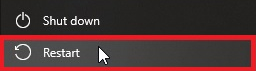
  • Press and hold left SHIFT key and click restart
    image
  • Select Troubleshoot > advanced options > startup settings > restart
  • Select 4 - Enable safe mode

2 Click start and type

%localappdata%\D3DSCache

Press Enter
Delete all folders

3 Click start and type

%APPDATA%\..\LocalLow\Nvidia\PerDriverVersion\DXCache

Press enter
Delete all files

4 Type

%localappdata%\Nvidia\GLCache

Press enter
Delete all folders

5 type

%appdata%\NVIDIA*ComputeCache*

Press enter
Delete all folders

6 type

%localappdata%\Packages\Microsoft.FlightSimulator_8wekyb3d8bbwe\LocalCache\SceneryIndexes

Delete all files

Restart PC

7 Click “start” and type storage settings - press enter
8 Click temporary files > scroll down > check box DirectX Shader Cache
9 scroll up > click Remove Files

10 Restart PC.

If installed uninstall geforce experience.

Thanks for the proposals. I had deleted the caches etc.
(and in my case it’s not the RAM limitation, as I’m on 32GB)

BUT I had not considered a DX11 switch, as up until now DX12 had better performance for me.
Now I switched to DX11 and the performance at the airports drastically improved!
So it seem the SU15 screwed up something with DX12. :roll_eyes:
Thanks! (I’ll do more performance test tomorrow in other areas) :grinning:

No worries — glad my ramblings can help someone hahah.

I might have to try that myself. Only had a little while testing SU15 but I was suffering. Had to turn LOD down a lot and switch off the AI traffic (realtime online) to get performance back to where it was before. Seems like a step backwards for me so far. Went to bed a bit disappointed that I have to detune my system again but at least it’s flyable without traffic I guess :person_shrugging:

Oh one more thing. Did you use the DLSS DLL Swapper before? That needs redoing if so or you’ll be back on 2.4.something!!

Seems ok to me, running on an i13700KF, with 4070 Super, 32Gb DDR5 RAM and DX12.

One thing I’ve noticed is your RJTT airport is different to mine, you say you’ve removed it but it looks like its still half installed. I’m using the default airport. Wonder if this is causing your issue?

Yeah, I’m using DX11 right now and all is good. But the thing is, DX12 wasn’t like this before. I’ve deleted the shader and rolling caches after the update.

I didn’t use an fps counter because, obviously, the game is a slideshow at the moment and I’d say this is about 2fps :rofl:

Yeah I suspect the 16gb of ram is to blame as well, but I can’t test adding more ram without buying more ram

My RJTT is the one from flightsim.to (fantastic mod btw, I highly recommend). I did try removing it from my sim off-camera, but the results were the same.

Your PC is better than mine though, with higher RAM and VRAM, so I’m assuming you won’t have bottlenecks

Whenever something like this happens it is crucial to take a screenshot of the FPS display in developer mode while the issue is happening. This allows identifying CPU/GPU bounding, thread issues and whether RAM or VRAM thrashing is occurring.

I’ll try this one. I don’t use DLSS since it makes my instruments blurry, but I’ll see if it works

I see! I’ll give it a try

Interesting that you have this problem with a 7900XTX and 32GB of ram. So could it be the CPU?

I’ve never had any stuttering in msfs . This update I have micro stutters now. I brought up the FPS counter. I see this vertical purple line in the FPS counter every 5 seconds. I’ve never had that. I’m a bit shocked this happened and nothing has fixed it. I’ve done everything here and I even went on to do a fresh msfs install with all defaults. I didn’t even download anything from the content manager and it is the same. I rolled back my Nvidia driver too. Sorry to come in on this post with the same problem. I can’t even post a topic for software I bought! I’m not at Trust Level 1 yet come Asobo! I would’ve created my own topic on this if I could . That’s a really ridiculous forum rule. I’ve been at this for HOURS. So if anyone has seen anything like the above and his experience in fixing it let me know. X-:plane works fine and all other games do. It’s like a I’m getting some sort of weird spike in my GPU according to that graph. I lose 10-15 FPS when that vertical purple comes through every few seconds. Sorry to post my problem on your post. I felt it was similar enough. Thanks for anyone who answers. I never have had that type of spike in the past. It’s always been fluid. I wonder if it’s a memory leak? The only thing I haven’t uninstalled is the Asus software for me MB, but I can’t see how that would affect MSFS. Thanks in advance for any answers.

13900k not o/c
Lian Li 360 AIO
32gb ram
4080 Gigabyte card
1TB M2 SSD - MS is on this drive. There’s plenty of room
1TB SSD
8TB Iron Wolf drive
Asus Tuf MB
2k Acer Predator w/ gsync

No idea what the DLL swapper is, but didn’t use DLSS as I‘m on Radeon. But also AMD version Frame Gen is off.
For me it seems somehow related to the Ryzen 3D processors :thinking:

As @PacyFire said it’s not to see the FPS, but so we can see all the other info that contains.

Hmm could be. I have a 7950X3D and it’s never been right but seems even more CPU limited since SU15. Awful really.