This looks like you’re actually running at non XMP.
One of our members sent me a PM asking for my advice (imagine that!) about what RAM to buy. He currently has 32GB (2x16GB) on an MSI B650 motherboard, and wants to go to 64GB. Not interested in overclocking or RGB; rather, wants set-and-forget performance and stability.
I scoured the CVL and found there wasn’t much that met my criteria:
(2x32GB) DDR5-6000
CAS 30
Hynix A-die
Non-RGB
Reputable manufacturer
I ended up suggesting Corsair Vengeance CMK64GX5M2B6000Z30
If he’d been interested in wanting to delve into OC, I would have suggested a different kit, since this one needs 1.4V to maintain those EXPO-6000 timings - meaning it’s really not a good candidate for overclocking, but should be quite stable.
The part you quoted from me is taken out of context. The entire context is you will be forced into running an extremely slow speed when you incorrectly install 2 sticks next to each other. That is a correctable mistake, not an intentional running at 4000.
I can’t speak for 100% use cases, but this is incorrect for the mobo you mentioned above. In your specific case, 2x32 GB is far better than 4x16GB because your speeds will be limited by the chipset to 6800 and 4800 respectively.
I don’t have an active A-XMP profile because I manually set the memory speed and timings. It works better than with an active A-XMP. You don’t need to enable XMP, A-XMP or EXPO if you know what you’re doing.
However, for casual users it is recommended to enable XMP if they have 2 memory modules or inactive XMP if they have 4 memory modules.
Additionally, a well-configured BIOS should deactivate XMP if it’s active upon detecting new memory, allowing users to choose between XMP and an inactive XMP.
As a casual user, I bought 4 sticks of 7200 MT/s QVL memory
for a Gigabyte Z790 AORUS Elite AX motherboard.
F5-7200J3445G16GX2-TZ5RK
It is spec’d at 7200 MT/s with XMP and 4800 native.
With XMP enabled in the BIOS,
it boots Windows 11 and runs apps without error at 7200 MT/s.
FS2020 will only run at 6400 MT/s without error.
And that’s the same issue as discussed above. Occupying all four slots means reduced speeds, though it looks like you are lucky in this case. The QVL has the same speed restrictions as earlier on the other board, but those are for across the board stability. Yes you may be able to run faster than the rated speeds, but stability can not be guaranteed and you just have to hope you find something that works. The fact still remains that running with 4 full slots are going to cause a performance decrease, all else being equal.
I’m not surprised that MSFS wasn’t working properly with all four RAM sticks running at full speed and the XMP profile enabled.
You confirmed what I wrote two days ago.
edit
A-die or M-die?
In your last reply above, you stated:
I don’t want to run my 7200 MT/s memory at 4800.
I don’t know what A-die or M-die is.
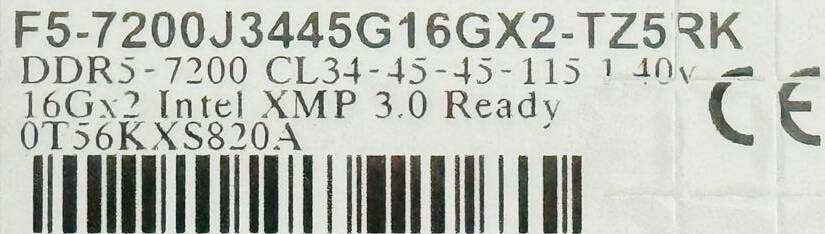
In G.Skill memory modules, the last letter above the barcode in this case is the letter A, indicating that these are A-die. If it were the letter M, they would be M-die.
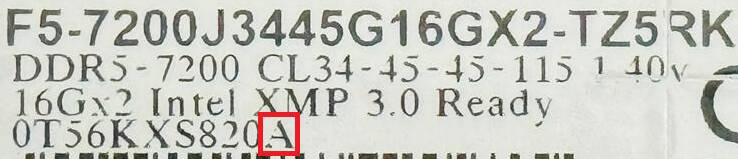
G.Skill produces A-die and M-die memory modules. The key difference between them is that A-die memory typically allows for better tweaking and overclocking compared to M-die .
This detail is crucial because certain timing values won’t work with M-die while they should be fine with A-die .
My package barcodes are different and don’t have an A or M.
4713294230249
848354040248
But, a user review on Microcenter states:
"This G.Skill Trident Z5 memory uses Hynix A die chips, which means it’s easily overclockable with just the slightest bit of tuning. I have this particular SKU at DDR5 8000 speeds with 1.45v. So definitely highly recommended!
Yes, I recommend this product."
I added a picture of my memory modules. The box has no markings regarding A or M-die. You can only find this information from the memory modules themselves, not from the box.
I’ve just upgraded but my previous memory was that exact same memory kit you have (F5-7200J3445G16GX2-TZ5RK). You have 4 sticks, I had 2 for 32gig total with an AMD x670e motherboard. With just 2 sticks I could enable the XMP profile for 7200 Mt/s and just bump up the speed to 7600 Mt/s and run perfectly stable.
Not sure if you ever tried just 2 sticks?
Also, if I OC’d my video card too much it would affect the memory’s stability…
I understand but I wanted to run with 64 GB.
According to the QVL, you cannot get to 7200 MT/s with 2 sticks of 32 GB.
I think 6800 was the max on 32 GB sticks for my motherboard.
I didn’t have any issues with this memory modules 2x16GB, XMP profile and i9 13900K CPU, which was seated in the socket of the MSI Z790 Tomahawk WIFI motherboard. The memory was running smoothly at 7200 without any problems.
Your 16 GB sticks are single rank, which is why you were able to run 7200. 32 GB sticks are dual rank and will run slower.
@MSFSRonS has 4 memory sticks - each with 16GB, meaning one stick is 16GB, exactly the same as my RAM and memory of user @WingWarper1
I’ll just refer you back to what I quoted direct from Gigabyte’s QVL on speed reductions when running 4 sticks and/or dual rank sticks, because I’ve already explained why you can not directly compare the speeds of two 16 GB sticks to four 16 GB sticks, even if they are the exact same model number.
Okay.
But, my statements were all based on my reference to my existing
Gigabyte Z790 AORUS ELITE AX motherboard and its QVL.
Or maybe purchasing the Gigabyte Z890 AORUS ELITE AX
and its QVL.
Your motherboard should go straight to the trash. Sell it if you can and get a new one, like MSI MAG Z790 Tomahawk WIFI, for example.
Don’t buy motherboards from Gigabyte if they’re of such poor quality. On MSI, it works and if it doesn’t work on Gigabyte with the same chipset and memory modules it means their products aren’t worth the money.
edit
My post is in response to the fact that your memory, originally intended to run as 2x16GB, is not stable on your motherboard when configured as 2x16GB. On the MSI MAG Z790 Tomahawk WIFI, this issue does not occur even when we overclock the memory beyond 7200.
Of course, there could also be something wrong with your CPU, specifically with its memory controller.
Really!
I am very pleased with Gigabyte and the Z790 AORUS ELITE AX motherboard.
I am very pleased with the Gskill memory, 7200 MT/s.
It is configured as 4x16GB.
I wanted to have 64 GB.
2 slots provides 32 GB max.
I am completely content with 64 GB runing at 6400 MT/s.
Being a casual user, I don’t have the knowledge like yourself to
configure the memory in the BIOS that may result it running at
7200 MT/s with 4 sticks.