yes Tony, clean install was done. I am now on Version 146. With this version VR with the Pimax is working just fine. All versions after the 146 seems not to work for me (and other as well…) for an unknown reason yet…
Thanks mate for the information.
I hope they solve the problem soon to enjoy it to the fullest.
Here is update…
Hi Mark,
This has been escalated and awaiting prioritization by our development team, we will be in touch if we need any more information.
If you have any follow-up questions, please reach out.
With Kind Regards,
Jon Ferry
Customer Service Representative
Support Team
Hi Mark, thanks for this update! This is good stuff that they are investigating. I was about to give feedback here as well because I haven’t received feedback from Fenix after my ticket yesterday. Thanks for sharing!
I actually had the same symptoms but only every now and then. The mouse inputs to the FCU/EFIS/… stopped working. After a few seconds it started working again. Never found the cause but I am not using my sim as much at the moment. Also I cannot say with certainty if it was before or after Fenix V2 update…
I guess you are not using MSFS beta? In the recent release note for beta they mentioned some issues with operating the glass panel in VR. But Asobo is probably not testing their beta with 3rd party add ons:
https://forums.flightsimulator.com/t/sim-update-13-beta-release-notes-1-34-11-0-august-22-2023/606372
## VR
** Corrected an issue that would cause some Touch enabled glasscockpit not to work in VR mode.*
Yes, I saw that too, but NO, we are not on the 13 Beta.
Thanks for this information, but no I am not in the beta
I just read in discord this announcement, it seems it will take a while until they reply to the issue…
Good morning all - with this coming Monday (28th August 2023) being a UK Bank Holiday, please note that the support desk will return on Tuesday 29th August 2023. Have a great long weekend everyone, and if you’re going to Wembley this weekend and see a guy in purple trackie bottoms, come say Hi!
I think it will take more than a weekend to sort this bug out. It might need some serious testing and re-writing of code. Potentially weeks io not months.
Hi Mark,
update from my side. The guys from Fenix asked me to install back again version 214 and to change the following:
Step 1: Make sure MSFS and Fenix App are closed
Step 2: Please go to C:\ProgramData\Fenix\FenixSim A320
Step 3: Open up fenixConfig.xml
Step 4: Change these 2 options to true so they match the same as below:
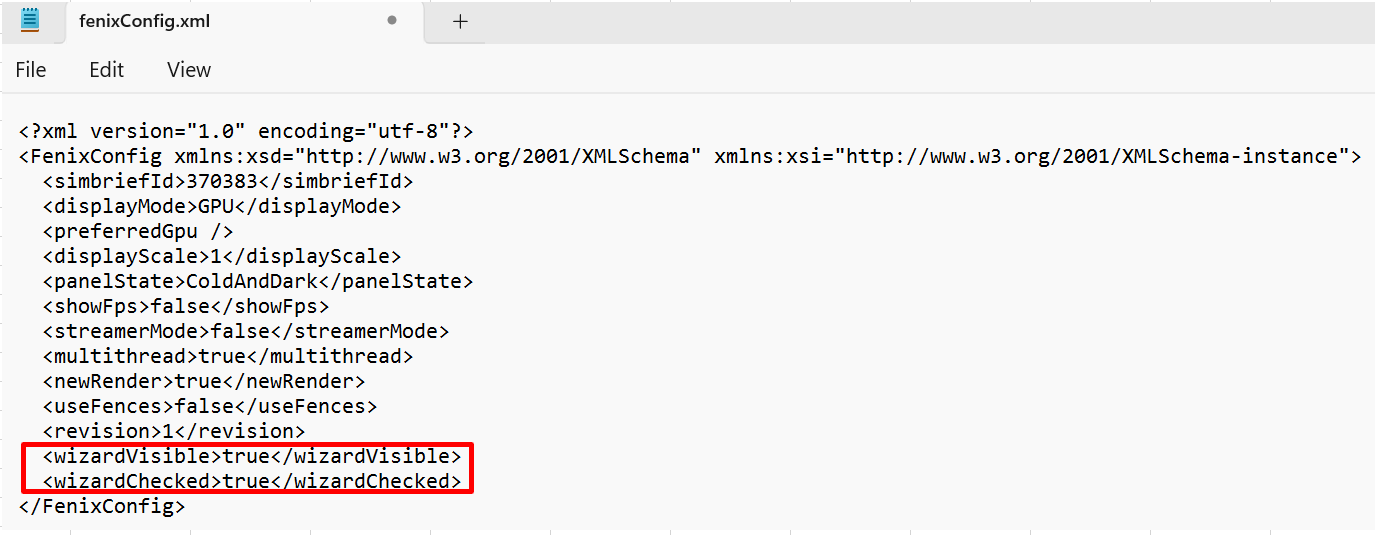
Step 5. If you want if you want verify it worked, open Fenix App and you should have a new renderer option enabled/ticked. DO NOT CHANGE THESE SETTINGS.
Step 6. Close Fenix App after verifying, and test to see if the issue is still occurring.
__
this indeed solved the issue for me. Give it a try.
I just reply back to them about the result and ask them how to handle upcoming updates in this case..
I just received an email to say they had closed my ticket but with no explanation.
I would like to try your fix but it doesn’t make sense.
Can you confirm which two options within the Config.xml you are referring to?
Ah that’s better. THANKS!
I will give this a go tomorrow and let you know as I’m all tied up for the rest of tonight in a meeting.
OK, Just completed a flight from Calgary to Boise and all good now. All that is apart from awful FPS & stutters on approaching destination airport.
I will now inform the uninformed on the fix.
Still have not had a reply from Fenix which is disappointing to say the least.
Good job we in the community know how to communicate eh?

Glad to hear it worked for you as well! I asked Fenix customer service how to handle upcoming updates but they told me they currently don’t know since the option is only experimental, we will have to wait until then!
I had the feeling you and I were the only oneshaving this issue  I was not able to find a since Thread about this topic…
I know of at least 1 other person experiencing the same issue on the Pimax Crystal over on the VRFlightSimGuy Discord channel and have passed on the instructions. He has made the config changes and will test out the Fenix later today.
I’m sure there will be more out there…
Happy to hear you got it sorted.
What do these options actually do I’m curious? Do you get Gandalf as a copilot or which wizard is this referring to?
No Gandalf sitting in the cockpit
The mentioned options provided an alternative rendering option, don’t know more details about it
Same issue for me. Still doesn’t look to be fixed…