Maybe you should ignore the atc. Often talks nonsens. Planning via simbrief is the best way and then fly this plan to the end. Maybe with ILS approach at the beginnig , just to do the touch down.
And as suggested here try short flights.
2 Likes
I muted ATC a long while ago and have the copilot assume radio duties. I used to think that I’d enjoy listening to the radio chatter, but that gets old fast. I much prefer silence in the cockpit.
Has anyone found a way to use simbrief and littlenavmap together to develop and follow a flight plan.
You are all over the place!!
On the “Dispatch” page of Simbrief, download “FMS Downloader”
The instructions are there as well.
It will import the plan from Simbrief to the default MSFS Flight plan folder, which then can be loaded into the world map planner.
Thanks. I am enjoying learning this airplane. 747 is too big and I’m too tight to buy a 737. If I load a simbrief plan to the world map and then load it to the A320 I lose a lot of functionality. What I’d like to do is create the plan in LNM, load it to simbrief and in turn load that into the A320.
Think it’s possible?
If you have time here’s another; I flew from KCMH to KPHX with ILS to rwy 28. On approach I had to manually slow the plane down and still landed a little hot. However, I did land. I thought the A320 would slow down with the autopilot on approach and final. I managed the flaps but lowered them a little early to get the plane slowed for landing.
As always all ideas and help are appreciated.
I believe you said earlier you are using the FBW A320? If one chooses to use their version, you must essentially accept that you will need to start using their designed flight plan system, which means importing a Simbrief flight through the flyPad and MCDU systems. This is fully documented on their website. Using the World Map is not well supported. It kind of works, but will contain errors and deviations.
Furthermore, if you want Simbrief/LittleNavMap/MSFS to always agree on flight plans, waypoints, procedures, etc, then you must accept getting a paid Navigraph account to update all of those programs with identical navigation data.
1 Like
If you are in the approach phase of flight (as shown on the PROG or PERF page) and you are in managed speed mode with auto throttle engaged (and in CLB detent), extending flaps will set your speed. Once you get to flaps 3 and flaps 4, you will be slowed to final approach speed as set in the MCDU PERF page. Usually this ends up around 145 kts but will vary some depending on conditions/weight.
2 Likes
How do I get slow enough to lower the flaps? Had a good approach, captured the ILS but never slowed enough to land.
What is the final approach speed that’s set in the MCDU? You can always switch to selected mode and dial the speed down yourself if you wish.
You should enter the destination data in the mcdu in the performance page. If you forget it, it will be shown in yellow to do it if you are near your destination.
After you activate the approach phase and you set the flaps with activated auto thrust the airbus will reduce the speed more and more at every stage of flaps. At full flaps you got the approach speed arround 130knts and can land.
2 Likes
Thanks to all who have helped I’ve managed 3 controlled ils landings. Today I had a strange thing on takeoff. The plane kept going faster and faster until overspeed was reached. Tried what I could to slow it and get back under control without success. The takeoff seemed normal but the autopilot would not slow it back to 250kts. Anyone know what I did wrong. BTW, this was the development version.
It sounds like you did not have auto throttle engaged and/or did not have the levers set in the CLB detent.
Something went goofy from the start. I know I was late getting the gear up and late moving thrust from FLX to CLB but even after catching these and moving thrust to CLB and making sure managed thrust was on, I was unable to regain control. I even slowed using manual mode but still couldn’t recover. I appreciate all the help I’ve received here.
You said you used FLX to take off. Did you have a FLEX TO temp set in the MCDU? You must have one entered if you take off with FLX or else auto throttle does not engage on its own.
If you did not enter a FLEX temp then you must take off in TOGA.
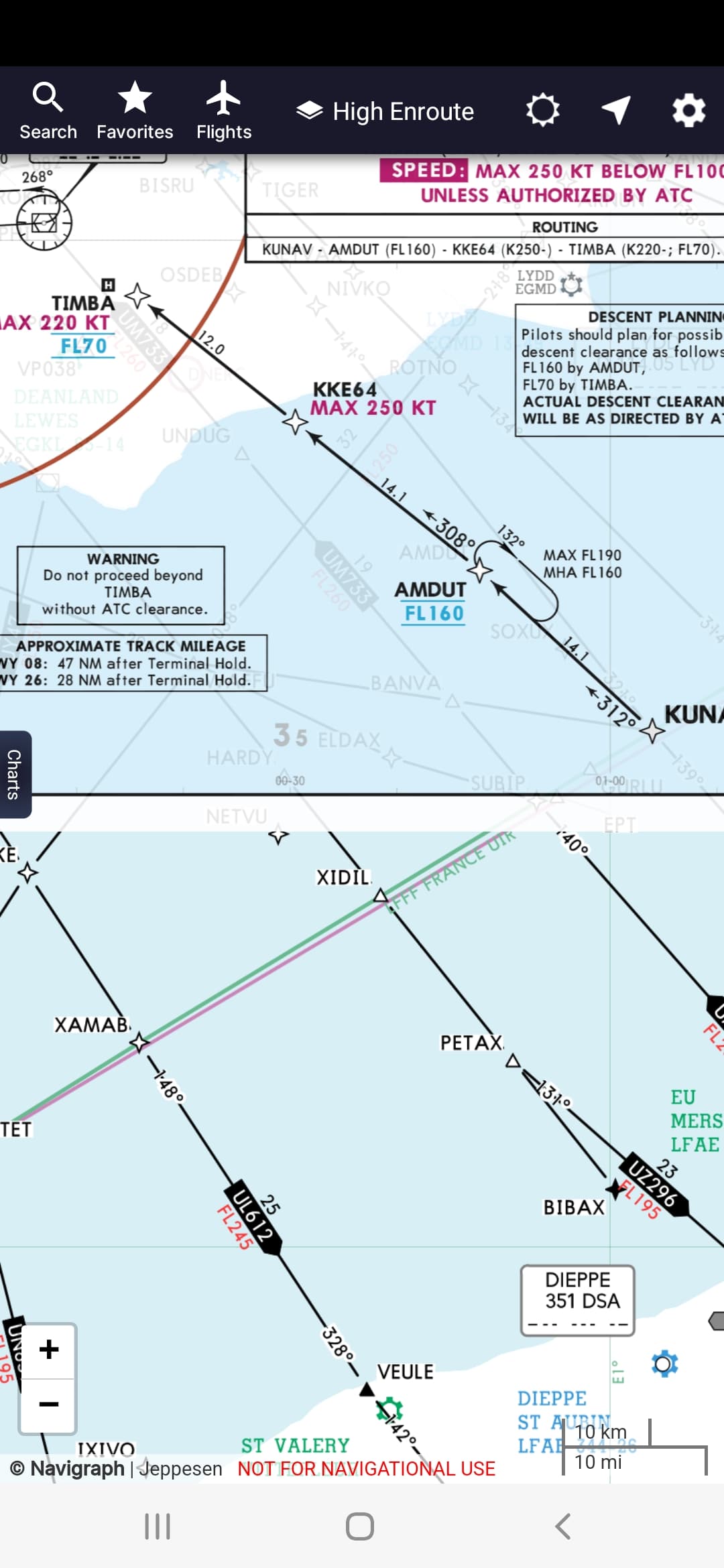
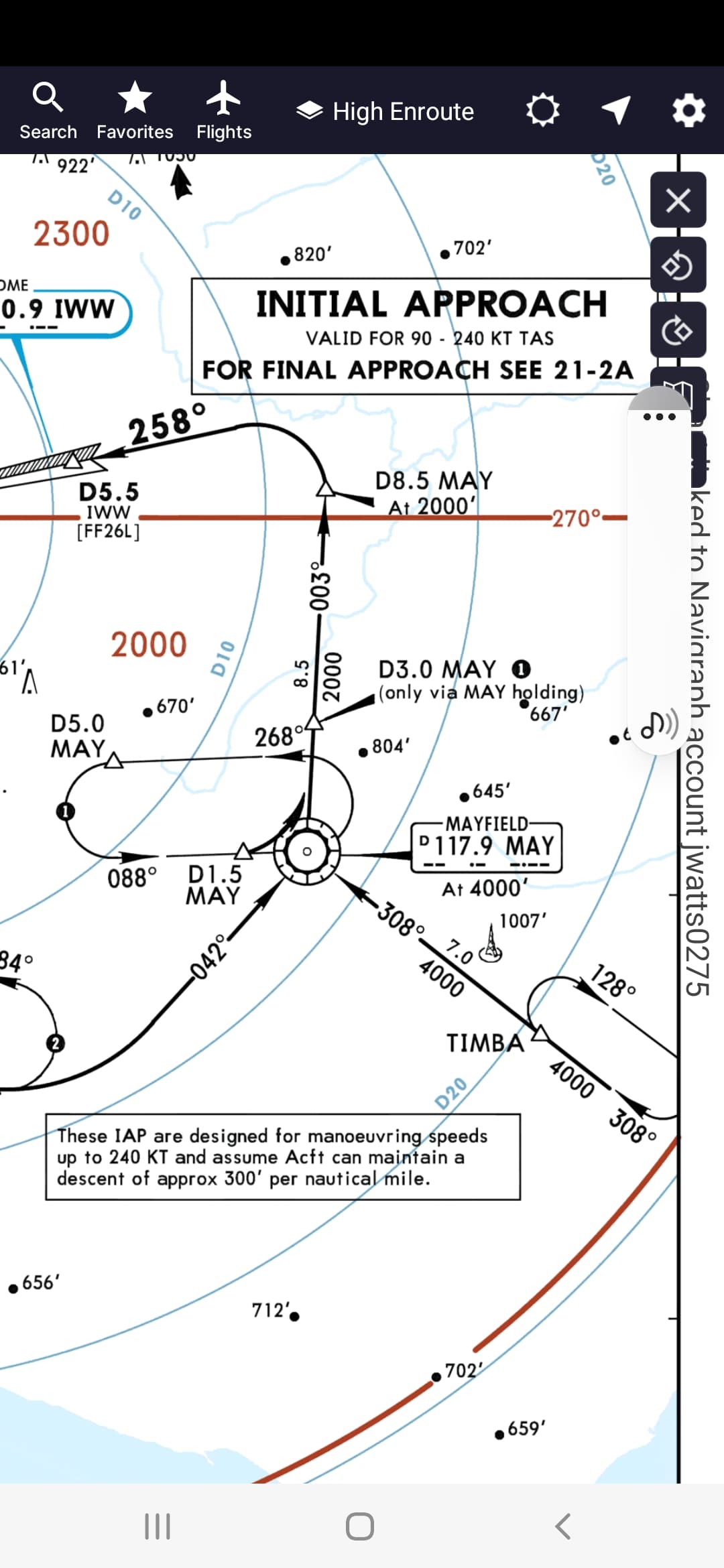
I would like to know if there are any Tips or tricks, using EGKK Kunav 1G arrival withTimba trasition, as an example.
I cross Amdut at FL160, Then I go into managed Descent to attempt to reach FL 70 at Timba it never seems to get Timba at FL70. By the time airspeed drops to 220 I am still too high at Timba.
Is it appropriate to use the speedbrake, as I always thought using speedbrake was last resort. Then from 7000 feet to 2000 feet. Whats a comfortabale realistic V/S rate for passengers?
Speedbrakes are somewhat of a last resort, but are very commonly used, especially in these circumstances.
I would guess that 70% of all real jet flights I’ve been on have used them.
1 Like
Thank you, I always tend to avoid the speedbrake. I always try to do the right procedure, and not have ATC nag me.
1 Like
It’s like taking your foot of the gas pedal to slow down your car, at some point, you’re probably going to need to push down the brake pedal.
The speed brakes in an airplane are another piece of equipment to be used when needed.
1 Like
Had a nice flight plan to KCMH, Star DUBLIN1, Rwy 10R. After reaching cruise, I descended to 23,000. At 23000 ft set autopilot to descend to 5000 and the plane would not descend. AP kept cutting out. I tried speedbrakes without success. I tried managed mode and manual mode. As a result, I was way too high to land. I would reset the AP only to have it cut out again and again. Any ideas on what went wrong. BTW this is development. Thanks.
Were your throttles still in the Climb position?