I contacted Tobii support, and they were super helpful! They were able to find a workaround to make this work, and they are aware of the issue and are working to find a more permanent solution in a future update. Here’s the workaround they found:
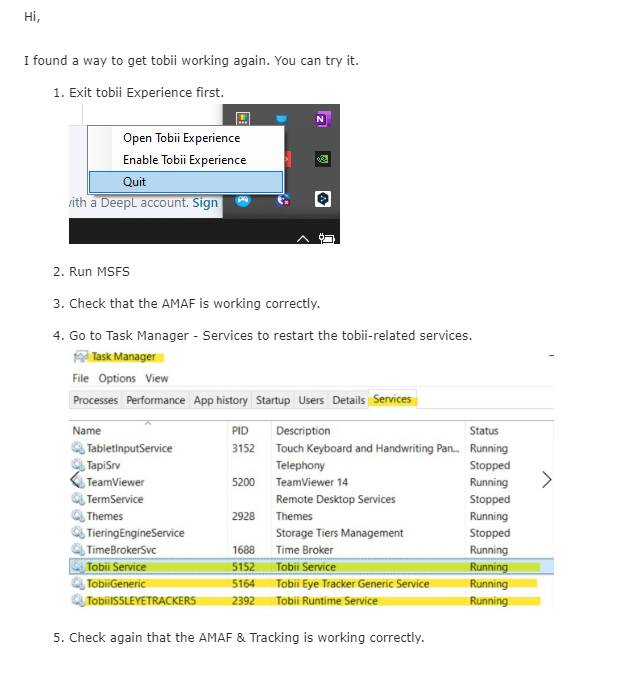
They also made a .bat file which you can run as administrator to automate this process when you want to use MSFS, just run it before starting MSFS.
Since I cant upload a .bat file, I’ll just copy-paste it here, just create a txt file, paste this inside then rename it to .bat.
:: Check for administrator privileges, and if not, attempt to run the script with administrator privileges
net session >nul 2>&1
if %errorLevel% neq 0 (
    echo Attempting to run the script with administrator privileges...
    powershell -command "Start-Process 'cmd.exe' -ArgumentList '/c %0' -Verb RunAs"
    exit /b
)

:: The rest of your script goes here

echo Closing Tobii.EyeX.Interaction.exe and Tobii.EyeX.Engine.exe processes...
taskkill /f /im Tobii.EyeX.Interaction.exe
taskkill /f /im Tobii.EyeX.Engine.exe
timeout /t 5 /nobreak > nul

echo Starting TobiiGeneric, TobiiIS5LEYETRACKER5, and Tobii Service...
net start TobiiGeneric
net start TobiiIS5LEYETRACKER5
net start "Tobii Service"

echo Processes and services have been successfully restarted.

echo.
echo Press any key to exit...
timeout /t 5 >nul
This will cause the IR emitters on the Tobii ET5 to go dark, but when MSFS starts they come back on and tracking works normally. In my case, after I’m done with MSFS, in order to get Tobii Experience back up and running I have to reboot the computer. Not a big deal, but good to know.