Since i fly mainly GA and starting now, what kind of thing for example in 172 i can do, that i cant in msfs configurator?
The LVARS is a good example, you can use Spad or FSUIPC7 to configure special binds, but you can’t use the FS20 UI (I don’t know in FS24).
Same goes for 2024.
I don’t fly the C172, so I can’t answer that.
I do however fly the Bonanza, which is another GA aircraft.
SPAD is the way - if you’re willing to learn.
What are LVARS ?
There is probably less need for Spad in FS24.
The FS24 control gui is tricky, but it works per plane and is flexible and free.
It really needs a spreadsheet mentality, one column per plane, 3 rows for the variable types.
Groups of cells on one row make a profile.
I think pictures are the best way to explain it.
Mobiflight is quite powerful as well.
As stated before Spad is indispensable. The best way to find out if it is for you is download it. It has a 2 week free trial, so try it and see if you want to make the investment.
i was in the same position as you about 4 months ago, bottom line, yes you should get spad and learn it.
you can try wo it, and whether on 2020 or 2024, you will quickly get frustriated trying to get even basic controls on your alpha/bravo working as you want. (and you will eventually end up having to go to spad anyway, so better to just start there, imo. i tried starting from scratch wo spad, and after a few days tried it, then purchased it, and have not looked back). (im very happy with spad!)
LVARS are Local Variables. These are the type of variable that addon developers use when programming complex aircraft. These variables are not accessible in MSFS but are available when utilizing binding software such as Spad, FSUIPC or Axis and Ohs.
You can use Spad to control the G1000 with knob fs. It works amazing to dial in a flight plan, change a frequency, change zoom levels on the display.
If you’re looking to map inputs from your controllers into MSFS 2020 or 24 that aren’t available natively in the simulator for mapping, you could also try Mobiflight. It’s simple to use and free to download, but if you use it regularly and like it then you can make a donation, or at least buy the developers a coffee now and again.
I don’t use spad.next, but then again I don’t have anything like a stream deck or other button panel that might need it. I have a VKB joystick & rudder pedals, stecs max throttle and their FSM-GA autopilot panel, a side extension module (VKB SEM) for ignition, start & various other controls and finally an additional throttle quad (the VKB THQ), with more buttons and axes for mixture & Prop.
All the axes, buttons, switches, toggles, levers, sliders and rotaries I have available to me can be mapped natively in either of the sims or via Mobiflight.
The reason I started to use it was because in 2020 the heading align function doesn’t work, and if you’re flying at low level on a bush trip or sightseeing this can be very useful. If you’re following a GPS line in NAV mode, but you need to navigate around e.g. a mountain or if you want to change course a bit to follow rivers, roads or railways, the heading align function moves the heading bug in the autopilot to match your current heading, so you can then switch to HDG mode and adjust your course with the HDG rotary without affecting anything else.
I’ve since found lots of extra controls that can’t be mapped in 2020 (or don’t work properly) which can be mapped via Mobiflight, so now I have VNAV and lots of other controls from the G1000 - map range, all the menu buttons and the FMS rotary knobs - mapped to my controllers so I don’t need to touch the mouse or keyboard any more in flight.
AIUI, spad.next offers a lot more options, compatibility and variability and it looks to be an amazing tool which is used and loved by lots of FS flyers, but if you don’t need all that functionality, then Mobiflight might be enough to accomplish what you need.
If you search the forum there are lots of other discussion threads on this kind of thing, but here’s an example:
Be great if someone would create plane / device specific Spad profiles for 2024 and sell them. I would buy them immediately. I know there’s profiles you can download via the Spad app, and I believe some profiles in Flightsim.to, but they seem so random and disorganized to me.
There’s a market for this I’m sure..
P.S. Can Spad run two profiles at the same time?
No there is really not. It’s hardware specific. There is no way to make profiles that will work for everyone.
For example a SPAD profile for the Cessna 172 with Honeycomb Alpha and Bravo. That’s a pretty common combination.
Can SPAD run two profiles at the same time?
You can’t fly two planes at once in the sim, and SPAD profiles are tied to specific aircraft. So no.
You can however create as many profiles as you have aircraft to assign them to.
You make one profile and use whatever devices you have connected as you want. I’ll be very honest, anyone that purchases Spad and is going to try to rely on downloading profiles is going to find it very hard along the way. If you purchase this software and do not invest a little time to utilize the software, you are doing yourself a huge disservice.
For example, I have fourteen devices connected and I can use any combination of those fourteen devices in one profile. You can even have your profiles be variant specific…such as C-172 analog, or C-172 G1000.
I agree with Bobo 100%.
I fooled around with pre-made SPAD profiles and found it pointless.
If you’re going to commit to SPAD, you have to commit to learning it and applying what you’ve learned to create your own.
I’ve joked that I spend more time programming in SPAD than I do in the air.
But there’s a lot of truth there.
My goal has always been to have a ‘mouse-free’ and ‘mostly keyboard-free’ cockpit. It’s very gratifying to configure everything in SPAD and have my desk feel at least somewhat like a real cockpit. That takes work - work that takes time.
Roger… thanks all for the advice!
@CaptainCoop779 - with the above said about learning to roll your own profiles (which I absolutely agree with), there are ‘snippets’ in Spad.neXt, which are partial profiles for particular devices to work with particular aircraft. The snippets database is available from within the Spad UI, and if you can find a snippet that works for your hardware for the aircraft you’re aiming at, you can download it and at least get a head start or possibly a complete working setup.
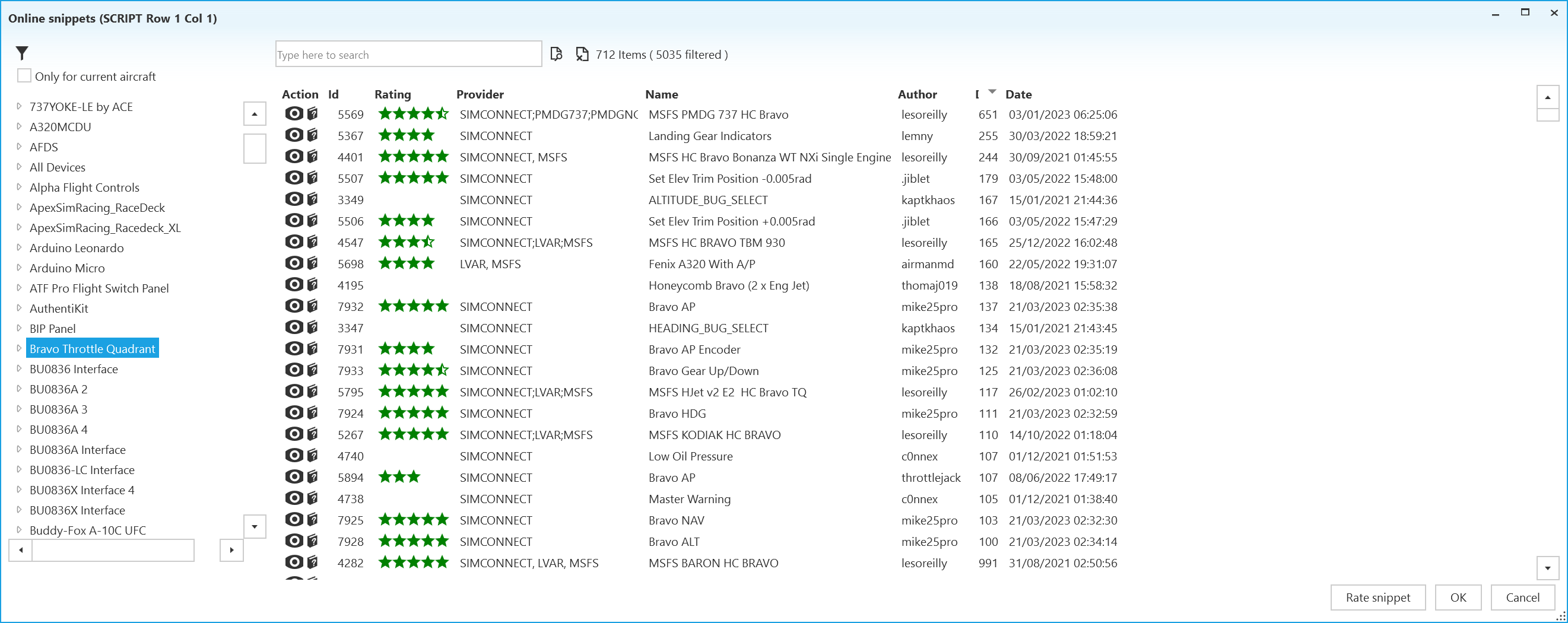
Snippets can be added by any user and downloaded by any user, so there’s no guarantee of quality, but you’ll quickly spot the users who do the best work - Les O’Reilly being a great example.
I uploaded complete mappings for the Emuteq G1000 hardware units for the MSFS WT G1000, for example, and someone with those units and MSFS could use those snippets with no additional work required.
Thanks, I’ll look again at the Snippets