Same here. And take off from runway → everything is quiet. Menu sound is working. Will try the G1000 version later to check if this is really model specific.
Just to add another confirmation of this issue.
Like many others the C172 steam gauge is the aircraft I do most of my flying with in 2020 so not too happy trying to set up all my controls etc when this most familiar aircraft is basically unusable.
Just how they managed to justify releasing this sim without the most iconic MSFS aircraft working baffles me.
Same issue. I really feel that basic testing was not done. They were probably just to busy managing bugs about the new engine and infrastructure and did not had time to return back to the basic…
Really happy that A2A comanche is working fine, at least I have 1 good aircraft to have fun with.
I also found that if I start on the runway (172 Basic) the engine runs but the flaps, top Garmin, fuel pump, and fuel flow don’t work. Also, if I switch the drone and move far away from the airplane (while on the ground with the engine off) when I press “R” to return the airplane skews to being in flight. Very frustrating.
Confirmed, the master avionics switch is turned off when starting at a runway, but even switching it on, it doesn’t resolve the problem.
I have the same issue with the flaps and fuel pump / flow
C172 glass cockpit engine won’t start for me either! Only difference is that I’m not surprised 
Can confirm the same issue.
Same here. I can confirm the same issue.
C-172 (All Basic Variants) has no avionics electrics. Circuit breakers all show in, and Avionics Master Switch is visually ON but the tooltip shows it as OFF. Toggling the Avionics switches does nothing to change the tooltip value of OFF. Works fine for the G1000 variants.
I confirm this problem.
This might be connected but the flap lever in the cockpit moves but plane and hud show no flapps
Using the template below will greatly help the team reproduce the issue and ease the process of fixing it. Before posting, search for an existing report. If you are not sure it’s a bug, please first report in User Support Hub.
3 tags are required - add them in the tag section next to the title above:
- One for iteration (msfs-2020 or msfs-2024)
- One for platform (ms-store, steam, xbox, or xcloud)
- One for aircraft (start typing in your aircraft name in the tag section and pick correct option)
Feel free to delete this quote section after adding your appropriate tags.
 SIM INFORMATION
This is vital information for our test team, please do not skip it or your issue may not be able to be reproduced or fixed.
-
Microsoft Flight Simulator 2020 or 2024: 2024
-
Version Build Number (Where do I locate that?): 1.1.7.0
-
Game Platform (Steam, Xbox, MS Store): MS Store
ISSUE DESCRIPTION
-
Did you remove all your community mods/add-ons? If yes, are you still experiencing the issue? Yes
-
If applicable, which aircraft is experiencing this issue: C172 “Basic”
-
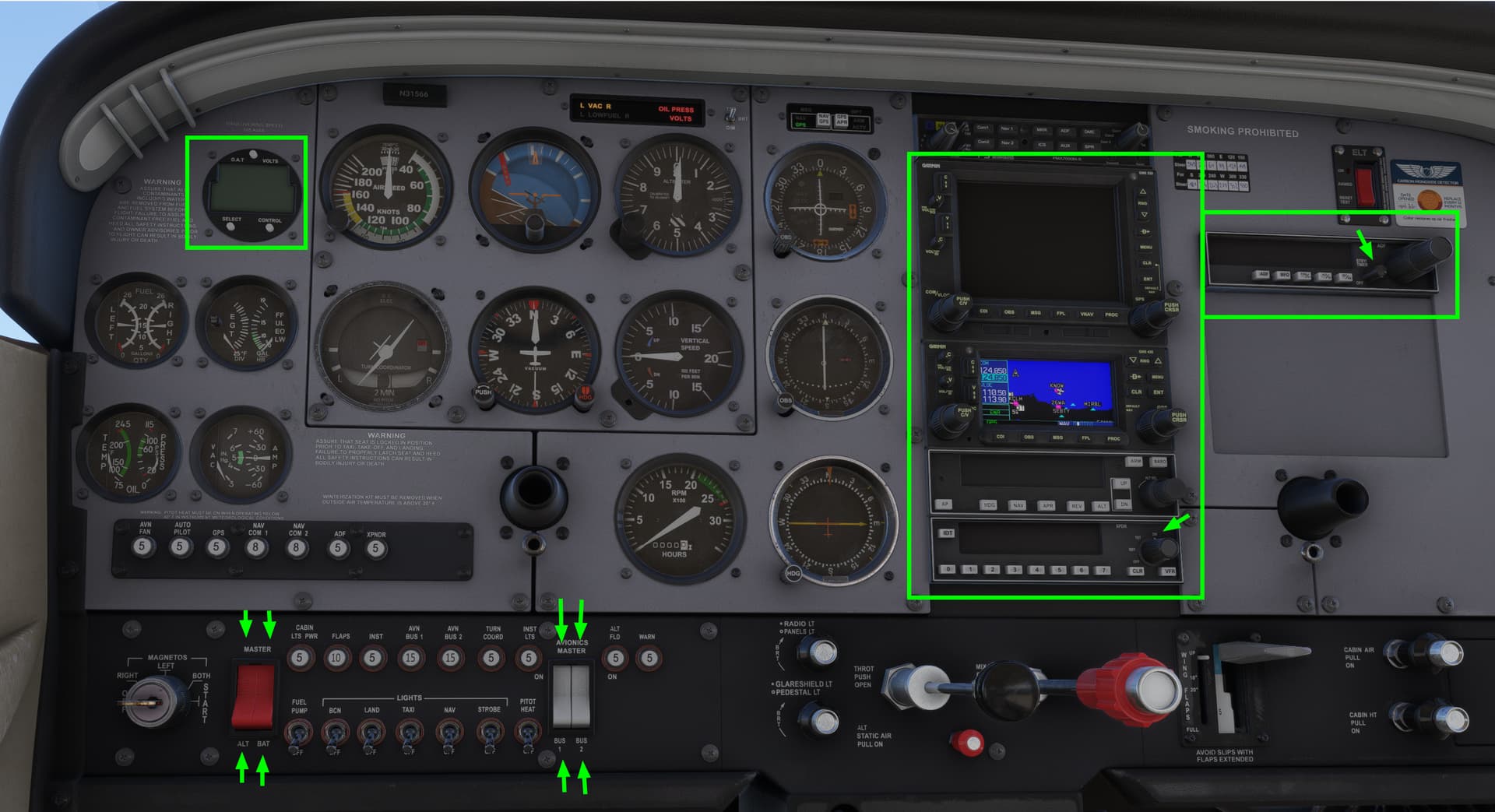
Description of the issue: Upon powering up the aircraft, the GNS 430 is powered on even thought both avionics bus switches are off. Turning on both avionics switches does not power up the GNS 530, autopilot or transponder.
FREQUENCY OF ISSUE
How often does this occur for you? (Example: Just once, every time on sim load, intermittently) Every time
REPRODUCTION STEPS
Please list clear steps you took in order to help our test team reproduce the same issue.
- Load C&D
- Power on aircraft
- Note GNS 430 immediately powered on
- Turn on Avionics buses
- Note GNS 530, autopilot and transponder not powered
YOUR SETTINGS
If the issue still occurs with no mods and add-ons, please continue to report your issue. If not, please move this post to the User Support Hub.
-
What peripherals are you using, if relevant: N/A
-
[PC Only] Are you using Developer Mode or have you made any changes to it? No
-
[PC, MSFS 2020 Only] Are you using DX11 or DX12?
-
[PC Only] What GPU (Graphics Card) do you use? RX7900 XTX
-
[PC Only] What other relevant PC specs can you share? AMD 7800X3D
MEDIA
Please add a screenshot or video of the issue occurring.
[END OF FIRST USER REPORT]
 For anyone who wants to contribute on this issue, Click on the button below to use this template:
Do you have the same issue if you follow the OP’s steps to reproduce it?
•
Provide extra information to complete the original description of the issue:
•
If relevant, provide additional screenshots/video:
•
SIM INFORMATION
This is vital information for our test team, please do not skip it or your issue may not be able to be reproduced or fixed.
-
Microsoft Flight Simulator 2024:
-
Build version: (can’t find it, following instruction as it’s for 2020. But release version)
-
Game Platform : MS Store:
ISSUE DESCRIPTION
-
**Did you remove all your community mods/add-ons? NO
-
Aircraft: C172, basic:
-
Cannot start engine from cold/dark:
FREQUENCY OF ISSUE
How often does this occur for you? It happens consistently
REPRODUCTION STEPS
Please list clear steps you took in order to help our test team reproduce the same issue.
- Battery : on
- Fuel valve : both
- Fuel cutoff : in
- Mixture : rich
- Fuel pump : on
- Magnetos : both
Result: Propeller does not start spinning. Nothing happens.
YOUR SETTINGS
If the issue still occurs with no mods and add-ons, please continue to report your issue. If not, please move this post to the User Support Hub.
-
What peripherals are you using, if relevant:
-
[PC Only] Are you using Developer Mode or have you made any changes to it?: NO
-
[PC, MSFS 2020 Only] Are you using DX11 or DX12? Not sure. Can’t find that setting in FS 2024
-
[PC Only] What GPU (Graphics Card) do you use?: Nvidia RTX 4090
-
[PC Only] What other relevant PC specs can you share?
MEDIA
Please add a screenshot or video of the issue occurring.
[END OF FIRST USER REPORT]
For anyone who wants to contribute on this issue, Click on the button below to use this template:
Do you have the same issue if you follow the OP’s steps to reproduce it?
•
Provide extra information to complete the original description of the issue:
•
If relevant, provide additional screenshots/video:
•
Having this very same issue. Engine cannot start.
Do you have the same issue if you follow the OP’s steps to reproduce it?
• Yes
Provide extra information to complete the original description of the issue:
• It appears that the main electrical bus does not activate when turning on battery/alternator master switches. No electrical functions work. For some reason the secondary GPS unit turns on without turning on the avionics bus but no other electrical seems to work. You get the sound of the gyros and fans spinning up but flaps do not work, starter for the engine does not work, avionics master does not turn on any other devices (Main GPS, transponder, AP, etc). Some lights turn on but main systems dont work.
If relevant, provide additional screenshots/video:
•
Same for me as well. I had to load in on the runway to get the engine running.
I also found that most of the avionics couldn’t be powered on. GNS 430 was working but not the 530, XPNDR, AP, or NDB units.
Using the template below will greatly help the team reproduce the issue and ease the process of fixing it. Before posting, search for an existing report. If you are not sure it’s a bug, please first report in User Support Hub.
3 tags are required - add them in the tag section next to the title above:
- One for iteration (msfs-2020 or msfs-2024)
- One for platform (ms-store, steam, xbox, or xcloud)
- One for aircraft (start typing in your aircraft name in the tag section and pick correct option)
Feel free to delete this quote section after adding your appropriate tags.
SIM INFORMATION
This is vital information for our test team, please do not skip it or your issue may not be able to be reproduced or fixed.
-
Microsoft Flight Simulator 2020 or 2024: 2024
-
Version Build Number (Where do I locate that?): 1.1.70
-
Game Platform (Steam, Xbox, MS Store): MS Store
ISSUE DESCRIPTION
-
Did you remove all your community mods/add-ons? If yes, are you still experiencing the issue? Yes
-
If applicable, which aircraft is experiencing this issue: C172 “Basic”
-
Description of the issue: The engine starter does not operate when the key is placed in the Start position.
FREQUENCY OF ISSUE
How often does this occur for you? (Example: Just once, every time on sim load, intermittently) Every time
REPRODUCTION STEPS
Please list clear steps you took in order to help our test team reproduce the same issue.
- Load C&D into aircraft
- Remove covers
- Power up aircraft and attempt to start (Note: ctrl-e doesn’t even work)
YOUR SETTINGS
If the issue still occurs with no mods and add-ons, please continue to report your issue. If not, please move this post to the User Support Hub.
-
What peripherals are you using, if relevant: N/A
-
[PC Only] Are you using Developer Mode or have you made any changes to it? No
-
[PC, MSFS 2020 Only] Are you using DX11 or DX12?
-
[PC Only] What GPU (Graphics Card) do you use? RX7900 XTX
-
[PC Only] What other relevant PC specs can you share? AMD 7800X3D
MEDIA
Please add a screenshot or video of the issue occurring.
[END OF FIRST USER REPORT]
For anyone who wants to contribute on this issue, Click on the button below to use this template:
Do you have the same issue if you follow the OP’s steps to reproduce it?
•
Provide extra information to complete the original description of the issue:
•
If relevant, provide additional screenshots/video:
•