Most seem to be related to live weather/METAR, rather than purely, the clouds look word not aloud.
Yes, I know those posts are maybe more related to Live Weather and METAR, but since regression with clouds depiction happened when METAR has been introduced (and also XBOX implementation) this is where you can find many posts with examples of clouds how they were before SU5/SU7. MeteoBlue Data interpretation should have been modified (in a negative way) to accommodate METAR and maybe XBOX rendering (it is a assumption since no communication has been made). If you use default weather presets or the free clouds mode https://flightsim.to/file/24251/floyd-s-epic-clouds, you can see that the sim is still able to generate really nice clouds. The issue is with LiveWeather engine.
If only they would allow texture swapping from 3rd party addons. But they don’t like the mod word so we’re stuck with what the sim has. Weird that presets don’t use the same cloud textures as the live weather engine. You would think during development they would have created the presets based on the same data that would have been used for the live weather. You can of course point the finger at the METAR issue but even then there’s no reason why outside of that little reality bubble you shouldn’t be able to see great looking clouds where the other data set kicks in or has more of a say in things. Even flying in areas that have absolutely no reporting data like over the ocean and shouldn’t be affected by METAR intrusion at all and is simply just pure MB data you still see the same types of clouds with the same issues. I find it hard to believe that just because METARS got put in that it completely abolished the original textures. If they’re there as presets, they should also be there for live weather or at the minimum present outside of the METAR control area or even at upper altitudes where METAR information becomes highly irrelevant like say above FL200 or something. I think if they’re so intent on keeping things restricted (legally bound or not), especially with weather, because we all know if that wasn’t the case there would already be more reliable and accurate options out there, then they should do it right or with some justice. I’ve been using MSFS since last October, so about almost 8 months now, the weather with several SU’s and patches since I’ve started using it really hasn’t changed all that much. We know what it used to be, what it can do, and what we need to do to get it to look like that again. Saying it’s not possible or needs more work with or without METAR being an affecting element is just…well maybe more testing should of been done to preserve the texturing and data to use it.
 Thank you for using the Bug section, using templates provided will greatly help the team reproducing the issue and ease the process of fixing it.
Are you using Developer Mode or made changes in it?
No
Have you disabled/removed all your mods and addons?
Kind of (turned GeForce filters off)
Brief description of the issue:
With Overcast / Broken clouds there is a noticeable colour banding
Provide Screenshot(s)/video(s) of the issue encountered:
I thought the Geforce filters may have been the cause but no. Here’s a pic with them off and then on;
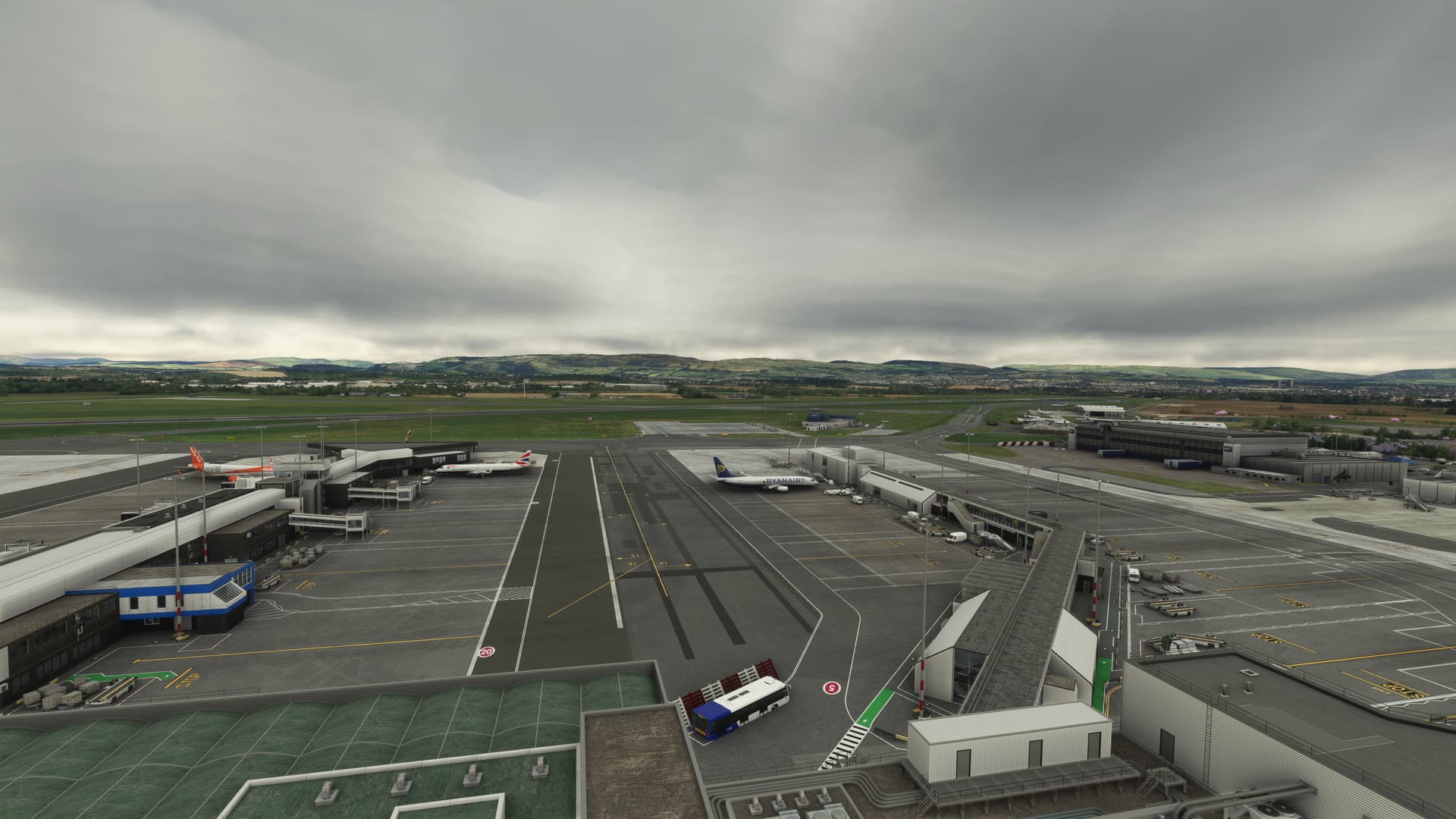
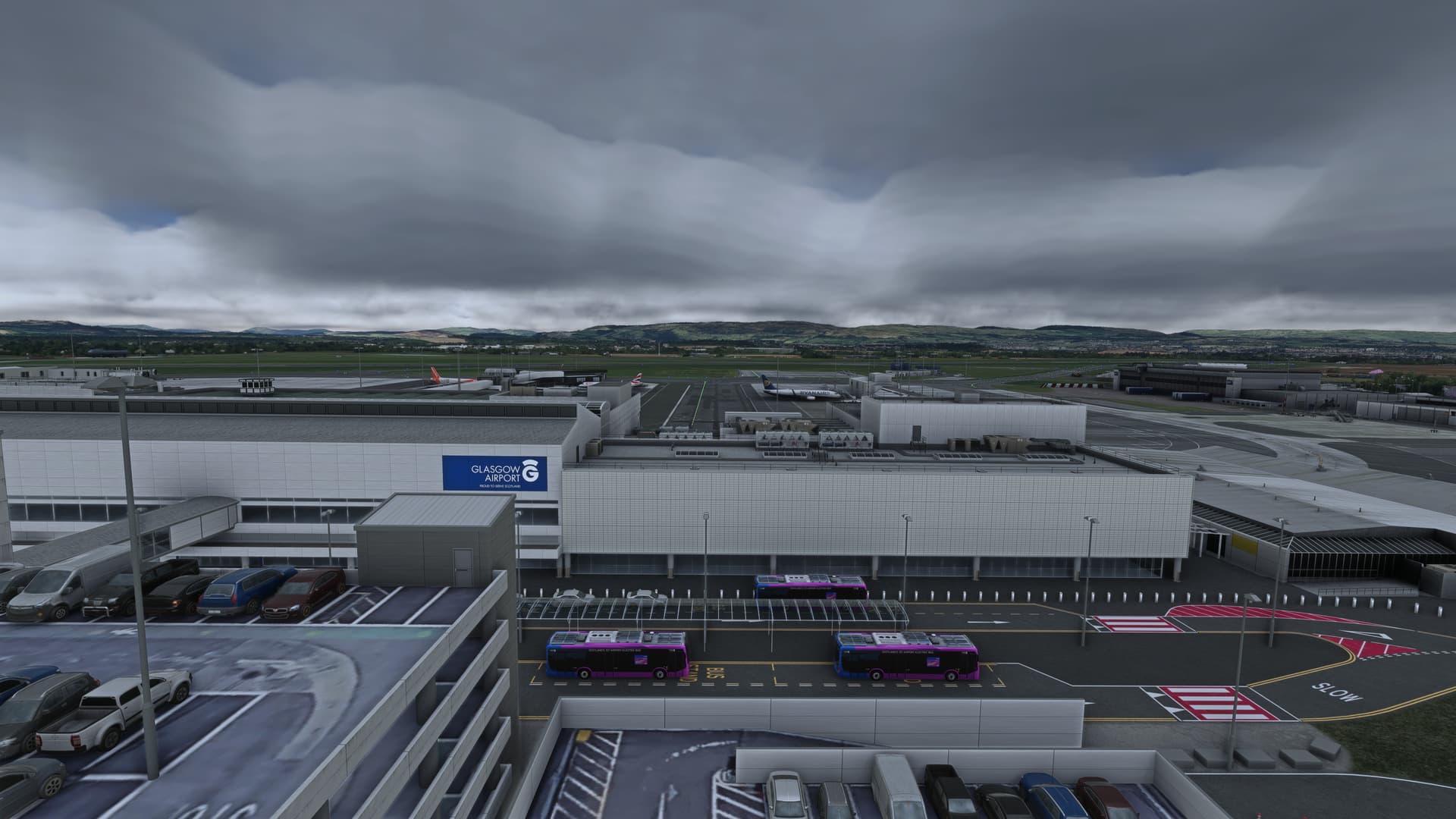
Detailed steps to reproduce the issue encountered:
Loaded in to EGPF with live weather @ 10:35z 06/06/23
Many issues may be due to an outdated graphics card. Please state your Graphics Card Driver Manufacturer (NVIDIA, Intel, AMD) and Version (Learn how to find your current graphics card driver version):
535.98
PC specs and/or peripheral set up if relevant:
Not relevant
Build Version # when you first started experiencing this issue:
Latest live build (non-beta)
 For anyone who wants to contribute on this issue, Click on the button below to use this template:
Do you have the same issue if you follow the OP’s steps to reproduce it?
Provide extra information to complete the original description of the issue:
If relevant, provide additional screenshots/video:
Do you have the same issue if you follow the OP’s steps to reproduce it?
Yes
Provide extra information to complete the original description of the issue:
I saw exactly that a few weeks ago, but sadly I didn’t take any screenshots of it. I checked yesterday when we had overcast weather, and I saw a decent representation without the banding, so it’s not a permanent issue, though I have no clue what would trigger it on occasion. It seems to affect overcast weather.
If relevant, provide additional screenshots/video:
It’s rare but I’ve seen this too. I found that bumping clouds to ultra pretty much cured it.