Try.
Close MSFS 2024 SU5 beta.
Open usercfg.opt file and edit FrameGeneration line so that it has NONE (which simply means frame generation is disabled) instead of FSRFG or DLSSG.
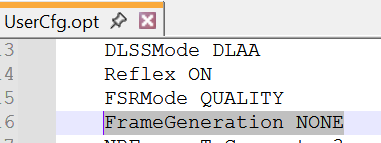
Save changes.
Then launch MSFS again and open Developer Mode. If there’s no CTD, while in Developer Mode, go to the Options tab and turn off the Smart Docking System.
After disabling the Smart Docking System, you can enable Frame Generation again.