Do you know where the Community folder is?
It is a folder in the Packages Folder.
Do you know where the Packages folder is?
Yeah I know, and yes I was moving the Community to a custom location
1 Like
Same stuff…my ears hurt.
1 Like
CTD while loading! MS store version. Can’t test the beta if it crashes before I get in the game🤷🏾
It might be related to anything that uses sim connect
For the same CTD in the Steam version, after updating to 1.5.10. I experienced one crash while the game was loading, and then another crash while loading an aircraft. No crash information for MSFS2024 was found in the Event Viewer.
100 percent. Reformatted F drive, clean install. Reset Community to custom location (with only Ini A350 in it and one livery), got into the Sim tons of times, changed settings, got into the cockpit, no issues. Linked Navigraph in the EFB, exited Sim, waited for SimConnect to unload. Got right back in and tried three times to load into Free Flight directly on a runway, CTD each time. Only thing that changed was the SimConnect was opened for Navi.
Same here, I’m not able to launch this version. I tried with no add-ons, and the same result was a CTD.
- PC-MS Store
PC - MS Store version - constantly crashing at approx 85% on the loading screen since 1.5.10.0 update. Have tried various things as mentioned throughout this thread, but always the same issue
If this is possible, roll back to 1.5.9 code base while team is figuring out. Current version is too broken to stay alive.
PC MSFS-2024 MS-STORE
Fault bucket 1856377202958665170, type 5
Loaded the iFly 737 MAX successfully and got CTD when clicking on Start flight
Both FSUIPC7 and FSRealistic were enabled in the exe.xml file
After I disabled FSUIPC7, FSRealistic in the exe.xml file I loaded the iFly 737 MAX successfully and was able to fly OK & exit the sim
1 Like
Hi, any news? Is it possible to roll back to 1.5.9 until the issue is fixed? Otherwise I (and suppose many others) can’t use the sim (at least with the Fenix)…
I never opted for this beta, why would it upload all that rubbish in to my computer and started CTD’s. Fire the idiot who caused this!
crashdata.txt (954 Bytes)
AsoboReport-Crash.txt (15.8 KB)
Ok so i went into my xml file
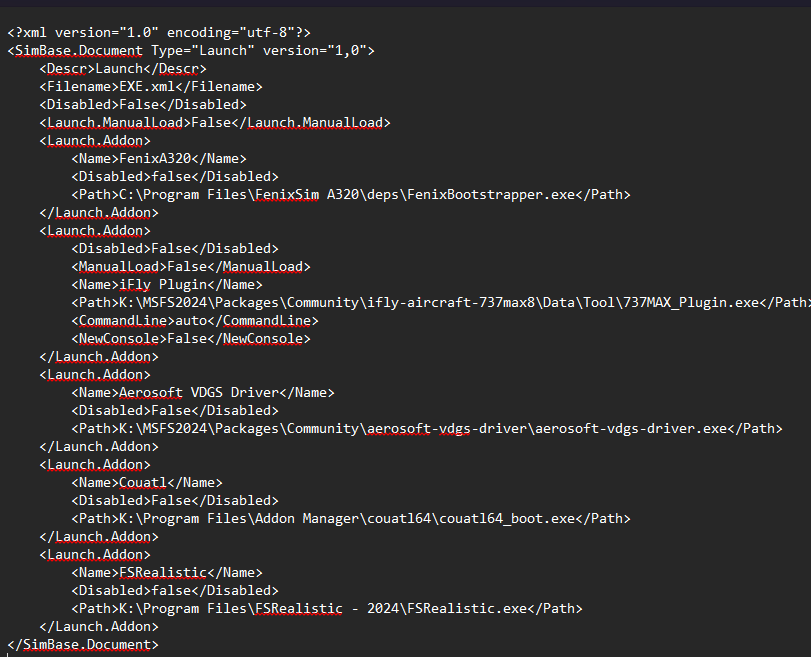
I backed up a copy calling it exe.xml.old
And then removed the fsrealistic lines and saved back
Loaded back into sim, it went through asking me to setup my sim experience again and avatar but was able to load in with ifly 738max and shutdown sim with no issues.
Thanks.
1 Like
This version is unusable for many as well, since autopilot and NAV functions are broken or unreliable. Best to roll back to 1.5.8 until things are properly fixed.
1 Like
How do you roll back to previous beta version?
1 Like
You cant. The only solution is to opt out of the beta and going back to su2.
1 Like
I’m having the same problem, a couple of sec in the menu, CTD. I have removed and reinstalled the sim twice, and fully vanilla, no mods or addons. In the version before 1.5.10.0 i could not even fly any MSFS2020 planes, not even from simmarket, and there were a lot of CTD’s too.
I’m on PC-MS Store.
Windows 11 Home 64-bit, CPU: Intel Core i7 10700F @ 2.90GHz, Memory: 32 Gb ram.
GPU: ATI AMD Radeon RX 9070 XT, 16 Gb GDDR6.
Here is my fault bucket:
Fel-bucket 1856377202958665170, typ 5
Händelsenamn: MoAppCrash
Svar: Inte tillgänglig
Kabinett-ID: 1636593003948156553
Problemsignatur:
P1: Microsoft.Limitless_1.5.10.0_x64__8wekyb3d8bbwe
P2: praid:App
P3: 1.5.10.0
P4: 00000000
P5: FlightSimulator2024.exe
P6: 1.5.10.0
P7: 00000000
P8: c0000005
P9: 0000000002db8078
P10:
Bifogade filer:
\?\C:\Users\bengt\AppData\Local\Packages\Microsoft.Limitless_8wekyb3d8bbwe\LocalState\AsoboReport-Crash.txt
\?\C:\ProgramData\Microsoft\Windows\WER\Temp\WER.b957774d-aa63-474a-8e12-53c0cf76e569.tmp.mdmp
\?\C:\ProgramData\Microsoft\Windows\WER\Temp\WER.603914f6-6f7c-4f2b-bba0-486a0d71d325.tmp.WERInternalMetadata.xml
WPR_initiated_DiagTrackMiniLogger_OneTrace_User_Logger_20240808_1_EC_0_inject.etl
\?\C:\ProgramData\Microsoft\Windows\WER\Temp\WER.3fb94c60-19a6-4409-9131-95e22f2d4261.tmp.etl
WPR_initiated_DiagTrackMiniLogger_WPR System Collector_inject.etl
\?\C:\ProgramData\Microsoft\Windows\WER\Temp\WER.4c102fbd-2dea-4845-92fb-e524b8713e0c.tmp.etl
\?\C:\ProgramData\Microsoft\Windows\WER\Temp\WER.763a4f25-6cb5-4fac-9caf-5b46dad739d3.tmp.csv
\?\C:\ProgramData\Microsoft\Windows\WER\Temp\WER.478ae624-0059-48c2-9192-120f2f7f9995.tmp.txt
\?\C:\ProgramData\Microsoft\Windows\WER\Temp\WER.983b265d-4209-4844-9189-e2c34350243c.tmp.xml
\?\C:\Users\bengt\AppData\Local\Temp\WER.1165fc96-7e3d-4225-9307-7ac8c98b5b39.tmp.appcompat.txt
\?\C:\Users\bengt\AppData\Local\Temp\WER.90f207e1-3bc0-426e-a913-502036aeb562.tmp.WERDataCollectionStatus.txt
Filerna kan vara tillgängliga här:
\?\C:\ProgramData\Microsoft\Windows\WER\ReportArchive\AppCrash_Microsoft.Limitl_1ddc307de07188569d4871d3bd36b225fac39f9_3dd55791_cab_0673c44a-9b19-4cd4-95b8-f58baa152e7f
Analyssymbol:
Kontrollerar lösning igen: 0
Rapport-ID: af610aee-d00d-45aa-9229-538e2db1e1c0
Rapportstatus: 268435464
Hash-bucket: 90bb11ee39a17ff789c32d3b077c05d2
Cab-GUID: ae1e2e8c-aed1-4bb8-96b6-58aa82382689
Regards
Bengt-Ove Peltz
They’ve completely broken the simulator. I’m always stuck on the loading screen at 87%. I have an empty community folder… The previous version (1.5.9) worked quite well for me. I hope Asobo rolls back this version to 1.5.10 as soon as possible… I don’t understand how they can release this version with such a huge bug. The game doesn’t even launch!
With below exe.xml file I was able to start a basic sim but it did not read what I have in my custom community folder, just stock scenery.
<?xml version="1.0" encoding="utf-8"?><SimBase.Document Type=“Launch” version=“1,0”>
Launch
EXE.xml
False
<Launch.ManualLoad>False</Launch.ManualLoad>