Sorry for the delay. Like @ThurOliver, I didn’t have any issue. Tested with current AIRAC, just for the sake of it also tested with AIRAC 2203 and plans are loaded correctly, no north pole at all.
As a side note, tried to load the plan with default navdata and it doesn’t find the airports. Also tried to search for those two airports and seems they aren’t there. If anyone can test that, would be grateful, just to know if I have something corrupted or not with the default navdata.
Back to the north pole issue, can you show us a screenshot and a little bit more detail on your nav data?
Best
Seb
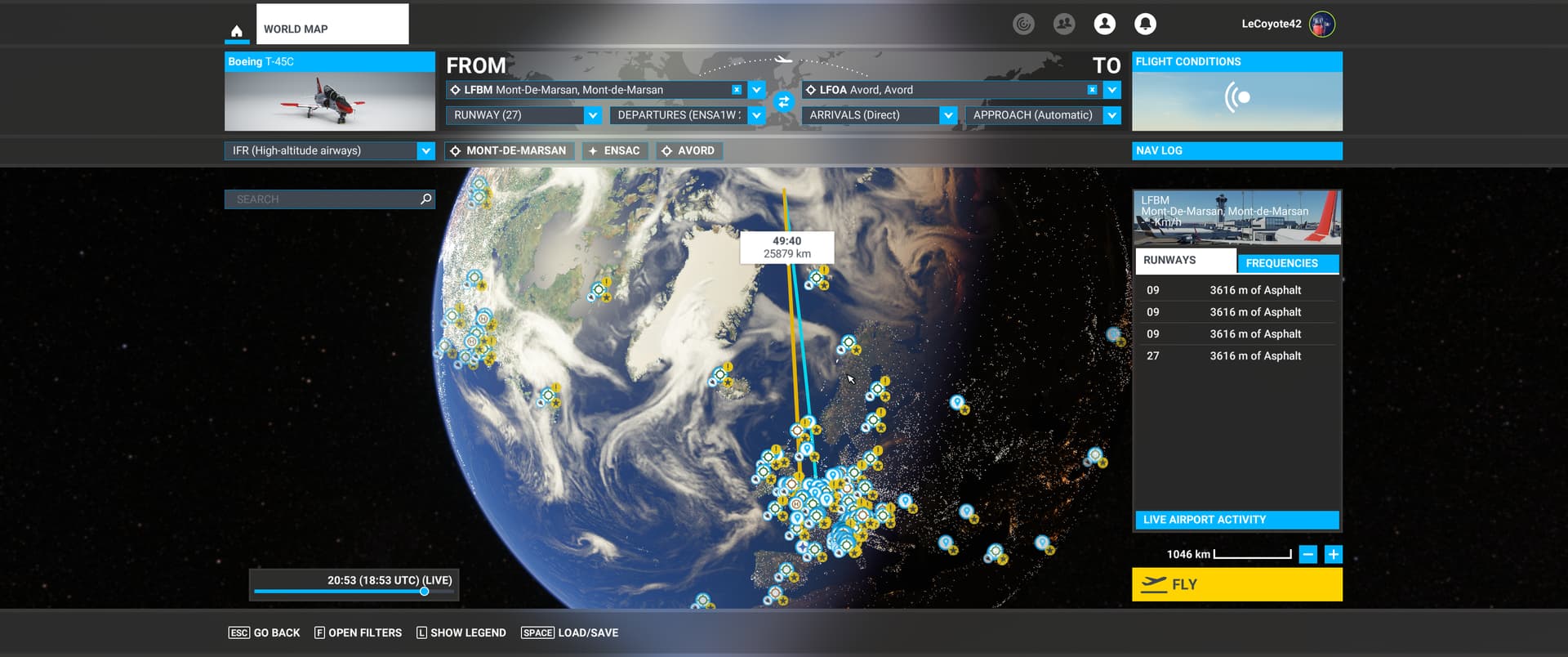
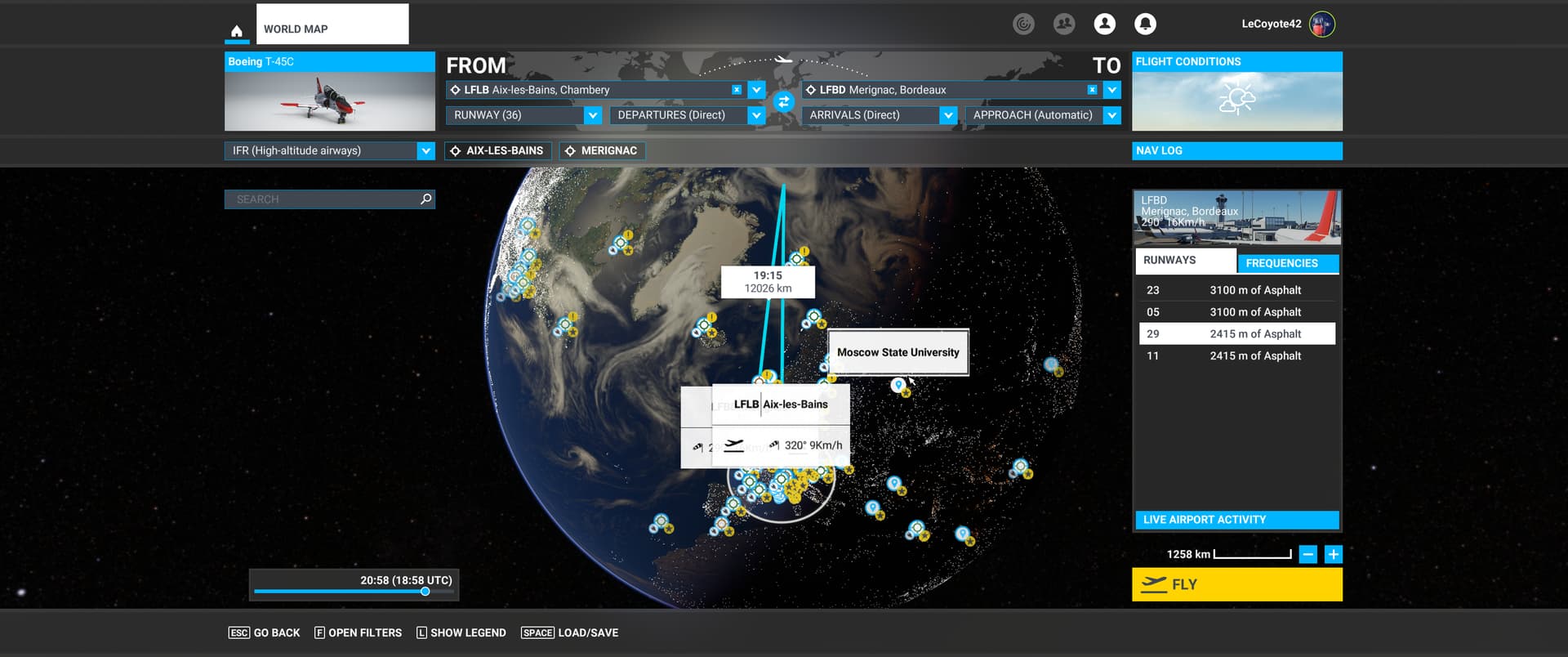
Here is the result of loading the exact PLN I uploaded above.
Unless something fishy is happening behind the scenes, I don’t see how AIRAC data could be a factor because AIRAC waypoints in the PLN work; it’s just the custom waypoints that are affected. But I’m using the latest cycle, ie 2306.1 as of half an hour ago, and loading that PLN had the exact same result with 2305 the other day.
About the airports, it just so happen that these are military airbases. However, I still have the exact same result with another plan I just created from two civilian airports:
LFLB-TEST-LFBD.PLN (2.5 KB)
Here again, loading the PLN results in a North pole issue:
Loading the FLT works just fine.
Cheers
There is definitely something messing up with the PLN from within MSFS. I loaded the LFLB-LFBD plan above, saved it again under a different name and compared the output:
- the broken waypoints all have coordinates N90° 0’ 0.00",W180° 0’ 0.00"
- the destination airport coordinates have changed: MSFS added 20" to LAT and LON.
I could not compare the departure coordinates because of the ongoing bug when MSFS decides you’re departing from a runway anytime you click somewhere it thinks you shouldn’t.
Cheers
Have you installed all world updates? The only thing that could happen is that a custom waypoint is messing with some BGL (that should @NAVData check) but currently, with all WU installed and any AIRAC I have no issues with the previous plans.
About coordinates being 90/180, yeah, that’s the north pole and that’s issue basically. Not at home now and probably won’t be able to test in less than a day (busy end of week sorry) but previous plans didn’t have any issue. I can only think about an issue with a World Update.
1 Like
I typically have not installed WUs for where I never fly. Can you explain why a custom waypoint that’s in an area for which I DO have the WU installed (in this case, Europe) be mangled by the fact that I don’t have WUs from the other side of the world? Because again, that sounds like buggy behaviour. I should NOT have to install Australian scenery to be able to fly a custom waypoint in France.
EDIT: besides, that does not explain why the FLT format is not affected, so if installing the whole world fixes the issue, it’s a happy side-effect, not a desirable solution.
I have the clear proof that it is a bug caused by MSFS when parsing the PLN “User” waypoints.
I tried creating a plan from Navigraph with custom waypoints, and to my surprise, it loaded perfectly. I compared the contents, and noticed that custom points had ATCWaypointType as “Intersection”, (with a fake ICAOIdent) instead of “User” as LNM and MSFS itself uses. Here is the resulting, edited plan:
LFLB-TESTEDIT-LFBD.PLN (2.1 KB)
This is my original plan created by the MSFS GUI (stripped of the custom cruise and descent points) but with the points replaced as explained above. It loads perfectly.
Cheers
Don’t know if you’ve read this very same thread, but exactly a few posts above @ThurOliver exactly explained that the issue was solved by installing all WU (and had your exact same complain, having to update zones they don’t fly).
Doesn’t mean it’s the ideal solution nor it means that this should be this way, but most probably due to how navigation data is coded you probably need to have everything updated so there are no issues in nav data.
Most probably someone else can give a more thorough explanation, but the issue should be solved by installing all WU.
Edit: I see your new message, but the thing is that neither @ThurOliver or me had issues with your previous plans, having all WU installed.
Let’s go back to the issue for a minute. MSFS can create custom waypoints; it can display a plan you create with custom waypoints in it; it can save that plan; but it can’t load it again. That’s a bug, there is no way around it.
Yes, I understand that installing WUs have the unexpected consequence of working around that bug. It is still a bug and it still needs addressing. In fact, Navigraph probably even decided to code their custom waypoints because of that bug.
Imagine if the same were to happen in a GPS-based app on your phone, and it said you can’t create a custom point where your home is unless you install the map for the whole world. It sounds as preposterous as it would be, which is my point here 
Cheers
I guess we should see what navdata are you using in LNM. Personally, I still can’t say it’s a bug, I would expect that updated navdata needs to correlate with updated world data, and that sounds logical to me.
Nevertheless I won’t discard a bug, I’d just say that with everything on the same page it works.
Should it work without everything on the same page? Probably, but that doesn’t make it a bug, more a cumbersome thing and also, if you won’t ever fly in those places, a more or less wasted storage space.
I guess there could be a bug somewhere, but again, if with everything updated it works, then it’s a hard to reproduce bug, thus hard to point out (actually with everything updated the parser does behave as expected).
If it fails withOUT every WU installed, then I would say it’s fairly easy to reproduce, right?
All my navdata comes from Navigraph, so right now it’s 2306.1 everywhere.
However, raw geographical coordinates should not require any navdata to work. If MSFS requires navdata to figure that out, then it’s a problem.
Again, the simulator should be able to plot absolute geographical coordinates without any AIRAC data or world updates. That’s what geographical coordinates are for, it’s just maths. You don’t need AIRAC data or world updates to know that from 49N000E to 48N001E is a (true) bearing ~146.1°. So again, if the simulator relies on anything else than maths to figure this out, then it’s a problem that needs to be addressed
EDIT: just to put another nail in the coffin, what about WU airports that needs to be removed because they conflict with (improved) 3rd party scenery? Should they be restored and the 3rd party removed to keep the PLN parsing happy? I sure hope not 
Agreed that it should parse any valid geographical coordinate, but, considering it’s a game/sim and not a real world gps, with a simulated world, terrain, coordinates, routes, positions and all the yadda yadda, I would still expect it to behave as any other piece of software. Heck even my BIOS needs updating though the processor’s architecture is the same. Anyway this, still i fully agree that parsing a route based on absolute coordinates shouldn’t depend on that. Don’t know how they innards work that the result is this.
Nevertheless back to the issue, I do still think that probably lacking updates but using current navdata breaks the links in BGL files (that’s what happened last time, just that last time it was an actual error in Navigraph navdata because the release was based on WU11 and when WU12 was installed it broke the BGL links, if I recall correctly).
Most probably that’s the issue here, or related to, and I would guess that the whole world navdata is linked, so even if the region you fly is updated, something elsewhere not and it breaks the route parsing.
So we agree that it shouldn’t work this way, not sure if it’s an actual bug or just the way it works (questionable, but still not sure if it should be called a bug)
Let’s assume that navdata/WUs are at fault here. Then why would loading user points of one type (“User”) break while loading the same coordinates with another type (“Intersection”) work? Answer: because it’s buggy.
I don’t really understand why acknowledging that it’s a bug should be so difficult, but to me if a program (yes, even a game/sim) can save a file it created and not open it again properly, it’s certainly a bug and not a feature, no matter how many non-mandatory (unless I missed something??) updates are not installed. It’s like you can’t open a Word file you just saved because you didn’t install all of Wordart. It doesn’t make any sense to call it anything but a bug.
EDIT: I can’t say I’m surprised, but after having wasted 40+GB worth of bandwidth and disk space (and about 2 hours of my time), the problem is still present, ie. the same PLNs that were broken before are still broken. I hope this proves (for good) that it’s a bug that really is independent from WUs.
I’ve tried all of the PLN files posted here and have had no issues importing them with one exception. There have always been issues importing PLN files not created by MSFS because LNM, Navigraph, and SimBrief leave out necessary information that MSFS has in their created flight plans. These incomplete files result in user issues such as routing issues and ATC not issuing correct commands. SimBrief is aware of the incompatibility issues and has provided information on how to make SimBrief PLN files work correctly in MSFS. (Basically, after import select each dropdown for the departure, arrival, and approach and re-select each item. MSFS “fixes” the PLN file to work correctly.)
None of the imported PLN files had screwy waypoints to the North Pole.
I had a problem with the LFBM-HI-LFOA PLN file. Both LFBM and LFOA have disappeared from both MSFS and LNM. Both of these are military airports and I assume they’ve been removed due to security concerns. The scenery around these airports have been blurred over which indicates to me this isn’t a problem with AIRAC synchronization. MSFS tries to create custom waypoints during import for these airports but they don’t work correctly. The strange thing is that Navigraph has both of these airports and associated procedures and charts. The only reason I can think of why they are in Navigraph is that maybe the military might use Jeppeson so military airfields are part of the entire Jeppeson package.
Same conclusion as me, none gave me any issue, hence my doubts about a bug.
About the airports, they aren’t in stock navdata, they are added by Navigraph, that’s why you don’t see them. You can only see them if you are using Navigraph navdata.
I am fairly sure LFLB and LFBD are in the default scenery (unless you don’t have the France WU perhaps )
I think we’ll have to agree to disagree here, and I’ll state the reason one more time.
Creating the same flight plan from within MSFS GUI, with custom waypoints:
- using the FLT format, the flight can be saved and loaded without issue
- using the PLN format, the flight can be saved but when loaded, custom waypoints are placed at the North pole
- using the PLN format and manually changing the type of the custom waypoints to match what Navigraph exports, the flight can be loaded without issue.
I’ll rephrase, again: MSFS creates a PLN that it cannot load properly again. I’m glad it works for you guys, but if it doesn’t work for me, then what is it called? What I am doing wrong between clicking Save and then Load on the unaltered file that the program created? If that’s not a bug, then please tell me what it is and how to solve this
Thanks.
They aren’t in stock data. I’ve already confirmed it (actually Richard -Navigraph- confirmed it on another thread because I was doing tests around your issue and when in stock data wasn’t able to find them).
If you would have read my messages, you would have noticed that I said so here, second paragraph (and as I can see, you never tested if the airport was there or not with stock data).
Unfortunately, three users not having any issue with the very same files you’re having issues, confirms it’s more probable there’s something with your install than a confirmed bug, which needs to be reproduced -by different users of course-.
2 Likes
The only thing I can think of is the aircraft and its FMC. Not all FMCs are equivalent even using the same AIRAC. That is, each FMC “interprets” whatever flight plan info that is imported to create the routing for the aircraft. In the past, I have seen different aircraft/FMC import the same flight plan with mostly minor differences. The best example are “discontinuity” or “vectors” waypoints that are inserted occasionally.
This is before even loading a flight/aircraft, no FMC comes into play here.
I tried sticking to the facts, but if we’re getting testy and making assumptions, here goes.
If you would have carefully read my messages, you would have noticed that I posted another flight plan sample with two airfields that are in the France world update (LFBD and LFLB, right below the message you referenced above), and not the two airbases from the initial post. I’d even be willing to make a new PLN with other airports but that probably wouldn’t be good enough anyway.
You are saying that my issue stems from a broken install. Let me rephrase my question then: how does MSFS allows itself to break to the point that it cannot do math? What type of addon has that kind of power over MSFS? I’d love to know which “feature” makes it possible for an addon scenery/aircraft/texture/whatever to interfere with latitude and longitude plotting calculations. That sounds like a solid design, for sure.
Sarcasm aside, if a GUI designed to PLOT A FLIGHT PLAN accepts interference from addon scenery/aircraft/whatever in order to plot geographical coordinates, then it is BROKEN by design. Latlon coordinates are always in the same place (duh, that’s what they are FOR) regardless of how many BGL files are installed or not. Math is not a matter of opinion.
Yes, I get “testy” when I’m trying to help someone with a given issue. No one’s helping anyone with guesses, you need to test.
And if you’ll excuse me, I’ll leave the solution to others or to yourself. To be honest, I don’t like to be called “testy” nor be addressed with sarcasm when I’ve not only tested all your plans, I’ve even played with different Navigraphs versions, opened different threads just to be on the sure side about my install and my tests just to give you sure feedback, and allocated several hours to your issue.
Next time, try to be more considerated, people are helping you asking absolutely nothing back from you. The least you can do is be gentle.
Have a nice day.
Best regards,
Seb.