On your desktop set up a shortcut to the folder you keep your mods in and a shortcut to the community folder. Then just drag over what you need for your flight, if it causes no problems you could even leave it there.
needed on xbox!
1 Like
After being involved in multiple beta tests, this feature is desperately needed for Xbox.
The impracticality of uninstalling add-ons given their download size and the fact that with aircraft their custom camera mappings, Hobbs meters, etc. will be lost makes testing without add-ons nearly a no-go for most Xbox users.
I’ve said this elsewhere, but it seems quite the oversight that this needed Content Manager feature wasn’t a part of the original design implementation in the simulator.
2 Likes
Vote +1.
Urgently needed on xbox.
And the posibility to store addons on a separate xbox drive than the base sim. My sim+addons dont fit on the 1TB ssd anymore.
(Does anyone know if theres already a thread for that?)
I mentioned this suggestion in another topic, wow didn’t think we’d be 2 years on and it’s still not been implemented.
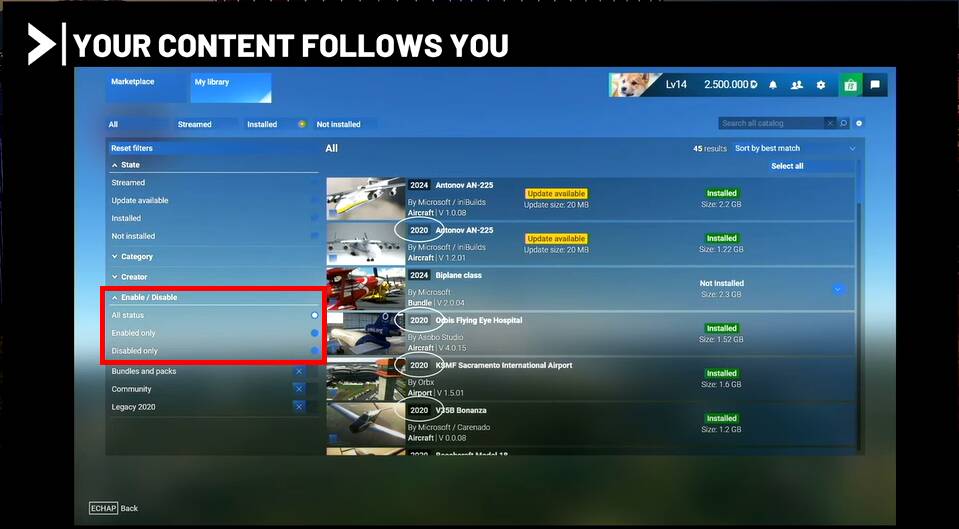
At this point it’s easier to manage 3rd party/community content via MSFS Addons Linker on PC than it is via the marketplace itself. How difficult is it really to just add enable/disable button rather than remove.
As the sim loads it could very easily just look this value up on whatever database it’s reading (even if the database structure/table is just a list of disabled addons), after the long delay on startup must be doing something.
Even the git tool has something very powerful in the form of the .gitignore file, surely the software developers must be aware of such a simple yet powerful feature. I’d settle for having to update a similar file manually if it meant I didn’t need to uninstall something just to disable it.
2 Likes
I 100% agree on this one. Not only to debug bad add on but to shorten the loading time with unnecessary add on loading for flight plan you project. Been able to do so without restarting the sim is a must.
And no Addon linker do that.
1 Like
Addons Linker has an option to move items in the Official folder to a separate Linker folder.
Problem is that Microsobo sees that it’s planes are missing, and forces and update to reinstall them.
I don’t want all these default aircraft that I never fly in my hanger!!!
(But they do, and they makes the rules.)
Side note: Any 3rd party aircraft that were installed into the Official folder and not Community could be moved into Linker. It’s just the default aircraft that can’t.
Can’t say I’ve seen that issue. I think I’ve got rid of all but one of the airliners as I hate carrying self-loading cargo around, even virtually.
@BegottenPoet228 did you just remove from the offical folder or got into the content manager and uninstall…that’s what I did?
T removal is separate to this issue of temporary removal for testing or those (such as Redwings 1935) which modify things in a way not always needed.
The only one that still remains is one I was able to find a cargo livery for so externally at least it looks like it’s just carrying boxes 
All done via the addon linker because it’s a community livery mod, so more manageable than official content.
Following a number of issues with the marketplace (slow updates etc) I’ve now boycotting it and going to devs direct where possible. This will obviously become less of an issue for me but doesn’t help all players, especially those on Xbox.
1 Like
I moved the individual Asobo and Microsoft aircraft folders from the \Official\OneStore folder to the \official_linker folder I created.
When I selected the planes in Linker, I saw the links in the Official\OneStore folder. But Microsobo didn’t recognize the link as being the same as the aircraft, and forced me to download all the aircraft I had moved.
I think I’m going to boycott the marketplace too, since all the planes I downloaded from 3rd party sites - even if they were installed into the Official folder - were able to be moved and linked. Microsobo didn’t care about them, even though they were in the Official folder.
2 Likes
This task of removing, moving, or copy and paste the community folder for every update is getting very tedious. Expecially for folks who have a very large collection of 3rd party payware items. I have over 20,000 items to move or get the simulator to ignore when an update releases. It would be better to have the simulator give the option for the user to load or not load items from the community folder. That way the current process can be completely avoided, and there isn’t any lost time waiting for files to move or get accidentally modified.
Rename the folder, then create a new empty community folder. Much faster and more safe.
1 Like
You don’t even have to make a new one, just rename the original, MSFS will make an empty new one.
When the update is finished, simply delete the new and rename the old one back to Community.
Has no one heard of MSFS Addon Linker?
https://flightsim.to/file/1572/msfs-addons-linker
I can’t imagine running the sim with even 100 3rd party addons let alone the claimed thousands. Must take almost a week to load and the wasted RAM usage.
I generally only enable the addons I need for specific flights and for things like scenery I use a tiered folder structure so if I’m flying in say France I select the France folder and the necessary addons are linked with 1 click.
As for the original request, I do agree that not being able to safe mode as required is a definite oversight on the part of the developers:
https://flightsimulator.zendesk.com/hc/en-us/articles/4405893759378-Safe-Mode-FAQ
4 Likes
Usually that process is not needed at all. I don’t move or rename my community folder at any time.
The reason this is suggested is that in case something happens or something is bugging afterwards is because some add-on sitting there is outdated, however it does NOT compromise the update or any files of the sim.
If something does not work as expected AFTER updating it makes sense to move/rename the community folder before blaming the update tho have broken something 
2 Likes
Once your community folder is quite filled you might run into another issue. Your organization might not allow to move files, annoying windows message that is. So you either download everything again and put it in the new addon linker folder or do some trickery. Such as renaming the original community folder communityold or something, leave your stuff in there and let fs2020 create a new community folder upon restart. Either way, in FSX we could simply check/uncheck addons. We need something like this back and a refresh button that rereads whatever it needs to read when booting the sim without loading all core game files again.
2 Likes
It would be interesting to have some sort of Linker addon for products installed in msfs /Original/One store.
As the installations progress, the list becomes long, as does the loading time and depending on the flights we may not need to quickly activate and deactivate all these addons.
As Parorng, NixonRedgrave & others have mentioned above, this would greatly simplify the Beta testing process, as well as when the community is trying to help other members troubleshoot a particular problem that they are experiencing. Voted.
2 Likes
This feature is essential now with so much extra content available through the in-game “Marketplace”. I can manage community content no problem, but official content is giving me issues.
1 Like
The number of add-ons available in the MSFS Marketplace is constantly growing. Additionally, we purchase add-ons from third-party websites. However, if someone has all their freeware and purchased add-ons installed and encounters issues like CTD, stuttering or other issues it would be incredibly helpful if the game developers could add a feature to disable specific add-ons directly within MSFS.
Currently, finding the add-on responsible for a CTD isn’t so simple and we often have to restart the game multiple times to identify the cause.
So, dear MSFS developers, please lend us a hand and add the ability to disable add-ons in the game. A simple checkbox to enable or disable add-ons, or “disable/enable” buttons, would be enough.