Short update from my side.
I checked again for BIOS Updates and as it turned out there was a new one from December 6th.
This one I did update and since then, I have had 5 successful starts where I could get on the runway. Had no time for a “longer” flight. But at least I am beyond the point it recently did CTD.
For your information my system specs are:
Intel(R) Core™ i9-14900K (32 CPUs)
ASUS ROG MAXIMUS Z790 HERO
64GB RAM Corsair Dominator
NVIDIA GeForce RTX 4090
Going to perform some test flights over the weekend and see if it still stays this way.
Good luck for all of you.
It looks the BIOS solution works.
Even for BSOD (I’ve experienced few)
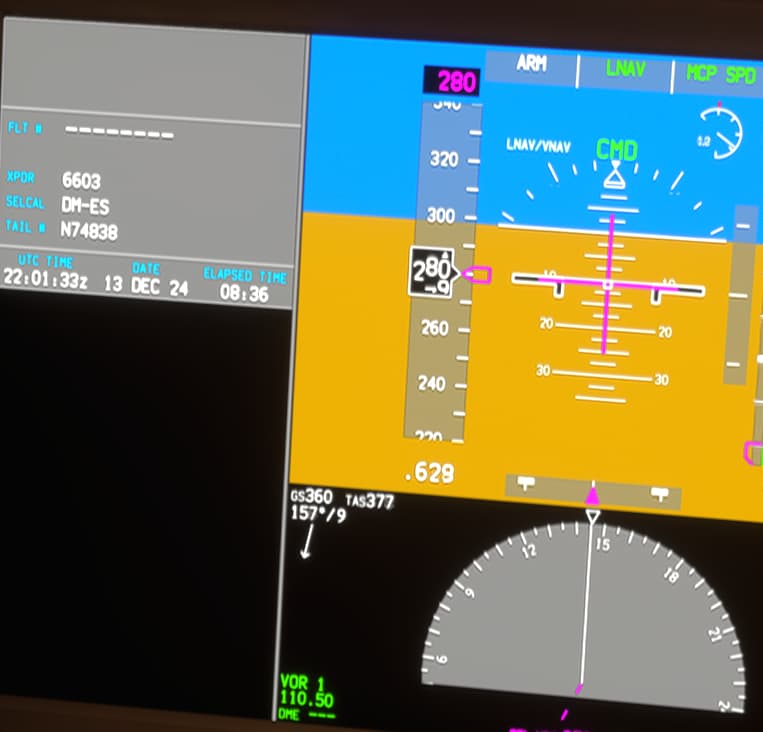
Elapsed Time is almost 08:36 hours of flight without CDT
1 Like
Can XMP be a cause of the error at all? I keep getting the same CTD and looking at event viewer it’s 90% of the same error.
I’ve disabled my XMP and I’ve now done multiple flights using sim rate (not been able to do this at all) and no CTD’s. I’ve even enabled my GPU undervolted and no CTD either.
Isn’t the error we’re getting to do with accessing the memory or is it something else?
My system specs are: 7800X3D, 64 gb 6000mhz ram (No XMP 3600mhz), 4070ti
1 Like
I’m testing XMP right now (after recent BIOS update).
Will post results.
Currently suspecting code optimizations and microcode update along with BIOS that have reached MB and CPU to be involved.
Anyway, I’m totally agree this should have been tested and addressed properly since no other apps are vulnerable to that CTD(s). My guess is we are dealing with certain parts of code that act differently on different systems and EXPECT some CPUs to behave “The Recent” way, not like 2 years ago (maybe less, I’m exagerating here). Compiler issue?
Let me know how you get on. I’ve not had a single CTD in the last 24 hours. I’ve completed numerous flights by using sim rate trying to see if it CTDs and it’s not done once.
I’m actually enjoying the sim at the moment.
We shouldn’t have to disable XMP but if it gives me a stable experience until it’s resolved then I’ll do it.
What I did actually is ENABLED XMP after BIOS update.
Testing in progress so far (no good/bad results yet).
Also, what is your Motherboard ?
What Intrigues me most - you’re on AMD, I’m on Intel.
My rig is: Asus ROG Strix Z790-F rev 1.xx, BIOS AMI ver 2801 from 11/29/2024 (American Date Way since it’s AMI!), Intel 13900K (no OC), 4090, 96GB RAM @6400 (XMP),
Same here on RTX 4090, 7800X3D and 32 GB RAM
Adjusting RAM EXPO configuration in BIOS was the game changer for me. Since then i am enjoying the game so much. No more anxiety and sim rate abuse to rush a flight before it crashes. Game changed from being a stressfull disaster to a ZEN like experience.
But i did not have to disable EXPO, i simply had to choose a different profle. There are 3 EXPO options for me on my ASUS ROG board and Kingston EXPO RAM. I switched to the EXPO profile that is optimized by Asus.
I’m not a pro, but what is going on, my experience and your words - it all gives me a strong hint about compiler/code issues (over-optimizations, race conditions, so on). Still should not be the hardware issue, or could have been tested.
There are confirmed bugs currently in the code regarding CPU utilization. My original settings work fine with all games and apps since ages. They have been well optimized/tested a long time ago.
But the currently buggy MSFS2024 code might stress the CPU-RAM config in a non intended weird way which leads to CTDs. This would also perfectly explain why there are people saying it all runs perfect while others claim they can hardly play it.
Have not seen the thread where it is confirmed.
Somewhere here in the forums someone mentioned that his bug report was answered stating that there is a bug causing all this stutter fps/sound drops and it has already been fixed in the current dev branch. Hopefully it will be rolled out with the next patch.
It is only my guessing that this could also be related to the CTDs that can be fixed by RAM config adjustments.
Anyway i strongly encourage everyone with massive CTD issues to check their BIOS settings for CPU-RAM.
AS Rock 650M Riptide is my motherboard
I’ll check, out at the moment
3.08 is the bios that I’m on
3.10 is latest.
Not Sure if ASRock has anything less than vague in between 3.08 and 3.10 versions for you.
Anyway, my latest update: I have XMP on and things are working for me after just the BIOS update. More tests for some MSFS2024 settings to be done. But I’m pretty sure they are going to be with non-essential results.
- Update BIOS.
- Start checking from the XMP config disabled.
- Enable and check.
Not sure if certain ASUS issues can be solved that way - maybe. This did help me, but no guarantees for the rest.
Yeah 3.10 is the latest but it’s causing a few issues for users so I’ve kept away from that one.
I’ve done some further testing and switching back on XMP does CTD the sim, but If I manually select the speed of the ram (6000mhz) then the sim works fine with no CTD’s.
So that only leaves the XMP profile being the issue with the sim.
In the BIOs, when you manually select the speed of the ram [6000 Hz], are you referring to the Memory sticks [ DRAM ? ] , or something to do with the CPU Ram itself ?
Similar issues, MSFS2024 crashing randomly, especially in career mode.
Faulting application name: FlightSimulator2024.exe, version: 1.2.8.0, time stamp: 0x00000000
Faulting module name: FlightSimulator2024.exe, version: 1.2.8.0, time stamp: 0x00000000
Exception code: 0xc0000005
Fault offset: 0x00000000037980a8
Faulting process id: 0x4DCC
Faulting application start time: 0x1DB616FD492095C
Faulting application path: C:\Program Files\WindowsApps\Microsoft.Limitless_1.2.8.0_x64__8wekyb3d8bbwe\FlightSimulator2024.exe
Faulting module path: C:\Program Files\WindowsApps\Microsoft.Limitless_1.2.8.0_x64__8wekyb3d8bbwe\FlightSimulator2024.exe
Report Id: 5654566c-9bbc-46a6-93a4-e9a840e53e72
Faulting package full name: Microsoft.Limitless_1.2.8.0_x64__8wekyb3d8bbwe
Faulting package-relative application ID: App
Win 11, 32gb DDR4 3000 RAM, i7 12700k, 4080S, msi z690a ddr4 wifi
1 Like
From this topic, I noticed at least 3 users that reported the issue have ASUS ROG Motherboard.
After updating to BIOS version to 2801 (latest), as suggested by many, I did not encounter any CTD anymore.
Before the update, I was not able to fly more than 10 minutes, due to CTD.
Thanks a lot to everybody for the various feedbacks!