Now that the missions in career mode are in real time, I need to know if an airport where I want to land has runway lighting or not. But I can’t find that information before selecting a mission or not, and I’ve already reached more than one that is dark 
Yeah, if I’m being honest, I’ve observed plenty of reason to do almost a full preflight planning session to ensure that the mission can be completed, especially with regard to the mission-time conditions. Weather, performance, runway and airport information. The more tight the margins or extreme the conditions, the more necessary it is.
You can often get away with not doing it and the only penalty for not getting away with it is losing the time you put into the flight, or sim money if you’re doing career mode and you own the aircraft, I guess. But as of yet, there’s no night flying in career mode.
Anyway, the more you do it, the better (and faster) you’ll get at doing it. Make a little flow/checklist if it helps. I actually enjoy the planning part - really keeps me connected with what I’m doing and keeps my skills up for real flying.
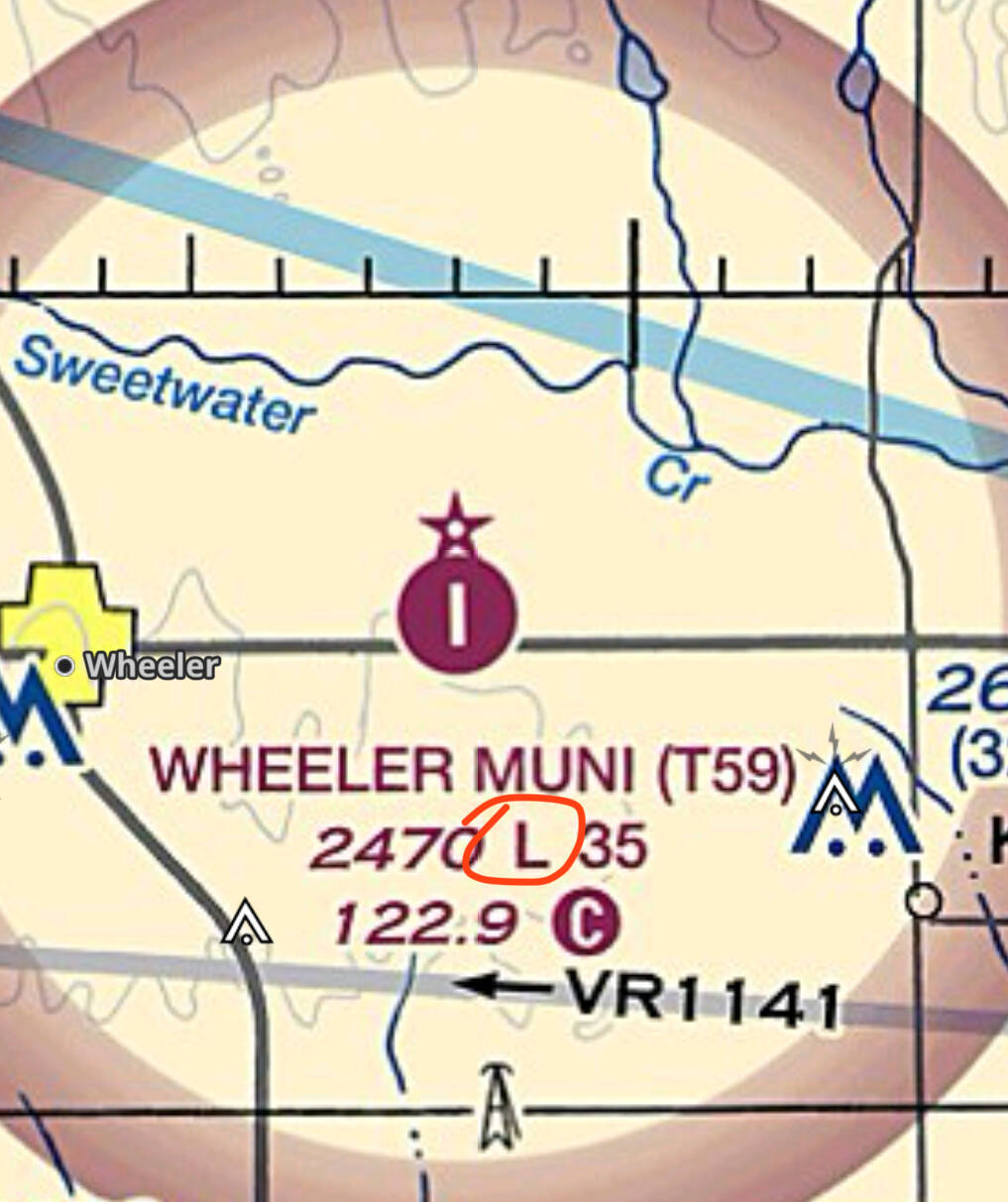
Oh, another quick method if you’re flying in the US: within the airport data block on VFR sectional and IFR enroute charts, there will be an “L” for airports that have runway lighting.
They’re in real time? They’re no longer attached to the time listed in the plan? As of yesterday, I hadn’t seen that.
Do MSFS 2020 and/or 2024 support Pilot Controled Lighting by keying the mic a certain number of times to adjust intensity? Thanks much. --Redeye
Not at this time. There is a wishlist thread for it.
Yep. Certainly in the beta they are. You can change the time but if you leave the slider where it is the flight is in real time. In the aircraft you see Zulu time (just to clarify I mean where your PC is and if I leave sim rate as it is it mirrors my clock on the wall). The flights I was doing in Indonesia were around 8 hours ahead though so my flight yesterday afternoon (I live in the UK) were at least in part night flights.
Interesting. Ok, I’ve been off the sim for a few days, will have to try tonight. Definitely will make things spicy with the inconsistent and, more often than not, incorrect airport lighting.
But it’ll also add a challenge in finding missions that go to lighted airports. Once again, the lack of a good missions filter is killing this mode.
Flying to WAQC at the moment and will land in the dark. Littlenavmap doesn’t mention any lights but the Navigraph charts mentions HIRL and PAPI, so we shall see! 
There were no lights!  Luckily I flew the RNAV GP and it was perfect. Runway appeared about 10ft above touchdown. I think HSE will want a word, or whoever the governing body might be. Having said that, I doubt anyone saw me out in the middle of the ocean. As it happened I’d already flown to this airport on another mission a couple of days ago so was vaguely familiar.
It was not a recommened thing to do and it’s not something I’d normally chance. Some people were clamouring for night flights and now we have them. Clearly we are expected to be able to manage things ourselves so that we can either land in daylight or be sure the airport has lights. I’m happy with that.
@TGAPMerlin Has the correct answer that it can be found on the airport chart.
That being said I would not be surprised if there are bad airports in the sim that are supposed to have lights but do not.
@CorvusCorvid538 what aircraft are you flying? Because I totally haven’t landed a simulated plane with the G1000 synthetic vision before.
PC-12 at the moment.
I didn’t actually use the syntheitc vision - it actually didn’t cross my mind (does the Honeywell in the PC-12 even have it, I can’t recall?). I just decided to risk trusting the RNAV GP and I was lucky. I wouldn’t normally gamble like this but I just wanted to get it over with!
That’s a new thing for the airport diagrams - they used to be only shown on the approach plate inset diagram. They’ve been slowly rolling it out, adding them to the airport diagram over the past two years, but the rollout is still nowhere near complete.