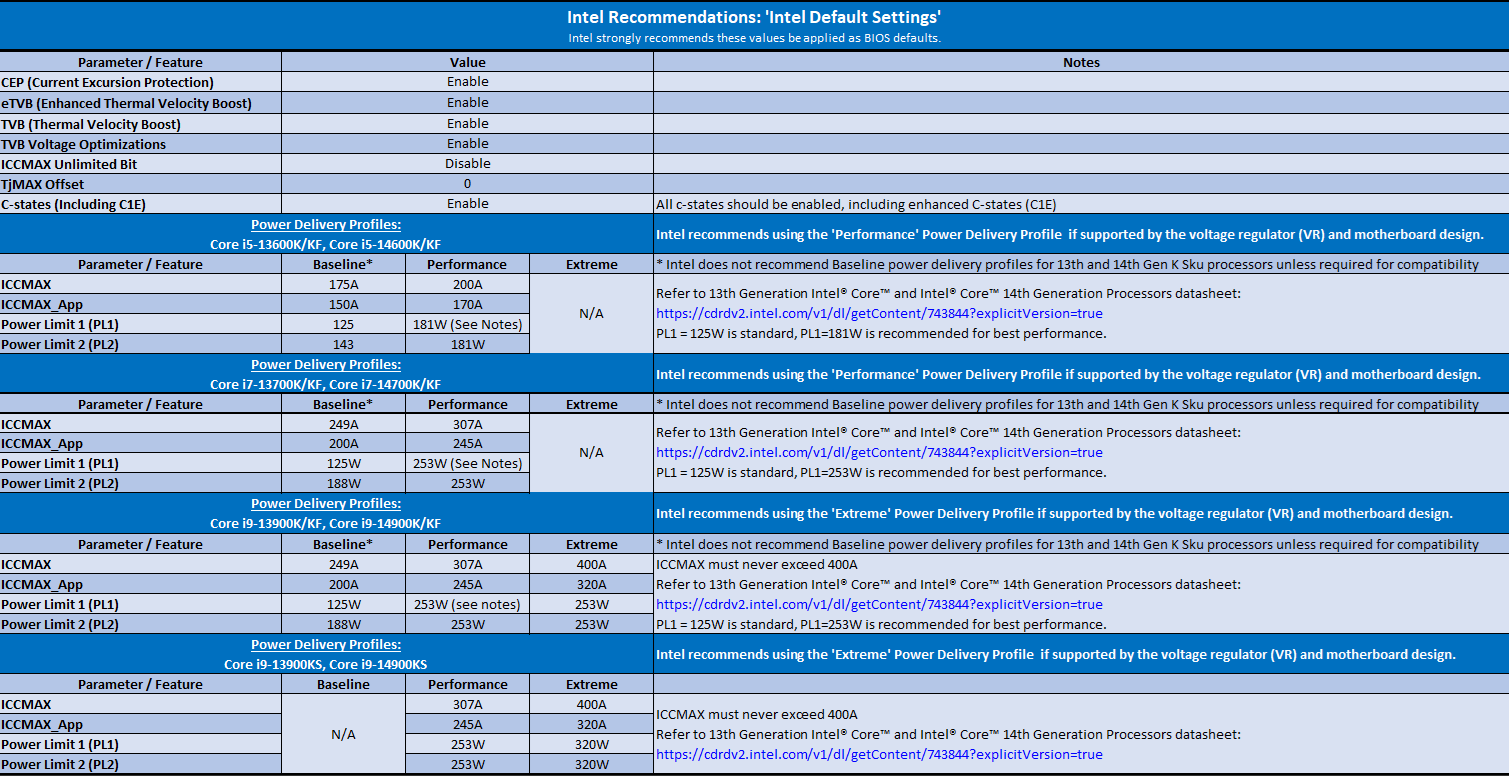
and implement microcode version 0x125 which fixes eTVB bug that may have slightly contributed to the instability issue and/or CTD.
It is not the root cause of the instability issue or CTD so you’ll need to be patient and wait for a new BIOS version that includes the 0x129 microcode update.
Oh really, in what way was it improved? I’m assuming you are attributing the improvement mainly to the additional memory capacity, since the increase in memory speed was only a small percentage?
Did you check how much RAM the sim (and your total system) is using before and after?
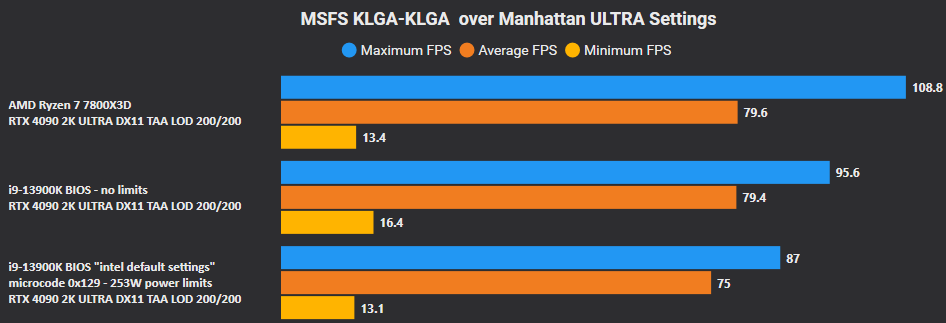
If rebuilds are on the table – isn’t the 7800X3D preposterously good at Flight Simulator 2020? My understanding is it’s something like 30% faster than anything on the Intel side.
I’d definitely wait for the final microcode update, FS 2024, and 9800X3D to see how things shake out.
I say this as someone with an hp reverb, 4080, and who upgraded from a 12700K to a 13700K just before the 13th/14th gen stuff hit the fan* It was such an easy upgrade (drop-in CPU replacement).
Unless the 14900K is a stellar deal, for about the same cost I bet you could probably get the 7800X3D CPU with a motherboard and RAM.
Cant really explain but its more fluent my system has less stress.
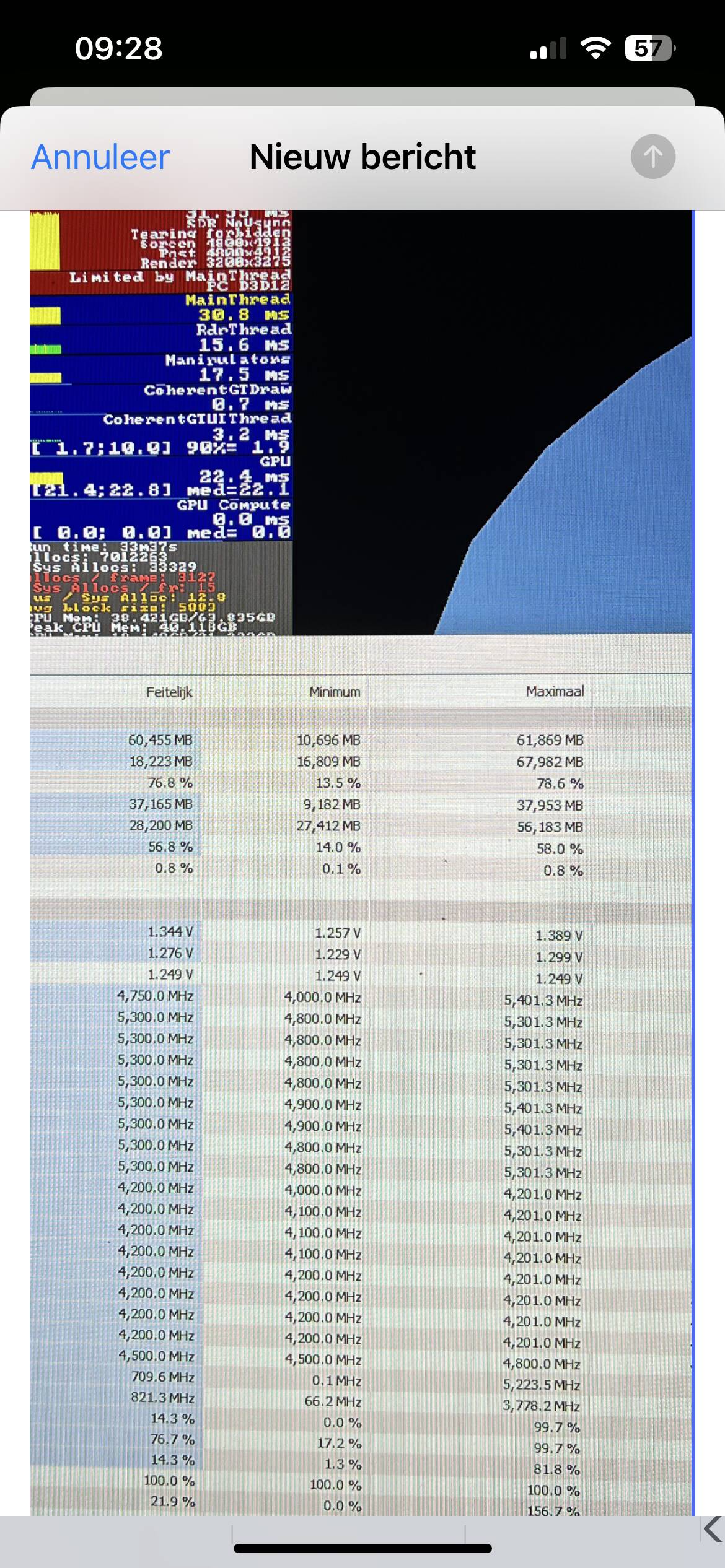
I noticed is some areas max usage of 38gb.
That is of course very dense areas and very high Res. Lod is also affecting the memory usage. So for me in VR its a big yes.
As I said its hard to explain.
At the time I addes this ram there was just the latest update so that might also influenced my experience. but simple I noticed many times in dev mode that the sim was using round 30gb in certain areas. knowing then that you have 32 creates that windows start to use more page file. know it still does that but much less. Page file is slower then Ram.
When I fly lod 300 in new york I see more memory usage and now its available.
Again I fly very high res and push my system to the max in VR. I like really ultra res and high settings. I can tell you that I can fly everything without any trouble and good framerate.
And you can see the screenshot. Fs can really consume this in VR.
My sim runs unbelievable good.
If you consider doing this make sure that you buy one pair of ram. Do not add just ram or you will lose youre memory speed in most cases. My 64 runs at 6400 and every bit helps when it comes to VR.
You can always buy and try and if you are not happy return it.
But start with a good memory use programm and check dev mode in aereas like JFK.
Again I am really happy and I know most people say its useless I can confirm that this is not true in VR.
Btw read somewhere that 3090 users already notices improvemt with 64. So I assume that 4090 users will have the same.
Also I checked with some other 64 users and they confirmed my experience.
and I am a geek, I like perfection
I am chronic sick and have a lot of time to read and test.
If your GPU is not fully utilized you may consider increasing some GPU-related settings, like resolution override (super sampling) in the OpenXR Toolkit.
Yeah I was also of the opinion that more than 32 is probably redundant in 98% of gaming cases. But MSFS is a strange beast.. might wait for 2024 and then re-evaluate. Thanks!
The consensus a year or two back was 32GB was enough for 2d (at least at 4K or lower) but with VR it was different and 64GB was handy.
However there have been multiple updates since including some that actually improved memory utilization rather than making it worse - so no idea what the current status quo would be.

 It was such an easy upgrade (drop-in CPU replacement).