Tried St Barts and indeed landing zone was wrong end of the runway.
I started doing the challenges and all I get on the Kruger is a short white line.
There’s no blue box or even instructions anymore.
Great QA!
Thanks, but the Precision landings work slightly differently, there’s no blue touchdown box. If you try the Famous, Epic or Strong Wind ones you’ll see a blue box, but not always on the right end 
Then what is the correct way to do precision? I’ve done some very smooth and some firmer landings at prescribed runways. All fail. And right now, even famous landings autofail, no targets.
I’m not sure about the Precision landings, which are new in 2024. This thread is really about the Famous, Epic and Strong Wind landing challenges that have the blue landing target (or are meant to have it and don’t in some cases).
Do you have the same issue if you follow the OP’s steps to reproduce it?
•
Provide extra information to complete the original description of the issue:
•
If relevant, provide additional screenshots/video:
•
I’ve never seen any blue boxes for any of the challenges. Makes it quite difficult to get a decent score when you don’t know where you should be landing 
Using the template below will greatly help the team reproduce the issue and ease the process of fixing it. Before posting, search for an existing report. If you are not sure it’s a bug, please first report in User Support Hub.
2 tags are required - add them in the tag section next to the title above:
Feel free to delete this quote section after adding your appropriate tags.
ISSUE DESCRIPTION
Description of the issue:
The touch down aiming point (blue box) for the landing challenges is at the wrong end of the runway. Landing challenges also start with engine off.
[PC Only] Did you remove all your community mods/add-ons? If yes, are you still experiencing the issue?
Yes
FREQUENCY OF ISSUE
How often does this occur for you (Example: Just once, every time on sim load, intermittently)?
Every time
REPRODUCTION STEPS
Please list clear steps you took in order to help our test team reproduce the same issue:
1.Go to any Landing Challenge
2.
3.
YOUR SETTINGS
If the issue still occurs with no mods and add-ons, please continue to report your issue. If not, please move this post to the User Support Hub.
What peripherals are you using, if relevant: Honeycomb Alpha Yoke, Bravo Throttle, Saitek/ Logitech rudder peddles
[PC Only] Are you using Developer Mode or have you made any changes to it?
No
[PC, MSFS 2020 Only] Are you using DX11 or DX12?
[PC Only] What GPU (Graphics Card) do you use?
RTX 4070
[PC Only] What other relevant PC specs can you share?
MEDIA
Please add a screenshot or video of the issue occurring.
[END OF FIRST USER REPORT]
 For anyone who wants to contribute on this issue, Click on the button below to use this template:
Do you have the same issue if you follow the OP’s steps to reproduce it?
•
Provide extra information to complete the original description of the issue:
•
If relevant, provide additional screenshots/video:
•
Hello @TouchablePizza,
Is there a specific Landing Challenge where you are experiencing this issue? I just tested the Courcheval challenge and also the weekly Challenge League Landing Challenge (Saba), and both had the blue landing target in the correct location and started with my aircraft’s engine running properly.
Here’s a screenshot I just grabbed from Courcheval. Note the blue landing target box at the correct end of the runway.
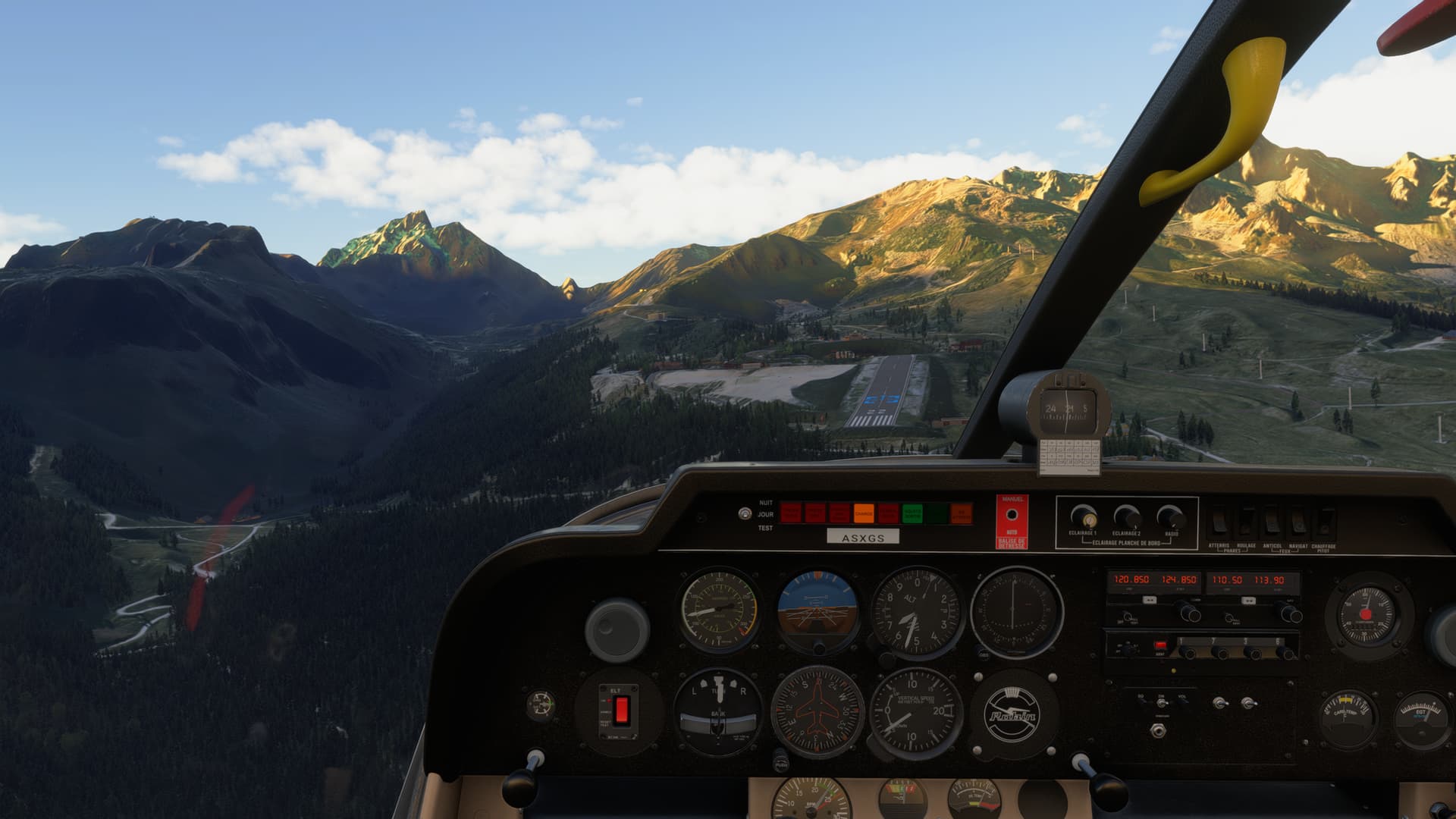
Thanks,
MSFS Team
Could you try it on the Nice and Christchurch challenges? Those are not correct for me. This is also visible on the briefing screen before clicking “Start challenge”. Not sure if there are more, i haven’t tried all of them yet.
The two I tried are the St Barts and Montreal. Also, both are in the TBM and it starts out with the engine dead. Thanks for checking on this
Could you (or anyone else) please be so kind and provide a screenshot of the blue landing target in the Saba weekly challenge league? I don’t see any target there, neither on PC nor XBox. Would love to know where to get points for landing accurately.
I have no problems with the engine though.
I also don’t see the blue box. Weird how it seems to work for some, and not others.
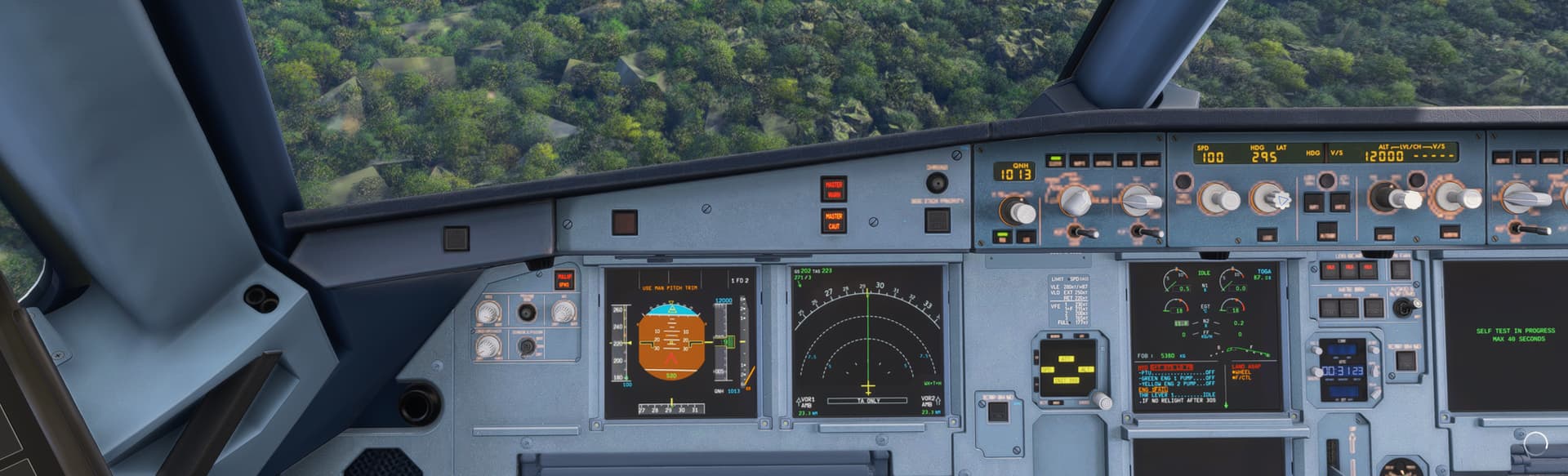
Someone had a similar issue with the landing challenges for the A320 so tested it out and yes theres seems to be a preload state issue, under landing challenges famous, after clicking ready to fly the a320 engines are set to cutoff Ive checked to see if its a binding issue but it wasnt

Thanks
Andy2790
I meet this problem too, most famous landing challenge with a320 always the engine dead on beginning.
Do you have the same issue if you follow the OP’s steps to reproduce it?
• YES
Provide extra information to complete the original description of the issue:
• EXACTLY AS LISTED
If relevant, provide additional screenshots/video:
• I HAVE NO ENGINES ON AT THE START OF ANY CHALLENGE
u have to crash the plane on first try restart challenge then will work , also if u exit game & come back u have to crash the plane or restart the chalenge then all will work , engine marker on runway etc first try dont work i dont know why.
Thank you I will try this later…
This unfortunately did not work for me. I started a landing challenge (Stansted, A320 newo V2) - it began with the plane in an crazy bank angle crashing about 1 second after starting without any chance to do anything against that. I tried this four times and it was always the same…
Today I tried again - exacly the same: Landing challenges with A320N V2 always start with engines off and therefore are unusable.