You can absolutely keep playing with mods. You just need to identify which mod is responsible for the stuttering and FPS drops. It’s not that difficult, it just takes a bit of time.
No addon is causing these performances drop…I’ve no addon installed and the situation is the same…the problem is the AI and DLSS 4.5 or 5 fever…however now the game is unplayable..
And me as many users are owners of the Premium Deluxe Version and waited a lot to have a good game experience…now We’ve to wait another SU hoping it works…bah…this is not a good logic…
I’m having very few problems with performance. I had a few stutters on landing, but the airport was heavy with scenery. My setup is: 4090, I9 14900k, 64 gig of ram, on board ssd storage. I also download all the airports and aircraft I can to my local storage. I figure the less that is being streamed, the better off I am. I’m using three monitors so I can see out both sides of the aircraft. The middle monitor is set at 4k and the two side monitors are set at 2k. This set up in the Fenix A320 gives me around 30 fps on the ground, and up to 42 at altitude. This is using TAA. With DLSS on and set at quality I’m getting around 52 fps on the ground. This is with SU7 and with SU6. There are so many variables between computers and setups it can be hard to tell if it’s a single problem or a combination of things. Just giving my experience. I don’t recall what version Nvidia driver I’m using, but it’s not the latest one. The latest one would not do me any good because I don’t have a 50xx series GPU so I haven’t bothered with it.
Yea appears to be an issue with Fenix, worked great with the inibuilds. Crazy though bc fenix just did an update with SU7. Hopefully it’s not just me and we can get it fixed!
Ok Guys…I don’ know why but I try to start MSFS2024 to make some test and ever4ything is back as NORMAL as in the SU6.
The only difference was that I uninstalled and reinstalled the latest WIndows Updates the system got just after the SU7 release. Hope this helps…Now I’ve to try to install Inibuild A350 and Fenix A320…I’m VERY HAPPY…I’ll report with addons installed…Cheers
Here some specs helkpful for those who have an old Pc like Me. I can assure good performances and good visual results.
Nvidia Drivers 616.92
1920x1200
DLAA
FSR 1.1
Maximum Fps 30
Everything on ULTRA except for: Terrain LOD 100, land shadows - 512, AF - Off, Textures Ultra or Medium (with MSFS Airliners or Props) use Low expecially with Fenix and Inibuild, Cubemap Reflections - 256, Visor Refresh Rate - Low (No Traffic, No Multiplayer, Cars & Maritime Traffic Medium, no Fauna, no depth of field, no Airport Aircraft, Low Airport Characters and Vehicles)
Hope this help
Yea please let us know how you make out with the Fenix back in sim.
Thanks
Not sure if it will help anyone else but after having many tantrums and alot of swearing, i had previously installed the latest windows update which had turned memory integrity on in my windows settings, this is known to reduce gaming performance so thats now disabled. I had also previously installed the Apronlife mod which i had uninstalled but it had left files within my sims folders and an exe file. Having removed the files and turning the windows integrity off, another clear of rolling cache, shader cache and directx12 cache my sim is now running like it was in SU6 and my vram and mainthread usage has returned to normal.
Been having weird issues in SU7 too.
5090, 7900x3d, 64gb.
Every 40-60sec I had severe stutters for 2-3sec.
I think, for me, it MIGHT have been latest DLSS files, 3.10.9.16. Reinstalled NV driver, reinstalled msfs2024, cleared caches etc. Back to ‘default’ DLSS versions (at work, don’t remember the version(3.10.6?)). Smooth sailing again…
Indeed SU7 does seem to be more stutters than before. Already cleared sim and nvidia caches. Doing my usual hardware-killing run: complex a/c at complex airport, traffic on. One already knows that things are gonna stutter… nature of the beast and so on. But it seems to be worse now. Mainthread seems to be more loaded more choked than before. Something’s changed.
Good evening fellows…here the report after Inibuild A350 Installation.
First start after installation MSFS2024 was terrible so I restart the PC and then everything back normal and smooth so…after installation restart the PC.
I tried to launch A350 but the WASM takes a lot of time and tonight I’ve not enough patience…maybe tomorrow.
I tried a flight with Cesna 172 and INIBUILD A320 Neo…medium textures…everything goes like a hot blade in the butter. Therefore INIBUILD A350 doesen’t break MSFS2024 SU7 performances.
So…see You tomorrow for the A350 report…good night folks
Disable Fast boot in BIOS settings.
Disable Fast Startup in Windows settings.
Someone might ask: “Why do you recommend disabling Fast Boot and/or in Windows, Fast Startup?”
The reason is simple: this kind of “quick boot” has a bad impact on drivers, which in turn can cause issues with overall system stability and especially with games.
To disable Fast Startup, hibernation must be enabled. If hibernation is disabled beforehand, the option to turn off Fast Startup will disappear. So the correct order is:
1 Disable Fast Startup in Windows
2 Then you can disable hibernation if you want.
How To Disable Fast Startup in Windows
1 Open Control Panel
2 Power Options
3 Click - Choose what the power buttons do
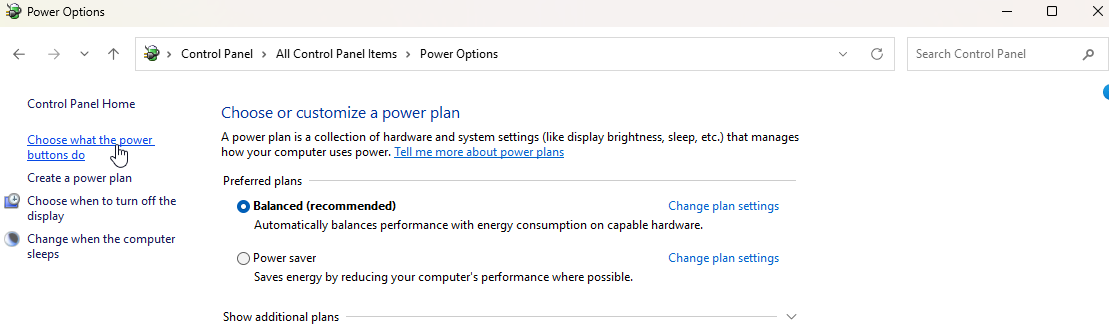
4 Click - Change settings that are currently unavailable
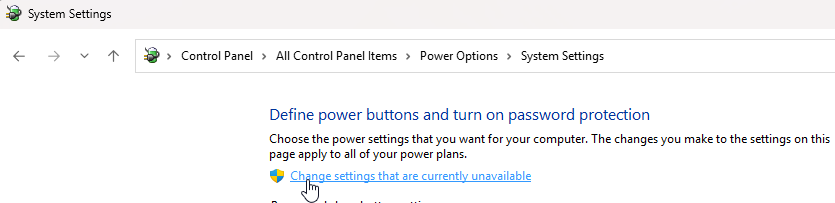
5 Uncheck “Turn on Fast Startup”
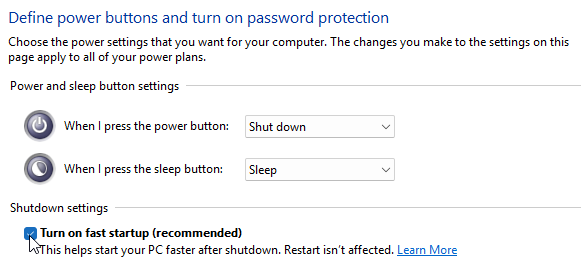
6 Save changes and restart PC.
7 Then you can disable hibernation if you want.
8 Disable Fast BOOT via BIOS settings.
That’s definitely frustrating, especially after reinstalling the sim three times and doing a clean GPU driver installation.
The fact that you’re seeing performance degradation even in the flight planning screen is interesting. It suggests the issue may not be limited to aircraft or scenery rendering.
Since you mentioned the GPU performance indicator turning red, have you checked whether GPU utilization, VRAM usage, or GPU power draw changes significantly between the main menu and an actual flight?
It might also be worth sharing your GPU model, VRAM capacity, and whether you’re using DX11 or DX12. That could help identify a common pattern among users experiencing the same issue after SU7.
Hopefully the developers can investigate this without everyone having to keep reinstalling the simulator.
Thank You TenPatrol…
About the A350 loaded normally and having a good 35-45 fps with the above config and medium textures at Nice Airport. I’m Happy…let me know if the performance drop is solved for You also.
I’l install A320 Fenix and will report…
Thanks to all
Same issue! Since SU7 i get stutters every few seconds. Its the Mainthread! Clearly it spikes every time i get the stutter. On SU6 i head no issues at all!
As mentioned above my problems disappears after having unistalled and reinstalled some windows updates. I don’t know if that was the trick but someting changed.
Today I installed the A320 Fenix and it doesen’t give any problem. The VRAM seems to be less loaded than before making me able to handle TP airliners better.
So what can I say…after a disaster the SU7 seems to be good on low end computers like mine.
Thank You Asobo.
Does anyone else solved the problem?
@Giasinga try to use one of the solutions suggested in this thread…hope You can solve the problem…I can understand how You can feel
No luck yet, starting a fresh install now so lets see!
5090 Matrix, 9850x3d here. Short final into KHPN earlier. Some abrupt stutters that I’ve never experienced (even while running say intentions). Panning stutter at FL400 on the east coast heading towards New York airspace have also become more prominent. Very weird.
Also. Huge stutter when loading a flight plan via simbrief on the G5000 in the Tude.
Did a complete healthcheck. All MS Updates are as they should be. Chipset-Driver is current and in Benchmarks i get top results.
There is only one Application i have issues with and its MSFS2024…
Same very bad perfomance.