Hey, so i have set the Sharpness in user.cfg to 0 and let the Nis Scaler do his work and the Sim never looked better since this im on Rift S and 1070Ti the better Graphics and FPS are very great. Awesome and many thx for that kind of Software. Hope in the future we can fix the brightness with this tool.
I can confirm after adding a custom FOV option to my current code: no difference in FPS! I can go all the way to 50% FOV (so you can see those black bars pretty well :)) and the FPS is unchanged. I am thinking that MSFS does its own thing when it comes to frustrum culling and it does not actually use the FOV value from OpenXR. I have one last shot with trying to also scale the visibility mask along with the FOV, but if that does not work, I’m not sure what to try next.
Exactly my thoughts. This does make the image sharper, but shiny at anything above maybe 5% sharpness. Not enough of a gain to turn the resolution down, imho.
Maybe I’m missing something?
You, sir, are like the J.esus of MSFS VR users. I praise your efforts 
I appreciate the hard work and countless hours of research mbucchia put into this project. But after testing for a long time with various settings, I have to say that I like the unNISed overall look better. It is the relative “calm” of the image (with, say, 100/100 and in-game image sharpening, with Reverb G1) with not too many “crawling ants” that I prefer over the gain in sharpness with less details and more noise overall. But it may be that I just couldn’t find the sweet spot.
Unfortunately, the gain in performance doesn’t make up for it. May be DLSS would do a better job, but I doubt we’ll see it with MSFS.
I can confirm. In my quest 2 narrowing the fov in OTT make a big difference in fps and more in smoothness
In flight sim? I don’t know how they’re implementing it, but flight sim seems to refuse to reduce the frustrum culling no matter what value I am passing.
Can you change the FOV on the fly or does it require to restart VR?
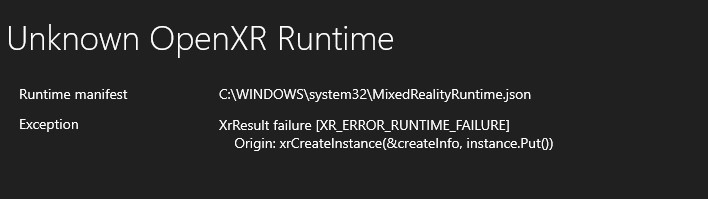
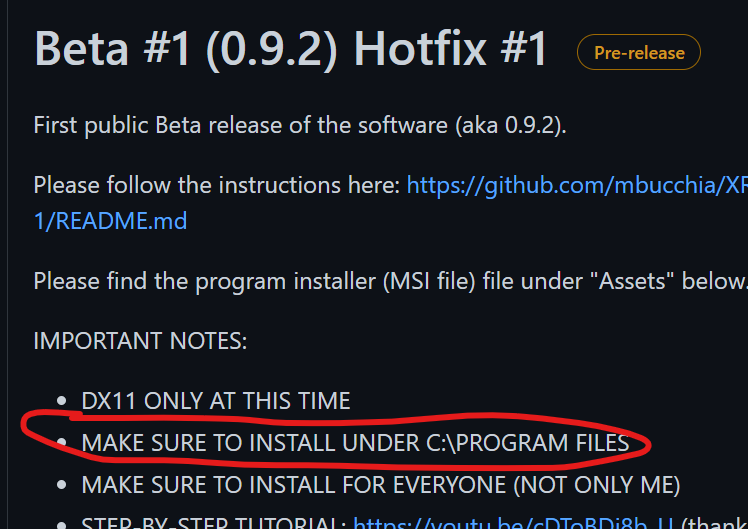
Thanks I finally saw that after reading through the readme a 3rd time. I was initially following a video from a YouTube channel and there was no mention of keeping the default location. I saw that this can work with Steam games but it seems there’s only support right now for limited titles yes? I was hoping to make it work with Elite Dangerous as well but nothing ever showed up in the Log File location after I started it 
OpenXR applications only. There are only a very few applications today using OpenXR.
For OpenVR applications, see a comparable project: GitHub - fholger/openvr_fsr: Add Image Upscaling via AMD FidelityFX SuperResolution or NVIDIA Image Scaling to SteamVR games,
Would the fov options help wide fov headsets like Pimax? Or is the in game culling not something that can be modified?
oooh, it’d be nice to turn off parallel projections!
I’ve been monitoring the thread about wide FOV issues to see if I could do something through an OpenXR layer. I have to be honest at this point I am stumped by what the game engine is doing w.r.t FOV, so I really don’t know.
Unlike what many people think, OpenXR does not pass a whole projection matrix to the game. Only some of its parameters. So that reduces the possibilities quite a lot. At this point I can only guess that some things are too hard-wired in the game engine itself, and there’s nothing that can be done externally.
I’ll keep looking when I have some more time.
@mbucchia I can also confirm that I see a huge fps boost by reducing FOV with the Oculus Tray Tool or Oculus Debug Tool with my Quest 2. No, it is not on the fly…you have to exit VR mode in FS2020, make the FOV change, and restart VR.
Hey I understand, thanks for at least looking into it!
Mattheiu, firstly, a million thanks for your spectacular efforts. I have a question. when I increase any of my current settings (which are MSFS scaling:100 OXR:100 NIS:80 sharpening set at 0), I induce a stutter every 2-3 seconds which looks like Motion reprojection trying to kick in and failing repetitively. I am not using SteamVR.
Any help would be appreciated. Kind regards, TJ
My system is
WIN-10 home edition
i9-9900k
32gig ram
RTX 3070 ti
Nvidia driver version-497.29
OXR and NIS latest versions
is it possible to use this tool with SteamVr active and not OpenXr?
did you turn of motion reprojection?
when I have this on I experience what you decribe.
With that cup/GPU, have you tried to lower the nis scale to 70 or 75 (from 80) to see if it helps…you may be just at the limit of the 3070 GPU when running the 100/100/80 settings depending on if you are also using motion reprojection which takes up resources as well. Check the monitoring tools to see if you are maxing out the GPU or cpu as you will get studders if bouncing up against 100% usage on either consistently. I am running 100/100/80 like you but on a 3090 and it’s very smooth, but when I had a 3060ti I had to lower the settings to closer to 50 or 60 (at that time in OXR as NIS wasn’t out yet). I also have HAGS turned off.