I have many payware and freeware sceneries and I’ve landed in so many airports since release. I can say that 90/95% of the airports have misplaced PAPI/GS causing long landings. So it’s a very serious issue and I don’t know how this thread is not much more popular: where people look while they are landing?
I agree! Truth is the vast majority of folks simply don’t know or don’t care. This issue mostly affects smaller runways - where the default positioning of 1000’ from the threshold has a larger error ratio. The majority of sim users fly into large airports with long runways where the 1000’ default position is either close enough to the actual position or doesn’t create enough of an error to be noticeable (or has been hand-placed to the correct position due to the popularity of the airport/scenery).
However, the majority of PAPI/VASI installations are on smaller runways (thousands of them!) and if you do most of your flying into those, you still may only start to notice something is weird when they’re bringing you in to the 1000’ point on a 2500’ runway and you have to slam on the brakes. A four or five thousand foot runway doesn’t have as much of an error ratio and is not as noticeable (even though the placement could still be very wrong). But again, most people probably think it’s a standardized distance in real life and don’t know it can be highly variable, essentially taking it for granted. It’s a very niche area of understanding, even amongst RW pilots.
Even official publications and training videos barely address the variability. You have to dig fairly deep into the standards and regs to find mention of the design allowances and even then, actual placement isn’t directly published anywhere. To find it, a person has to either look at an aerial photo (which could be leveraged in Asobo’s scenery creation engine), or use the published angle and threshold crossing height (TCH) to derive placement. The latter comes with a caveat that not every runway has a consistent slope throughout.
Additionally, if we’re going to start moving these toward the end of the runway, we also must normalize the tree/obstacle heights in the runway clear area in the sim (as dictated by FAR Part 77 in the US) because the lower TCH is going to put us in the overgrown sim trees a lot. These aspects will need to go hand in hand.
But as I often say on my stream, “notice I’m flying under the PAPI on final because I actually want to stop on the runway”  .
.
I’d like to show one example of the issue in a payware scenery (LICC by Beautiful Models of the world), but basically this problem, as I said in the comment above, is there in almost every airport, much or less severe.
As you can see in the picture below, I’m approaching runway 26 following the RNAV approach Z procedure.
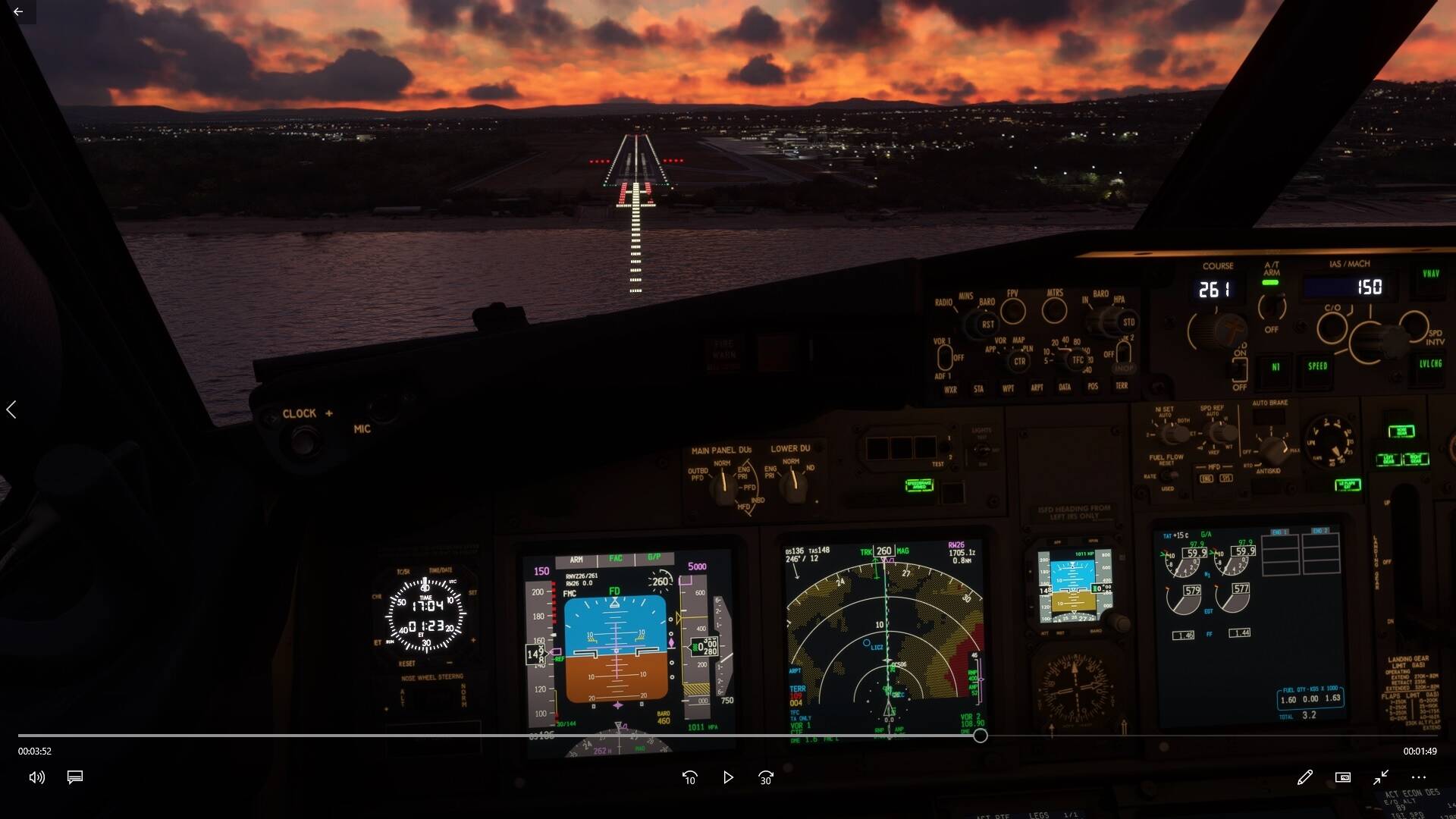
The magenta diamond representing the glidepath (not the glideslope as it’s not an ILS) is almost perfectly centered showing the airplane is on the correct descent path. However the PAPI is showing 4 reds meaning you are very low on the approach.
If you follow the PAPI (2 white, 2 red) you end up as much as 20ft above TCH reported on the approach chart which is 49ft. So you perform a long landing.
This is just one example. I tried also to contact the developer explaining the issue, but I haven’t got any answer so far …
PS: the strangest thing about this issue is that GS/PAPI misplacement always make you perform a long landing. Never saw an airport where if you follow GS/PAPI you are short on final.
I can understand why it’s wrong on the autogen ones, but no excuse on a 3rd party payware.
I stopped looking at the PAPIs on short final some time ago.
I agree with you: the payware airport should have no excuses. But why 90% of payware are still wrong? Developers are not able to do sceneries anymore?
I still think that despite the impact and importance, it’s just incredibly niche knowledge. I would bet a handsome amount that it never occurs to scenery devs that it’s variable and the implications of that variability with regard to TCH and touchdown zone. Most people probably think it’s a fixed, standardized location.
Heck, most IRL pilots probably don’t consider the placement in the real world. They just see and do.
But once you do notice, you’ll notice it everywhere.
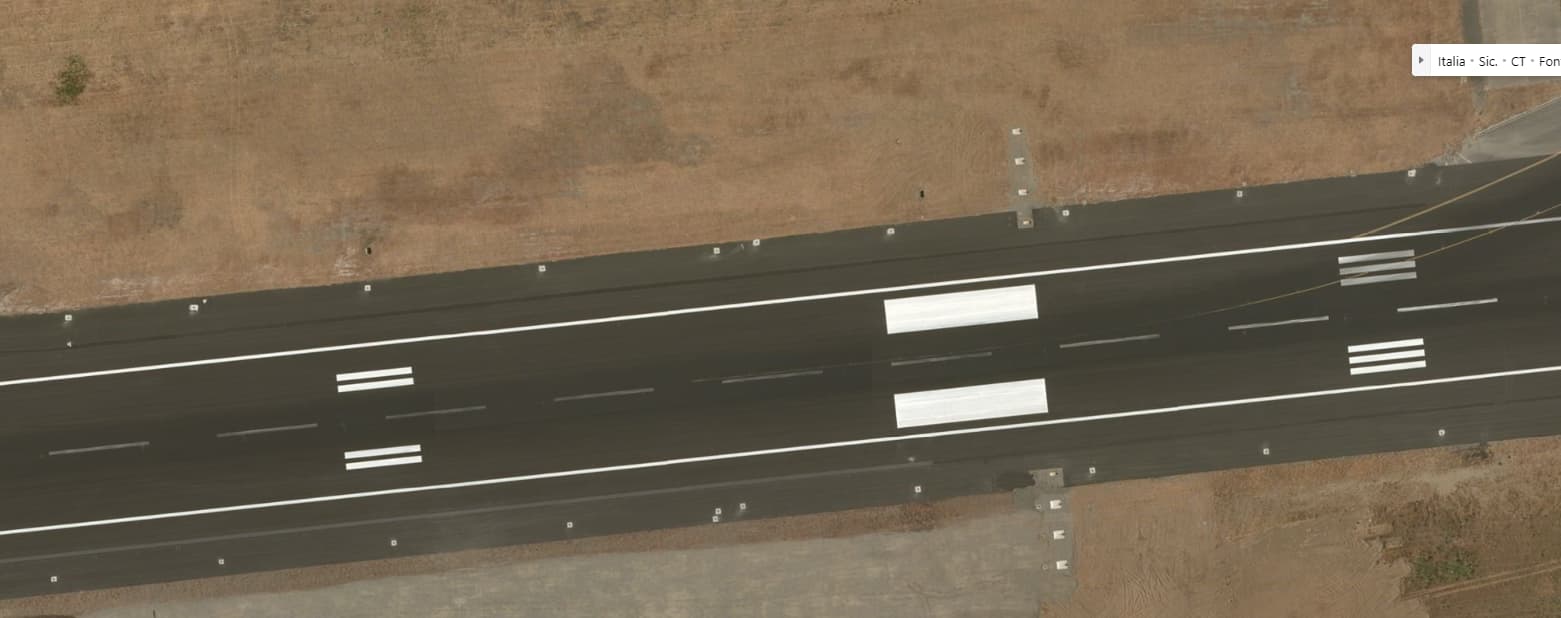
Can you look during daylight, maybe fly the drone overhead and see if the light boxes line up with the aerial photo?
Not so easy to do on a LCD screen with limited Brightness / Dynamic Range. (Not enough pixels to accumulate to make a bright light source)
At longer ranges, what could be done, to make the Light Brighter, is to increase the size of the Light (More Pixels), but that might involve quite complex simulation.
Same applies to strobe light,
VERY BRIGHT small light sources.
The only way to make them appear Brighter, on a limited brightness/ dynamic range LCD screen, is to make them Bigger (and hence more blinding !!_)
I think I’ve already checked, at least at LICC, and if I remember correctly the light boxes were in the correct spot. I’ll check again to be sure.
Thanks N6722C for the great explanation about the daytime PAPI brightness issue.
It would seem more practical to enlarge the PAPI lights in FS to make them more realistically visible during the daytime than to have them accurately sized but visible only at an unrealistically short range. Useability should trump size accuracy to allow FS pilots to fly in a realistic environment. The PAPI is a great safety device for flying the correct approach angle in all visual conditions.
The PAPI at KLEE runway 04 crashes you into the trees if you ride the glideslope.
Definitely a related issue with obstructions being in the clear plane. It’s hard to understand why that hasn’t been fixed - I’d imagine it would be easy to set a flag to virtually “chop” any obstructions in those areas (versus globally, which would mess with private airports).
And you know, in the scenery SDK, there is even an option to ‘exclude vegetation from runway boundary’. But either it’s not enabled by default or it doesn’t extend very far on the longitudinal axis.
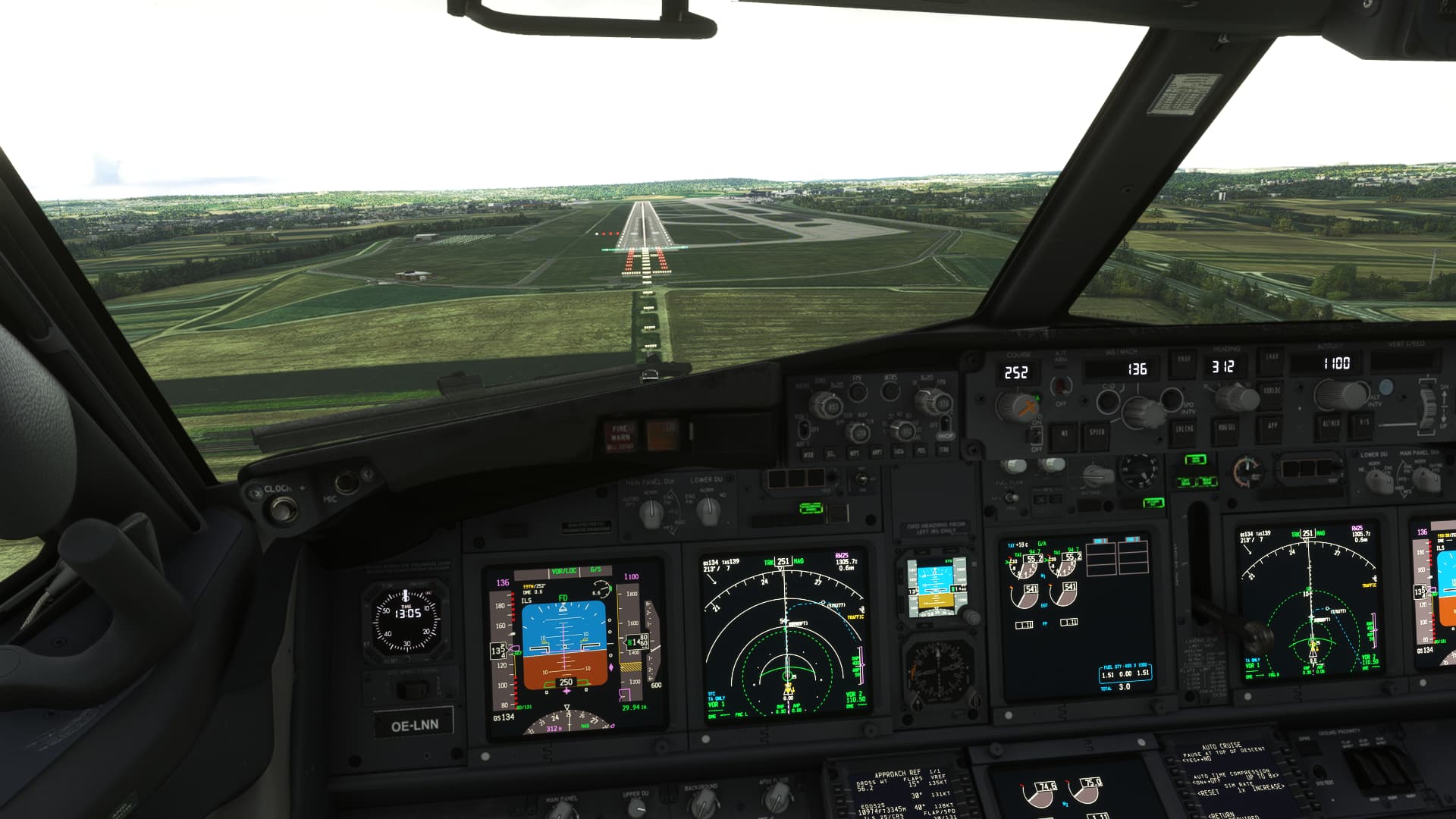
Interesting. Something is definitely not right there.
Making a few assumptions and generalizations from the picture:
- The aircraft is at an assumed RA of 250’ and a distance of 3700’ (.6 nm) from the GS antenna (which is co-located with the DME in this instance)
- Eye height to a calibrated RA of 0 may be as much as 15’ difference, I haven’t found a reputable source on that
- The PAPI is 164’ offset (further down the runway) than the GS antenna in real life and seems to be positioned correctly in the sim.
So we’re going to look at this from a few different perspectives:
Working the numbers to produce angles
- At that altitude and distance, you are on a 3.84° glidepath from the GS
- You are on a 3.7° glidepath from the PAPI
- The top of the 4-white sector of the PAPI is 3.5°, which should be a minimum RA of 236’ at that distance.
So at 250’ RA. the PAPI should definitely be all white. If you consider a maximum 15’ eye height, you could be at as much as 265’ eye height, so even more into 4-white territory.
The 3 red and 1 white displayed in your picture should put you at an eye height of between 168 and 191’ at that distance and would definitely put you just below glideslope (at most), certainly not above.
Nominal height on glidepath/glideslope
- Looking at it from the center of the PAPI glidepath, you should be at 202’ eye height on the center of the PAPI at that distance, which is 10’ above a 3° glidepath.
- Looking at it from the center of the electronic glideslope, you should be at 194’ RA, which is in the 2 red, 2 white zone of 191’ and 213’ eye height at that distance (moreso in that zone if you add the 15’ eye height differential)
So if you had been on glidepath, you might be just above 3-red/1-white sector, however you were way above the glidepath and should have been well into the 4-white zone.
Possible causes and analysis
- The PAPI system could be located much too far down the runway. No visual evidence this is the case based on aerial photos. For it to give a 1-white/3-red (2.5-2.83°) indication at that RA, the PAPI would have to be located an additional 1200’ down the runway, well beyond the 1000’ markers, which they are clearly not.
- The Glideslope antenna could be located too close to the end of the runway. Based on visual cues and coincidental aircraft position information (DME), I do not believe this to be the case.
- The Glideslope angle could be set too low. Again, with the above cues, I do not believe this to be the case.
- The PAPI angle could be set much too high, showing too low when on or even above glidepath.
Conclusion
Because the RA, DME, and glideslope indications seem to coincide with the realities implied by the Jepp charts, and the PAPI is located in the correct real-world position, I conclude that the PAPI are angled much too high.
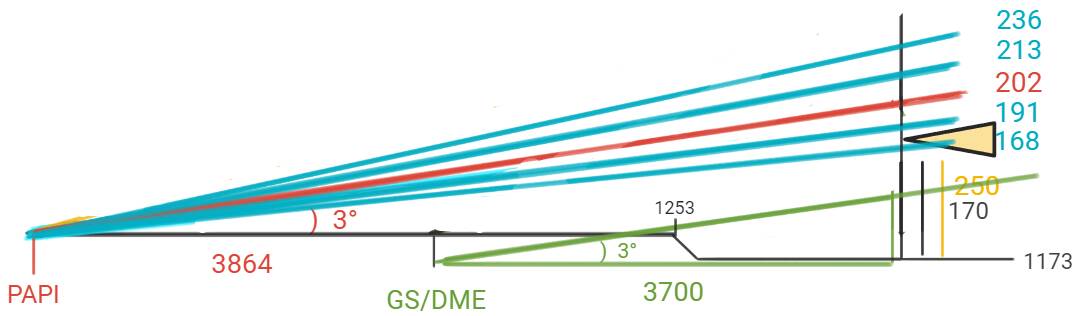
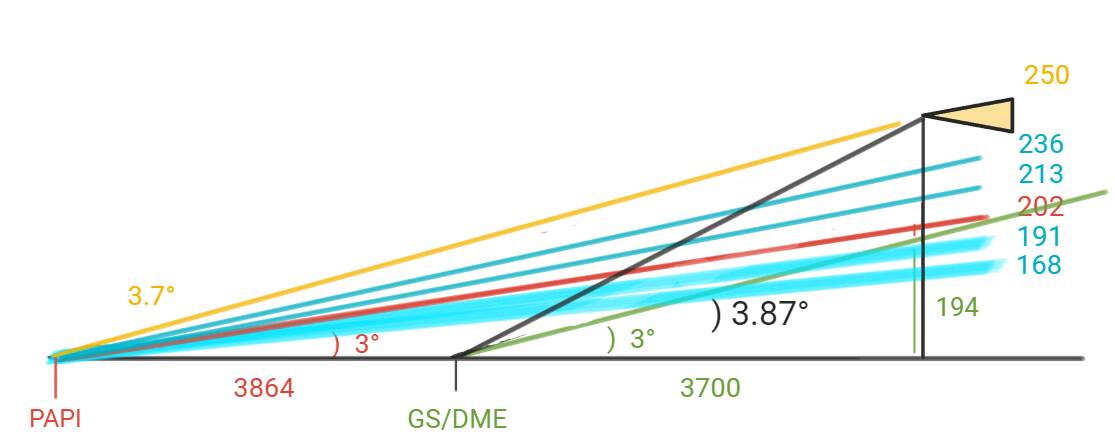
To illustrate and support my conclusion, I drew a crude diagram. In the diagram, the angles are very exaggerated and it is not to scale, but the numbers foot.
- The red line is the center of the 3° PAPI path
- The blue lines are the different sectors of the PAPI
- The green lines represent the nominal 3° glideslope
- The black line is the actual angle from your aircraft to the GS antenna
- The yellow line is the actual angle from your aircraft to the PAPI
- The yellow triangle is the aircraft
I wanted to check my work to make sure my assumptions are correct. The math was correct, but the reason was not, because after all that, I failed to consider one other possibility that wasn’t evident in the picture: and I just confirmed it - the TDZE is 1253 in the sim, which is 72’ higher than the published TDZE of 1181.
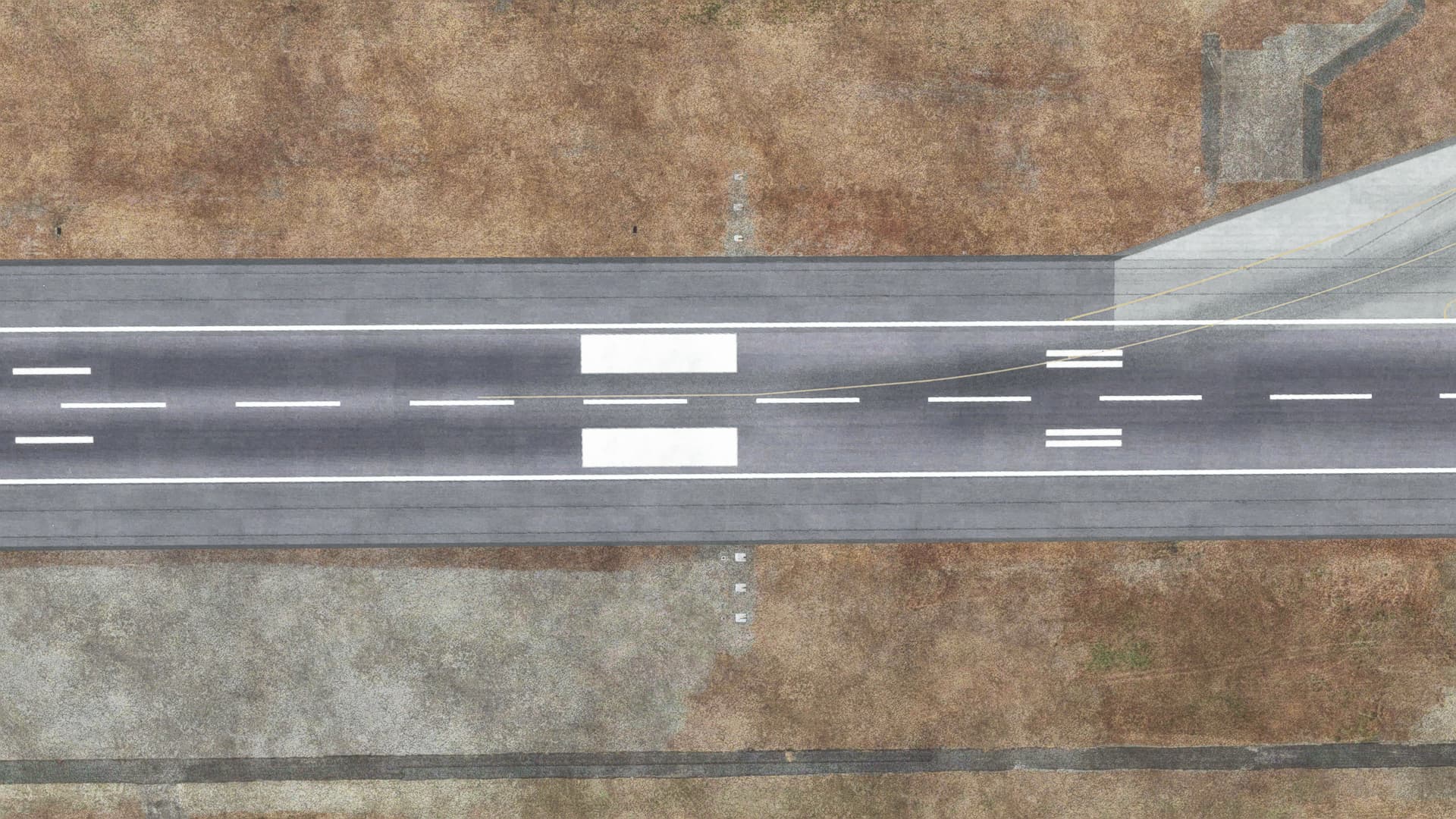
However, at .6 DME, the terrain is at 1173’. The reason for this is that approach end of runway 25 is on a plateau in the sim that doesn’t exist in the real world, it should be a much more gentle rise of only about 19’ over that distance (versus 72’)- starting at 1162’ MSL, ending at 1181’ MSL. In fact, the entire runway itself is only sloped .05° in the sim, but it slopes up to the west at .5° in real life, so almost an order of magnitude off. The picture you posted hides the sloped approach end from that angle, but you can clearly see it here:

The result is that the RA on short final is all messed up - much higher than it should be for the given barometric altitude. You were actually only at a height of 178 above TDZ, which would put you in the 1-white/3-red zone.
However, that still doesn’t account for the GS/PAPI disagreement. You should have been close to glidepath, unless the GS transmitter height in the sim is located at or underground, which is very possible given the artificial plateau.
Either way, BIG oops for whoever did the scenery. Definitely a discrepancy, but in this case, not the specific discrepancy that the thread is about. I’d almost report this as a scenery bug if I were you.
Is it weird that I enjoy and am also annoyed at finding discrepancies like this? I guess it’s kind of like a little game.
However, I wish there were an easy way to fix misplaced or incorrect PAPIs, incorrect approach lights, etc, without going into the SDK and creating a modified airport. There are simply too many to fix.