To be fair to Carenado both the PC-12 and PC-24 are flyable aircraft and the bugs can be worked around. There are quirks but hopefully Carenado can work on those and these will be great planes.
How is 100% to 0% throttle workable??
Hey folks - let’s take the other aspects of the plane to a different thread please. Let’s keep this clean for the reported defect. Thanks.
1 Like
There are other posts on this worth doing a search, it explains the difference between 100-0% throttle vs standard axis.
Did the team attempt to reproduce this in the end?
For what it’s worth, I’m having the same issue but not using a mapping to turn the lights on. I am, however, using Ctrl-E to start the plane up rather than going through step-by-step…
1 Like
When I change the lights manually all works ok, but you do need to let the battery settle and it will charge back up to full during flight. Looks like bug is logged for this now so the developer can look at fixing.
Here the same.
I am having the same issue and ATC keeps telling my to expedite my decent even after changing the baro to the correct settings as well as my landing gear drops automatically
Not for me it does it all the time no matter how i turn them off or on
Feel free to delete this quote section after adding your appropriate tags.
ISSUE DESCRIPTION
Description of the issue:
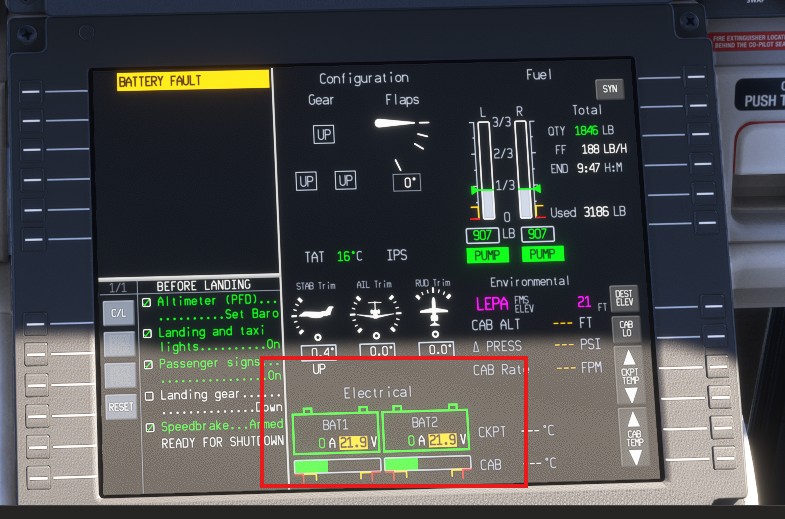
Battery failure during flight with new aircraft
Did you experience this issue before you joined the Beta?
No
If applicable, which aircraft is experiencing this issue:
[PC Only] Did you remove all your community mods/add-ons? If yes, are you still experiencing the issue?
No add-ons
FREQUENCY OF ISSUE
intermitted
REPRODUCTION STEPS
Please list clear steps you took in order to help our test team reproduce the same issue:
YOUR SETTINGS
If the issue still occurs with no mods and add-ons, please continue to report your issue. If not, please move this post to the User Support Hub.
What peripherals are you using, if relevant:
[PC Only] Are you using Developer Mode or have you made any changes to it?
[PC Only] What GPU (Graphics Card) do you use?
[PC Only] What other relevant PC specs can you share?
MEDIA
Please add a screenshot or video of the issue occurring.
[END OF FIRST USER REPORT]
 For anyone who wants to contribute on this issue, Click on the button below to use this template:
Do you have the same issue if you follow the OP’s steps to reproduce it?
•
Provide extra information to complete the original description of the issue:
•
If relevant, provide additional screenshots/video:
•
I see this error message also, although the batteries seem fine, this is the 3rd flight in succession since the SU2 dropped Ive seen it. Sometimes batter flicks between green and amber.


1 Like
I am also getting the Battery Fault message. I am in a Xbox X.
Using the template below will greatly help the team reproduce the issue and ease the process of fixing it. Before posting, search for an existing report. If you are not sure it’s a bug, please first report in User Support Hub.
ISSUE DESCRIPTION
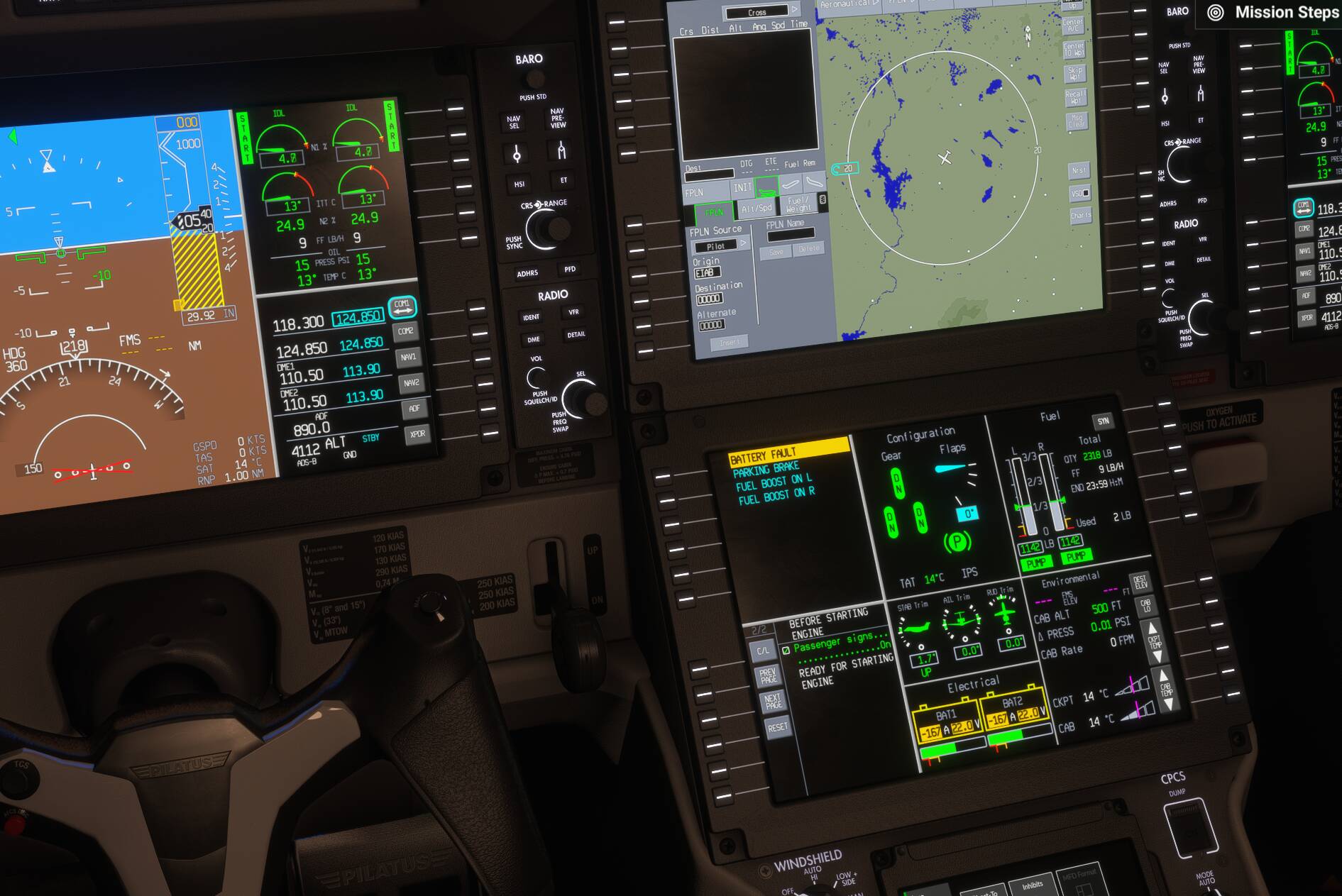
Aircraft will not start in Career Mode. Only just started happening keep getting message Battery Fault.
Startes up in Free Flight fine.
FREQUENCY OF ISSUE
Happens everytime I try it.
REPRODUCTION STEPS
Please list clear steps you took in order to help our test team reproduce the same issue:
-
Do a manual start get engine start and ignition on panel. Ignition light goes out but engine start light stays on. On centre Pedestal Battery light Fault flashes.
-
Do auto start same problem.
YOUR SETTINGS
If the issue still occurs with no mods and add-ons, please continue to report your issue. If not, please move this post to the User Support Hub.
What peripherals are you using, if relevant:
[PC Only] Are you using Developer Mode or have you made any changes to it?
No
[PC, MSFS 2020 Only] Are you using DX11 or DX12?
N/A
[PC Only] What GPU (Graphics Card) do you use?
GEFORCE RTX 4090
[PC Only] What other relevant PC specs can you share?
N/A
MEDIA
Please add a screenshot or video of the issue occurring.
This topic was automatically closed 365 days after the last reply. New replies are no longer allowed.