We have the Intel Core i9-9900K with a Founders RTX 2080 ti and this does not employ Hyperthreading.
Ultra + Settings. 47 + fps on the Apron, 55 + in the Air with Dense Pay Ware Scenery and Smooth as Silk.
Thank you Wired2Fire.
We have the Intel Core i9-9900K with a Founders RTX 2080 ti and this does not employ Hyperthreading.
Ultra + Settings. 47 + fps on the Apron, 55 + in the Air with Dense Pay Ware Scenery and Smooth as Silk.
Thank you Wired2Fire.
Everything you need to know about the HPET bug:
Karl
Is there anything else I should be changing and if so could you recommend me anywhere I can learn further about this topic?
For sure, it’s a pleasure to help you getting started on it. Overlocking is sort of a large topic so depending on your current understanding I recommend the following videos:
For the absolute basics:

For more specific details related to intel 10th generation processors:
and of course if you would like to go deep into the rabbit hole I recommend r/overclocking FAQ
https://www.reddit.com/r/overclocking/wiki/faq
Cool, thanks for that, I currently don’t have any stutters but it is an interesting feature to understand/experiment with.
Of all of the tweaks and tricks I’ve tried to get better performance this one really did make a marked improvement in both FPS and eliminating stutters. The smoothness is beyond anything I’ve been able to achieve so far. Also my CPU temp spikes on loading from the world map to the plane on the ramp have been reduced by 15 -18C. That’s a pretty huge temp. improvement.
On the downside, after a Sim session I loaded up Modern Warfare COD and all 8 cores were running at 100% during the loading sequence. I shut it down before it finished the load and will have to change BIOS profiles whenever I play a First Person Shooter, I suppose. But that’s a small price to pay for the Sim improvement.
I7 10700k @ 4.89Mhz, RTX 3070, 32GB RAM @3200, 2560 x 1440 @165Hz
I7 10700K (8C/16T) OC 5.0Ghz 1.260v LLC3
RTX 3070 Gigabyte Gaming OC OC +125/+1000
32GB 3200Mhz CL16
MB MSI MPG Z490 Gaming Edge Wifi
Deepcool Assassin III (from yesterday, 19° less delta temp room than my old cooler)
New OC coming with this beast of air cooler (I don’t do liquid), 5.1Ghz for sure, 5.2 possibly.
Old LCD TV Samsung 42" 1920x1080 I need to change, warm the whole room
Yep agree for HT OFF, old trick I use for long with MSFS. First it have a pretty good impact on temps when flying or benchmarking (stress tests), which will allow me to OC even more my CPU. Then, I also have a good boost on fps.
May not be right when DX12 will land for MSFS, will see if I turn it ON at that time.
I know this will be off topic, but is it possible for you to help me overclock my cpu. I have the i7 10700k asus z590-e 850w psu and the rtx 2070. The reason I’m asking is that for some odd reason my computer is high voltage to my cpu and I cannot control it.
I have the same motherboard from Asus…in the Bios there is an “EZ” option that is one-click and sets up an overclock profile that is modest and you don’t have to go deep into all of the possible options and risk problems. I also have the i9 10900k so not quite the same CPU, but I would recommend that you open the Asus Bios and toggle the main Bios options screen over to the EZ menu that simplifies the screen, and in the upper right of that simplified Bios options screen just toggle On the automatic overclocking feature. I have had it running for a while now with MSFS and it’s been solid, not CTD or thermal issues at all.
Sure, I recommend you to checkout this post here PSA: if you have an Intel processor with 8+ cores disable Hyperthreading [Updated] - #23 by JuraciVieira
The process for your CPU and motherboard can be quite similar. But you need to understand the risks and preparation you need first in order not to damage your system (which is very unlikely nowadays) but it’s good to be on the safe side. Check those videos and links and let me know if that helped you.
I have an i9-9900K CPU and I am very hesitant about turning off Hyperthreading.
Doing it does not seem logical.
If you have a task and give it to one Core, that is fine.
If you can give that task to Thread 1 of that Core, you can
give Thread 2 another task to perform simultaneously..
Intel advises that Multithreading will improve performance
around 30%.
I’m not sure about 8+ cores but with my 6 core processor, HT may improve fps or have the exact opposite effect depending on where I fly. For example, in NYC, I get slightly higher framerates with HT on. In less complex locations, disabling HT can gain me up to 25% in fps. I wish I can dynamically turn HT on/off during gameplay.
Yes that is the expected outcome on the majority of games and you should keep it on for them, with MSFS 2020 it’s different, the architecture benefits from multithreading up to a certain point past that point it starts to hurt your performance. I don’t know the exact details to tell you why MSFS 2020 is like that because it’s not open source but I believe it has a lot to do with the fact that it is a simulator where certain things are not as easy to distribute in multithread as it normally would be for other games.
If you are overclocking your processor it would not hurt to try disabling it for a quick test, see for your self, it may vary from system to system, but from what I have tested with my old 9900K and my new 10900K HT disabled makes the game gain 5 to 8 FPS across the board.
Same CPU as me I didn’t have any problems and did see improvement in performance less stutters few more fps. mainthread render time was slightly lower.
No harm trying it it’s recommended to switch back for other game though . I think with the coming sim update it might be better turned on anyway after that.
That is correct, I still intend to run some benchmarks comparing HT on and off after the Sim Update 5.
I will add a disclaimer for that on the post.
Check this out:

looks like they have managed to a allocate the glass instruments to their on thread improving the overall performance.
That’s exactly the issue I meet when one my physical core is used 100%. With HT ON I can see 2 logical threads linked to this physical core saying one is used E.g. 78% and the other one E.g. 46%. That mean 78+46 = 124% usage on one physical core  That’s what I call saturation.
You can easily turn HT OFF in bios it will not arm anything, no danger here. And turn it back ON easily too. Nothing will be broken, it’s 100% safe.
Not possible. The utilization sum of two logical core that make up a physical core should not exceed 100%. The physical core cannot be utilized 124% since 100% is the limit. What program are you using that shows this crazy info?
Obviously I agree this is not possible  , but all my monitoring tool show this behavior, probably due to the grabbing data granularity of such tools, from 250ms to 2sec. That’s prove the sim (or windows) distribute wrongly thread on logical core.
All my monitor tools show such behavior. I mainly use CPUID Hardware Monitor, Hardware Info 64 (HWINFO64) and a lot “Remote System Monitor Server Control” which install a server on PC side and its Android apps “Remote System Monitor” to monitor on the phone .
Watch those 2 examples took with MSFS was running (it was stopped, but this behvaior appear when its running too), and a granularity of 250ms (default is 2000ms). Precisely observe core #7 and its 2 logical thread T0 and T1.
24,8% + 97,6% = 122,4%
72,0% + 96,9% = 168,9%
So both logical cores T0 and T1 clearly collide on physical core #7 and maximize it at 100%.
With HT OFF this can’t happen as only one logical thread is linked to one physical core.
Edit : I’ll do the same when the sim is running, but believe me, the current % usage collide like this when MSFS run.
If you look at what Hyperthreading is and how it works, it shouldn’t matter. Hyperthreading allows logical cores to run 2 threads at the same time to make better use of the CPU’s idle time. When a single thread needs a full logical core, there won’t be another thread running on that core regardless if hyperthreading is turned on or off. The only thing that could happen is the CPU running hotter because idling cores are being used more, but then it’s just a thermal problem.
Is there any other reason why it would make performance worse in any scenario?
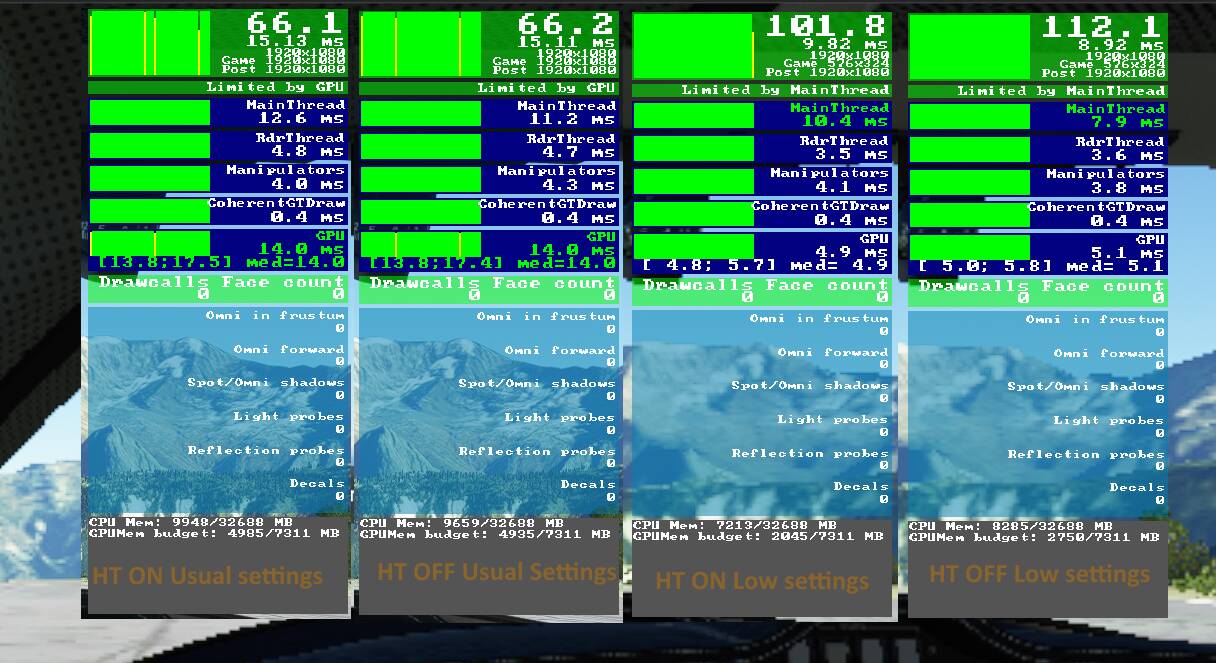
Below a test I made January 21 of this year and I already posted around here. As you can see on both screenshot on the right, with low graphical settings, so when GPU is not the bottleneck (so limited by mainframe), the FPS increase greatly with HT OFF. Obviously it’s not the case on both left screenshot when I was limited by GPU.
Edit : this is my usual test scene, pretty solid, so same weather, time of day, date, plane, airport, not flying, etc.
Thanks for sharing your benchmarks here. I intend to do several benchmarks when the new Sim Update V is out, I’m curious to see if this tweak still holds.
For me the top 3 performance improvements right now are: