Does surface type and incoming solar radiation vary friction?
Another thing you could try is going to the southern hemisphere and seeing if the results follow the date or the season.
Does surface type and incoming solar radiation vary friction?
Another thing you could try is going to the southern hemisphere and seeing if the results follow the date or the season.
Is it still there when you allow more time between changing the date, and releasing the brakes? Perhaps there is some residual thrust or some other unseen effect? Or a conflicting axis assignment?
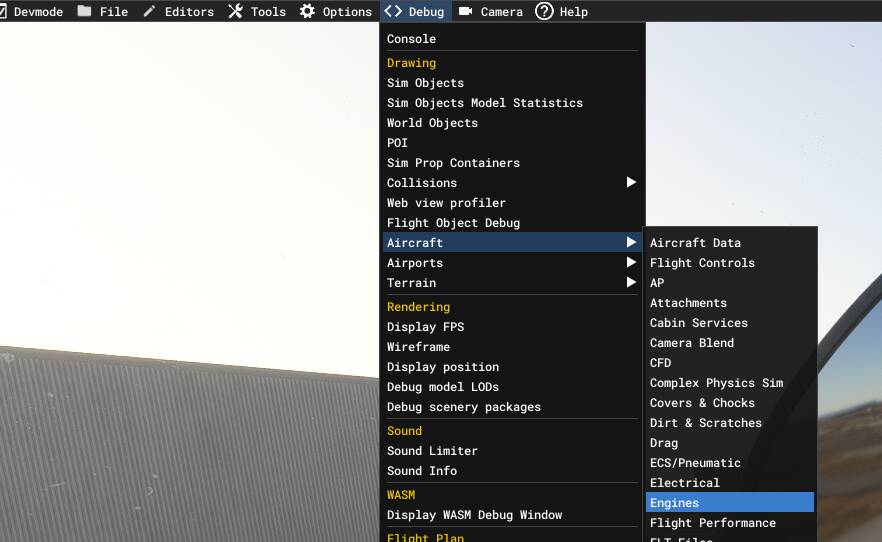
What you could surely do is enable developer mode from settings, and then go into aircraft engine debug and check if the throttle and thrust are the same across instances.
Could also run this in dev mode with some debug windows open to see what variables are actually changing.
Hi. I have experimented with longer pauses. No difference.
A developer has confirmed that there’s something weird going on in the background with icing (introduced in a recent update).
I spent hours trying various combinations. I’m happy there is an issue that needs to be fixed.
Thanks.
Edit: I’m on Xbox so unfortunately can’t use dev mode. Others on PC though have experienced this issue (so not an Xbox only thing).
Do you have this issue in non-icing conditions?
I just spawned the Asobo default Cargo 172, out on the runway of TNCM, clear skies, and with the wind layer deleted.
Power is at idle, and I flicked through the months, and I saw no movement of the plane.
Yes. Tests weren’t under icing conditions (15 DegC).
It’s some weird icing effect that is being introduced by the game. In error.
I’m not seeing it at all. If it’s icing, then in theory what you might be able to do is turn the planes engine off, and use the wind alone to get the plane to slide across this “ice”.
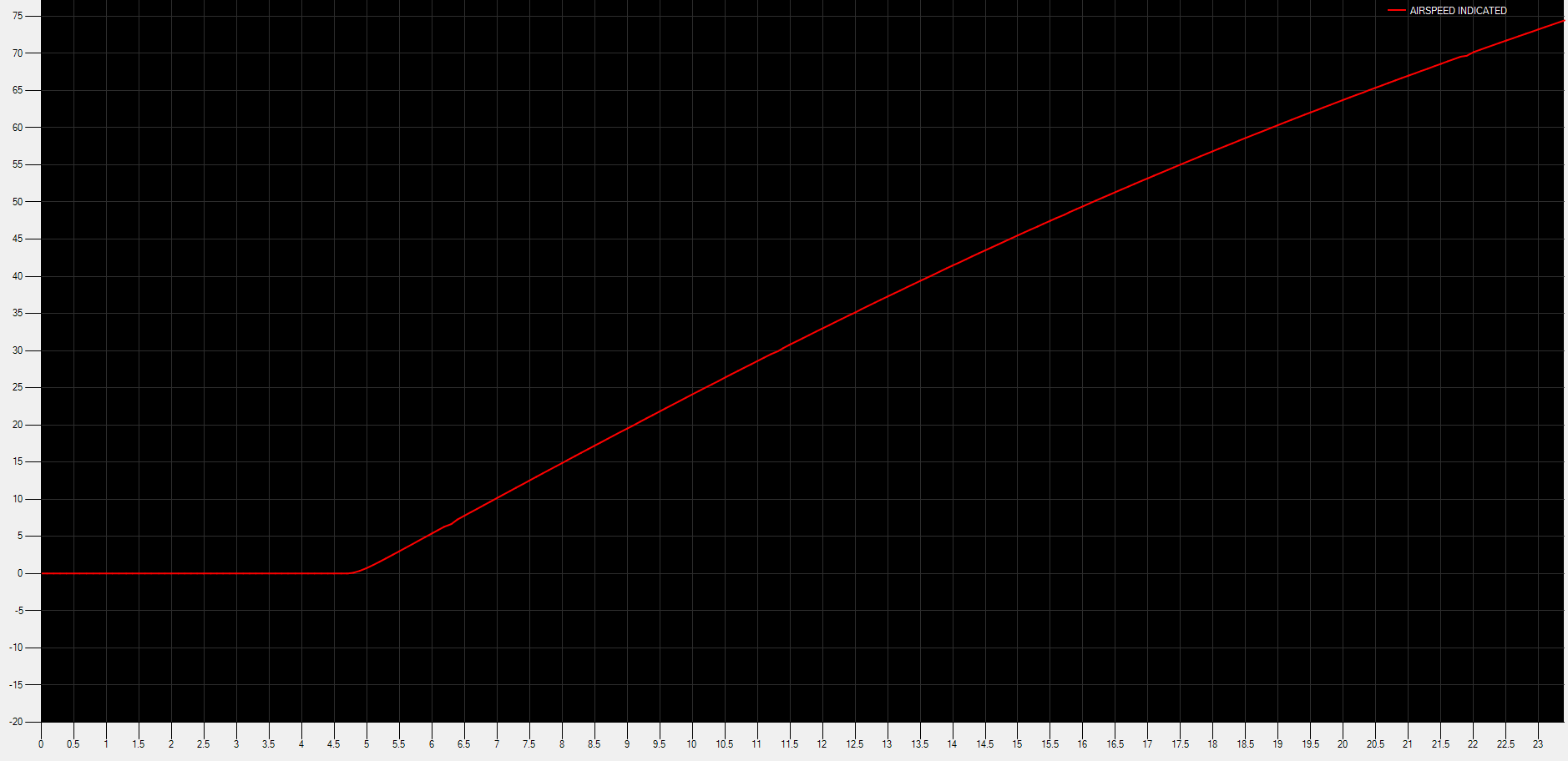
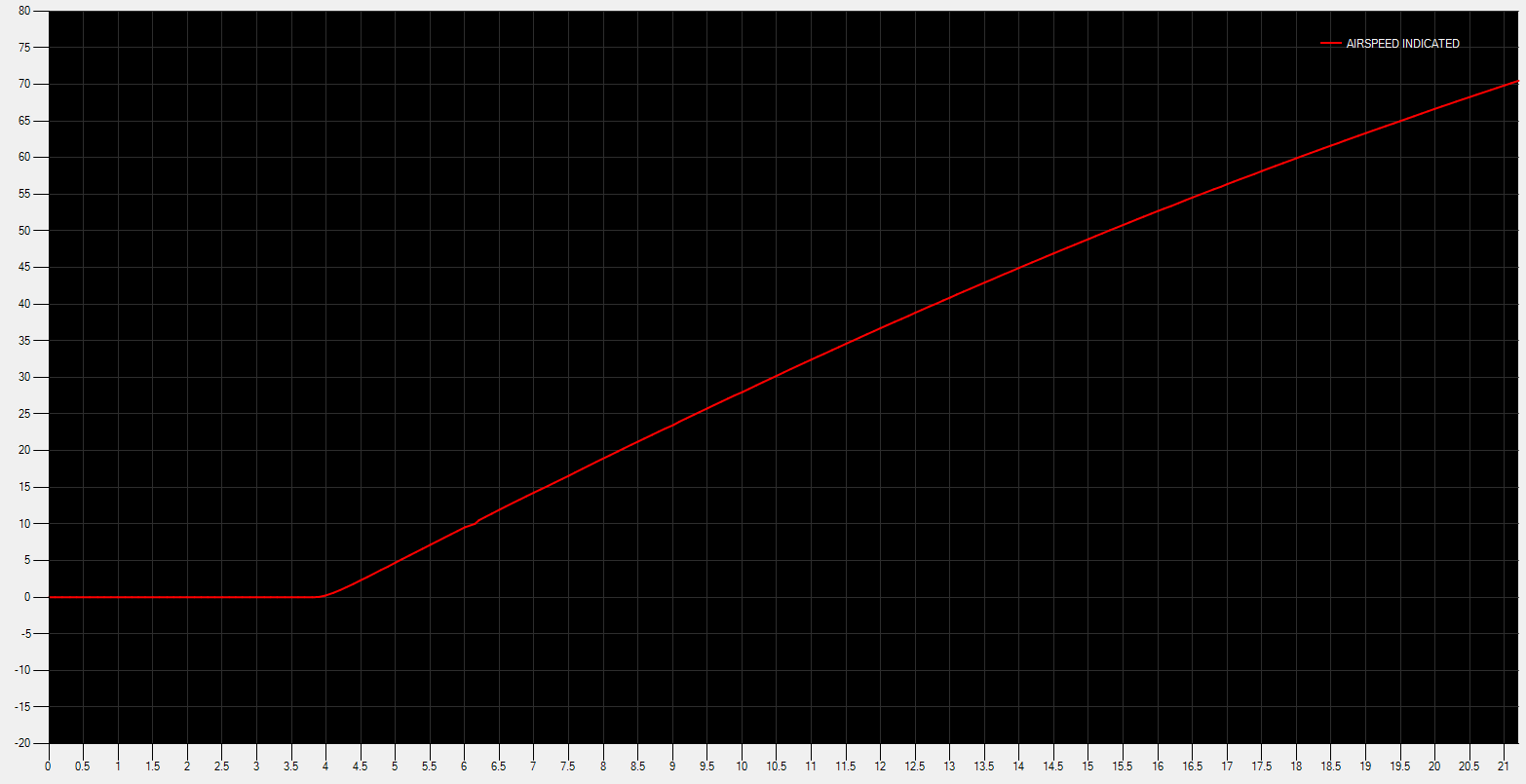
One other test I plan to do now is to power up to full power, then release the brakes. I’ll then graph how fast the plane takes to accelerate to say 75kts. Once in January, so roughly the middle of one of your windows, and then again in August.
January
August
I’m seeing no difference in the acceleration curves between these two months. Time of data, weather, wind, temperature, and pressure would all be identical, just changing the month on the weather panel.
Okay, so fiddling with pressure on a cold day definitely gets the plane moving.
If you slide the pressure value all the way to the left or the right there is no movement, but if you move it more slowly you can get the plane to bound around a bit while stationary, and even move if the pressure drops enough.
Let me shoot some video of this…

Great testing! I wish I was home to try a few things. Maybe check temperature, too? (Density altitude)
Good stuff. It is obvious that for whatever reason, you are not subject to the same issue myself (and others) experience. Weird. Thanks.
I adjusted temperature from -90 to +60C, and the plane didn’t move an inch.
The weird thing with the pressure is if I rapidly drag the pressure down to 948 the plane won’t move, but if I slowly lower the pressure it moves. Even weirder, slowly increasing pressure doesn’t do it either. Going from 1020mb to 1013, and the plane moves. Tap the brakes, and the plane stops, and doesn’t start moving again. 1013 down to 1009, the plane starts rolling. Tap the brakes. Increase it from 1009 back to 1013, and the plane stays still.
This has to be a bug.
That’s amazing. What a strange thing, especially considering how much of an effect temp has on air density. So obviously not density-related, even though that’s the biggest thing that would affect engine performance and parasitic drag (all other things being equal).
Strange!
I’m going to have a look to see if I can get numerical values for tyre friction somewhere in the SDK.
172 is listed as encrypted so I can’t look at the wheels debug, so I switched to the 152. Interestingly this doesn’t seem to have the issue. Altering the pressure doesn’t affect the plane at all, either is large steps or very small ones, though you can get it to roll if you raise the wind high enough.
And I just now found that temperature does have an effect, but it’s not immediate.
When looking at the 152 wheels debug page, fling the temperature slider around appears to have no effect, but one part shows what I assume is the temperature of the wheel brakes themselves.
This drops very slowly as you lower the temperature in the sim, and rises even slower. It takes about 24 seconds to drop one degree.
I don’t know why brake temperature would affect whether a stationary plane can move or not if those brakes are not even being applied.
Whatever the root cause is, I’m pretty convinced it’s the plane itself, and not some external impulse. I completely delete the wind layer, and it still does it. And if I turn off the planes engine it won’t move an inch no matter what I do to the temperature or pressure sliders.
Vote added… This phenomenon was driving me crazy and resulted in a weekend of checking settings, bindings & addons.
Fortunately, I found this post and the penny dropped when I read about the cold weather conditions. Just the same for me as I only started experiencing it this week, when I did some flights up in Northern Europe with sub-zero temps… all of a sudden the aircraft was racing away as soon as the parking brake was released, but with the throttle still at idle.
Checks at two of the airports I have been using (ENGM & EVRA), but with the weather set to July, and the issue is gone and taxi behaviour is back to normal. I used the same gates, taxiways, Flight Plans etc to ensure some consistency. The difference in behaviour is night & day.
System: PC
Aircraft: PMDG 737 & 777.
Thanks for vote. It drove me similarly to distraction!