Same issue for me with my RX 7900 XTX GPU. Latest AMD Adrenalin version 26.7.1 installed but FSR (3.1 or any) Frame Generation doesn’t appear as a graphics choice at all. Prior to SU 6 I was using FSR 3.1 successfully. Wondering why SU 6 seems to think that FSR 1.1 is available but not FSR 3.1.
Actually, I got that wrong. It shows 1.1 on my end too.
7900XTX, 26.7.1, FSR Upscaling override on in RadeonTuner. FSR 4.1 available in settings > general > VR

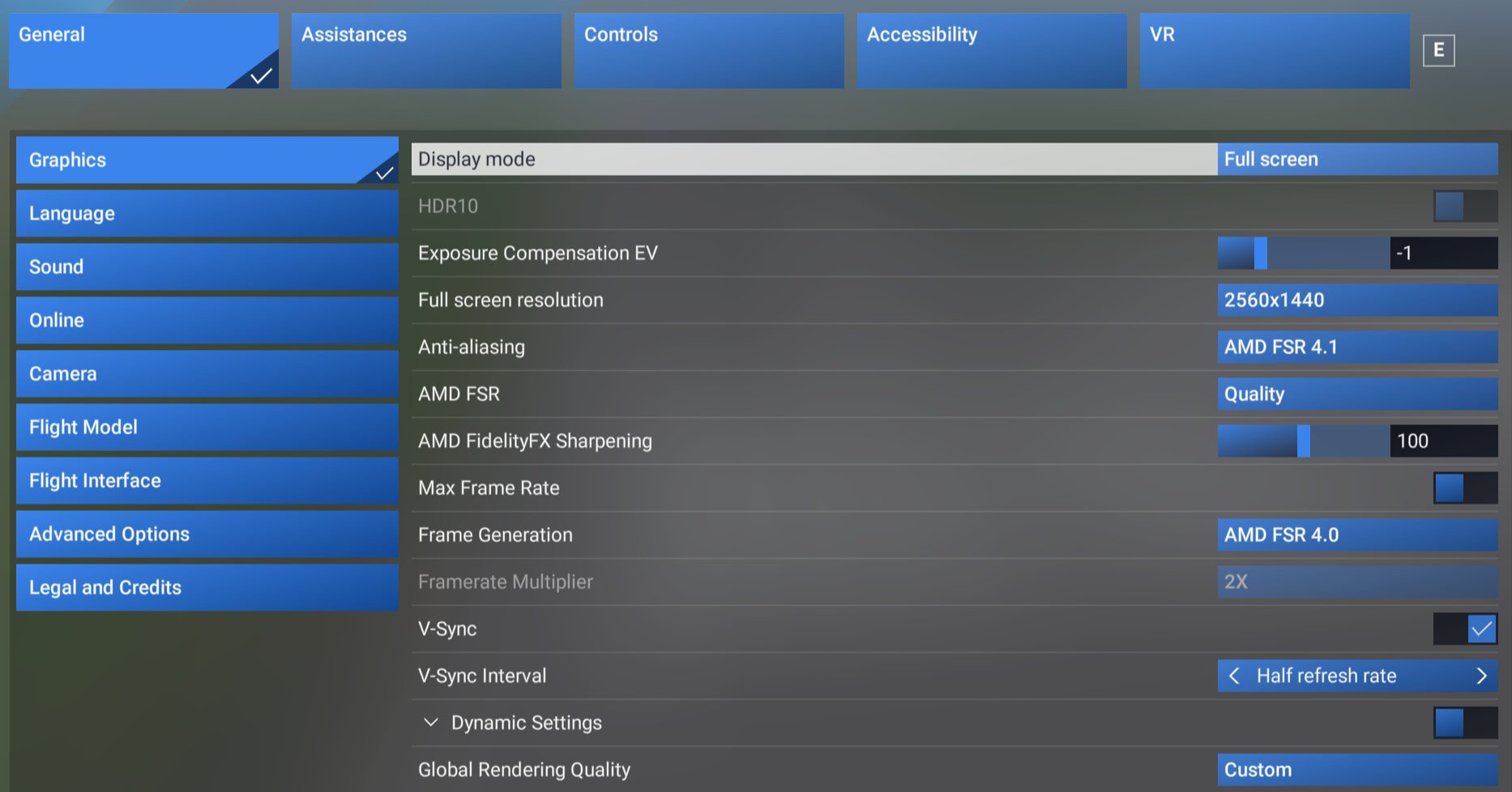
Request of the community managers and Asobo: Some clarity on what we are seeing would be appreciated.
I’m guessing from the release notes that the code has reverted to SU 5.1 and is using FSR 3.1, and that it’s just the User Interface showing 1.1?
But there is enough confusion that a better and more comprehensive description of what versions of both Anti-Aliasing and Frame Generation are being used for common GPU models would be appreciated:
What FSR versions are being used for:
| GPU | Anti-Aliasing | Frame Generation |
|---|---|---|
| AMD RX 9000 (RDNA4) | ? | ? |
| AMD RX 7000 (RDNA3) | ? | ? |
| NVIDIA GPU | 3.1 | 1.1 (Typo, really 3.1?) |
For example:
- For those with AMD GPUs, does the Adrenaline software override the FSR version being used?
- For those with NVIDIA GPUs, does the FSR Frame Generation rely on the DLL file in the MSFS program directory again (as it did in all versions of MSFS 2024 up until SU 6 beta), or is it still just whatever the GPU Driver has (which is a black box, I’ve found no way to understand what version of FSR NVIDIA is using in the absence of a DLL in the MSFS program folder…)
- For those with AMD GPUs, does the Adrenaline software override the FSR version being used?
For the AMD 9000 series, (not sure about the 7000 series) all that is required is for the game to support FSR 3.1. When FSR is enabled in the Adrenaline software, the driver will change the upscaling path from FSR 3.1 to FSR 4.
You may also have noticed the following comment in the latest release notes:
So in the Sims settings it will report back what the driver is supporting. For the RX9070XT it would be FSR 4.
see also:
AMD FSR 4 uses a driver-level upgrade feature that can replace an existing FSR 3.1 implementation in compatible games. However, it requires specific conditions: the game must use DirectX 12, incorporate a standard signed FSR 3.1 DLL, and run on a supported GPU (such as Radeon RX 7000 or RX 9000 series)
I have a 7900 XTX. In MSFS 2024 prior to SU6 I didn’t have to turn on any settings in Adrenaline and FSR 3.1 appeared in the Sim settings Frame Generation. With SU6, V1.1 appears in the Sim settings Frame Gen. No Frame Generation setting appears in Adrenaline, possibly due to the Sim not interfacing with Adrenaline properly. I appear to be getting 2x my Sim FPS target anyway, but I have more stutters now than before.
On NVIDIA RTX 5090, up to and including SU 5.1, FSR Frame Gen selected in MSFS 2024 would indicate “AMD FSR 3.1”, and use whatever DLL was in the MSFS Program directory (which is how DLSS Swapper can swap in a different version, for example).
During SU 6 beta testing that was changed so that there was no DLL (or if there was it was ignored), and instead FSR Frame Gen was somehow coming from the GPU driver (in my case NVIDIA), but still displayed “AMD FSR 3.1” …
Now that the final SU6 release has supposedly reverted to the SU5.1 implementation, it’s alarming to see “AMD FSR 1.1” instead of 3.1.
I want to know if it is in fact 3.1, reading the DLL as before, or, is somehow bypassing the DLL and is actually a version 1.1.
Something is not right
Nvidia users only have two .dll files amd related it seems?
amd_ags_x64.dll (file/product version: 6.1.0.0)
amd_fidelityfx_dx12.dll (file version: 1.0.1.41314)(product version: 1.0.1.0)
amd_fidelityfx_dx12.dll shows as 1.0.1.41314 (3.1.4)
Any AMD Gpu owners, wanna check what .dll files are there for you guys inside the folder where FlightSimulator2024.exe and gamelaunchhelper.exe located please?
And for Nvidia gpu users, we have the same files and versions?
This is supposed to be the AMD FSR Frame Generation DLL file. And it is present in the MSFS Program folder (I have NVIDIA RTX 5090).
However, in SU 6 Beta testing (between v1.8.5.0 and v1.8.11.0), this DLL was ignored and bypassed, and somehow MSFS was using whatever the GPU driver (NVIDIA) had available for FSR, and MSFS was still reporting that as FSR 3.1…
… However, now in final release of SU 6 (1.8.14.0) the release notes say that they reverted to using the DLL (just as in SU 5.1 and prior versions of MSFS) - but the UI is now showing 1.1.
The question is, if 1.1 is just a typo in the UI, or, if MSFS is still bypassing the DLL and using a v1.1 somewhare in the NVIDIA driver.
For the SU6 beta, the sim was using the 3 fidelity_FX files for FSR 4 presumably from the Redstone SDK. These files were located in the Content folder of the Beta.
amd_fidelityfx_dx12_loader.dll (This file was renamed to amd_fidelityfx_dx12.dll)
amd_fidelityfx_framegeneration_dx12.dll
amd_fidelityfx_upscaler_dx12.dll
For the SU6 release they went back to the single file for FSR 3.1. amd_fidelityfx_dx12.dll version: 1.0.1.41314
It is also important to be reminded of the release note I mentioned above.
- AMD FSR version is now displayed according to your GPU software.
So, it could either be a typo or the way the driver is reporting back the version.
RX9070XT user here confirming its the same version
amd_fidelityfx_dx12.dll version 1.0.1.41314 (3.1.4)
9070xt here, when selecting fsr frame gen in adrenaline it will show as 4.0 in the sim, however when panning around the cockpit or outside the aircraft there is a shimmering on windows or cockpit displays, when using the 1.1 shown in sim ( not selected in adrenaline) it doesnt do it.
Hi folks,
This is not a bug, nor is it being displayed incorrectly. FSR is a collection of technologies from AMD which includes GPU features such as both resolution upscaling and frame generation. In Sim Update 6, Microsoft Flight Simulator 2024 uses FSR 3, which is the same version that was previously used in Sim Update 5.1. The specific version of the FSR frame generation feature used in FSR 3 is v1.1, which is why you are seeing it displayed as such in the sim.
In Sim Update 5.1, this was incorrectly displayed as “Frame Generation 3” in the sim, which was technically inaccurate as it was the v1.1 implementation of frame gen that was part of the overall FSR 3 version.
We realize this might be confusing, but rest assured MSFS 2024 is using FSR 3 Frame Generation in Sim Update 6. This is not a regression from SU5.1.
Thanks,
MSFS Team
6 Likes
Where is “1.1” coming from?
Is Asobo now refering to AMD FSR SDK v1.1 (now more than 2 years old)?
The DLL file is version 1.0.1.41314 (aka 3.1.4) which is where we are accustomed to seeing the version.
AMD refers to this as FidelityFX Super Resolution 3.1.4 (FSR3) - Upscaling and Frame Generation
Well you’d better correct Microsoft Copilot then, because it says the following on this:
Me: Is there such a thing as FSR 3 frame generation v1.1?
Copilot: Short answer: No — there is no “FSR 3 Frame Generation v1.1”.
What does exist is FidelityFX SDK v1.1, which includes FSR 3.1, and that’s likely where the confusion comes from.
What the sources actually show
-
AMD released FidelityFX SDK v1.1, and this SDK version adds support for FSR 3.1 (the updated upscaler + frame‑generation package).
-
FSR 3.1 includes improvements to frame generation and decouples FG from the upscaler, but there is no version called “FSR 3 FG v1.1”. The “1.1” refers strictly to the SDK version.
-
AMD’s official documentation lists FSR 3.0, FSR 3.1, and later FSR 3.1.x, but no FG‑specific versioning like “v1.1”.
Why the confusion happens
FSR has two parallel version numbers:
-
FSR version (e.g., 3.0, 3.1, 3.1.4)
-
FidelityFX SDK version (e.g., 1.0, 1.1)
People sometimes mix them up and say “FSR 3.1 SDK v1.1”, which can look like “FSR 3 FG v1.1”, but that’s not an AMD naming convention.
Final answer
There is FSR 3.1, but no such thing as “FSR 3 frame generation v1.1.” The “1.1” belongs to the SDK, not the FG algorithm.
First flight for me since SU6 dropped, EGNX to EBBR in the PMDG 777F.
I installed latest AMD drivers (7900XT, also used DDU driver cleaning) and I too see FSR 1.1. I have my settings a little different to what I’ve seen from most of yours though:
Radeon Chill enabled in Adrenaline set to 60fps for idle and peak
FSR enabled in Adrenaline (I don’t use FSR upscale, only TAA, maybe this option enable/disable is irrelevant)
Max frame rate set to 30fps in sim
Frame Gen enabled in sim
Result for me at least is silk smooth. Might be worth a try for those seeing stutters?
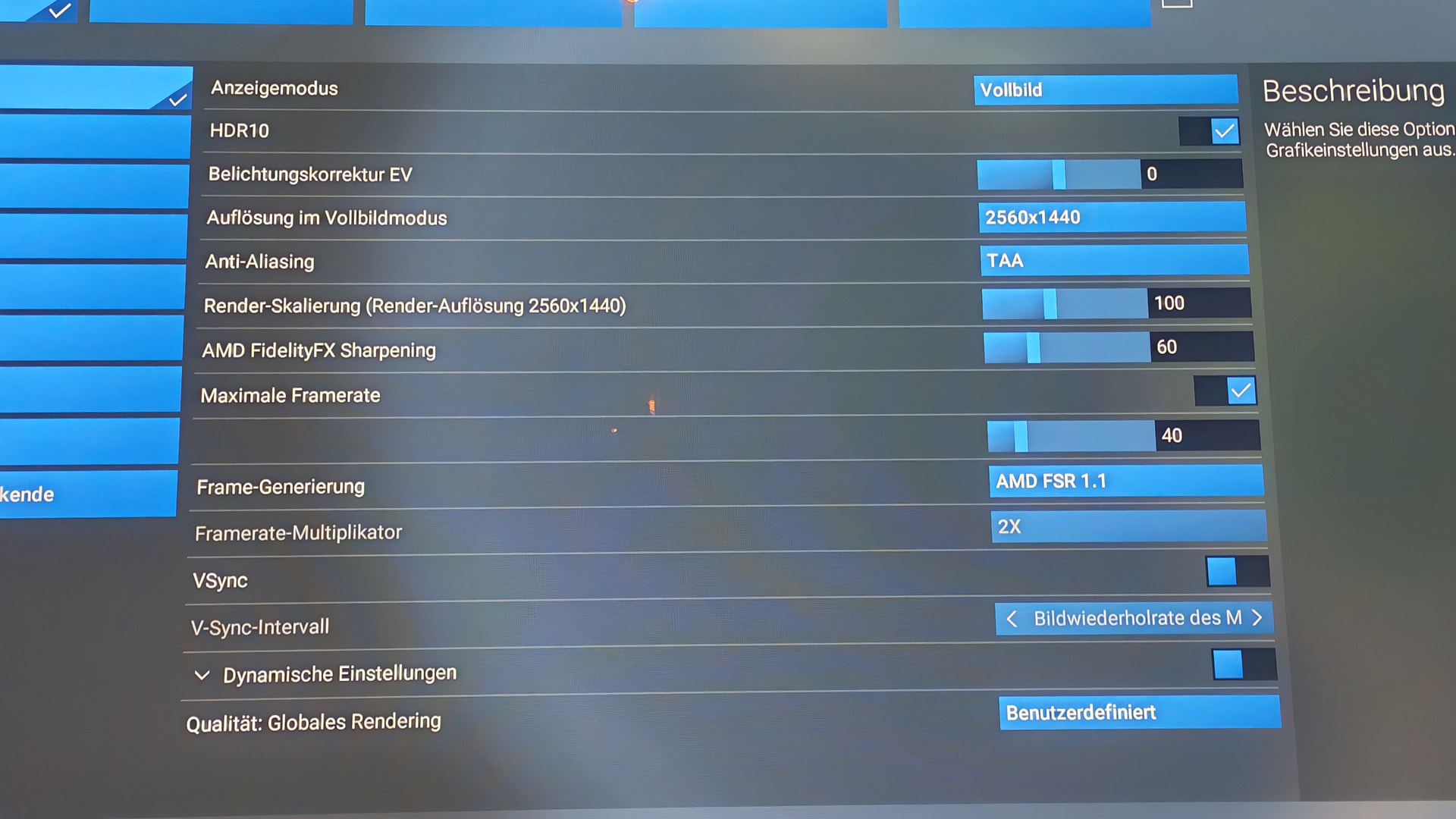
It’s a typo. FSR 1 did not have frame gen.
It is not a typo, it is correct. You can check the official response here: