I have a 144Hz gaming laptop and a 60Hz TV and I can’t tell the difference between them in MSFS in terms of smoothness. In fact, if I had to pick only one I’d go for the 60Hz TV, because it is much bigger and the QLED colours are magnificent.
Completely different animal, movies and TV have massive frame bleed and interpolation , totally different from a digital game.
Doesn’t it seem strange to spend thousands of dollars on a high end PC, flight controls, head trackers, butt kickers, elaborate sim rigs, gigabit internet connections and then get a cheap monitor/TV?
Cheap?I don’t consider $800 - $1000 as being cheap.
The OP linked a pretty mid TV
@NZAviator6456
I installed a HiSense 55" U7 4K TV yesterday to my existing two 1366 x 768 60 Hz 1080p 32" TVs. After configuring it for 3840 x 2160 @ 120 Hz (Frame Rate Limit set at 33%) with HDR10, took the NXCub out for a spin & thought you might like to hear of my first impressions.
-
First, a 55" TV is BIG. The top of the screen is 31" above the desktop, so if your current desk is, say, around 30" off the floor, then you’ll be craning your neck upward a lot of the time. I’m fortunate in that my desk’s height can be raised or lowered, so I’ve dropped it to be 25" off the floor. This means that I look slightly down when viewing the cockpit panel, and straight forward when wanting to look out the cockpit window.
-
Second, the size of the monitor makes a HUGE difference during take-off & landings. Previously, on my 32" TVs, I was always zooming in to read the glass displays (traditional analog gauges were easier to read), and constantly moving my eyepoint, switching between looking out at the runway & looking at the panels. I also used the default panel views a lot when wanting to look at specific switches or settings displayed in the glass panels.
With a 55" TV this is rarely necessary. The entire cockpit panel is rendered & large enough such that I can see & read all the text in glass panels, and interact with switches & knobs without having to pan around or switch views.
In short, the larger 48" x 27" screen really helps in immersing you in the game. Landings & takeoffs seem much more “real” at this scale. -
Third: Moving to a single 16:9 TV from two 32" TVs, I immediately noticed the difference in my peripheral vision. Even though I only had a dual, rather than the more usual triple-screen setup, I’d gotten used to being able to glance to the left & see what was outside the cockpit without having to use the hat-switch to pan left/right. This is similar to the observation of @GlennyPlays :
I’d considered a triple-screen setup, but don’t have the space for it. I might try adding one of the 32" TV to the sim. It won’t match up with the 55" because of the size difference but might be worth seeing if it gives me back the peripheral vision on one side if it does not look too weird.
[Edit 04/30:
I did end up adding one of the 32" TVs as a second screen (as Experimental Window #1). Despite the difference in size, it works quite well & has returned my peripheral vision on the left-hand side of my main 55: screen]
The third TV is “reserved” for LittleNavMap & a web browser if needed. I can’t use it in the sim as it sits to the left of my other 32" TV & there is no space to the right of the 55" to put it. This is another benefit of having the 55" - I can move all the “peripheral” windows off to this 32" TV, leaving the 55" clear of “obstructions” to the view!
- Previously, at 1080p, I was always main-thread limited, irrespective of the type of flying that I did.
Bush flights are now GPU-limited, and so on these types of flight I see a drop in FPS from ~ 60 +/- to ~ 25 +/-. This is to be expected because the GPU is obviously rendering a much bigger screen area. However, even at 25, the flights are smooth & stutter-free.
@GlennyPlays is seeing similar performance:
I’ve yet to try any tweaking (such as dropping down to 60 Hz) to see if I can increase FPS.
More computationally intensive flights, such as flying the A320neo over Manhattan and into KJFK, remain the same at ~15 FPS (all settings are set to Ultra), as the flight is still main-thread limited.
[Edit 04/30:
After tweaking, running at 33% of my monitor refresh rate (MRR) of 120 Hz, I’m getting really smooth bush flights at 40 FPS (as displayed by the Gamebar performance widget). Flights around high-density airports & cities, such as LA / LAX or NY / JFK will drop the framerates down to between 33-37, which is still good enough to land without stutters. I could get higher FPS if I lowered some of the settings such as AI traffic.
Partial Specs & settings for these flights:
Build: SU15B v1.37.15.0
3rd-Party Addons: None, Community Addons: None
Flight configuration: Multiplayer: All Players. Traffic: Live, Weather: Live
i7-12700K (No overclocking), 32 GB 5200 MHz DDR5 CL40, Intel Arc 770 (16GB, v31.0.101.5382).
Graphics Tab: Full Screen 3840 x 2160 TAA, Render resolution - 100, AMD Fidelity - 150, VSync - On, FRL - 33% MRR (120 Hz), HDR10 - On, DX12B, TLOD @ 400, OLD @ 200, Motion Blur - Off, Other settings - all Ultra (Water Waves & Glass Cockpit Refresh Rate @ High).
Traffic Tab: Aircraft Traffic Type - Real-Time Online, Slider Settings - All 100%, Generics (AI, MP) - Both Off, Show MP in Vicinity - On, Traffic Variety - Ultra
Data Tab: Data Connection: All six options - On, Data Limit - Off, Bandwidth - Unlimited, Rolling Cache - Off
Developers Tab: Developer Mode - Off
MSFS Version: MS-Store, Standard, plus All World & City Updates
Edit Ends]
- Picture quality is really good:
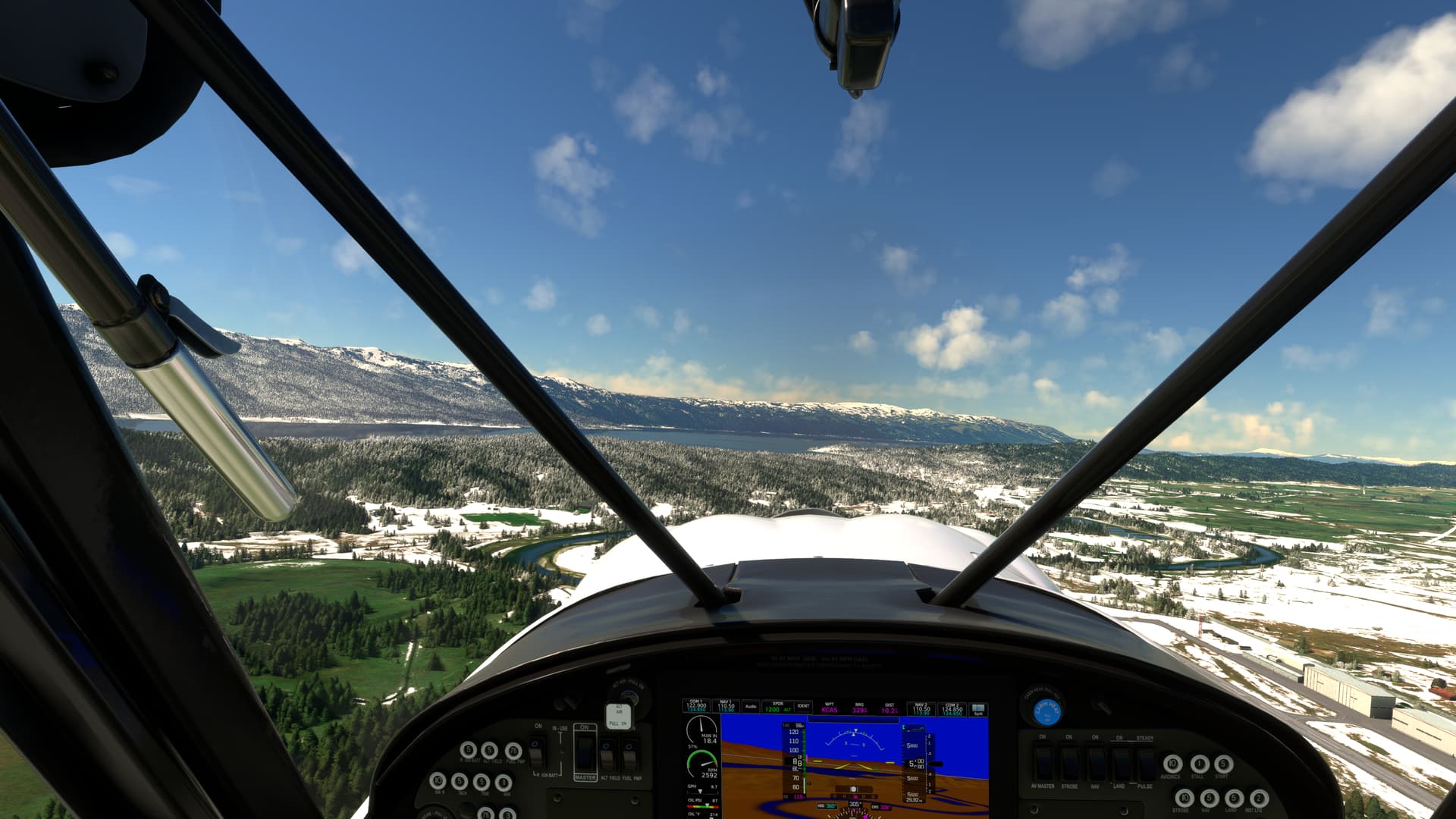
So, IMO, if only used for MSFS (as you say this TV / monitor is for), I see no reason to pay extra for a PC monitor. I had considered ultrawide monitors, but I see no cost benefit to them. If you want a wide view, go with three TV monitors instead! 
Finally, I do agree with @WingWarper1’s comments on features. You are not going to get good picture quality with a really inexpensive TV .
I hope these initial observations helps with your decision-making!
That picture looks magnificent - crisp and clear! I’m assuming you are using TAA antialiasing? You might want to try and experiment with other antialiasing methods to help your gpu limited situation.
Yup, TAA. My current settings, subject to change as I experiment further, are:
Graphics Tab: Full Screen 3840 x 2160 TAA, Render resolution - 100, AMD Fidelity - 150, VSync - On, FRL - 33% MRR (120 Hz), HDR10 - On, DX12B, TLOD @ 250 / 400**, OLD @ 200, Motion Blur - Off, Other settings - all Ultra (Water Waves & Glass Cockpit Refresh Rate @ High).
** TLOD: This had been set at 250. I tried at 400 and found on my bush flight that the FPS only dropped by 1 or 2, so I’m going to leave it at 400 for a while.
Thanks for the antialiasing tip. I’ve also got to get a new HDMI cable. My current cable (Nippon Labs HDMI-HS-6 6 ft. HDMI 2.0) - which was fine for my 32" TVs - only has a transfer rate of 18.0 Gbps, which is why I think some of the settings on the TV are greyed-out & unavailable. NewEgg has an ESTONE High Speed HDMI to HDMI 2.1 Cable Support 8K@60Hz,4K@120Hz, 48Gbps for $12, which might allow for further improvements too. At $12 can’t really go wrong.
Hisense U7 series is a hero TV for a MY SYSTEM! setup on a budget. As soon as you try to beat it you’re at 48"-55" OLEDs. It’s the only TV worth buying under $1000 for personal gaming use. Although it’s like an old TN monitor, you aren’t watching it over 25 degrees to the side. The newer QLED versions are better at viewing angles.
@phutyoo
I agree! It delivers a very good flight experience for the price ($480 US). The only drawback so far is that (as you & reviews point out), it does have a fairly narrow viewing angle. I’ve noticed that if I sit centered on and about 2’ away from the screen, the image on the left & right sides appears a bit redder & less sharp than the center. I thought that this was a color calibration problem until I moved further away from the TV. Then the colors on the sides matched those at the center.
They have the qled version but it’s like $700 or more. Then you start looking at a 48" OLED for another few hundred.. . Go into the HDR calibrations in the XB menu and it gets the blacks deeper.
I have a TCL 65 inch Class 6-Series 4K QLED Dolby Vision HDR Roku Smart TV and it is great for FS2020.
HDMI at 60 Hz.
I use a DP 1.4 to HDMI 2.1 cable.
I sit about 6 feet from the TV.
I don’t have to move my head to see the whole screen.
Just move my eyes from right/left & up/down.
@MSFSRonS
I have to get used to the larger screen
This morning, I setup the 32" 1080p to the left of the 55" as a second MSFS monitor. Despite the difference in size & resolution, with the Cessna 152 it does not look too bad, as in effect, the screen shows the window portion of the cockpit, so this gives me good peripheral vision on the left-hand side.
This afternoon I completed a 1.5 hr. VFR live weather / live traffic flight from Key West to Fort Lauderdale, following Hwy 1 up to Miami, then I-95 to the airport, and found that sitting 3 - 3.5 ft. from the screen “solved” the issue with the redness / sharpness.
FPS was a consistent smooth, stutter-free 38-40 throughout the flight - as mentioned previously, my frame rate limit is currently configured for 33% of my monitor refresh rate (120 Hz), so that’s working out well too.
Can I ask the full model number for your TV? I’d been thinking about a bigger monitor and your detailed post prompted me to look at this. However, I can only find 55" U7 with the same specs for approx £1000 GBP.
I’ve been using an LG 55U7300 on my desk since 2020 and couldn’t be happier. Started with a 2070 Super, moved to a 3080TI, now have a 4090. Worked great with all 3 cards at 4K.
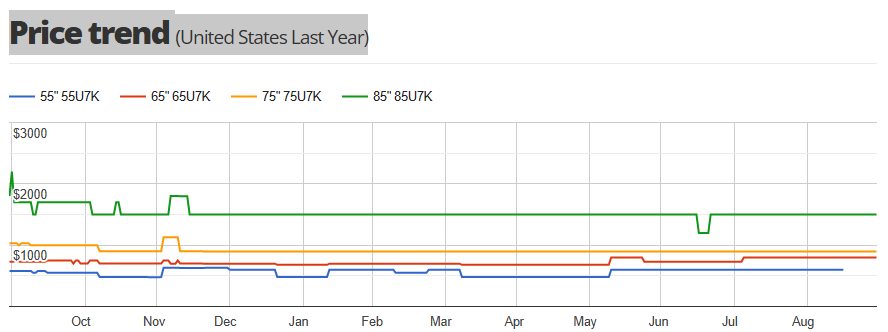
If it is a choice between the monitor and the particular TV that you chose (and you have the budget) the monitor is the better choice. The monitor has a much higher refresh rate, a much lower pixel response time at 1ms vs 9.5 on the TV. The monitor has a DP connection and HDMI; the TV has only an HDMI connection. Not having a DP on the LG C3 I’m using is a drag, but the LG has Gysync, VRR and up to 120Hz refresh rate; however, it was a lot more expensive than either of the options you are looking at. The one advantage of the TV is it can display at true 4K. Whether that is useful is up to you, since most or almost all games will have to be upscaled to 4K. I don’t think any of them will output at a native 4K resolution.
Thanks, it looks like only the newer U7N is available in the UK now. I’ll have to wait for a while or the sales for the price to come down.
Good suggestions you made there. One minor detail though (and I’m reaching here…)
Not that anyone would buy a big 4K monitor and run it in 1080p, but I’ll bet somebody somewhere has thought that bigger would automatically make their 1080p experience better, when in fact it can make it worse.
For any given resolution there are the same number of pixels in a 19" monitor as in a 65" monitor. As such, those pixels will be farther apart on a bigger monitor. Sitting close to a big monitor @ 1080p will be a less-than-ideal experience. In short, the bigger the monitor, the higher the resolution needed to look good at a given viewing distance.
4K opens up the big monitor experience for people sitting fairly close to their TV’s.