That’s not “formed,” it’s deterministic, cinematic. It’s one of many boxes that says “these conditions are here.” And those boxes move and may or may not be accurate at the time, depending on that data that are feeding them. And it may or may not be updated in a timely manner. It seems to have gotten more granular and accurate.
That it looks better in the past is not the dispute. They currently need to work on the various types of cloud renderings.
Despite that, the weather right now is doing the exact same thing it has been. It is moving in the same way. The only thing I’ve visually observed METAR doing in the last few months is injecting visibility differences that are not bound to rendered precipitation. So if the METAR changes to 3sm visibility in real life and the storm isn’t there yet in the sim, the visibility drops, then the storm arrives, say, 30 minutes later, when the METAR vis is back up to 10SM. That’s the discrepancy.
It’s still doing the same thing. It just looks worse for certain types of clouds.
As far as it being stochastic, created weather, it’s so off the mark to think that’s what’s happening that I have to laugh. When those videos were filmed, there were no triggering mechanisms for the types of synoptic, mesoscale, or storm scale lift present in the sim to generate weather. Even now, the only lift we seem to have are from very localized thermals and perhaps orographic. I don’t know if those are tied into local weather generation, but I doubt it.
Back then it was simply on a moving loop. Storm box here, clouds do this inside. Box moves. Clouds move. That’s it.
Well, you may be right about those boxes of weather and loops. I know it worked like that. But the loop were 12 hours instead of 6 that we have now and i bet those 6 hours of loops has less detail as we can see since su7. They also described it as such boxes before release of this sim 2020. But in my opinion it looked and felt much more like weather with the 12 hour model they used pre su7 because it felt developed over time not fixed and generic like it does now.
Besides, i get it you want it accurate to those METAR and i want it as it were advertised for me before i bought this sim to be able to enjoy it again. I found this sim weather awesome at release. Never experienced something like it in earlier flight simulators. Now it feels same as all the rest.
I feel Asobo have done a good job on everything else but the atmosphere has gone backwards since release “visually”
I really don’t care about METAR, not as a stand-alone, anyway. As I’ve said dozens of times, I want it to be accurate enough to all real-world weather observation tools so I can make decision in the sim about weather ahead that is obscured/embedded or I cannot possibly otherwise see. Aviation weather is such a complex topic and it can’t be boiled down to one observation - I keep saying radar is so much better for precip, but for some reason METAR continues to be attributed to me.
As it is, the injected weather has gotten better, but it’s still off enough that it completely leaves us blind when operating on the margins. Keeping in mind that some lag is acceptable and expected in any realistic scenario, just not as much as we continue to have. So if it’s bad (inaccurate) enough, we just have to go “well I wouldn’t do this in real life” but I find myself saying that way too much when compared to all the other fidelity that’s striven for.
That said, I still agree with you that there could be improvement to the rendering types of clouds. 100%. But again, it doesn’t seem that since SU11 that has anything to do with what METAR or anything else is injecting as my observations have shown the clouds are behaving independently of that. I’m not seeing cloud (or no cloud) bubbles from METAR at all anymore. I do see some visibility bubbles, as I stated above, but again, that’s often a timing lag if it involves precip.
But this is the entirety of my point: We keep attributing this to one thing (METAR) while ignoring the actual problem (injection lag or lack of granularity breaking usefulness of rw observation tools) and obscuring (no pun intended) the discussion with whatever is continuing to cause the poor cloud renderings, despite other improvements in the meantime.
I know that weather planning is a really important aspect in flight simulator and aviation. I use it too and will allways do. Now Asobo tried to implement weather that feels like weather in this sim. Maybe wrong thing to do to be able to call it a “flight simulator”? It must need to match those weather tools to be a flight simulator? In my opinion it doesn’t because in the real world observations is only a “tool” for those that fly not a thing that makes the aircraft fly. In my opinion i see it like this. If they implement a weather from a source that doesn’t match those real world flight weather planning tools they needed to implement own observations of the weather that could have been exported to be able to use those with real planning tool. Like “Active sky” does. We can even use that with simbrief while planning there. That in my opinion were lacking at release of this sim and should have been implemented instead of completely change the weather system to something else and instead focusing on making the actual source in use be injected propperly for example the 225@3KTS wind bug we had at release. That they fixed instead by implementing winds, temp and pressure from METAR. Then they added more and more data from those less detailed METAR reports instead of focusing on the actual source they released together with this sim.
And i must agree that the issues we see in the sim is not only the METAR but thats what they said they added for the visuals in su7. Thats why i blame it to be the cause. How it actually works nobody beside Asobo knows for sure because it’s a secret right? Then we as users only guessing what is happening. And as i said earlier the only thing we as users know for sure is that it looks and behaves worse now.
I think @Perrry and @CharlieFox00 make some really good points. Thank you both for taking the time to do so.
At the end of the day, we need a means to assess the weather in the sim ahead of a flight, and it should get the basics of visibility and ceilings right, relative to the real world. MeteoBlue would nominally be the place to go to for that purpose, but it often doesn’t reflect what we actually experience in the sim.
“Well, I wouldn’t do this in real life” isn’t an attitude I like to fly with, so more often than not, I find myself turning off live weather if the in-game weather is forcing me to simulate something illegal in order to fly on an online ATC network like PilotEdge (there, advising controllers that you have information Zulu tells them that you’re flying with your own weather). The fact that that’s necessary is unfortunate.
Edit: I should clarify that what I mean by that is one goes to MeteoBlue to check METARs and other details about current conditions and they indicate that the weather at the airport is OK for your planned VFR departure. But then you turn on the sim and there’re clouds all around down low and you’re like: dafuq? That wouldn’t happen in real life because one usually doesn’t teleport in to some random location ahead of a flight in the real world. You’d know what the weather is by looking out the window on your drive to the airport, and it wouldn’t be too different than the current METARs. We are reliant on things like MeteoBlue to give us that current picture in the game, so it would be nice if they’d do a better job of matching.
I agree about that the weather needs to match the source they are using to be able to plan. If they say we are using MB we should be able to go to their website checking that source and expect it to match that specific source. That were not allways the case at release of this sim. It didn’t allways match the forecast model they were using as i said with the wind issue. Thats a thing they should have fixed first because that fix would have made the weather more accurate to real world conditions. Not perfect but winds, temp and pressure is those kind of things forecasts predicts well. If they fixed and synced that data they got from Meteoblue it would have improved much both visually and those things we couldn’t see like winds by it self but instead they added data from METAR on top of the MB model that is an endless task to improve because those data sources will allways have data that doesn’t fit the other source because it’s 2 different things basically. METAR is an observation and Meteoblue is a prediction.
@CharlieFox00 says radar is a better option to make it accurate. For sure it is. But a radar don’t collect data and sends it in real time and it’s not a globally available thing. That data needs to be handled and make it to look like weather. And that needs to be done by Asobo. And how much work does that need? If not it will be a static rain cloud that doesn’t update until next radar data is available because it’s “known” data that is not able to be dynamic or change. Known=not able to change/static unknown=able to change/dynamic. The more accurate the weather becomes we also need to know that the more static it becomes.
Well, i just hope Asobo gets the visuals of weather back to the standards as i were used to before su7 were released. Then how they will manage that without option to switch between the old and new system i’m not sure. Hope they figure it out soon.
Maybe in a perfect world, we would have an in-game weather planning tool? (I think you already mentioned this, @Perrry?) If the game can’t be made to match MeteoBlue, maybe we could at least tap in to the same data source that the game is ACTUALLY using to generate its weather?
Maybe I’m too much of a geek, but a flight for me usually plays out like this:
T minus 1 or 2 days - plan the flight in LittleNavMap, choosing the route, navaids and altitudes, then write it out on my flight plan form
T minus 30 - 60 minutes - check the winds in MeteoBlue and compute the wind correction angles and ground speeds. Use those to compute fuel requirements. Double check departure and enroute ceilings and visibility are OK for the planned route.
Start the sim and observe that the clouds preclude me flying VFR
Turn off live weather, then fly anyway.
If we had a means of obtaining GFAs, FDs, METARs, TAFs, etc out of the game’s data, we could do all of the above and also be able to count on the weather matching the current conditions (within reason). The original ideal was that MeteoBlue would be the source for those current conditions, but it hasn’t worked out that way.
Agree, a realistic planning tool that matches the source (MB) in the sim would make a huge difference. But that will cause issues for those on VATSIM as an example that expect the weather to match those METAR around airports all the time because there is still users on VATSIM that uses older sims that still uses METAR as the source for weather. Xplane 12 uses different source than METAR too. Xplane 12 has also changed and uses forecast models as well but there we can see what the winds are instantly when we download the weather data and that data matches what we get while flying. I can only see an option to choose the system we want to use as a way to make all of the users happy and enjoy the sim equally much. But it seems that this sim should only be enjoyed by one type of users.
Correct me if i’m wrong but for me it’s a flight sim even if the weather behaves like weather but may not always be accurate to real weather but it stays fluid all the time and feels like weather.
For me It’s also a flight sim if the weather stays more accurate and are more generic but we are able to plan using those real weather tools.
But i preffer the more fluid system over the more accurate system we have now. The thing that makes it less of a simulator in my opinion is the lack of options. If they release a system they advertised together with the sim we should always be able to use that if we preffer that and makes the sim feel more realistic. Now in my opinion it feels less like simulated weather. It feels much more fixed and not simulated.
Exactly the same for those that want the weather to stay accurate that makes the weather feel more realistic for those users.
A quick sumarize:
I preffer a more detailed fluid/varied weather to feel realistic like we had pre su7.
Others may preffer a more accurate weather to feel realistic but may ignore the less detail like we have now since su7.
But in the end both is correct opinions just different views on what is realistic right?
With options included we could have chosen what we preffer the most and enjoy the software that we bought instead of be here at the forum arguing or defending what system is the best and most realistic.
I get that weather is variable and doesn’t always live up to a forecast. But I’d also expect that current conditions are reasonably well described in the METARs and in MeteoBlue. That’s what puzzles me about MSFS. Often, in the LA basin, I start up the sim and find a bunch of low cloud when MeteoBlue shows no cloud. My suspicion is that the sim is dumping in the cloud in an attempt to model haze/smog. On those days, I give up and just turn off live weather. The weather “vocabulary” in the game seems too limited; everything is just some variation of cumulus clouds.
Who actually knows for sure what is happening besides Asobo? Or are they equally confused as us users? Actually most of the users has been confused since release. But it’s not getting better by injecting several different sources that reports different data. That only makes us even more confused. For example as i have mentioned many times that the Meteoblue data were not injected propperly at release already but the fix is not to inject more sources like they did. The fix should have been to make sure the MB data were synced propperly and the data MB sends is also shown propperly for example the 225@3kts that we had in the sim all over the world but the MB data had other data forecasted. I’m 100% sure MB doesn’t predict 225@3kts all over the world at the same time. But they didn’t, they added another source instead. If they focused on the source they actually had to begin with i bet we would have both more accurate weather and a more detailed weather right now. Not perfect accurate to real world conditions. It will never be.
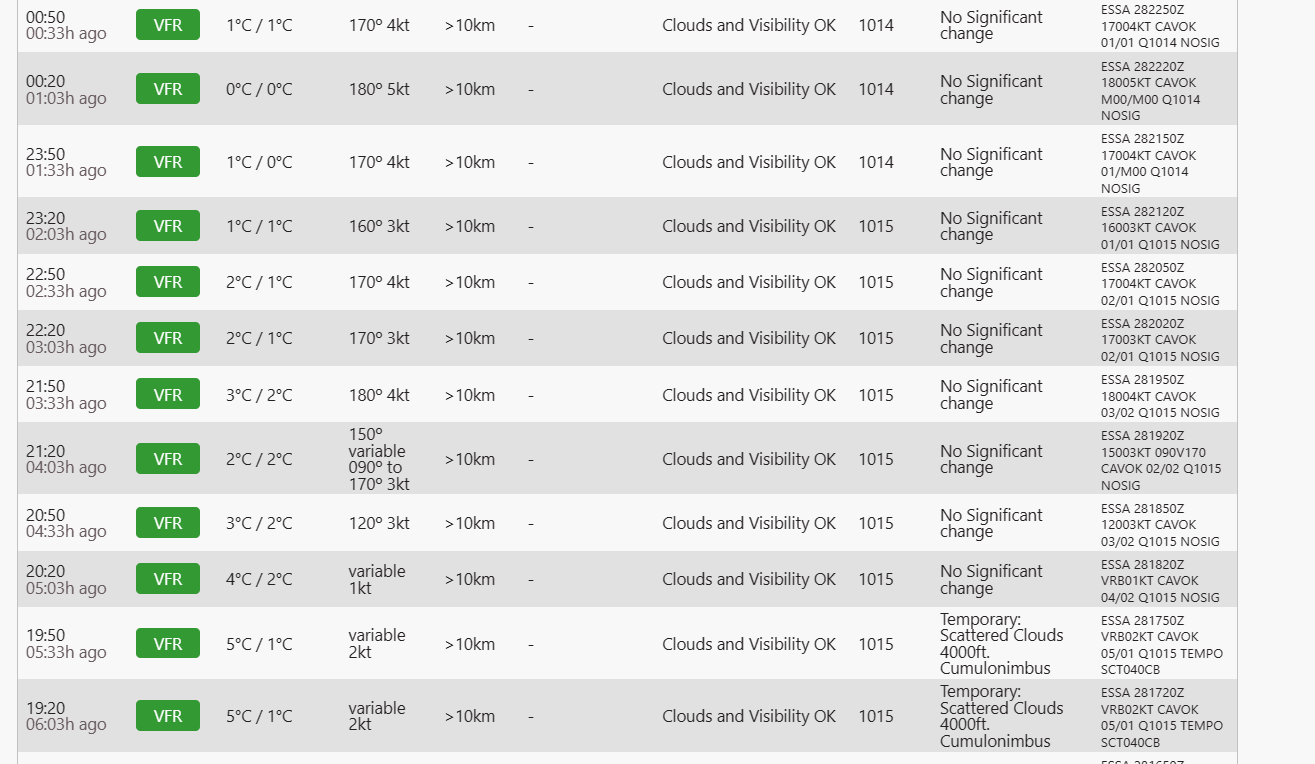
This is an example that METAR doesn’t report all of the clouds IRL either.
Near Arlanda Airport. As you can notice some clouds in the vicinity 5 hours ago.
CAVOK doesn’t mean completely blue sky i know but many sim pilots says it’s accurate when the sky is clear of clouds when a METAR reports that. But in fact the METAR is not accurate. It’s accurate for the purpose of landing the aircraft but not accurate for the purpose to make the complete picture of weather/atmosphere accurate.
And that list also shows how generic METAR data is.
The defininitions I have seen used for CAVOK are no cloud below 5000 agl, no percipitation, no thunderstorms, no fog and greater than 6 statue miles (~10 km) visibility. …So it could be completely overcast and still be CAVOK.
I keep asking: Is the sim using METAR to locally generate clouds? It may have been at some point, however in the past several months I see no evidence that it is, even evidence to the contrary. Like, at this point it’s almost a strawman.
I was merely pointing out the definition of CAVOK doesn’t preclude clouds. I have no idea where the sim is getting its weather data from. If I had to guess, I’d speculate (as I did above) that the issue is that it tries to represent everything as some combination of cumulus clouds. It doesn’t seem to have any other tools in its toolbox, and a hammer (so to speak) doesn’t make a very good screwdriver…
I decided yesterday to take a look at the weather debug option and I found that in ATL which was full overcast and with low visibility that two things popped out at me. The first one was that the turbulence slides was set down to like 10% I moved it all the way to 100. Not sure if that will make a different or what difference it makes with turbulence as it’s been a lacking feature that has been discussed on here. Another thing was the cloud density setting. Even in full overcast the value was well below 1. So the values was something like 0.____. Something to look at more maybe. If the overall density of the clouds were improved then a lot of the depiction drama would go away some. It’s not that the clouds aren’t there any ballpark where they should be, it’s that they don’t have the density that they should. @dectenor1 We know exactly where the data comes from and how the data is used or supposed to be used in the sim. The problem is that they have either dumbed down the data, removed certain variables or data points that aren’t active or missing from before, or there’s a massive bug that’s causing a conflict in representation. My money is on METAR being the influencing factor which I’ve stated many times in this discussion.
I have recently withdrawn from these disscussions - although the first entry about the weather came from me after SU7 with the note that nothing is correct here any more. (and some other)
In my opinion, besides the incorrect implementation of the METAR data, a lot of the cloud density was taken away (due to the complaints that the clouds are too pixelated - unfortunately the voxel engine brings with it and the denser the more pixels ,that’s the nature of the engine and ok for me for this great look!).
You can see the lack of cloud density in the clouds themselves - it no longer feels like you are enveloped in a cloud and when you fly towards white clouds they look like clouds and turn out to be transparent “scraps”.
And that is the problem when the “wishes” of some apply to all.
Unfortunately, this is the “disadvantage” of the “make a wish” community, but everyone is entitled to their opinion.
Don’t get me wrong, I still love the MSFS and use it as a first hour simmer or as a serious simmer (but I don’t like the term, everyone should have fun). But it looks like the resolution of the weather has also become lower - for performance reasons or whatever. So here we have the result. And we are back to the important point of “selectable options” as I have pledged from the beginning also for turbulence. Even Seb has mentioned that there might be an option for the resolution of the weather - so it is well known that it can be better. With the options resolution, density, cloud types, (whatever) - you would save a lot of discussions (possibly with little work) - and everyone can adapt this performance to their system. There is nothing wrong with that. Of course it is difficult to fulfill every wish - I appreciate the work you are doing here for our hobby but you can see how important the topic of weather is and how many threads there are here - you should concentrate even more on this “problem”. It’s definitely better than after SU7, no question and I use the SIM again more than just “turn it on, see that nothing has changed and turn it off again” but as I see some threads are “bug logged” so I think it’s still being worked on!
As I said, there are certainly several reasons why the feeling and the “look” for some of us have changed “significantly” - for the expense of accuracy ? performance ? - may be true in some cases - but it is certainly possible to do both !! (and by the way, there was a “fog” before - there is still no “regulated” visibility values or haze - so that can’t be the reason and it was even “3D” !!)
Flying from Montreal Canada to Quebec now, live weather said it was cloudy, loaded in a few clouds here and there but otherwise a nice sunny day in the sim.
Checked my weather app and it should be murky overcast cloud coverage.
Well have to say the LIVE Weather has Just got worse. we had a Severe Thunderstorm in Alicante and rain yesterday i logged on got the Rain just but not heavy and wheres the LIGHTNING AND THUNDER??? its Just silly how can that be LIVE?
Actually the accuracy is the smallest issue in my opinion. The weather is more accurate to METAR after su7. They have implemented visibility, winds, pressure and temps that many asked to get to have it more accurate. They also changed the MB model to inject 6hours of data instead of 12. In that 6 hour of data MB also inject some data from METAR but nobody exactly knows what data they blend in. I bet when they also switched MB model to 6hour model those thunderstorms were reduced much. They have changed the trigger for thunderstorms. But i think nobody knows what it is that trigger lightnings to occure in the sim. I think many have believed it is the CAPE index that triggers lightnings. But i’m not sure.
The issue for me is that the weather feels much less like weather after su7. It feels dead instead of alive. And i much more rather have an alive weather than 100% accurate dead weather.
Absolutely agreed. It is indeed much more accurate, but consequently much too mathematical. Weather is alive, moving, changing. I think we could use with a little bit of randomness injected, at least for visuals. That and bringing back some density into the clouds. The cumulus clouds could also be a lot smaller and localised. Hopefully in time we have a weather and atmosphere update