Oh my goodness! Are you serious? I blindly reserved 250gb for nothing. Thanks 
Might want to consider starting a disk cleanup. Right click on C Drive and click Disk Cleanup then when the window pops up in the lower left hand corner click on clean up system files. I know that windows updates can store a lot of files especially when installing build updates, look at the delivery optimization files section as well in this same menu. You don’t have to execute the cleanup but you can use it to discover what else is using up space. Furthermore, what size is your page file set to? You’ll find that by right clicking This PC while in the explorer window. Then scroll down or look all the way to the right depending on if your window is maximized or not and select Advanced System Settings. When the window pops up you will see a tab called Advanced then under performance click settings. You’ll then be able to see how much space your page file is taking up. Don’t delete it! I have 32 gigs of ram and I still use a 20 gig page file but I direct it to another drive. But it can also be set excessively large so it’s worth it just to know how big it is. Furthermore, system restore points can begin to take up a lot of space as well.
Did you install the OS yourself or was it preinstalled? If it was preinstalled you could also have a recovery partition eating up space as well.
Cheers!
Very helpful. It was pre installed.
I will check what you suggested tomorrow and revert back, I’m sure ill have some questions!
Some of us are always here  . Rather you ask than scrubbing things that might cause you more problems than good!

You should have a digital license for your OS then, just be sure to activate it with your MS account if you haven’t already!
Whats a digital license if you don’t mind me asking
I’m such a tech noob!
You have an OEM copy of the OS installed I’m assuming, so you will have a digital license that will be connected to your MS account given that you have used your MS account for the PC account.
Yeah but in terms of in-game performance (stuttering, slow scenery updates) or in terms of download speed and volume? And wouldn’t that also be different for a slower versus a faster aircraft? And wouldn’t it also depend on your style of flying, spending a lot of time in some of the same areas versus never visiting the same place twice?
I’ll need to check that out also.
Where could I see that? Thanks once again you have been very helpful.
Stuttering is more related to either quality of network connection or graphical settings (which may be asking too much of the hardware). The amount of calls made for terrain is mostly limited by available RAM, hence the recommendation to send that to a dynamic cache is really an optimistic view that all 16GB is used by the sim (which it’s not).
You’re very welcome! Start menu icon, click the search icon and type account, then you’ll see manage your account. You can sign into your OS with an MS account or local account but given that you have a digital license I’d recommend activating windows using your MS account because this digital license is then linked to your account/device of which you can transfer to a new device if need be. As well in the event you need to reinstall the OS a new, the activation process is a breeze whenever you sign in on the newly installed OS.
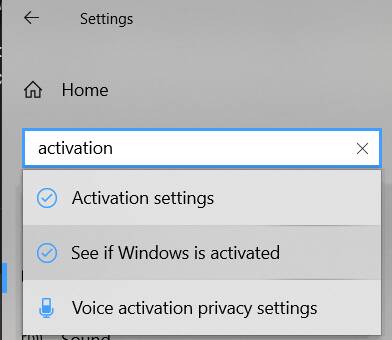
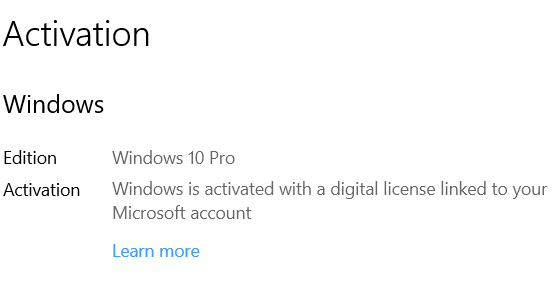
Thanks once again!
May have one or 2 more questions tomorrow!
Thank you very much!
Appreciated
Bring em on!
You’re very welcome 
Disk cleanup.
How to
In windows search bar type
disk cleanup
Right click on it and select run as administrator
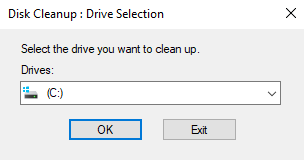
Select disk C and click ok
On the disk cleanup tab select all check boxes
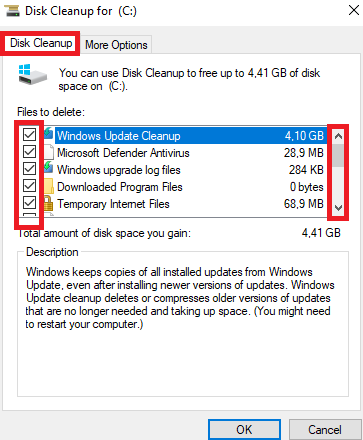
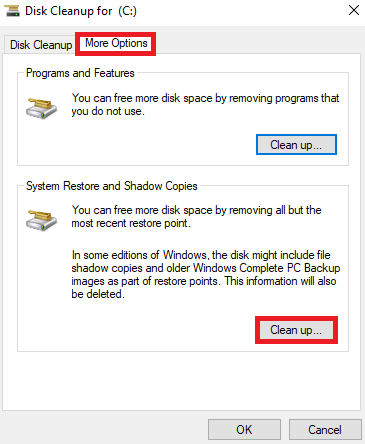
Click “more options” tab and under “system restore and shadow copies” click “clean up”.
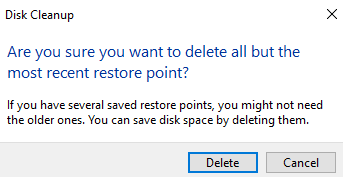
Click delete
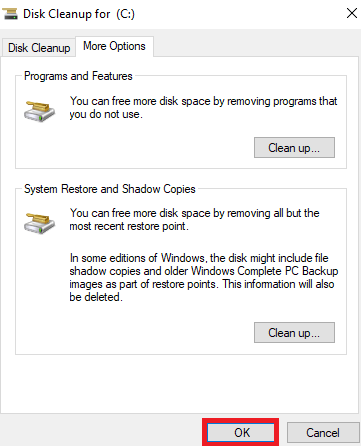
Click “Ok”
Source https://forums.flightsimulator.com/t/install-over-a-ssd-and-hdd/409997/9
Right, but I still think that misses something, or maybe there is something about how the dynamic cache works that I am missing.
Scenario 1: Say you are flying from point A to point B, and the sim downloads all the scenery it needs along that route. Then you fly back to point A again (the same session or the next day). The sim downloads all that scenery again, except for what it already has in the dynamic cache. The more you have in your dynamic cache the less there is left to download. Larger cache reduces your download data amount.
Scenario 2: Same scenario, but you fly a fast aircraft such as a fighter jet at low altitude, and the sim needs scenery at a faster rate than your slow internet connection can download it (or maybe faster than the heavily loaded CDN servers can provide it). On the out flight you get slow scenery loading and a poor visual experience, on the return flight the scenery is already in cache. Larger cache reduces your required download data rate.
Seems to make sense? Or is there something else going on that I am not getting?
You can always submit a Zendesk ticket or await the next Dev Q&A to see if Seb or someone from Dev Team can answer the question directly.
pff, i have nearly 2TB in my FS2020 Folder… and dayly a little bit more. xD
what can i say, take more, 256gb nvme for os, 2tb sata ssd for games, 2tb nvme for msfs, 50tb hdd for media/distributive/ lol
I would not do that, because I not need a size of (64 * 1.5)… I’am allways not a fan of general recommendations like “x times than”. The rolling cache holds temp data, which users not again use if they not fly the same route ( and this also not completly , it download again some data ). We have a lot of discussions in forum which show us, that a “to big rolling cache size” cause more issues as it helps I would never set more than 32GIG, currently I have 16GIG.
do you mean the “manual cache” ? the rolling cache does not pre-load some data. A cache which pre-loads data along a route does currently not exist, so far I know.