Hi,
I’m loving the new experience, with Flight Simulator, Thanks again for your hard work!
I’m planning on getting the new 3080 and having a 40 FPS VSYNC lock @ 4K would be ideal to have in the sim!
Hi,
I’m loving the new experience, with Flight Simulator, Thanks again for your hard work!
I’m planning on getting the new 3080 and having a 40 FPS VSYNC lock @ 4K would be ideal to have in the sim!
So did you? And did it?
It would be much useful to know the outcome.
I do exactly this with a 3080 using nvidia control panel. Works very well for an extremely smooth experience.
I have an RTX 2070s.
Planning on upgrading my CPU soon but not the GPU as I recently upgraded from a GTX. 770.
I understand that the CPU is probably more important anyway for this Sim. Any thoughts on which processor would be best Gordon? I ask as you say you have smooth performance which is my goal too! Cheers simon
I have a 10900K which I think is pretty good, plus an RTX 3080 (only waited 6 months for that on pre-order  ) and 32GB RAM. I see a lot of mixed reports on the 11900K and whether that is faster/better/stronger or not (there’s a a few comparisons in this forum if you search for them). Hard to say if it will add much - cost difference is about £70-£80 I think. Given how close they are cost wise, might be a tricky choice. I’ve never used AMD CPUs so don’t really know anything about them - other than I hear they have a lot more cores which, currently, doesn’t seem to help MSFS very much.
Before the 3080 I had a 2080 super. This worked pretty well too, and whilst the 3080 hasn’t added a lot in FPS (5-10 maybe, but actually hard to tell with the sim updates/hotfixes going on, so not really a stable comparison) I think it has added a lot in terms of smoothness and stability. The sim just feels a lot slicker. Placebo? Maybe. Also the hotfixes may be playing a role.
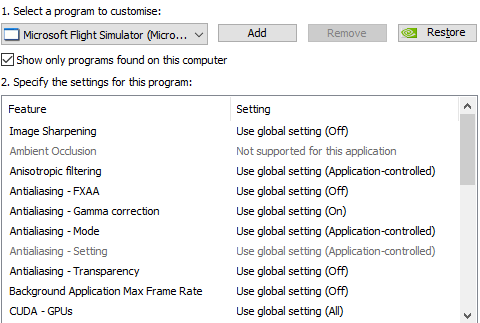
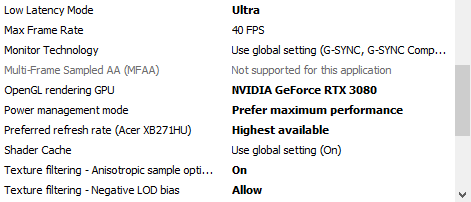
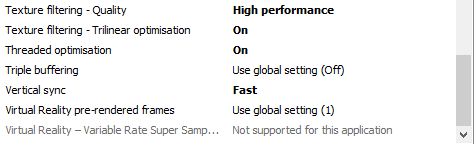
I was getting 50+ FPS in open areas, 40+ in most areas and the odd dip into the 30s in heavy PG areas. So I read that locking the frame rate helped smoothness, so I thought I’d give it a go. I used nVidia control panel to lock at 40 (I think in the sim you can only lock at 30 or 60?). So far it has worked really well. Very smooth and enjoyable experience.
Thanks Gordon. I’m guessing your 10900K is the i9-10900K 3.7GHz (Comet lake) socket LGA1200?
Would you mind sharing what MoBo you are using also?
I am going to need to change this too for the new processor. I am running 3 24" monitors (may upgrade the middle one to a wide screen at some point)
I may as well upgrade from 16 to 32GB RAM whilst I am at it, although not sure what material effect this will have on FPS/ smooth experience.
Cheers!
Edit: I may give VR a go at some point, but budget and suspicions about average sim performance prevent me from doing so right now. I’m guessing that a 10900K, RTX 2070S and 32GB RAM should be sufficient for good performance in VR. In other words, I am wondering whether this is well enough “future proofed” at this level of specification?
Any views on this are most welcome, Gordon and other folks!
Hi
Yes, I have an i9 10900k, sorry - should have said. This is 3.7GHz as you say. It does include the Intel Turbo boost which automatically boosts clock speed based on demand and cooling. When I first installed, this boosted clocks to 5.0GHz (it says the maximum is 5.3GHz), but that was a bit unstable and I had some early crashes. I capped it at 4.9GHz and have not had any issues since doing that. Here’s a link:
The socket is LGA1200 and I got the MSI MPG Z490 GAMING CARBON WIFI motherboard. Note I use WiFi, so needed that version - I think there is another version without the WiFi if you don’t use it. I also wanted one with two M2 slots (although I only use one right now). Link here:
Link here:
https://www.amazon.co.uk/gp/product/B0886R9SK2/ref=ppx_yo_dt_b_search_asin_title?ie=UTF8&psc=1
I was running a 2080 Super, but then, as I said, upgraded to a 3080. My case is quite small, so the only 3080 I could find that woult fit in it was the EVGA RTX 3080 XC3 Ultra Gaming (there are slightly different variants of this available too).
Other specs:
Corsair Vengeance RGB Pro 32Gb (4 x 8Gb) DDR4-3200 memory
Samsung 970 EVO Plus 500Gb M2-2280 NVME SSD
Samsung 850 EVO 1Tb SSD (this was reclaimed from my old system)
Samsung *60 QVO 1Tb SSD
Seagate BarraCuda 4Tb 3.5" 5400 RPM HDD x 2 (you can never have enough hard drive space )
Corsair HX 1000i PSU
Corsair iCue H150i RGB Pro XT liquid CPU cooler
Acer Predator XB271HUbmiprz 27 Inch WQHD Gaming Monitor G-Sync
Internet is pretty good for the UK (cable):

In terms of settings etc:
I run at MSFS 2K, 2560x1440 on the Acer monitor
I also run two other monitors, both 1920x1080 either side, but only run MSFS on the big monitor. The others are for this forum , Little Nav Map, Navigraph, Chrome etc
In MSFS (not in the sim to take the screen shots, but from memory):
Ultra everything
LOD sliders at 200
Render scaling - 100 normally, been experimenting with 120 now I have the RTX 3080
Motion blur off (hate it)
Lens flare off
Generic AI/Multiplayer models ON
Multiplayer OFF
All other online settings ON
Real time traffic ON
AI traffic OFF
(I believe AI ON + MP ON causes big issues - but I never play MP so not a problem for me)
Azure ATC voices ON
No rolling cache
No manual cache
In nVidia Control Panel:
Other settings
HAGS is set to ON
Gamebar is set to ON
(tried various combinations - no perceived difference for me)
nVidia drivers 466.11 - installed using GeForce (I know, people tell me to use DDU, but (touch wood) I’ve never had an issue, update the drivers when they come out and not noticed anythign very good or bad either way)
I routinely use these mods:
Working Title G3000
TBM Performance Improvement Mod
Global Shipping
Bijan Seasons
The only mod I’ve ever had a material issues with was the Bush Radio, where it stopped the sim from loading (or took so long I assumed it was broken )
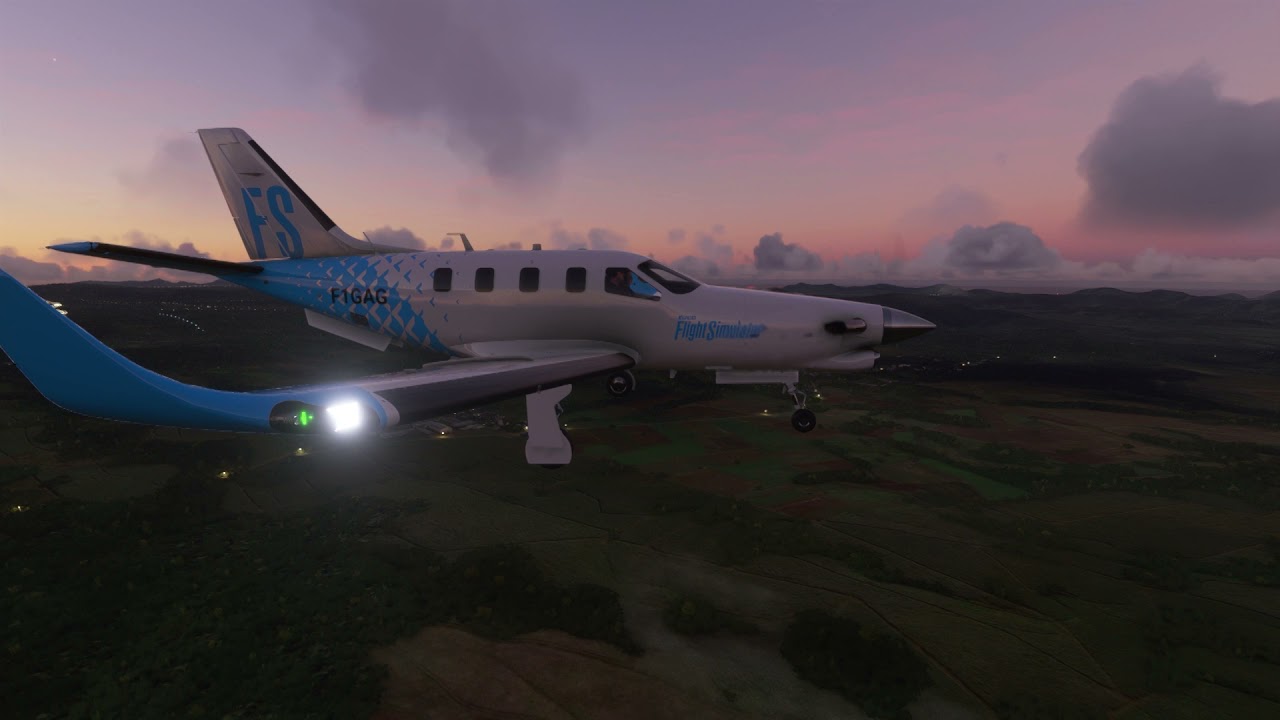
Hope all that helps. I’ve done a few videos, so you can see what my sim looks like, but of course you don’t get a sense of the smoothness through these or how it feels to fly. Here’s some examples:

Wow thanks Gordon - really comprehensive and therefore really useful to me! I has to chuckle about your “motion blur off” comment - couldnt agree more.
I am about the push the button on these purchases, so its very timely advice. One thing that has been holding me back is that I am dreading the prospect of replacing the MoBo myself. Fingers crossed it goes smoothly.
I also use this machine for my work, so can’t afford to mess it up!
I would like to use the global shipping mod, on top of Fabio’s replay tool, Pacx, MCE, Pilot2ATC (not yet acquired) and SkyPark.
I’m going to check out your vids in my lunch break 
Cheers, Simon
Sorry, one more question Columbo… I am currently running a 750w power supply. Does anyone have a view if this would be adequate to run a 10900K and 2070S off the Z490 MoBo ? Cheers.
I used to have a 750W power supply for my rig with a 2080 super with no issues. I was a little worried about that when I went for the 3080 so upgraded to the 1000W. Probably way too big…
Cheers - I have done the deed and will report back over the weekend! Thanks for your help again.
Hope it goes well!
with 11900k + 3090 Asus OC + 64g ram 3600, maximum power i reached was 450-550W.
so i guess you wil be fine with 750w
What a difference. Not cheap to upgrade but wow so pleased I did. I haven’t even bothered to look at FPS, it’s smooth enough that it doesn’t cross my mind. Can even land at lfpg now with near smooth performance. It is unrecognisable from before. All settings ultra apart from motion blur. LOD 195. Ultra wide display (not 4g)
Really appreciate your advice.
Simon
Why not 4G?
And how are these builds running with FS24?
The suspense is killing me