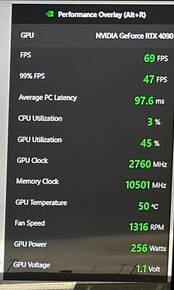
4090 + DLAA + Frame Generation = WOW

THIS, for Christ’s sake!.. THIS !
The (not so) shortage of semi-conductors cannot justify enough for the fact that the GPU beast of its time is almost quadruple the price the absolute beast of 5-6 years ago (namely the 1080ti which was almost a Titan-for-people) which sold back then at a retail price of… 700-800$!!! (and it was consider a hefty sum back then for a GPU). Inflation my a**

I’m not surprised one bit though, I knew Nvidia, with the 40xx, wouldn’t go back to their “normal” pre-covid/pre-scalping and mining high ranges of price tags, as everyone was saying back then during the big shortage of GPU. They’re not stupid. They just discovered that apparently, a lot of people are not suffering this much, if at all or even quite the contrary, from that “erosion of purchasing power” they are all talking about on the news everywhere…

Prices went rocket high during the last two years yet scalpers easily sold their GPUs at much higher prices, so why wouldn’t Nvidia come up with “scalper prices” right from the start? It’s a trend that will not be going back any time soon. You’d think at 3 or even 4 times what it would cost to build yourself a high end PC gaming, people would say “hey, enough now! You keep your overpriced mumbo-jumbo!” but no… the demand for their insanely priced 4090 is very high.

Remember: 1080Ti, a card which performances were legendary (it still equate to a 2070 Super minus the RTX and with more VRAM), the absolute beast of its time: 700$ at release…

4 Likes

Demand is high for 4090, but how many times will it last? Not sure those cards have the same success as the last generation. Competition is raising…
Also, the PCB is nearly similar to the previous Gen, and a ridiculously gigantic cooling system was wrapped around. That’s let me think: what kind of performance we will had see if the radiator was the same size as a 3090? I know the making process was improved, but what is the part allowed thanks to this big radiator ? Can we keep the same form factor and really improve the electronic and power consumption ?
I got the feeling they went too far this time…

2 Likes

So all those who got a 4090, are you satisfied with its performance uplift compared with your previous gpu? Im planning to buy one too. Thanks!

2 Likes

I’m afraid MSFS (unless when it will have true multi-screen support) is really not the main deal when it comes to uplift compared to a 3090. It’s too CPU bottlenecked, even as of yet if you put the very best CPU there seems to be for MSFS which seems to be the 5800x3D at the moment. Your GPU will be bottlenecked. Now there’s DLSS 3 so…
I don’t know for other people but for me DLSS is a no go as the instruments are so blurred out with it, but then again I only play on a 1440p screen so it doesn’t help to alleviate the problem.

As of yet, I think the 4090 is really something that will shine on, at the very least, something like Cyberpunk 2077 with highest ray tracing which is quite demanding on the GPU and is not that much CPU bound, just like the vast majority of other games.

The problem is, as usual with very high end cards that only a minority will buy, by the time you’d find an optimized enough true graphical gap in games (which now requires exponentially more and more resources from gaming studios, and is becoming a real problem) worthy of such a beast, the 60xx will be out and there you go again… You might say “Well, at least it will be a long term investment! It will still run well in 2-3 years with so much power to begin with!”. Yup. It will. Sort of… because by the time you reach at last that really noticeable enough graphical gap that that 4090 would have seem worthy of it, the generally poor “optimization” will have your 4090 run at a good 60-70 fps, possibly slightly less (if you don’t push it too much). Good enough? Until you see benchmarks and reviews of that brand new, shiny, 3000$ just released RTX 6090 that is able to pull those huge figures… and you’ll be tempted again if you have enough money! I guarantee you any of the current 4090 buyers will!

Bottom line is, there will be one game or two, if any, where you’ll see your 4090 at its TRUE best AND efficiently used. And that’s if you’re lucky enough to be interested by the very very few AAA games that will be interesting enough graphically wise to warrant such a pricey GPU…

I switched to a 2070 Super (from a 1070) when it was released, obviously not the biggest beast of its gen, but not so far off. Before I switched to a 3070ti recently due to some friend selling it to me at a dirt cheap price cause he was switching to 4090 and didn’t care for the money in the slightest (lucky guy but lucky for me incidentally).
I asked myself “Out of all my experience during the 20xx gen, when did I told myself that I really put my GPU to good use and took a slap in my face with really a next gen experience?”

Only 2 times (MSFS and especially Cyberpunk 2077) and a third with less impact (Metro Exodus last edition focused on ray tracing) did I told myself “Wow! This is something!”. It’s no longer the huge and phenomenal graphical gap you had when you bought something capable of running Crysis back then… yet, GPUs are getting more and more hugely powerful and cost more and more a fortune.

I’m thinking GPUs are growing too fast compared to the gaming industry and the resources they can afford to put into elevating themselves to getting closer and closer to photoreal renderings instead of “simply” making games only looking a little better each time but so poorly optimized they consume the raw power of GPUs just so game devs don’t have to deal with optimization, counting on our GPUs performances to “brute force” adequate FPS instead…

It’s as if car makers were dealing with a problem where each new car they’d design would exponentially be heavier than the last and they would have to slap bigger and bigger engines to the point of having an F1 engine to still be able to run a family car or your nextdoor neighbour’s sedan at 100mp/h lol

Luckily, we have 3D engines big name like Unreal now who are finding innovative ways like Nanite for example. But still…

6 Likes

All this, and all in between.
Let me print your post and put that on a wall, the opinion I could have said if English was ma native language.

Thanks! :slight_smile:

1 Like

Hate to tell you the game doesn’t have support for DLSS 3 yet so no frame generator…

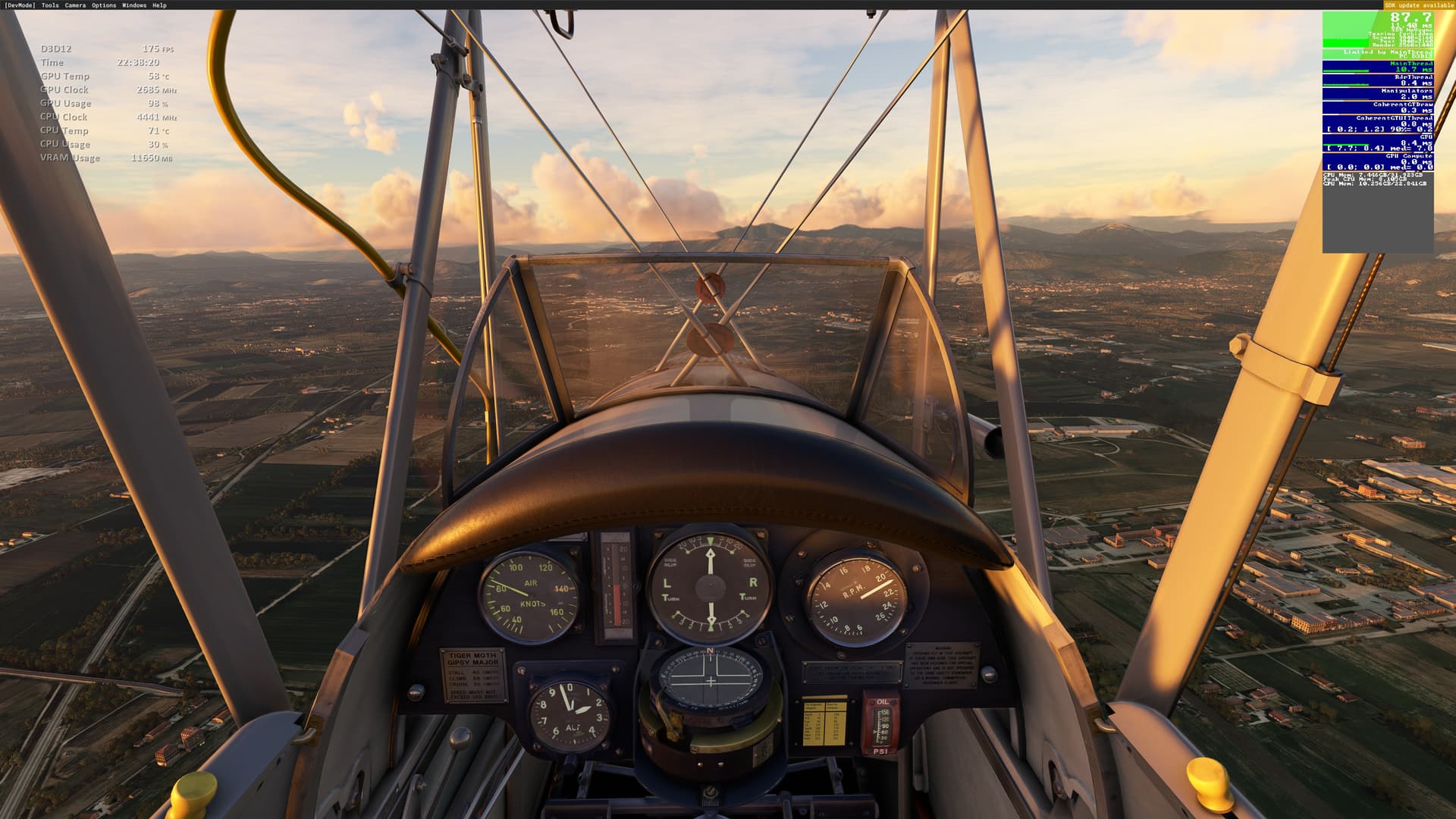
I went from a Radeon 6800XT and gaming at 1440p as well as VR. It performed well in 2D at that resolution and meh in VR (it couldn’t use motion reprojection properly). I now have an Asus Tuf 4090 and a 43" 4K adaptive sync monitor and the uplift in performance for me was great. Last night I flew the Tiger Moth over Naples and surrounds near sunset with absolutely everything maxed out in settings, including TLOD 400 and OLOD at 200 at 4K. With DLSS3 and frame insertion I got an insane 175fps. This with a Ryzen 5800x3D. DLSS3 works really well, everything was sharp including the instruments and the only artifact I saw was the lowering sun’s glare on the windscreen as it came through the arc of the propeller. I’m using DX12 and SU 11 of course, which enables DLSS3. Ryzen 5800x3D.

4 Likes

Please see the release notes for the beta:

https://forums.flightsimulator.com/t/sim-update-11-beta-release-notes-1-29-22-0/548906

Title now supports new NVIDIA technologies such as DLSS3 (including Frame Generator) and Reflex on supported NVIDIA graphic cards on PC. We also added support for 2 DLSS modes Super Resolution: Auto and DLAA

Buying one now. Cheapest here in my region is 1700 usd which is not overpriced.

1 Like

Enjoy your 4090! Remember to have SU 11 beta if you haven’t joined already and for frame generation to work in DLSS3 you need Hardware Accelerated Graphics on in Windows settings/display/graphics section.
Oh and be careful with bending the 4 way adaptor cable when fitting it in your case, plus make sure the connector is all the way in on the GPU. I’m going to buy a 90 degreed adaptor when they come out later this month. For now I have left the case side panel off, as it was too snug a fit.

1 Like

This DLAA feature seems to cause some problems like overexaggarated motion blur and the displays getting a white frame.
I will wait and observe the situation a while until buying an Nvidia :slight_smile:

What you are describing as motion blur is actually ghosting. And yes, DLAA cause very visible ghosting which makes displays look really poor when any rapid movement happens in them. This is more pronounced with DLSS and FSR as well.

But I have to say, after having some initial reservation against DLSS frame generation, now after testing it in a few flights, I have changed my mind. Yes, it has issues with some artefacts. But, if used without the DLSS/DLAA, the glass cockpit screens don’t seem to have any majorly noticable artefacts like the ghosting I talked about. And it truly helps me to lock to a 60 fps which is visually fluid in my 28inch 4k screen, I had to force VSync on from Nvidia control panel to avoid screen tearing, but that doesn’t cause any perceptible issues for me. And due to this, so far i have CPU stutters reduce to almost nil. I still see stutters sometimes, but that have been very rare.

All this may be due to the relatively smaller high pixel density monitor I use, with larger displays with less pixel density, the artefacts may be more noticeable.

2 Likes

Hi, are you saying that you are happy with the shimmering… I also find that lights are much better including runways clarity and visuals from a distance. In fact I find DLAA the most comfortable especially in VR. I would say DLAA is inbetween DLSS (which is way to blurry for me) and TAA which is the great clarity but does impact FPS.

I have seen the shimmering you are talking about in some very rare cases, but may be because I am using a non standard setting here by enabling Vsync from nvidia driver control panel, it does not happen that often for me. Without VSync on, i see screen tearing obviously. In the UI there I see quite a bit of artefacts when not actually in a flight. And then again, may be because of my smaller monitor it’s not that noticable to me. And honestly I havn’t tested that much in night time, so that may be a reason I don’t see them often.

With dlaa/dlss/fsr, i find the ghosting too distracting as I have to stare at the avionics screen quite often.

Of course you did, you have to justify your purchase. :grin:

Not really for VR

What monitoring software do you use, I find its design very neat.

I am not justifying anything. It’s entirely my personal opinion and I am not saying others will see the same benefits as me. And i got it as an upgrade, didn’t have to pay full price. But that doesn’t matter. I needed 24gb vram more than DLSS3, ideally I would have liked to get an rtx 3090 at cheaper price, but in my country, the second hand market is very sketchy, almost non existent and retail rtx 3090 prices are almost as much as rtx 4090. So, didn’t really have to justify purchasing it.

If you go through my comment history, i have been complaining about the 10gb vram of my 3080 for a while, with DX12 and even on DX11 it ran out of vram frequently in heavy airports and with ultra settings. So that is the primary reason for the upgrade. The 4090 isn’t even utilised fully in this game. But I do play other games where it did make a difference, try running Plague tale requem with ray tracing patch with 4k ultra, you will see. But like I said, i am not justifying anything. I still think $1600 is too much for my needs, but it’s what it is.

1 Like

It’s nvidia GeForce experience perf overlay. If you run afterburner with RTSS, you can have a highly customisable OSD with many tweaking parameters to perfect the look of it.

1 Like

All good, I was just pulling your leg. :wink: