I have a budget of $6000 for a flight sim PC. I’m looking for recommendations since it’s not my area of expertise. I think I would like an Nvidia RTX 5090 and 64gb vram. I don’t know about the other components. Is this a realistic price point?
Can you clarify what you expect this budget to cover or what you already have:
- PC
- Monitor (and what resolution it is, or that you desire)
- Keyboard + Mouse
- Speakers
- Flight sim peripherals (yoke, stick, rudders, etc.)
You will spend 80% of your budget on this card. And they don’t have 64GB of VRAM but 32GB. I guess you meant RAM. It will cost you around 1,000USD for 2x32GB of DDR5 RAM. What about CPU, motherboard, cooling, SSDs, case, monitor, flight controllers, keyboard, mouse… Do you have any components at all?
Weather or not you need a 5090 depends heavily on the resolution you plan to play at and if you wish to play in VR. I play at 1440p with a head tracker and there is absolutely no reason for me to upgrade my 4090 for a 5090 and I play maxed out aside from TLOD at 350. The 4090 is still a very viable card and can be found for much cheaper than a 5090.
Spacecadet 4539, if this budget is for only the PC then you can build a really nice PC for that amount.
I have built a number of flight sim pcs through the years and last year in April 2025, I decided to build a really high end PC for simming.
The AMD 9950X3d cpu had just come out and the Nvidia 5090 had not been out very long.
I traveled to a Microcenter near Baltimore Maryland to snag a 9950X3D with an AMD X870E mb and 64gigs Of DDR5-6000 CL 30 ram. They had just gotten in a Zotac 5090 solid. Back then it was $2699! Ram was much cheaper (@$200 for 64 gigs) as was my 4 TB ssd.
A full rig set me back around $5000. To build the same rig now with all of the inflated prices would be between $6500 to $7000.
Then you add a yoke, Throttle Rudders and big monitor and you are looking at another $2000.
Tell us what if any parts do you already have.
You can research pre-built vendors. I got mine from NZXT which is fairly popular.
Look for “Player Three Prime”.
I bought a Digital Strorm Velox in 2023 for a little over 5K . Rtx 3080 Intel I7, 64 GB, CPU AND GPU watercooled. Just ordered a 5080 water cooled to swap out. Digital Storm is not cheap but I can definitely vouch for equality build, hardware, and support. Check, it out then call them to discuss your build and questions.
IMO a 5090 is studpid at the price point.
And the 5080 while not cheap is the bargain right now. The 3080 at the time and still is a great pearformer.
Thank you everyone for your replies. I currently have an Xbox and I am tired of getting memory issues,( blurry add on scenery, avionics shutting down, etc.) so I already have flight controls mouse and a 4k monitor. Eventually I want to do VR and add ons that are PC only. I like to do group flights but only a few of the multi player aircraft are modeled correctly. The rest are default Asobo even though I have the aircraft and liveries in my library. Also the scenery of the group flights organizer looks green and lush on the stream I’m watching on my laptop but on the Xbox my scenery looks like scorched earth. So I’m only looking to get a complete PC. I don’t think I need a lot of storage because it will be flight sim only. Does that sound correct?
If you want to play in native 4K without compromises, then the RTX 5090 is an excellent choice. It’s expensive, but it’s the first GPU that has allowed me to enjoy MSFS 2024 in 4K the way I wanted.
I used to have an RTX 4090 when I was gaming at 1440p. After I upgraded to a 4K monitor, I realized that the RTX 4090 no longer gave me the uncompromised 4K experience I was looking for, so I upgraded to an RTX 5090.
Are you planning to build the PC yourself, or do you have a friend who could build it for you? Alternatively, are you considering buying a prebuilt system?
I am not at all a fan of the 5090. Not only because the price is beyond ridiculous, but also because I have never seen a system run MSFS2024 REALLY well on it. I mean run as you would expect it to run. Just check this forum; you will find more than a few posts of people with a 5090 complaining. In our own support, it is even clearer: even though 5090s are rare as hen’s teeth, they rank pretty high in hardware where people have issues with.
Personally, I would never pay over $750 for a graphics card; in fact, my daily driver uses a 5060Ti that does everything I want. Another machine has a 7900XT, double the price but most certainly not double as good.
One part I would spend serious money on at this moment is the monitor. I am often surprised people waste (?) a ton of money on a GPU and attach it to a mediocre monitor. I would rather have good-looking frames than a lot of frames. A high-end OLED display will make every system look good.
Mathijs Kok
PMDG
This is key! But really a 4080/4090 would do you until hopefully prices come back down out of the stratosphere. You could even get a used GPU to save a bit.
Get a 9070XT until ridiculous nvidia prices cool off? I can run the sim at 4K with few compromises and comfortably use VR with mine. They are absolutely the sweet spot when it comes to $ per frame in the sim.
On my system (Ryzen 7 9850X3D, RTX 5090, 4K OLED and 64GB of DDR5 RAM), MSFS 2024 runs extremely well. I’m setting aside the well-known bugs that affect the simulator itself, because those exist whether you’re using a $4500 RTX 5090 or RTX 5080 or Radeon GPU. Unfortunately, many of the issues people experience are caused by MSFS 2024 being buggy rather than by the GPUs.
OP has a 4K monitor and also wants to fly in VR, so a powerful GPU is definitely important.
If image quality compromises are not a problem for him, then an RTX 5080 or even an RTX 5070Ti could be enough. But if he does not want to make any compromises and wants native 4K with maximum image quality, then those GPUs are not ideal for that scenario.
Dont sleep on peripherals you have not thought of yet !
Button boxes like Virpil or Switchology are a must have for immersive controls. If you dont go VR rightaway, also consider 2 or 3 tablets using POPM or GlassOut.
@valentino633862 had an RTX 5080 and tried to play in 4K. After some time, he replaced it with an RTX 5090 so he could play in 4K without any issues. Here’s what he wrote:
“i upgraded to the 5090 and my fps is over 150 at heathrow, major airports in 4k resolution and it is smooth as butter, all ultra, tlod 400 and object 200, best thing i ever done, never have to worry playing with the settings each time, using DLAA and sometimes TAA, but DLAA is so sharp and crisp”
I didn’t even know these switch boxes existed. More to think about .
Thanks everyone for your advice. So many diverse opinions from save your money to go all out to every thing in between. Lots to consider. At least I have theOLED.
I can’t speak about VR, but I have built a PC (9800X3D / 5090 / 96 GB) in the past year to run MSFS 2024 on triple 4K screens. In doing so I learned a lot and did some benchmarking which may help you to get a general sense of resource usage at various settings levels.
The issue for your budget is obviously the GPU and cost - 16 GB VRAM is accessible, but going to a 32 GB 5090 uses up your budget. The previous generation AMD RX 7900 (RDNA 3) has 24 GB but may be limited in other ways (like missing out on the newer FSR technologies for RDNA4). And going to the 32 GB RTX 5090 eats most of your budget. The yet to be released 24 GB RTX 5080 Super might be worth waiting for… but once it hits the market, the demand may be insane causing insane prices for a while.
Here is a chart of some testing I did in May (SU5) of the A330 at KFJK using each DLSS Anti-aliasing mode, each at the Low, Medium, High, and Ultra Global Preset, on 2K and 4K screens. You can get a general sense of FPS, RAM and VRAM usage.
(disclaimer, not scientific, and every pc is different. Full test description in this thread)
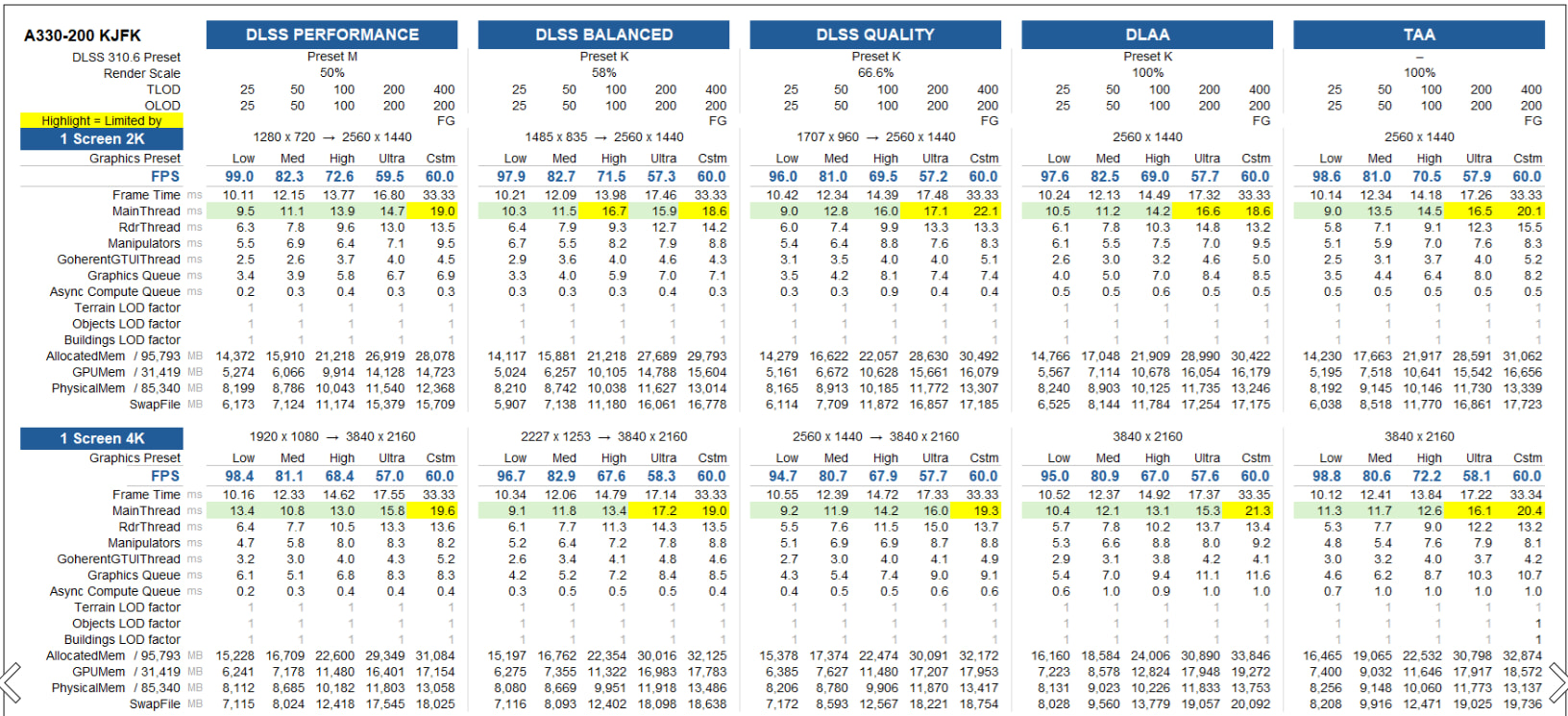
For example, in 4K, DLSS Performance (Preset M) with Global graphics preset High yeilds really good results under 16 GB of VRAM. From there you have room to customize TLOD and OLOD a bit, and so on. (I would suggest that 60 FPS is a sweet spot, whether native frames or 30 with 2x frame generation, which I use - any extra resources I spend on increasing TLOD/OLOD, not FPS).
Of course you can get better with more VRAM, but the cost might be prohibitive.
It can be a rabbit hole !
Depending on what you (want to) fly, there is a sea of options out there that can eat up your 5k in a day.
Sorry if i sent you on that way. 
The good part about using an Xbox is that the peripheral options are limited so you can’t keep spending!