As a general precaution against any weirdness from developing after changing out RAM, I clear CMOS and/or reset motherboard defaults in BIOS just before the swap. Then I boot back into the BIOS with the new RAM and configure everything.
BTW, for EXPO memory, I recommend starting with the EXPO 1 profile and checking for system stability. Later you can try EXPO 2 and see if it also runs stable. EXPO 2 should contain tighter sub-timings for your RAM and can lead to slightly better overall performance.
Very, very happy to hear it’s working out!!! Yes dood!! Get that under volt rocking!!! Been busy myself. I’ve done enough for tonight. Time to try it. But not done yet. Going to increase my bandwidth next on my ram.
1 Like
Just out of curiosity, why? Don’t wanna leave any potential performance on the table.
That looks great. So, you manually set your CCD1 max to 5800? Or is PBO calling for 5800 just due to the undervolt?
I wanna get everything finely tuned without going insane…what’s the best method? Each core -1 till BSOD then up one?
I didn’t set that manually. The best method is one core at a time. And only run your stress test on that core being adjusted. Go core by core 10min runs. BSOD means you’re closer than not booting Windows. Hard fault errors closer, whea (windows) errors, you’re close. At the end do runs with all cores going min 45mins, recommended 1 hour. This takes many hours. I went in jumps of -5 at first. I got really familiar with the CPU in a hurry and could recognize by how long it took to get errors and which kind, how much roughly to adjust
1 Like
More for system stability.
It’s best to start with a clean slate (IMO) when changing out hardware on the same motherboard - and only takes a minute or two to add back all of your config settings.
2 Likes
I do have a boost override of +50 thought. x1 pbo scalar
On a separate note, I’ve changed to the latest Nvidia Studio Drivers - I seem to be getting smoother gameplay than the Game Ready driver. Anyone else notice this?
1 Like
I tested the studio first, found it really good. testing the gameready now.
1 Like
Let us know if you see any difference - are you benchmarking? - or just ‘how it feels’?
1 Like
I have been testing with msfs, same airport DX11 and DX12. And benchmarking. Will do.
No - I don’t use frame generation. I use VR 99.9% of the time anyway.
I’m still scoring around the same. Around 21 000 on cpu. This is the best cpu result I’ve manged so far.
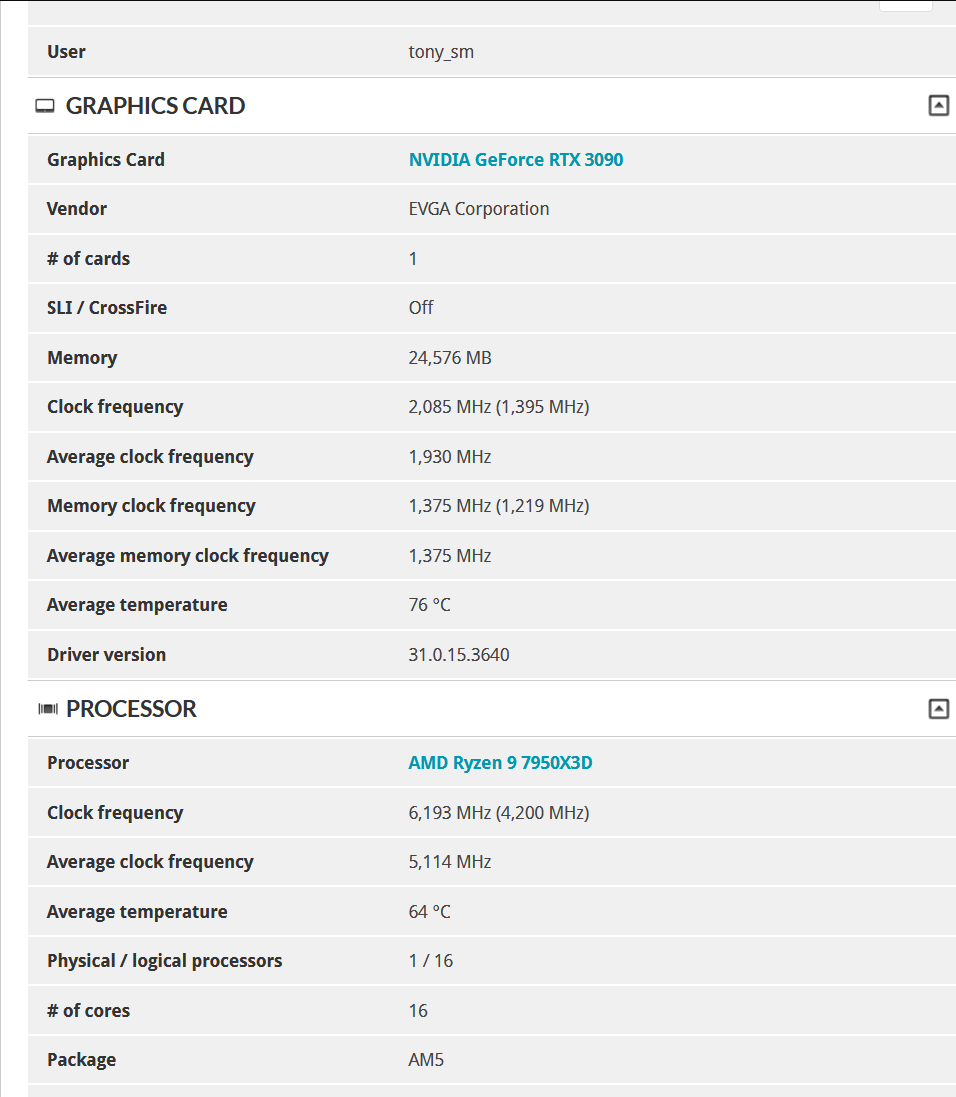
I have changed a few things further. I OC’d my infinity fabric pretty decently (2100mhz), and run a negative boost override, x1 pbo scalar. I still have to test this in MSFS, but I’m hoping the result is a long held boost. As I have been tweaking things, I have been noticing this is what is happening. The sweet spot is 5100mhz average for gaming, uuuhhh simming. There you can hold the longest boost with under volting. I didn’t expect to see this however. What in the what??? 6.2GHZ!!!
EDIT: I’ll have to try running without my gpu running hard. Less heat.
EDIT2: at -100 boost override, Mostly staying boosted. I’ll have to try -150. That’ll stop the cache cores from boosting past 5.1ghz. I’ll give up the burts to 5.25ghz for an almost steady 5.1ghz. more testing
In benchmarks in 3dmark, the drivers run identically as far as scores. In MSFS They both average the same fps give or take do to, it’s msfs. However. I do find the studio driver to be smoother, and will switch back to that.
What would the practical benefit be with a sustained 5.1 vs 5.25 boosts in MSFS on CCD0? More consistent frame times? Higher frame rates? Or the ability to take on more load (higher TLOD) without a reduction in performance?
I haven’t had much time to fine tune in awhile, but in play testing, the lowest I’ve seen cores drop is to 4.8 (on average) keeping the 5.25 boost depending on the scenario. I don’t mind though because temps are more than acceptable at 61 C max, even after a 6 hour session.
The benefit, to stop cores cycling down into the 4ghz range. To keep boosted. To keep higher tlods going smoothly is what I’m tuning for. A lot more heat gets generated. this causes cores to cycle down lower, and more often. trying to find the balance. Especially, trying to hold 40fps (No frame generation) in tlod 5.00 in any scenario.  Something did change with AAU2, I could do tlod 5.00 all day long holding 40fps, drops into the 30s in LA NYC. I flew in tlod 6.00 mostly and up to 9.00 in non large urban centres, Island chains etc. Now it is more difficult to keep 5.00 steady at 40fps. I can get spikes into 86C and this is where I get thrashing, and a skip/stutter. Didn’t see this before AAU2. If i go to tlod 4.00 it’s much better and I can really load up the gpu and OC. I want this in tlod 5.00. I don’t want 2 to 4 stutters in a 1 hour flight.
EDIT: From my research, when the 7950x3d has a hardcore undervolt (CCD0 at least), RAM has a heavy OC (The step I’m at is getting into Hardcore OC). The mobo is set up properly. The cpu will stay boosted at 5.1 almost constantly in gaming/simming. Like in the 95% +/- range.
1 Like
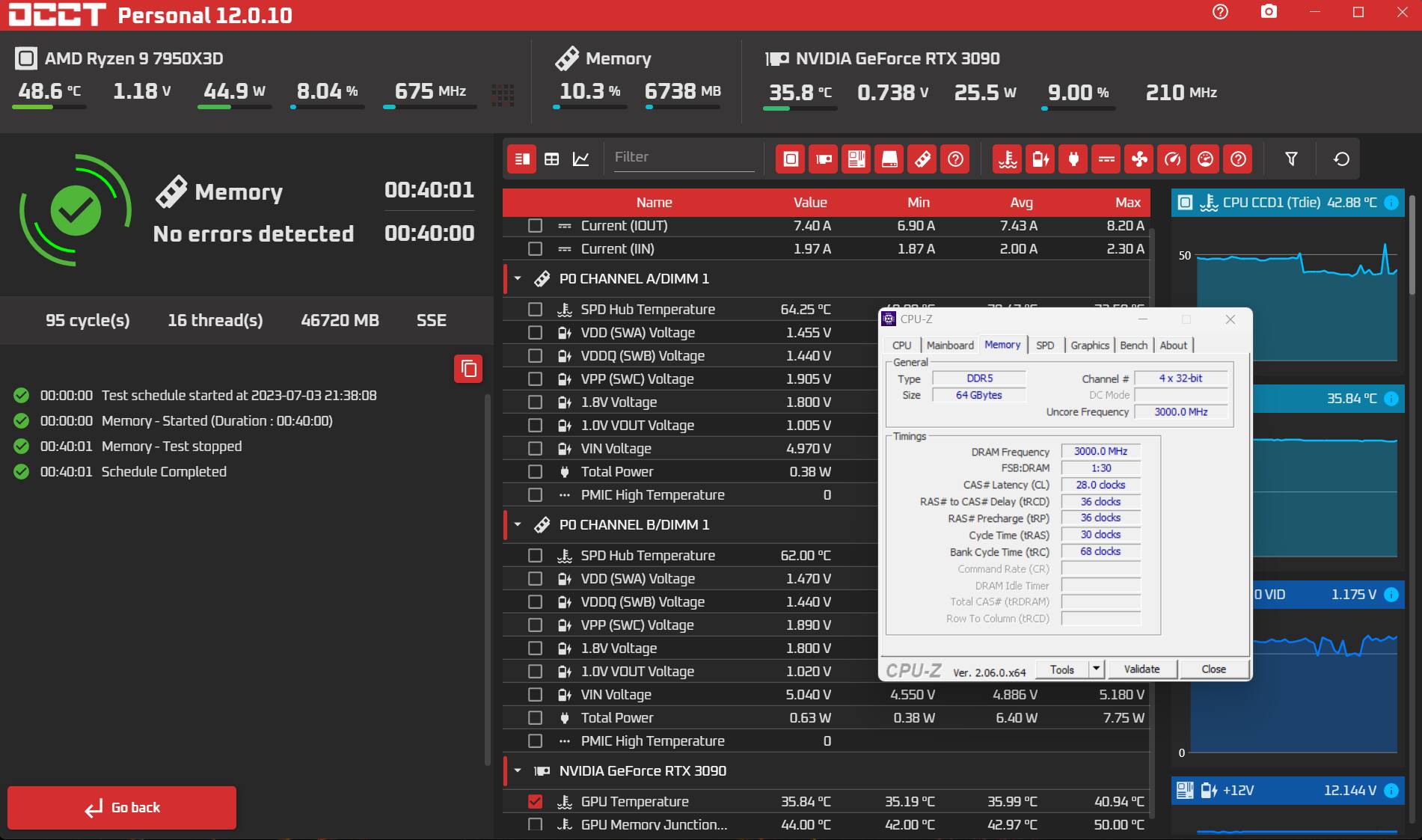
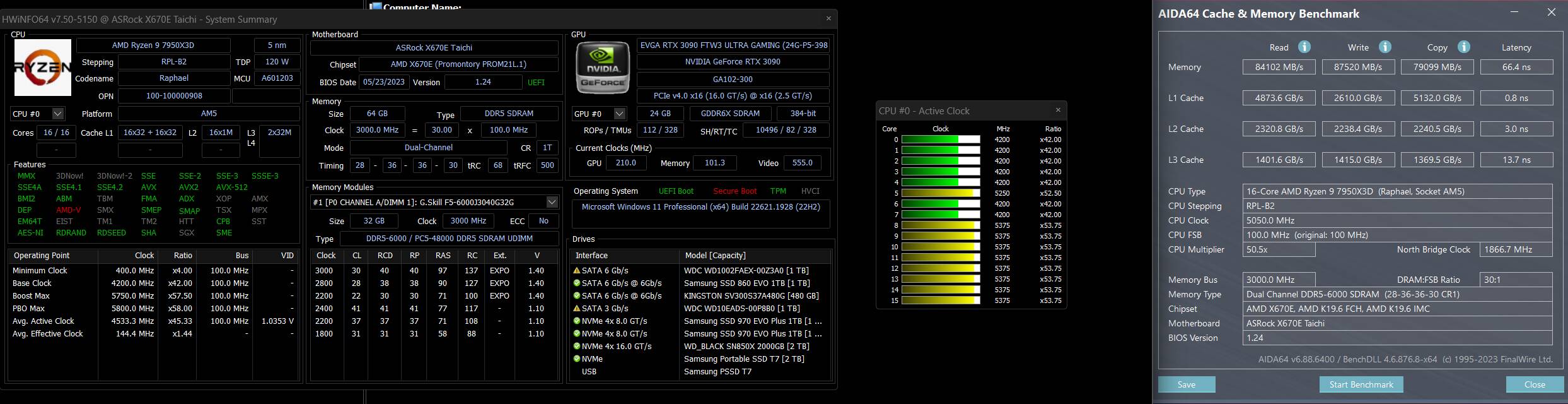
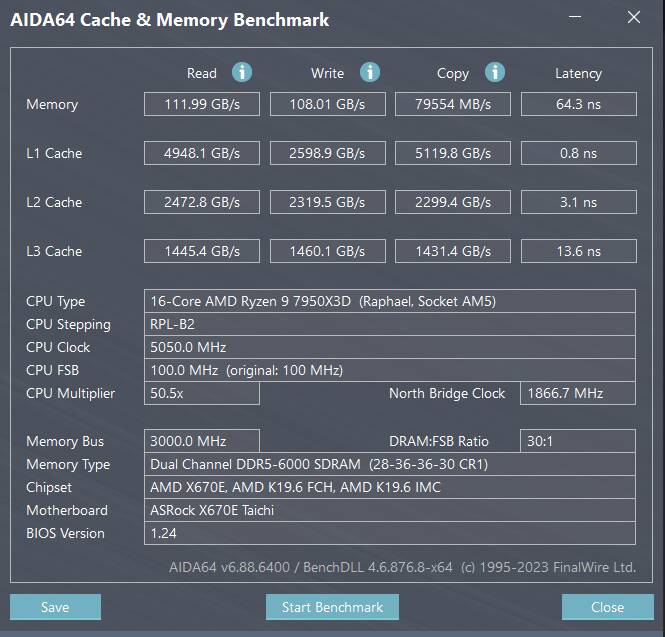
My memory was stable, but I didn’t like my benches. I adjusted in Voltages: VDD Misc; VDDG CCD and IOD, and VDDP. The results speak for themselves. I’ll put the two together, same timings. Infinty Fabric back at 2000mhz (Works way better if on a perfect ratio) until I can stabilize 6200mhz bandwidth on the memory. It is going to a place I don’t like for an everyday runner with my DRAM VDD voltage. Without watercooling on the dimms, I want to keep it 1.5V or under. right now it’s rock solid at 1.47V. If I relaxed my tRCD and tRP to 37’s or 38’s (at 36s this kit is really showing it’s worth, hitting this is more rare) I could probably pull off 6200mhz with the voltages I’ve already explored. I can boot it in and get OCCT running for a few mins. Been up to 1.51V so far. If you are looking for that perfect ratio for OC’s past 6000mhz with your Infinity Fabric (Yes, a kit rated at 6200 or 6400 is still an OC, anything past 4800mhz is) remember to run Linpack in OCCT, This will verify your infinity fabrics’ stability. I also have tried CL26 with my settings. I can’t get it to post with the voltages I’ve been to. It would come again to relaxing those mentioned timings I’m sure. The way to go, would probably be staying at 6000mhz, and getting to CL26. 26 x 2000 ÷ 6000 = 8.6ns. 28 x 2000 ÷ 6200 = 9.0322ns. CL26 @ 6000 is defo faster.
What does this achieve? The better Ram does, the higher fps in 1% Lows.
This I posted already, its the comparison. This bench alone is pretty darn decent, this was also with 2000mhz infinity fabric.
This is smokin!!! 
 or rogue bench? Yep rogue bench. When I first restart I can duplicate. Latency stays stable, no R/W/C over 90000mbs
EDIT: Did another pass. wow on the latency!!!

EDIT 5000: I can’t stop noodling with sub timings. Need to get the balance right. I got my latency to decent for x3d AM5. But I also shaved off my read and write times  . I have expanded my copy. Darnitall. I’ll be back when it’s done and final.
EDIT 1Million, Totally stutter free tlod 4.00 in G/A stable 40fps so far. Need to hit NYC. Soon to test in tlod 5.00
EDIT 2Million: Kept up at 40fps until NYC area loaded in, then it kept at 35fps. Smooth all the way. All payware airports in area. Samscene NYC, RK bridger packs +++.
1 Like