Thought I’d come back and say that the runtime update is working great for me.
I know a few have had issues, but I tried quickly yesterday with the latest patch and it seems pretty good.
I’ve managed to get my smoothness back just by dropping the Clouds to High and I think I’ve pulled back my TLOD a fraction, but basically everything else is on Ultra and it looks great.
I also got some kind of clash between the OXRTK scaling and the in-game AMD sharpening. I think this was when I had OXRTK on NIS and in-game on. I’ve set the in-game sharpening to 0 now and I think I prefer FSR in the OXRTK anyway, but personally my preference is to have minmal sharpening anyway.
Me too it’s fantastic. Playing with settings is Sooo much easier now. MR is just so robust now. I use a bit of both for the sharpening.
I’ve switched back to TAA instead of DLSS too.
OXR 100, preview mode,
TAA 100,
FSR 65%
Sharpening in sim 150, toolkit 75.
TLOD 100, OLOD 200, Clouds High
Most everything else ultra.
Windows 11, G2, 3080, i5 9600
HAGS OFF but I may test this on again tonight.
Interesting!
I might have to switch back to TAA to see what effect that has. I certainly prefer it from a clarity perspective, but the performance on DLSS seemed pretty good.
I think I’m running FSR in the 80-something percent range (3080Ti/i9-9900K)
I’ve still got HAGS on.
The biggest question I have is: Will I ever stop tinkering??
I imagine I’ll get it to a point where I’m happy and then nVidia will release the 40XX cards and I’ll be tempted to upgrade again - at which point the tinker cycle starts again
I haven’t. Definitelly seemed better with HAGS on but then the latest oxr tools update messed everything so bad that i can’t conclusive say anymore. Right now, for me personally, it doesn’t much matter if it’s on or off. But, objectively speaking, i have measured the effect in some other AAA games and benchmarks and i definitely get better results with HAGS on.
Yes. Funny story. A few posts above, I mentioned how I have never been able to use HAGS (and I mean EVER) without crashing. After the latest OpenXR (112) I decided to try it again. I immediately noticed an improvement! Framerate in MR remained consistent at 30FPS, which is to be expected, but the improvement was the “smoothness” of the MR.. not jitter or stuttering when flying low to the ground at high speeds, as an example. It was so noticeable, I was giddy and wanted to play like that forever, and then it crashed. Again.
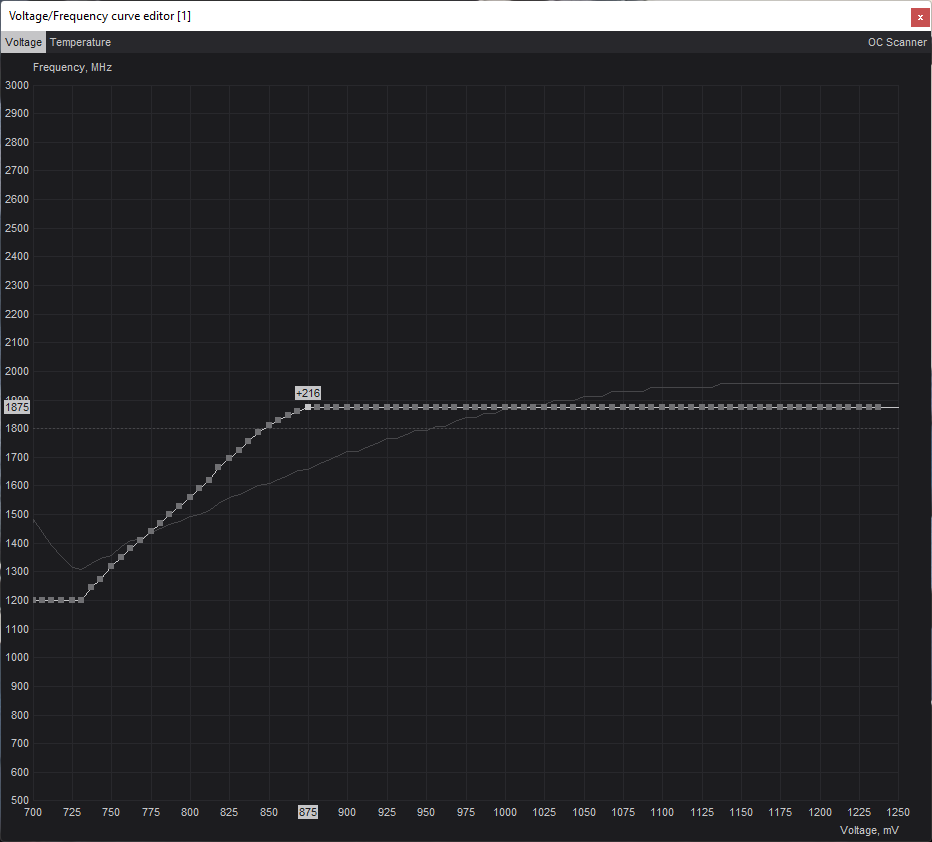
But this time I actually got an error in SU10 (not just a CTD with no errors) and it detected an issue with potential overclocking of the GPU. Well… I AM undervolting my 3080Ti. So removed my custom voltage curves and flew with HAGS on for 8 hours without a crash and it was amazing. I eventually went back and modified the curves… because I can’t stand by rig turning my bedroom in to an inferno… and I managed to dial it in just right and it’s working great so far.
So for me, yes I am now seeing the benefit of HAGS and I have it running stable. For the first time all year. lol
Curious. I don’t have crashes, but also have undervolted 3080ti. Would you please be so kind and tell me what brand of 3080ti you’re using and what your curve is? I presume you’re using afterburner to set the curve.
I just tried this yesterday and my 3080Ti Gaming X Trio went to 1965 on default, so I managed to get that speed at 925mV.
No idea how stable it is but I took a flight or two and it didn’t crash.
I don’t use the machine for anything else anyway so hopefully it will be good. Certainly my temps seem better without any noticeable performance hit.
If you followed my setting, i don’t really advise it, even though it seems to work good. I did very little real testing with undervolting the 3080ti and i don’t advise anyone to use the setting i wrote.
No, I understand. I would say the same about what I wrote too.
I don’t really know what I’m doing and from what I read, these things (overclocking/undervolting, etc.) need time, patience and no little skill, so my advice would be the same as yours - don’t do what I did
Yeah, I don’t recommend using my undervolt either. I mean, it wont hurt your card.. but depending on your own “silicon lottery” could have very different results with crashes. The one I posted above 1875@875 runs rock solid, until I turned HAGS on, and then I started getting crashes with the GPU overclocking error in SU10.
So I had to bump up the voltage a little bit more but i’m still in testing mode with HAGS enabled.

 )
)