What I could do is load the sim convert back to the dev vers give it a go, it may take a while but will let you know…but have to spend a bit of quality time with partner…watching bakeoff.. . Oh what joy..when I should be flying.
So it’s taken hours of work to build up a decent coverage of airline ‘flightplans’, and just completed first flight from EDDB to EGKK. Observations with respect to AIG are that offline traffic injected by AIG Traffic Manager results in lots of traffic taxiing around airports, taking off and landing. But a cacophony of ATC calls to expedite climb/descent to whatever alt to the point that it’s almost impossible to engage with ATC yourself - before anyone says, I know in-built ATC leaves a lot to be desired and there are better options etc…
The AIG TM also seems really unstable, and it crashed multiple times during the flight which, while giving a brief period of respite from the ATC expedite barrage, did seem quite eerie.
Real-time online traffic is OK; a lot quieter in terms of number of aircraft (although Gatwick at 10pm is quite quiet these days), but the one EZY826 flight that did come in, from EGAA, was dressed as a China Eastern livery, which looked a little out of place, to say the least.
So, all in all, it’s really promising, but there’s a little way to go before it really gets there…
Have you reported your feedback on their discord channel as well?
Answer to your question, Most simmers be disgusted by my behaviour, dont normally behave like that. However just tested, yes yes you do see traffic on the dev version went from KORD, but skipped and took off radar was full. It literally was a quick test took off 4000ft and A/I was everywhere. Kept seeing united liveries changing to other liveries which the devs are aware of. Never taxied so fast and taken off lol  . Its now made me think should I go with dev version.
Hi Guys, just spent 2hrs following step by step, instalation of India Group, Traffic manager, finally just when i was ready to add all the aircraft, Warning!! The path has reached 255 character limit. Mine was a MS store download, i could never understand how deep the path was, on my way to the community folder /ect
C://user/ blong/appdata/localcach/packages/microsoftflightsim/local cach/packages/communityfolder, can this be made shorter, if not how do i point community folder to new OCI traffic manager, it mentions a junction??.plz anyone
You can enable long name / path support in Windows 10. This can be done via group policy.
Here’s a way. Make sure you know what to do before playing around in the registry - it can break things otherwise
Thx man, for reply, i will check this link, maybe tomorrow, iv had it for 1 night, i feel ■■■■ like this only happens to me …not very IT minded…thx again m8
Thx m8 but that counts me out, i dont have a clue, besides i dont want longer,
I just want c:// msfs2020 folder, you shouldn’t have to go digging for it, no other sim or game has ever had a ridiculous path. Just another frustrating thing we put up with..
Thx you all but iv got to hit the sack, i,ll read more tomorrow, thx again..
When you install the sim, you get a screen with a path. You can choose whatever path you want then.
Once installed, its not easy to move it, but there could be an option in Windows settings - apps
I checked the AIG forum and they said they are working on a solution.
U got around this by using addon linker which can be found on www.flightsim.to you can create a folder anywhere and it forms a chain link to community folder, runs absolutely no problem.
If yoy go this route look on YouTube for addon linkee tutorials it’s pretty basic really
Regards
Maybe a stupid question how does it change, if I move it to my addon linker, because traffic is only injected if I select the traffic controller app…not sure what changes anything? Because I can load the sim have what settings I want..but if I want AIG traffic, I set everything to zero. Then just double click AIG Controller to inject the traffic, when I am at the gate.
If I didnt want AIG traffic, I would set my traffic settings to what I want, and not bother double click AIG traffic controller to inject the A/I.
Don’t worry about level of tech savvy, the work around is quite easy / simple.
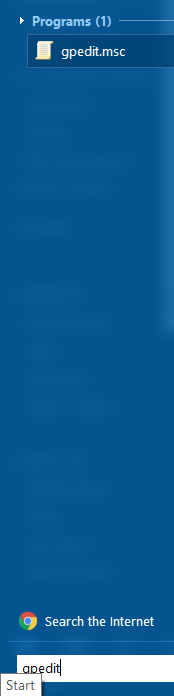
- Click on start and type “gpedit” then select “gpedit.msc”
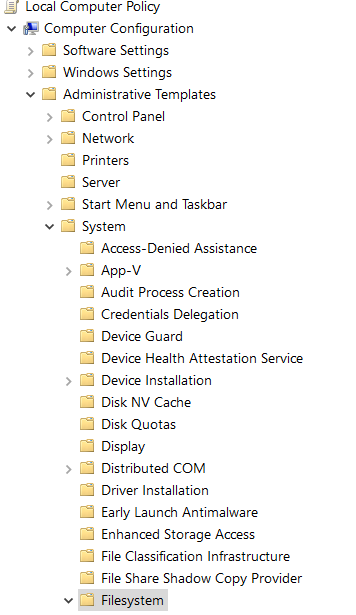
- On the left hand side, under “Local Computer Policy” → “Computer Configuration” (which is the first section) expand the following;
Administrative Templates → System → Filesystem (and then click on "Filesystem)
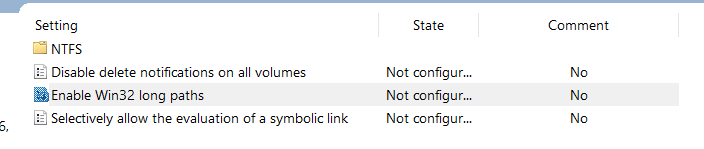
- Now on the right hand side, double click on “Enable Win32 long paths”
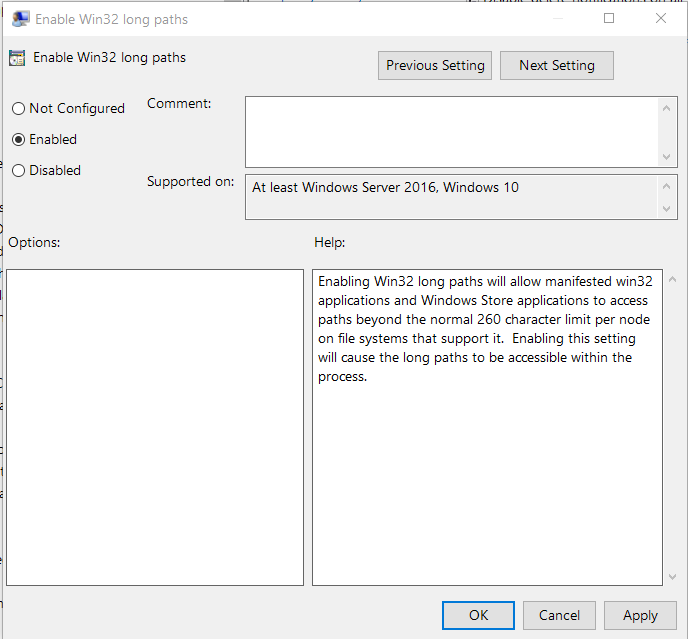
- Once opened, select “Enabled” and then click “OK”.
- Go ahead and close out the remaining Windows.
I hope that helps.
Thank you m8, this sounds hopeful, couldn’t sleep been awake since 1.am, thinking this through. Well done, thx everyone who replied…
Moving the location of both the community folder and the Official\Onestore folder to a different location on the hard disk is not that difficult a process, if handled with care.
This post explains what can be done:
Eg. for MS Store users, moving the contents of C:\Users\USERNAME\AppData\Local\Packages\Microsoft.FlightSimulator_8wekyb3d8bbwe\LocalCache\Packages (i.e. both Community and Official) to a new folder, e.g. C:\MSFS and then rerunning MSFS will result in the sim detecting no packages. Content manager will then initiate and ask you to install all the packages again.
Using the “Browse” button, instead, to browse to the newly created folder, e.g. C:\MSFS will allow the content manager to detect all the content and start up normally without having to re-install anything.
This is probably the easiest/safest way to move the location.
However, take it slowly and don’t ‘delete’ anything without ‘backups’ being made in case it results in a broken installation with a full download required.
Edit: I added a forum guide on how to move the installation packages from the default location:
https://forums.flightsimulator.com/t/how-to-change-the-installation-path-of-installed-packages-inc-community-folder/471682
With addon linker you can store the AIG oco files outside of your community folder, which gets rid of the error that the path is to long, in there latest update they actually suggest not storing in the community folder.
In essence it creates a hyper link between 2 folders
After installing a few new flightplans,the sim crashes on startup.
It worked yesterday,but CTD of the sim.
I tried the Safe Modus,rebuilt the content.xml,the flightsim.cfg,did a repair of the sim,finally deleted
everything from AIG.Still can’t run the sim.It’s so frustrating.
Scott