Airbus Elevator Trim UP no longer working with bindings

Using the template below will greatly help the team reproduce the issue and ease the process of fixing it. Before posting, search for an existing report. If you are not sure it’s a bug, please first report in User Support Hub.

3 tags are required - add them in the tag section next to the title above:

Feel free to delete this quote section after adding your appropriate tags.

ISSUE DESCRIPTION

Description of the issue:

I have what seems to be a unique problem with the Airbus Family, default A320neo, A321, and A330.

I’m using MSFS 2024 on an Xbox SX, and I’m using the Honeycomb Yoke & Bravo Throttle Quadrant along with a mouse and keyboard.

Today I attempted to fly the default Airbus A320neo V2 for the first time on Xbox in 2024 and I discovered that the elevator trim up does not work. I can trim down but not up. I have attempted it in multiple configurations; the keyboard, buttons I have set on my yoke and the Bravo trim wheel itself. The only thing that does work is moving the trim wheel with my mouse.

I have checked for binding conflicts, created new bindings, and new profiles. But none have helped. Only the iniBuilds Airbus family is effected. Though the A310 and A300 work just fine. I also tried the LatinVFR A320 which is also working. All of them with the same elevator trim configuration.

Since SU 4 has iniBuild or Asobo added any new configurations to how the trim wheel works?

REPRODUCTION STEPS

Please list clear steps you took in order to help our test team reproduce the same issue:

  1. Use the Honeycomb bravo, or keyboard to control the elevator trim up

YOUR SETTINGS

If the issue still occurs with no mods and add-ons, please continue to report your issue. If not, please move this post to the User Support Hub.

What peripherals are you using, if relevant:

[PC Only] Are you using Developer Mode or have you made any changes to it?

[PC, MSFS 2020 Only] Are you using DX11 or DX12?

[PC Only] What GPU (Graphics Card) do you use?

[PC Only] What other relevant PC specs can you share?

MEDIA

Please add a screenshot or video of the issue occurring.
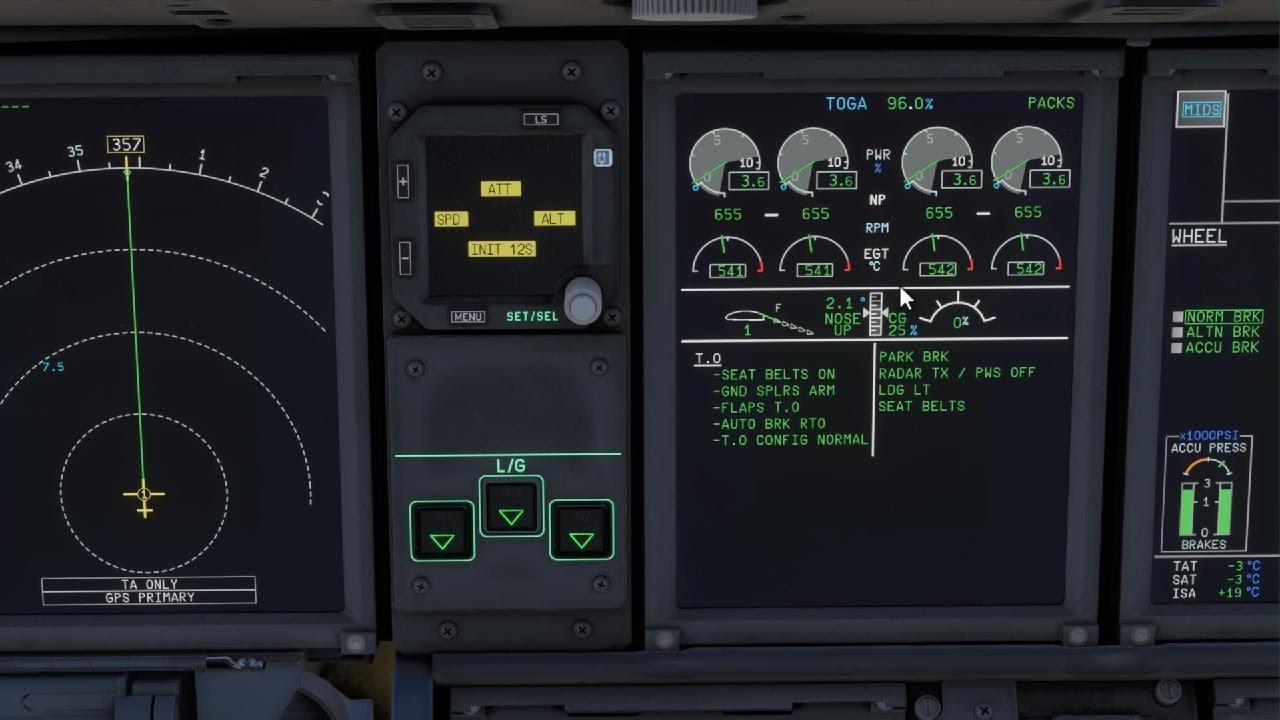
Can replicate with A320/321/330. It seems when you click on trim up it is going up of 1% but go back to the previous value.
Tested with ms-store, same result with keyboard or my joystick Extreme 3D.

A320:

I think the condition to replicate is to spawn C/D (and start the aircraft) or on the runway. Once in flight the trim is automatically controlled by the fly by wire system so I don´t think you can manually controlled it unless you deactivate those fly by wire functionalities (I assume so, users may correct this statement if incorrect).

1 Like

correct
The problem is first noticed while configuring the aircraft for take off. Once in the air the autopilot will handle the trim automatically.

2 Likes

Same issue with the Beluga & A400M, tags added.

1 Like

Same issue on A400M, both keyboard and joystick. Trim down works, trim up moves just a bit and returns. Which means that I’m going to have a very funny takeoff in a moment, with a negative trim…

Edit: I found a workaround, which is really silly and inconvenient, but may save a flight one has already invested a time in.

I assigned the trim axis binding to one of knobs on my HOTAS, and it worked. I mean, it did not restore the button functionality, but allowed me to bring the trim back where it should be and take off without crashing…

1 Like

I am experiencing exactly same behaviour on PS5. Can’t trim “nose up” once in Direct LAW mode.

Update

*** Give a brief description of the issue:

Tested on PS5. When spawning in A400M, no matter if in the air or on the runway (happens always - in cold and dark, on GPU/APU/Ready for Taxi), “Elevator trim up (nose UP)” key binding is not working. Trim nose up button on the pedestal does not trim nose up either.
At the same time trim nose down works as expected, both via keybind and via button on pedestal. Setting up an axis binding for “Elevator trim axis (-100% to 100%)” works correctly as well.

*** Provide Screenshot(s)/video(s) of the issue encountered:

*** Detail steps to reproduce the issue encountered:

  1. Spawn in whatever situation you please
  2. If spawned on ground, power up the plane and try to trim nose up - it will fail when using mentioned keybind for “Elevator trim up (nose up)” as well as when using physical button on pedestal.
  3. When spawned in the air, Enable Direct LAW mode and try to trim nose up via keybind or via button on pedestal.
  4. At the same time trim axis will work
1 Like

I have noticed the same issue on the default A320 on the Xbox series X using the Thrustmaster TCA airbus flight stick and throttle quadrant. Attempts to trim up by the assigned control twitch the trip up by one sub unit but it “springs” back as if there is a binding conflict (I checked, there is not)

Sometimes it’s possible to manipulate the trim wheel with the mouse, but only after engine start and ready to taxi.

2 Likes