Please add the #msfs-202When I want to fly with one of the airbus planes in the whole game the autopilot works at a certain waypoint, after take-off the lines go away at the heading button and when I then right click on it it does not go back to those lines and I also do not get that circle along it. I have made a flight plan via simbrief without being a subscriber to one of the subscriptions and according to a tutorial I have filled in all wind speeds etc. in the fmc. I do not understand what is going wrong at the relevant waypoint. I hope someone can help me because I think the airbus planes are the best of the sim0 or msfs-2024 tag to your post, depending on which sim your post is about.
Hello 
I’m inclined to think that your plane flies along the Flight Plan until it crosses a discontinuity. After that, there’s no indication in your flight plan to tell the autopilot what to do next. It happens when you insert a SID (Standard Departure), the FMC will not “autoconnect” the end of the departure and your first flight plan point, even if its the same.
In your case, this can be coming from multiple things :
- Like everyonie of us, as I said, connect manually the end of departure to your flight plan; simply hit the “CLR” button on your FMS, then hit the side key (near the screen) to erase the discontiuity
- You said you’ve made your flightplan with simbrief without being a customer; this mean that simbrief created your flightplan using points / routes / constraints that are 2y+ old. It is possible, that your route is not recognized by MSFS, which has the latest data (kind of). SOme points have disappeared, been remove, or so. And when you insert your Flight Plan in your MCDU (“FMS” in Airbus language), it create discontinuities. Would you mind posting your Flight Plan here ?
- If the lines are disapearing on the main screen, then it might be that the Flight DIrector is not enabled. Then you want to hit the button “FS” on your upper panel (which we call the EFIS, just left of your autopilot control unit, which we call the FCU);
That’s a lot of things, but the main point is : this behavior seems normal and linked to a Flight Plan issue. If you give me the flight plan Simbrief gave you, I can try to recreate an up-to-date Flight Plan with my subscription (or someone else if I’m not around, I’ll have to work sometimes today  ), so you can make a new test.
Cheers,
K.
Having same issues as iiNamedOwen. It is not question about discontinuities or that you are not SimBrief customer, because I understand it is free.
After take-off you just lost FD, AP’s won’t react, plane is not holdable and you crash. What ever you try to do. All Airbuses, except A400M Atlas, which somehow someway recowers after take-off, when hitting randomly FD, AP2, AP1… Success rate something >50%
SimBrief, NaviGraph, Inibuilds, Microsoft, you can only guess, but it just don’t function.
Hello,
Thanks for the reply. How do you want me to share the flight plan? I can only see the waypoints of the route in simbrief. The one of the departure I can not see anywhere only when I load it on the fmc ingame.
And how can i do this ( * Like everyonie of us, as I said, connect manually the end of departure to your flight plan; simply hit the “CLR” button on your FMS, then hit the side key (near the screen) to erase the discontiuity) in the fmc?
This is how i do it:
when I set the departure I go to F-PLN on the FMS and then I choose the airport where I am at that moment (EHAM). Then I choose the first waypoint that is after the airport code on the EFB at the OFP page Routing and then I press INSERT on the FMS and I do this also at the arrival page for the arrival airport (LEMD).
Hii 
Yep, simply share the route, i.e. the list of legs. As an example, here is the latest route Simbrief generated for me :
VTCH/29 N0438F390 BOKI1L BOKIB W9 PANTA Y7 TL NORT1C VTBS/20R
With that, I might be able to tell you how compliant is your route with current aviation data (AIRACS). And I’ll share back one that is totally compliant that you’ll enter manually in your MCDU for a test 
That’s the good way of doing it (also for the arrival). Then you should go in the FPL page on the MCDU, using the arrow UP and DOWN, to go through the screens. You may see something like this :

Even if the end of the departue (NORNI in the exemple) is also the first point of the route (NORNI), the MCDU will not “connect” them. In this case, you need to click on “CLR” then hit the Left Select Key (we call thel “LSK” on the left border of the screen, “RSK” on the right of the screen) to delete the “-- F-PLN DISCONTINUITY --” line.
If your aircraft run to this discontinuity this because you forgot to remove it, then it should move from NAV to HDG mode and continue straight ahead. As I said, it might not be the root issue of your problem, but your description make me think it is 
Also, the page from the FlyByWire team about the MCDU is really neatly written, if you’d like to learn more, while we’re trying to spot your problem.
Bonus time, not related to your problem
There are discontinuity that you should not remove. This one is an example :

It says that you should fly to the next point “manually” (i.e. using your autopilot). In real life, these are parts of procedure where, generally, you’re expected to get orders from the ATC, so it is normal and expected that after the last point before the disconinuity, you continue on your present heading until the controler tells you to go to the next point (they’ll give you the correct heading, and altitude, in that case). In flight simulation, it’s okay to avoid this part of this procedure, so you’d click CLR to forst remove the “MANUAL” line, then do that again to remove the “-- F-PLN DISCONTINUITY --”.
K.
Note : I stole pictures on the internet for educational purposes from here and here
Hey 
I’ve accumulated something like 150h on airbuses in 2024 (384h in the game but I fly a lot helicopters ^^), and never had this issue at the take-off (in-fligh, I have it, supposedly because of the real-time weather, though). There’s surely something we do different, and we should dig on that because flight an airbus in FS2024 is less fun thant flying an helicopter, but it’s still an happy moment 
Unfortunately, SimBrief is not free. The free version brings you Air Datas (called Airacs) from 2021. Back in the time, when FS2004 was never updated as we do today, FS2024 had Airacs of a date (let’s say, Sept. 2004) and all you had to do with external tools was to generate a Flight Plan with Data compatible with AIRACs of September 2004.
But today, fantastic job by MS & Asobo, the AIRACs are updated in the sim (there’s a lot of discussion about AIRACs quality, but it’s out of scope). For 99.9%, AIRACS of MSFS2024 are for February 2025 at the time of this post. If you use the free version of Simbrief, you’ll have AIRACs that are older, as stated by the Navigraph Team.
Which can create a lot of issues. Usually, there is no scenario where a point named ABCDE in Europe disappear, and a point named ABCDE appear in America in the same cycle (update). Usually, SID/STAR naming change so you can’t have a different procedure with a same name on a different runway. But it’s not always as easy. That’s why I asked @iiNamedOwen for their flight plan, because it may change based on where they fly in the world.
I do not think that it is the solution of your bugs. But if we’re sure it is not, then we can move on for other tests
Also, if you also want to share with me a flight plan so that I can compare it with AIRACs 2025, I’m happy to do it.
Happy flying,
K.
Hi,
Thnx for reading my post. I have NaviGraph subscription for AIRAC’s. I haven’t by the way tested, what happens if I use older AIRAC’s. Where/can you check in the sim, which AIRAC it uses in the moment? That test would be reasonable because I managed to fly Airbuses until December, when everything changed. I fly only IniBuilds sim versions, not ad-onns.
Hello
The best way to see if your MSFS has Navigraph Airacs is by launching the Navigraph application called “Navigraph Hub”. It will display you something like this (cropped screenshot) :

If installed, Navigraph Airacs will override the default data of MSFS.
In the Ini A320, your MCDU will give you the date of your data, but not the provider. So it’s a bit clueless for our purpose here.
 One hint, though : try to put your a Departure or an Arrival for
 Santiago (SCEL). I found out that using current default AIRAC, this airport has no arrival, only Approaches. If you try to insert a STAR for SCEL and find no STAR, then you’re not using Navigraph data. This might not be the case in a few month when default data are updated.
Cheers,
K.
this is my current flightplan
EHAM/36C N0438F380 WOOD3W WOODY N872 MEDIL UN872 KOVIN UM728 RESMI UN857 DISAK DCT DIRMO DCT ARTAX DCT BEBIX DCT LMG DCT UVELI DCT OSMOB DCT ARVID UT424 PPN UN857 BANEV BANE3D LEMD/32L
Thanks for all the help. This is the solution why its not following the plan. When i clr the discontinuity it is following my full flight plan!
I’m glad it helped.
I just reviewed your flight plan in SimBrief with current AIRAC Data. Here’s what it says :
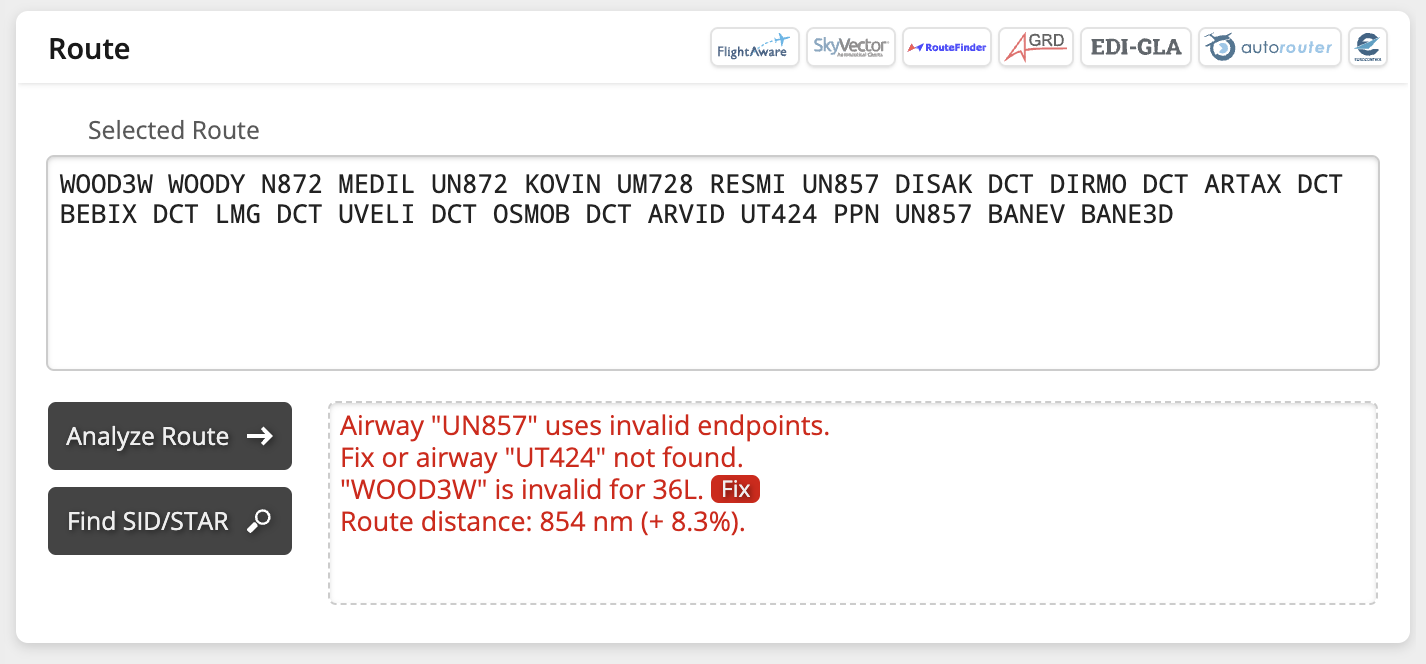
There might be a chance, when you hit the “Init Request” button, that you have an error in the flight plan. Or maybe not. I don’t know how good is the Ini A320 (or MSFS2024) at handling incorrect flight plans.
A flight plan compatible with current AIRACS would be :
EHAM/36L N0436F370 KUDA2Z WOODY N872 MEDIL/N0421F350 UN872 LESDO UM728 RESMI UN857 DISAK/N0441F390 DCT ARKIP DCT ARNAV DCT LMG DCT UVELI DCT OSMOB DCT ARVID T424 PPN N857 BANEV BANE3D LEMD/32L
But if you try to enter it in SimBrief, it will potentially say that the route is invalid (it depends on if this route is valid in your free airac from 2024). And SimBrief will draw direct lines when you hit the “Generate” button with an invalid route (or on a partially invalid one).
If this become an issue, you could use Simbrief to generate the load sheet (fuel, passengers, cargo, …) then use the Flight Planner to get a route. Then they’ll enter the route manually in the MCDU. I don’t know how good is the Planner at generating random load, selecting the correct flight level. I think it’s a good tool to keep an eye on
Happy flying, mate, enjoy the sky !
K.