Yes, they do.
Indeed. There are parameters to allow the Dev to set base sensitivity to controller inputs.
But users can be lazy too - many poor aircraft behaviours can be tuned out by altering the sensitivity curves and reactivity.
I find that it does not matter how you set curves sensitivity it seems to change every time you start the sim or from plane to plane and after each update. I only wish that they make 2024 a real sim again. I never look inside buildings or use drone for sightseeing of building etc. I just want a sim that has planes that fly right. Has controls that work well. Nice scenery to fly VFR / IFR Real weather that works. Etc ect. I’m sure Im not alone. Give us a sim with less bling and bells and whistles that we don’t need.
Well, you certainly need to have different curves for different aircraft. But it’s not been my experience that they are not persistent or make no difference to the flight experience. In fact given the wide range of controllers available, there is no way a Dev can set the FM to work optimally with all controllers and the use of curves pretty essential in many cases.
There are certainly some frustrating limitations for Devs surrounding the core physics that need to be addressed and changes are promised for 2024. But equally the SDK already gives developers many tools to get good behaviours.
When I look at flight models, I can quickly tell when the Dev has made the effort. In fairness, many Devs are not necessarily flight dynamics specialists and they have a million and one other things to get right. Tuning the flight behaviour needs real world data, skilled test pilots and knowledge of how to apply the SDK to get the right behaviour.
Well developed aircraft will largely ‘fly right’. (None are perfect but some are far better than stock). Badly developed ones will not.
Poor controller calibration will not lead to right flying either.
For inertia, I think it is a good idea to increase MOI values such as empty_weight_pitch_moi in flight_model.cfg.
Changing the controller settings is a hassle because the settings need to be changed each time the aircraft is changed.
Interesting, will look into that
I always use VR and my 2dof motion rig with belt tensioners for extra g-force feel and buttkicker for vibrations. I have ONE setting for all planes for DCS, Xplane and IL2.
They all feel great and towards how it actually feels flying acro in an S2 Pitts taken speed and mass into consideration. Much more predictable how the plane as an aerodynamic object would move thru air. However abrupt motions in MSFS with same settings give terrible oscillations both on pitch and roll axis…
Ok. Found this thread: MSFS flight models, aerodynamics, etc
Anyone know a good GA plane with acrobatic capabilites and a center stick (no yoke)?
Will try out the Sting S4.
Edit: not bad at all. Takes some planning to flipping over. Doesnt accept hours of inverted flight, behaves well with my motion sim. Should just delete the giant Asobo list of paper planes and look for good efforts like the Sting I guess.
Anyone know of a biplane operating at this level?
As for me, after some experimenting I never touch reactivity. It essentially limits the corresponding control surface maximum deflection without actually altering the stability (instability) of the flight model. Besides, it messed up all my controls horribly.
I found it pretty essential to deal with very sensitive rudder pedals coupled with very sensitive yaw behaviour. I was only ever having to use 5% of my pedals range, so losing some of the upper range was no loss at all
This. Outside of trying to get it turned around into a tight parking spot or demonstrating a max-effort slip, I can count on one hand the number of times I’ve used full rudder deflection in the sim or real life in a normal scenario. And when you get toward the limit, there just isn’t a ton of finesse needed, and the airflow (or springs) are pushing back against you so hard anyway that you’re naturally making smaller changes out there.
I was doing some commercial flight testing with a highly experienced simmer the other week and he sent me a video of his T/O rolls. We were chatting after and as a btw, I asked him if his reactivity was still at 100% on his pedals (I could tell he did from the jerky, sharp movements).
After confirming this was the case, he put them to 50% at my suggestion and immediately had a far smoother roll and a much happier experience.
If you use the input viewer app and do video capture, it’s always amazing to see how little rudder input is needed in MSFS. It feels like you are using a lot, but then you watch the video afterward and it’s something like 3%!
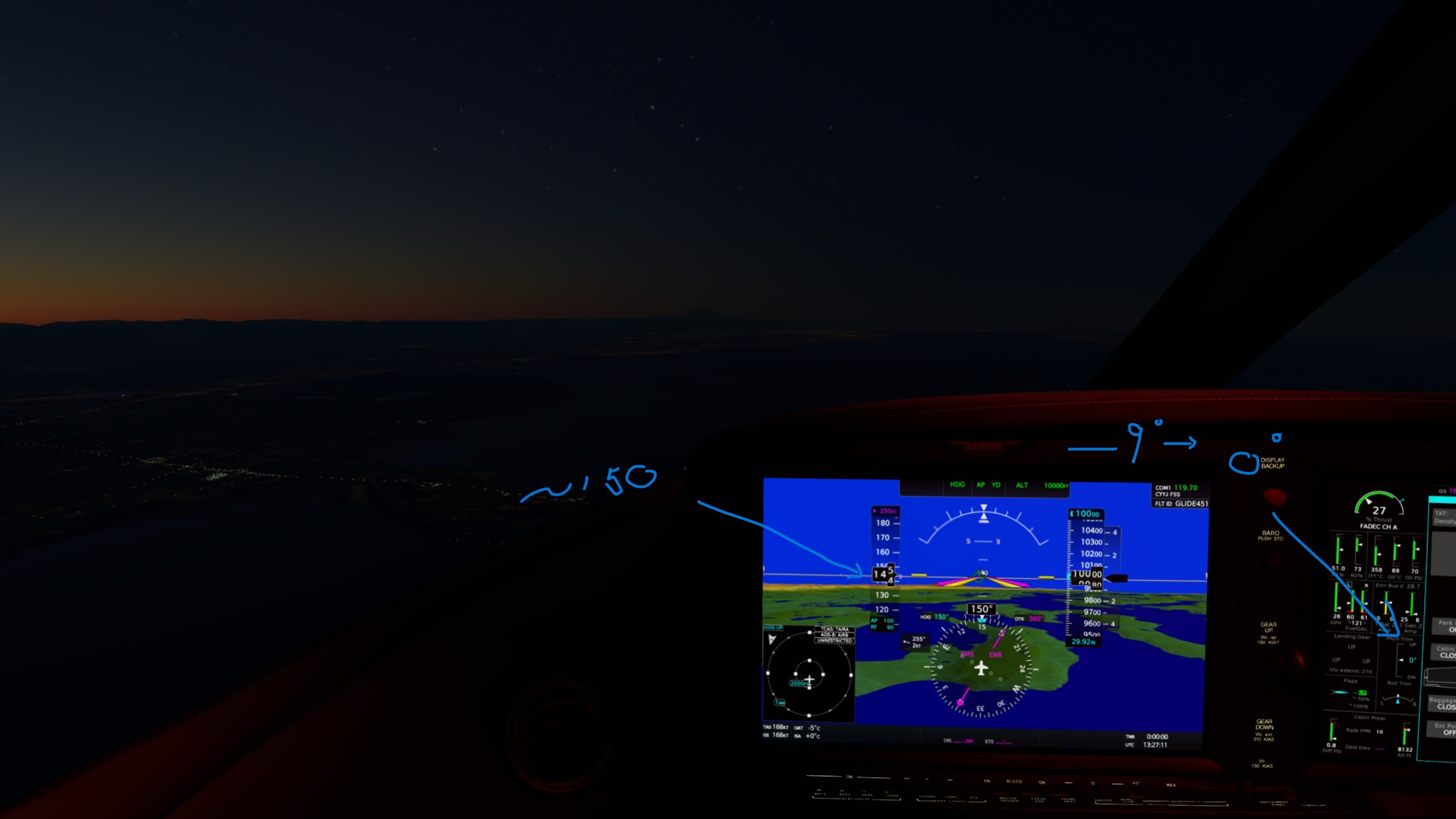
Good place to chat about flight models? The Vision Jet is good for testing this question. Get to 10000, turn on Alt and Heading, set the FMC and AP, set the throttle to “top of Green”, and watch the airspeed setting and the pitch trim go to around -9 degrees. So, the AP is pitching the nose down to maintain altitude. Bring the throttle back to around 27% thrust, and the AP adjusts trim pitch to zero. Airspeed drops to ~150kts, well below optimal cruise. My aircraft seems to be fighting with itself. Shouldn’t I get zero pitch at optimial cruise speed?
couldn’t say for sure, not really my area
optimal regarding fuel use?
my understanding, knowing nothing about the subject, is that at optimal cruise you should see a slight pitch up… say between 0 and 2.5
otherwise you are using more fuel than you could
this will all change in 2024 by the way
Great news. I was not aware there were improvements coming in that area. I am wondering how much is developer dependent and how much is built into the default SDK flight model.
this is a very good question, i think the answer is a lot
the sim gives you the tools to make it fly, its up the developer of the model to make it fly right
said set of tools will be considerably expanded in 2024, so, if a developer wants to, he or she should be able to achieve much more realistic and complex flight models than in the current sim
I just tested this in the HondaJet, and it’s similar behavior but not to the same extent (-4.6 degrees pitch down). This is incorrect. The AP should deliver less fuel to maintain level pitch attitude, not pitch down to fight the airframe.
I agree, look at the A2A Comanche. That flight model is entirely custom. Looking forward to what the devs can conjure up in 2024.
I think there would be some pitch down trim if you are exceeding the optimal cruise speed with all factors of balance and weight and wind figured in. Some tail high taildragger type aicraft IRL can be clearly seen in flight with a very tail high incidence when flying faster than typical cruise speeds too. Like pushing the Beaver to 130+KT is likely going to be flying at a notable negative AOA. I don’t think there’s much reasoning to it, with some better than others. Maybe in a vacuum 0 trim has some relevant value? And some of it will be the modeling, where the Kodiak seems to be in a range around +/- 4% trim from anywhere between 160-193KTAS, and the SR22T has somewhere around -30% trim at 185KTAS. Then the Archer II at it’s 122KT typical cruise just sits there happy at a big old 0%(no AP so spend plenty of time trimming it), although it does phugoid properly and requires throttle management to hold it based on wind direction and feels properly responsive to the changes-one of the better Carenado FM’s actually.
But the trim value is not fully correlative between different aircraft. It’s kind of all over the place. And if you watch an Islander pilot IRL fly out of Barth, they crank the trim wheel around like it’s The Price Is Right Big Wheel Spin, but who knows what that would translate to in an indicated % value shown in the flight sim. Depends on how much or how little that trim wheel is configured to actually move the tabs, and in sim that value I’m sure is different per whatever the developer gives it. An airliner may only be moving fractional percentages with big motions(or clicks) where in a Robin it’s swingin’ much higher relative values. I just do what the aircraft asks to be done.
I find when I pull up the HUD to see this numerical value, I pay way too much attention to it. Although if I know an aircraft needs +18% to find it’s happy place settling in on approach it’s helpful, but it’s a nuisance in cruise. You start looking past your entire panel to goof around with that number in the corner. HUD is helpful for bush flying though when you’re hardly looking out the front for a quick V/S glance(although chasing that as an instantaneous ‘value’ can also make you a bit nuts).
Now aircraft that don’t follow the phugoid effect and suddenly begin some progressive dive or climb from a static trim percentage is another matter. Including one of my GOAT’s…ahem..kodiak..ahem.
One other thing in AP mode, there’s probably a difference to using digital hat trim-such as on an SR22T which follows that setting in and out of AP, and say something like the TB wheel trim which is an axis, where the AP may be fighting an input from your peripheral. With that wheel some aircraft are synchronized to come out of AP and the wheel is where AP left off(almost as if it had been servo operated), and others if you set 10% climb, then come out of cruise or approach, the AP value is a big swing to the wheel setting, and the aircraft reacts violently to the difference the second you move the wheel. I’m not sure what developer voodoo gets past that, like a reset trim on AP disengagement or something.
Again calling out the Kodiak, which does not save the difference. Using the HUD that shows trim value, and the ‘training screen’ that shows input changes, you can kind of ‘cheat’ by looking at that value and slightly moving the wheel in AP to see on the screen approximately where the trim value is and creep it there. Without doing that, say you trimmed out for X climb, engaged AP, and now you’re just disengaging at the approach WP, you have an input of +15% and AP is at -1%, touch the wheel and hang on.
Hopefully for 2024 there’s some way to implement an instant ‘trim reset’ for peripherals to simply match it immediately to the AP setting(like a virtual servo). AND/OR at the very least the individual aircraft control setting menu simply allows you to simply tweak the trim sensitivity once and for all for each specific aircraft. Either would help a lot.
What are you targeting for “optimal cruise speed” and what is your weight? I see ISA is +0. Oh, and what %N1 were you getting at the top of the green?
It just struck me that the Vision Jet was too slow, and the Hondajet was a little better. Then I started thinking about how to get a few more knots out of it. It’s very developer dependent.
I get the approach for setting trims, etc. Aerofly has an interesting approach to this which allows them to transfer the “state” of your inputs to another aircraft.
Somewhere in the formula for flight, when you exceed optimal cruise, pitch down, but perhaps it should say reduce mixture in jets with a state of the art FMC. On those two jets, it felt like a prop solution applied to a jet problem.
i don’t think that’s how jets work
only gasoline spark ignited engines require some kind of mixture control
in turbojets and turbofans… because of “witchcraft”… there is no need to meter the mixture
no idea why really