I have access to a new system running the 9950x3d with a 5090, running msfs 2024. To you guys who have the amd 9950x3d, how many cores do you have activated? 8 or 16? I want the highest fps but I don’t want sutters either. I’m building a dedicated sim setup and I’m not able to load the sim on that computer yet until I get monitors. Thanks for any info.
I have a 9950x3d and 5090. I keep my windows power setting on balanced and I don’t mess with the core settings.
Works fine.
BTW I built this system in early April 2025 and used these settings.
I update Windows and the chipset drivers when new ones come out.
Windows 11 is very capable of deciding how many cores to use. Just give it access to everything you got.
Mathijs
I have a 9950x3d and just use the standard Win 11 gamebar software along with the ultimate power plan to manage my cores. If you use the balanced power plan it will only let the sim use the 16 cores associated with the 3d cache and park the rest. If you use the performance or ultimate power plans it will load the sim on the 3d cached cores and allow the sim to use the other cores as needed (which it does). I find I get the best sim performance with the ultimate power plan.
Thanks for the info. Excuse my ignorance, but this is my first AMD cpu. I’ve always used Intel. Where in the windows settings do I find the power plans? Thanks. I don’t remember ever setting up anything on my other rig except for turning on game mode.
Edit: Never mind, I found those settings. There looks like there are three choices. Efficiency, Balanced and performance. It was set on performance.
Why do you think it doesn’t do that on any other Power Plan? I run at efficient and see all cores being used. Indeed, a Power Plan can ‘park’ cores, but the OS will wake them if there is a task that can be done. It will never lock them. It will dampen the rate at which frequency can increase, though with the constant high load of the sim that will never become an issue.
Mathijs
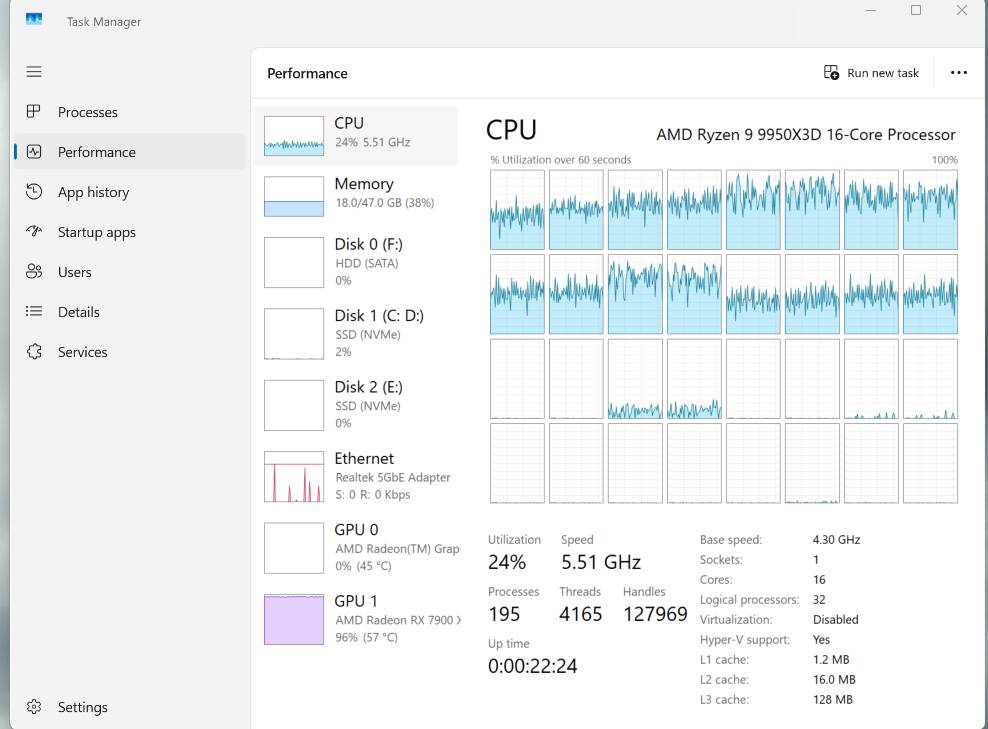
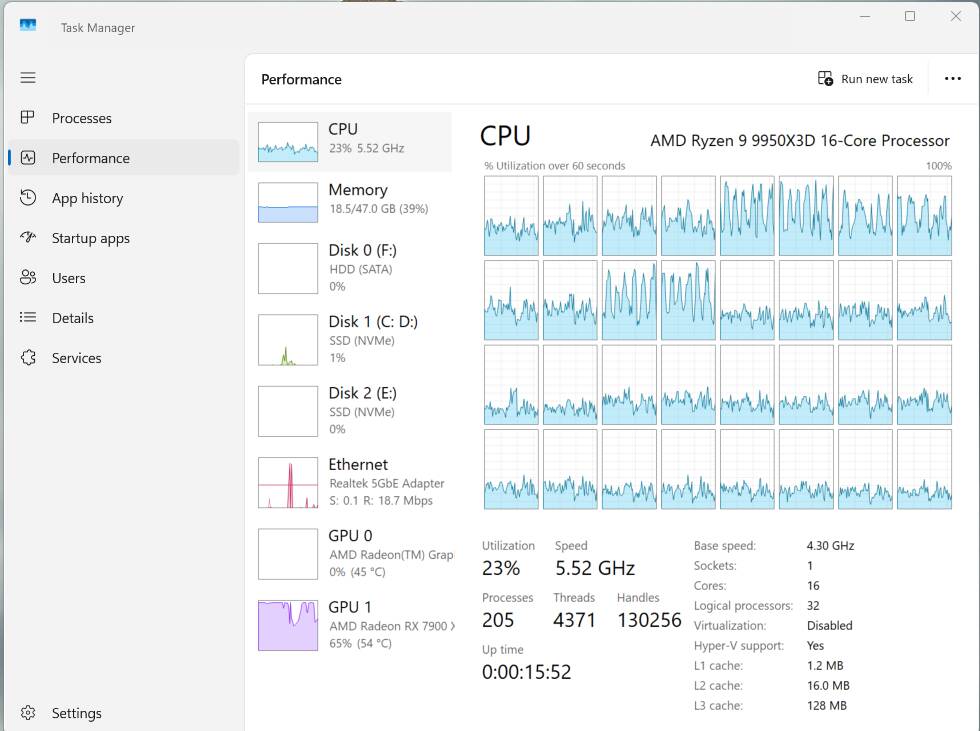
I did a quick test with my 9950x3d to show what happens. Both screenshots below were taken with my IndiaFoxtEcho F-35 sitting on the runway at KDFW:
Balanced Power Plan - sim runs only on CCD0 (3d cached cores):
Ultimate Power Plan - sim is loaded on CCD0 but is using all cores
So the first pic of the balanced plan shows the sim running on the 3d cached cores as advertised by AMD. Most cores on CCD1 are parked and Win 11 etc is probably running on the 4 CCD1 cores showing some activity. I started up a few other apps (browser/file explorer) which loaded onto more of the CCD1 cores as expected. If the sim maxed out the 3d cached cores then some cores in CCD1 would probably be unparked and utilized. Keep in mind parked cores are in a deep sleep and it will take a little time to unparked them - only microseconds but maybe enough to cause micro-stutters.
The second pic of the ultimate power plan clearly shows the sim utilizing all cores with no cores parked (performance plan would look the same). There are activities such as writing to rolling cache, server comms, etc that are not going to impact fps/stuttering that can run on CCD1 and offload critical CCD0 processing.
So my vote for the most efficient allocation of work across all cores would be the ultimate power plan (or performance). Ymmv  .
I’ve been saying for a long time that we’re gamers and sim enthusiasts, whether it’s MSFS or other simulators, so our systems should be running at maximum performance. That includes using the Ultimate Performance or High Performance power plan. I’m glad to see you share the same view 
I would be interested, however, to see what the performance is like in Sim when comparing balanced to the ultimate power plan. My understanding is that for the dual core CPUs you would only want the X3D cache cores running for gaming and you need to select the balanced plan along with the Xbox game bar running for that to happen. By spreading the load to the non-cached cores, it might help for other applications but not for gaming. Try the same test when running the FPS counter in the sim to compare performance.
Sadly, this is not how it works for the dual CCD X3D CPU’s.
Setting the power profile on ‘high performance’ or ‘ultimate performance’, will schedule the tasks on the higher clock speed cores (the non-X3D ones). Even though they have higher clock speed, they are a lot slower than the X3D cores for gaming workloads. So really, if you have one of these (like the 9950X3D), use the ‘Balanced’ power plan only.
If you’re running a single CCD CPU (like the 9800X3D) it doesn’t matter, since all your cores have the X3D cache.
@WingWarper1 as well; yes, it’ll use all the cores, but It’ll be slower than running on only the X3D cores. After a certain point throwing more cores at it simply doesn’t make a difference. Having the software run on the X3D cores however does make a difference. Your background tasks will run on the non-X3D cores, which is what windows thread scheduling will do when you have it set to the Balanced power plan (also make sure your AMD chipset drivers are up to date).
And yes, this also means that if you’re not running heavy productivity workloads besides your gaming workloads, the 9950X3D is entirely useless. Could have gotten a 9800X3D for a lot less money for about the same performance, or a 9850X3D for better performance than the 9950X3D.
For my 9950x3d, the only thing that you will notice running the ultimate/performance power plan is the sim runs smoother and the fps 1% lows are a little better. Every little bit helps with the sim.
It will help if spreading the workload to the non-3d cached cores is done intelligently as I stated above for activities such as writing to rolling cache, server comms, etc that are not going to impact fps/stuttering. It will actually improve the sim performance. If you look at the 2nd task manager pic of the balanced plan it shows 12 cpu threads not being used (parked) and 2 other threads barely used. How can that be a more efficient use of the cpu over the other pic showing the ultimate plan utilizing all 32 threads? The mainthread for the sim will always run on the 3d cached cores.
Because by not using ‘Balanced’, you’re telling windows to ignore the type of workload, and run it on any free core, not the core best suited to the workload. So it’s very likely the mainthread would end up on one of the non-X3D cores since those have a higher clockspeed.
If you want to compare it to intel, setting performance profile to ‘high performance’ on AMD would be equivalent to letting it run on E-cores and P-cores alike on intel. You do not want this.
I would say that AMD is to blame for the confusion here with their naming conventions for the power profiles. You will find that for gaming workloads using the ‘high performance’ profile is slower.
Actually, the sims mainthread is clearly running on CCD0 in my pic of the ultimate plan above so performance impact is minimized. You seem to be discounting the enhancements that MS/Asobo did several SU releases ago to offload the mainthread and improve the multi-thread operation of the sim.
Not on my 9950x3d. Under the ultimate plan, all my games run on the 3d cached cores (and use more non-3d cached cores only if they want to). I’ve included a pic of World of Warships running exclusively on CCD0 3d cached cores under the ultimate power plan as an example - see below.
I’m not sure which processor you have but prioritizing games on CCD0 is always the case no matter which power plan you use and is even the case on my PC with a 7000 series 7900x3d. AMD has come a long way in optimizing their dual CCD cpu’s as in the beginning using the balanced plan seemed half baked but not any more.

I believe this is no longer entirely the case, as @WingWarper1 also confirms in his post above. Keeping the system well maintained, including updating chipset drivers and the BIOS, is key.
In the past, there were issues with CCD scheduling for games and applications on dual-CCD X3D CPUs, which is why the Balanced power plan was recommended. These issues have since been fixed, so you can also use the High Performance or Ultimate Performance power plan.
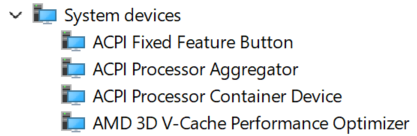
Also, it’s important not to forget about the BIOS settings that support the AMD Chipset driver (and Widnows), specifically the AMD 3D V-Cache Performance Optimizer.
As for the BIOS, it’s CPPC Dynamic Preferred Cores.
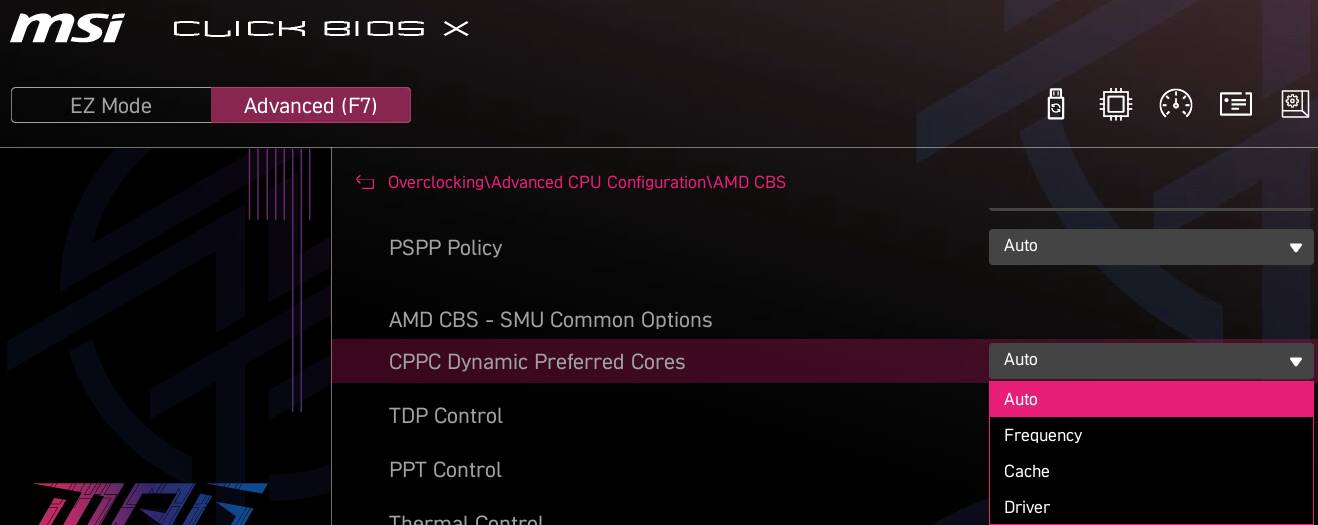
- AUTO/DRIVER: Allows the driver to select the preferred CPUs according to the currently active window.
- Frequency: Prioritizes the CPUs in the CCX with the highest operating frequency.
- Cache: Prioritizes the CPUs in the CCX equipped with 3D V-Cache.
So, in case of issues or when running an older, buggy Windows installation with outdated chipset drivers, it’s worth keeping this BIOS setting in mind.
Great point as my post above assumed that this bios parameter is set to either its default “AUTO” or “Driver” setting which will then allow the Win 11 chipset drivers to select the cpu behavior based upon the power plan. Only if it was set to “Frequency” then the cpu would always use its strongest core.
If you look at your two screen shots, where the processing for Balanced is being done on CCD0, the total utilization is at 24%. For the Ultimate plan, yes some of the processing was moved to CCD1 but the total utilization actually dropped to 23%. So, all the Ultimate plan did was move some of the processing from the more gaming efficient CCD0 with the X3D cache, to CCD1.
Based on what I’m seeing in those screen shots you would have better gaming performance using the balanced plan rather than the Ultimate.
Risks of Ultimate / High Performance: Forcing an Ultimate or High-Performance power plan can disable or interfere with core parking. This can cause game workloads to scatter across non-V-Cache cores, leading to lower 1% and 0.1% low frame rates (micro-stutters) rather than a smoother experience
All it takes is one core to bottleneck (mainthread on CCD0) and you get stutters so offloading the non-critical work within a game like writing rolling cache to disk etc is a good thing. Obviously, I’m not going to convince you so I would encourage you to just try it - you might be pleasantly surprised! You can easily change the power plan in Windows and you don’t even have to reboot.
Happy flying 
Well, I wish I could but I don’t own that CPU. I’m running the 9800X3D. I’ve been looking into upgrading but from what I’ve read value to cost wise the upgrade wouldn’t be worth it. And I am open to be convinced.
What I would like to ask of you, if you wouldn’t mind, is to post screen shots of FS performance comparing the two power plans. If you create a test in the sim using a large aircraft at a large airport, to ensure you are Main Thread limited . Open the FPS counter in dev mode and compare the power plans against each other. I would be interested to see the results. I’m not married to either plan but I’m just going by what I’ve read and hopefully it will give others and myself a clearer picture.
Cheers