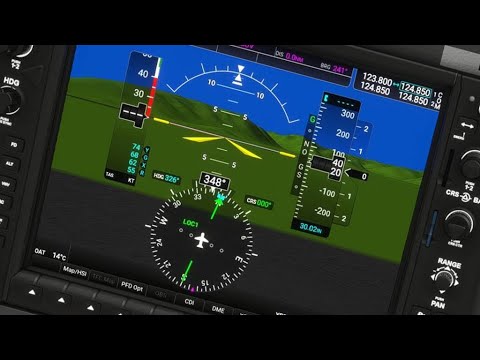
Its always difficult to pinpoint what’s going wrong exactly.
Can you take a look at this video from the 16:00 minute mark and tell me if you can get the flashing bar going on that happens from 16:10 after he presses the FMS knob? And if so, if you can follow what he’s doing up to about 17:10?
If you can’t get the flashing bar, you’re probably not using the right button/command to press the FMS knob (press, not turn) and you have to look at what your mouse interaction buttons are.
If you have discord I would also advise to go to the msfs official discord help&support channel and ask for some help there. As it is probably easier to help and troubleshoot with someone actually in the sim and have direct feedback.
If it’s the Hondajet specifically I would recommend going to their forums/discord for guidance or use the search function on this forum to search for topics on the Hondajet to get you to the right place.
I am in need of some guidance. I first had Flight Sim in 1986 or so. My latest version was FSX . I am a retiree and recently upgrade my laptop to a Lenovo Thin 7i Prox X with a 12700 cpu, 32 gb ram, I tb ssd and integrate Nvidia 3050 GPU. I put FSX on my new machine but wanted to purchase FS 2020 40th. When I use FSX it runs at 40 to 50fps and then suddenly drops to 0 and the software crashed. I would like to find out if FS 40 is going to even tax my machine more. I realize my current system may get too hot as it isn’t a Tower of gaming laptop.
Some input is appreciated. I’m an old ■■■■ over 70 but don’t want to waste my money.
Hi, you can call me: Lima
I am not playing Microsoft Flight Simulator at the moment.
I want to try flight simulation because: I had a traumatic flight, and because of that, it has been very painful to perform the flights. So my idea is to join a VR set and decrease my anxiety
So for this I kindly ask your help
Hi. I’ve been flight simming for years in fsx but a recent new pc build means I can finally run MSFS. It looks fantastic, with so many places to go I think the only problem is where to start!
Thanks Beechc23. Still deciding after reading numerous posts about fps near large airports etc dropping to unplayable whether I should not up grade or should just try XPlane 12. I would have thought that with the 12 gen laptop c/w 3050 I could cruise at 30 fps and not degrade.
Hi, I go by radioactivated or xnopyt (I prefer the former since it isn’t an increasingly stale Tom Scott reference). I’m playing on PC.
Before now, I messed with the Google Earth flight sim years ago, and I’ve known a few flight simmers/pilots IRL, but couldn’t justify getting sim equipment since I was moving around a ton for school. Now I have some free time and money, I figured it was good time to get into sims for myself. Who knows, maybe I’ll be in a real training plane some day.
Hi all, I’m Sid, from India.
I joined this flight sim community in 2020
I am trying to post an issue, on the forum,
but I am unable to, it says :
“An error occurred: You are not permitted to view the requested resource.”
Hi, this is FosterGame70316
I am new and just purchased MSFS2020 Premium Deluxe for PC - Digital.
I have flown all the MS flight sims at some time or another. The graphics improvements look amazing!
I am interested today in learning how to install my purchase on a Windows 11 PC. I’ve been reading here and seems there’s lots of directions in how to do it. Will the install procedure have a written details? Just looking to have a clean install on a ‘dedicated’ pc.
Thanks for having me!
i-7 12700 12th Gen
Nvidia RTX 3060
16GB RAM
512 NVMe SSD
1 TB SATA HD 7200rpm
**Hi, you can call me: Ceezy
**I am playing Microsoft Flight Simulator on: a dusty old PC
**I want to try flight simulation because: it’s a new and interesting challenge.
Good I’m Aser from Spain
I fly on Xbox Series X, years ago I was on PC but I no longer met requirements and 1 month ago I bought the console.
My Gamertag is: Aser90 #3056
I’m flying with A320neo and F18
I would like to join a Spanish-speaking virtual airline but I have not found any. If you know any tell me plis.
I am delighted with the simulator, I find it fascinating to be able to do it from the console.
Best regards.
Welcome to the forums! When you get a chance, take a look at the Code of Conduct to learn the rules here, and check out #msfs:forum-guides for some forum tips.
I also found a virtual airline that is looking for Spanish-speaking pilots, if you are interested!
Thanks a lot. Now I keep an eye on what you have sent me although I just saw that airline and it is PC and I from Xbox I was already with them talking …
They use a PC program to record and enter flight data. Being from Xbox I can’t record that data.