I am using the ATC switching from feet to flight level and vice versa in its altitude directions as a cue when to switch between STD and local baro.
This is wrong, 29.92IN is basically the STD baro that is used above the transition altitude (in the game globally 18’000ft) and very rarely in live weather the local baro used at the airports. Did you press ‘b’ to set to local baro before the take off?
Thank you for a detailed reply I think this could be it…I was wondering why my pilot requested cancelling IFR and requesting a new one to the same destination. I will try to see what you suggested and see if it works.
I always press b before takeoff 
But Yesterday when I was flying, the ATC told me to switch to 29.92IN even though I was stuck at FL10? Not sure, I am going to fly again and test
1 Like
Yes, it appears to be corrected. I’ve made two flights now - no more call-outs to continue my climb. It turns out that the issue was related to live weather and ATC’s perceived radar altitude rather than the BP.
1 Like
Hi all! Is anyone else still getting asked to expedite their flight level? I streamed with the 787-10 yesterday and it kept on asking me to expedite my flight level.
Just curious if anyone else is still have the issue after the last update. I thought it was supposed to be addressed in the last update?
Nicole
1 Like
So I followed everything you suggested in #2. I started flight from Doha to JFK. I selected the gate to gate, then changed take off approach, and that’s it. Took off, and everything was going smoothly. I was ascending to FL120 and after a minute or so, AI decided to change the destination to the same one I had but this time, made it a low flight IFR like you said, and started asking me to descend.
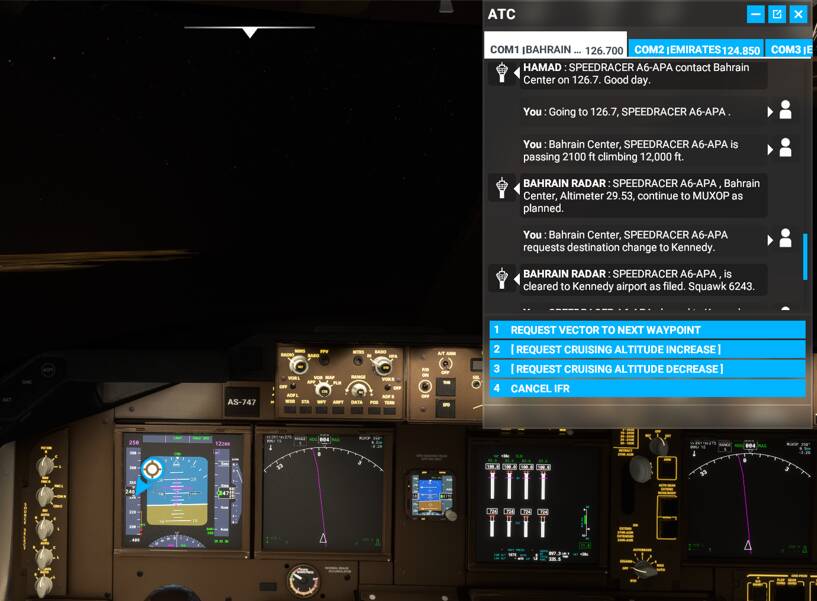
If you notice, the second to last transmission has me requesting change destination to Kennedy (despite the fact that it is already Kennedy). Now that made me descend to 8k ft and stick there.
Now I’ve been playing fs2020 since its release. This type of sudden ATC nonsense started happening fairly recently. I did all the things you suggested. When I clicked the Navlog button before starting the flight, it said my flight level is FL420.
When you changed the take off and approach, did you do this on the FMC after starting the flight? If so, then it’s technically a change in the flight plan, that’s why the copilot asks for another flight plan clearance.
I know it only happens recently, but the changes recently is only on the copilot ATC radio handling behaviour. Before SU5, if you make changes to the departure pattern or approach, the sim technically sets a new flight plan that’s pending clearance. You can see this on the ATC menu where you have a new line saying request IFR clearance. Before the update, the Copilot doesn’t have the capability to handle this request, that’s why it’s always there in the ATC menu, and the copilot just handle the other ATC comms.
With the SU5, now the Copilot has the ability to request new IFR flight plan clearance as long as the option is available in the ATC menu. It’s technically an improvement in the capability of the copilot ATC handling, albeit an annoying one since we can’t control them to avoid this.
That’s why when you choose a departure pattern and approach, you have to do so from the world map flight plan before you start your flight. That’s the only way for the aircraft to load the entire flight plan, and don’t make any changes to it, like selecting a different departure pattern or approach. You need to have everything finalised along with the cruising altitude before you start the flight session. Then the Copilot won’t see any flight plan discrepancies and don’t request a new clearance.
Working 100% for me after latest the latest update. Which I believe the most recent update is SU6.
WU6 not SU6 which is coming next month.
1 Like
Yeah I only made changes in the world flight planner. I rarely if ever mess with the FMC.
So you’re saying not even select which pattern to select for even taking off? because the AI selects weird departure patterns. So that begs the question as to why the Co Pilot is requesting new IFR clearance despite me already cleared from the flight planner and before takeoff?
Tried again with only a change to departure pattern. Copilot requested a new IFR after takeoff again 
I can always disable Copilot from talking to ATC but that means I’ll have to handle all the comms. Ugh.
Weird… I mean you can still select the pattern from the world map, but as soon as you enter your flight. That’s it, you shouldn’t change anything anymore. I’m not sure what’s causing your flight plan to change after you enter your flight.
Thank you for the correction. Difference being world update vs Simulation update?
Thanks for all your help though! If you (or anyone) have spare time and are interested in re-creating my issue, see if you can replicate this in the flight planner. My Comms is all AI.
FLIGHT:
High Altitude IFR
AIRCRAFT:
Boeing 747-8 Intercontinental
FROM: OTTH
Gate 5 - Heavy
DEPARTURES (MUX01E 34R)
TO: KJFK
ARRIVALS (PWL2 ALL) (or PARCH3 31L)
APPROACH (ILS 31L)
Yes, that’s right
1 Like
Made the mistake to do a flight wit traffic and atc again.
I know this isn’t the first topic about this. But honestly i can’t care less. Things like this should be repeated every day multiple times a day.
I’ve been very positive about the latest world update. But now i’m done sightseeing and figured to do some actual flight simming in tbm @ florida. It was horrible.
Why does it take so long Asobo why? Fix it. It’s a basic functionality and it’s broken. You keep selling a game with to many broken features to new customers while the old customers keep complaining about these issues and it’s completely silent on your end.
It’s a complete joke it takes so long to fix these issues.
But noo, we all have to wait for a delayed q&a session to get some answers. And then we’ll have to wait another month untill the fix is actually ready.
I don’t care that stuff get’s broken once in while. But please pay some attention to the speed in wich you inform your customers about these issues and make sure to aknowladge them. Prioritze it and fix it asap.
There’s no point of waiting till the next schedueled update since these bugs aren’t planned to be here either.
Hotfixes could be rolled out everyday.
So that’s my frustration for today👌
6 Likes
They have no time.
They must push out content very fast as we see , because MS is pushing.
So we get lots of content and xbox related downgrades but they cant fix all the old bugs.
They hired external guys to make the g1000 fixed.
Next two updates will be sim updates, so lets hope for this.
1 Like
Yeah ofcourse we’ll have to ‘hope’ for this to be fixed in the next sin update. But how mich time will ik take for them to make one single post on the forum for each of the bugs that they know about after an update. Let us now when it’s aknowleged and if it’s gonna be fixed anytime soon or not.
I mean people are honoring Asobo for their open communication with the community.. But i don’t agree with that at all.
Everything is a mistery untill the updates arrive.
Almost all the games i have on steam have random fixes/patches going out on random dates and times. Asobo needs to move on with the fixes and prioritze them over content updates.
1 Like
Very true, but they wont. They keep pushing xbox ( they even make the pc version a xbox port] and content, so they get most money in short time.. 