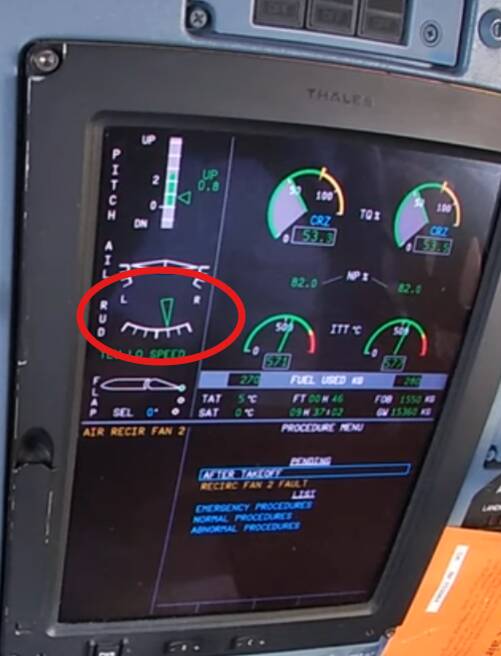
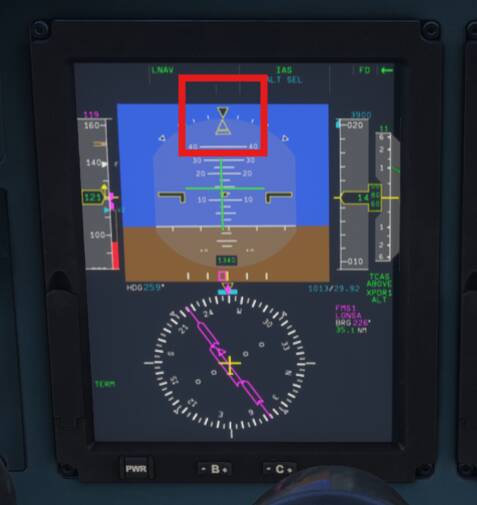
The ATR -600 features automatic rudder trim, activated when YD is engaged. During normal flight you can see it adjusting the rudder trim tab to the right (on the EWD, in reality, the tab moves to the left) for coordinated flight (canceling propeller effects). During engine failure it should compensate for asymmetric thrust automatically as long as the YD is engaged.
In the sim, the rudder trim stays centered. When inducing yaw (for example, asymmetric thrust), absolutely nothing happens, the aircraft does not return to coordinated flight, no action on the rudder trim tab.
In the simulator you can easily get away with not applying any rudder input following an engine failure at low speed. This is not realistic. In real life you need to apply rudder quickly to stay in control, and close to full rudder input is required. If the YD is engaged, the auto-trim function should correct during engine failure.
For all the CFD fluff, propeller effects are still not realistically modelled. This ATR tracks straight during take-off, the real ATR will tend to roll and veer to the left during take-off roll (no wind). During flight, rudder trim and a bit of aileron trim to the right should be required to stay in trim (rudder trim should be adjusted automatically when YD is on), during engine failure a lot of rudder input should be required, and it needs to be applied quickly.
FREQUENCY OF ISSUE
Always.
REPRODUCTION STEPS
During take-off, observe the aircraft is tracking straight, no left yawing tendency (no wind). Observe no left yaw in-flight even during climb.
Induce asymmetric thrust, observe uncoordinated flight, no auto-trim action. Observe very little yaw when retarding one power lever to IDLE, the other to RAMP.
YOUR SETTINGS
Not relevant.
MEDIA
Engine failure: no rudder trim action (also very little yaw for an engine failure):
Aircraft should roll and yaw to the left, requiring right rudder and aileron trim input. During take-off roll, right aileron input is required to keep the wings level (no wind), right rudder to maintain the centerline. When selecting the YD on, it should apply right rudder trim input for coordinated flight.
While I completely agree that the Yaw Damper does nothing on the sim, I have always and still do find that it needs constant right aileron input in level flight to prevent it from rolling over to the left and thus, application of R WING DN trim
I have only flown it with my keyboard, but yes, I think I noticed the same. But no yaw to the right on the runway and no right yaw in flight. This is in flight, no AP or YD engaged, rudder trim centered no right yaw whatsoever and this is in climb, so no P-factor:
A fun little addition here. After takeoff, the aircraft tries to roll to the left which is expected behaviour and can be countered with roll input and removed using aileron trim while flying manually
However, once the aircraft has been in autopilot and you then disengage autopilot, the aircraft is no longer trying to roll to the left which means that if you had used aileron trim during climb out, the aircraft will roll to the right and you need to reset the aileron trim
Indeed. I had noticed this actually on the original 2020 version in that after takeoff you would be fighting to stop it rolling left after takeoff but when you disengaged the autopilot to land, it stayed wings level. I had never used the aileron trim before my last couple of flights after you mentioned it above
If you disengage the AP during any other stage, does it still roll? On approach, with low power, you’ll manually need to reset the trim close to neutral in real life as well when the AP comes off. So maybe it is correct.