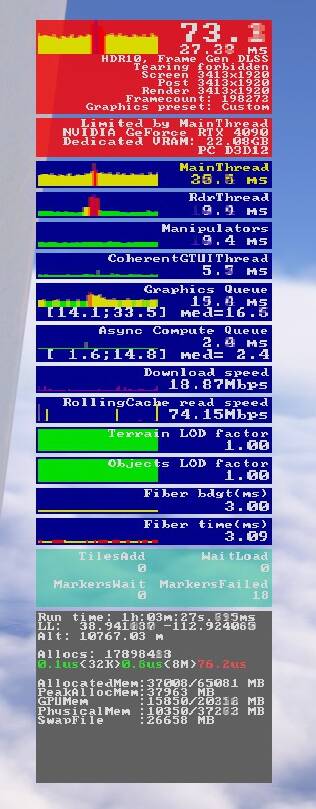
This stuff is starting to utterly confuse. While I had some perfect flights over the weekend after updating my drivers on Friday evening, the stutters and crackles are now back for me since yesterday. Without me changing anything else.
So the only thing consistent about this I can see that it is not consistent at all. Almost feels like a loop of change something, work for a day or two, then it goes back again to being bad. And then the cycle begins anew. Which is really strange behaviour, since how come it sometimes works and sometimes doesn’t without any changes on the user end?
I hear you. For me I’ve been able to identify that it happened when I was at TLOD above 200 near metropolitan areas with complex scenery. Other then that I’ve been in almost every scenario imaginable since I posted my results weeks ago and haven’t had any issues out of blue.
Yes I do have enabled a marketplace light enhancement for aircraft. But I did have that enabled last night where I had some of the best flight experiences smoothness ever. I’ll try to disable it and see what happens
I hope I’m not tempting fate but fired up my pc this morning and have just had the best session since getting my 5090 on Monday. Stress testing with the YS11 at EGCC with Med - Ultra settings and FSLTL at default (other than IFR traffic capped at 30 which I find is sufficient anyway and I didn’t want to push my luck!). Able to taxi around a busy airport with no stutters or audio glitches. Ended flight and thought I’d throw caution to the wind and spawn at a gate at Inibuilds EGLL. Same settings and still no major stutters. Taxied for takeoff with lots of other aircraft moving around and took a short hop to Gatwick with the wonderful freeware airport scenery installed. A handful of very small microstutters enroute which seemed to decrease as I flew away from Heathrow and a nice smooth landing at Gatwick with only tiny stutters on approach and turning sharply when taxiing. So not quite perfect but so much better than most experience in the past 48 hours. This flight from Heathrow would have been impossible for my old 3080ti at these settings so today I’m feeling much happier about my investment. With a bit more optimisation this could be perfect for me at least!
Well it turned out I was tempting fate. First flight this afternoon with exactly the same settings as this morning and the stutters and audio crackling is back. Only difference is I’m now in the JF Arrow and in the NYC area. It was nice while it lasted….
I had stutter and static free flights the last two days in dense areas like Los Angeles. Today it all came back. I’ve tried all the tricks in windows and bios and none of the solutions have worked permanently. I’ve come to the conclusion that there is nothing we can do on our end to fix this problem. This is an Asobo issue they need to figure out. If the problem was on our end, we wouldn’t have days without any problems while other days things are horrendous.
I have a 7800x3d, 4090, 64gbs ram with NVME and even on the lowest settings the stuttering and audio stutters continue. Can’t go much lower than having photogrammetry off, TLOD and OLOD at 10 and all other settings set to low or off.
I’m back to the conclusion that this is a problem with Microsoft/Asobo servers. I’ve tried several of the fixes suggested here and would have a day or two of no stutters, but they always come back. This morning is absolutely terrible and I’m just flying over remote northern Minnesota.
Last night everything ran smoothly with no stutters or static sounds, today it is really bad. If it was on our side, we would be constantly having problems, so I agree with you that it’s an Asobo problem that they need to figure out.
That’s correct, last night the SIM ran perfectly fine. But in the past that’s what it would do one day runs great, then the next couple days absolutely horrible without a change of anything in the settings.
I might be going crazy, but anyone else just saw this whole issue disappear this afternoon? I still get some short spikes on the main thread while flying, but not audio crackles anymore, and the spikes are much shorter than before. Even my extreme test flights over LA with the Super Hornet are now smooth.
Are you rebooting your PC before starting a flight?
Please reboot your PC, stop any unneeded background task, do not start any other program (in particular no browser) and start the simulator and the flight. I’m looking forward to hear your experience.