Yea, that was kind of a bummer… Of course, these issues reappeared again without any input from my end. How is one supposed to troubleshoot this if it so random?
Honestly I barely remember having audio stutters in msfs2020. I remember a lot of other issues with 2020 but never had audio stutters like I do in msfs2024. In 24 it’s been prominent since release. Not every flight, but many flights. It’s ruined so many flights for me and has been one of the main reasons I’ve hardly touched the sim since last winter. I came back recently thinking it must have been addressed by now but I see that it still hasn’t.
I normally always reboot before (serious) flights since I have the issue and until now it eliminates the problem everytime until a sim restart. But last weekend I flew some LR flights with the A350 and I got one flight where I departed without audio stutters but got them after 10 hours of flight during approach. So personally I guess it has also something to do with VRAM or other memory / cache overflow.
1 Like
Had yet another audio stuttering flight from Copenhagen to Manchester. Performance for a long time is steller running at a locked 30 fps x 4 MFG (120). I have tried absolutely every ‘fix’ listed in this huge thread to no avail. Audio crackles do not even relate to any cpu spikes on the task manager graphs. Setting TAA or DLSS fails to stop them, lowering settings from Ultra to Medium fails to stop them, flying default scenery fails to stop them, switching off Tobii and having a static non panning view fails to stop them. Its an awful issue that affects so many yet Asobo seem to not comment on the matter or offer a solution. MSFS 2024 / SU4 Beta (happened in SU3 also) / Windows 11 Pro 25H2 / 7800x3D / 64 GB DDR5 6000 C30 / RTX 5090 / SSD and nVME drives / 1200W PSU / 1 gig wired internet connection producing a constant 1150 Mbps download speed. I also have all the world and city updates downloaded and installed locally. My system is high spec yet the sim locks up and stutters randomly! It is so disheartening, Ive invested a huge amount of money this year on new hardware
1 Like
Yea, Task Manager is really useless for troubleshooting this issue. The sample rate there is just too low to show any effect due to these mostly sub-second CPU spikes. But if you use more in-depth tools, it clearly shows the sim shooting up to 100% usage for that split-second and making everything else stall due to no available CPU power.
One interessing fact I stumble upon is that while there are always slow downs in the sim in areas with a heavy data load, they are not always resulting in an audible issue. And this seems mostly correlate to the behavior of the GPU graph.
E.g. this is a noticable stutter, but without an audible crackle. In this case, the slow-down mostly happens in the RdrThread and the GPU graph, while the main thread does show impact, but not much.
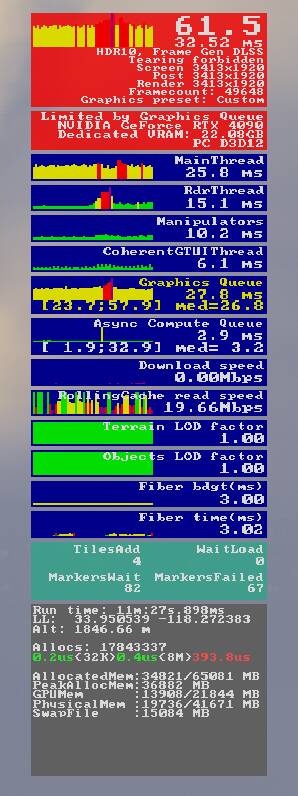
Compared to this screenshot which show a heavy slowdown in all threads except the GPU queue. This is an extreme example, but definitely audible 
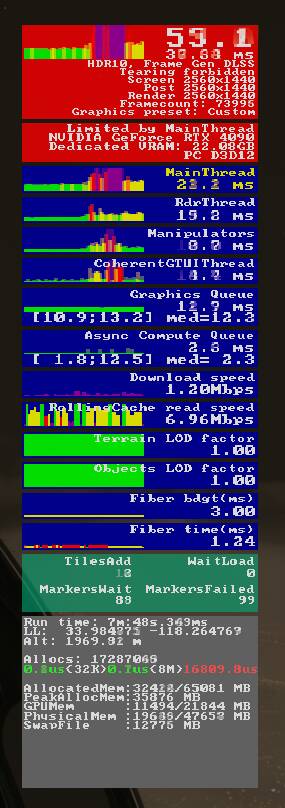
While this does not really help with fixing the issue or even finding a workaround, it clearly shows that something chokes the CPU/main thread hard. And by now I’m convinced there is not really anything that we as users can do. Because I stopped changing stuff on my end and still can see the issue come and go without much rhyme or reason. Even spend a couple of hours with CoPilot to help troubleshoot, but even the AI was kinda out of ideas in the end
1 Like
This bug as well as broken jetways are tops on my list as far as horrible bugs are concerned. For me, it generally happens in intensive scenery areas. My system:
7800x3D, 5070ti, 64gb
If this is due to low memory resources (which I’m not convinced it is) I’m really not sure what else I can do about it.
1 Like
Not so much an issue of insufficient memory as of an extremely hungry simulator. In my test flights here I can see easily see an allocation of 36GB for the sim and once or twice did see it even going over 40G.

1 Like
Very very smooth flight here. Heathrow-Hamburg, Fenix  no stutters at all.
Installed win11 25H2 not long ago. Suddenly I got audio stutters too on a flight earlier today! Never had that before.
A solution might be to check your motherboard manufacturer for updated Realtek drivers. For Win11 you need to go to MB’s site - not Realtek.
At least that fixed the problem for me - smooth sailing again.
1 Like
Thats good advice about motherboard audio drivers. Some M-boards have good quality audio chips.
It’s worth scanning the music recording forums when choosing a motherboard and configuring Windows. They focus heavily on removing audio problems.
For those that are having audio issues my advice would be to stay away from installing the audio drivers that come with the motherboard’s manufacturer. Asus’s Reatek in my case. Along with the drivers themselves they have a tendency to install a lot of bloat ware that comes with needless services such as Nahimic and others. For audio I simply let Windows install its default audio drivers and I have never had issues.
Anyway, that’s my take.
1 Like
I always wondered about this - I have avoided installing the MSI motherboard audio drivers and just let Windows install what it wants, and have not had issues. (I did allow NVIDA to install its audio drivers).
Well…a bit strange advice.
If you want the latest and correct Realtek drivers you need to go to MB’s site. For pre-Win11 you could go to realtek. There is no bloatware. Its pure audio drivers.
Windows does not install any Realtek drivers. Just generic drivers for the Realtek chips. Its like using generic video drivers for your 5090- card: Not very good…
Furthermore it fixed my audio stuttering introduced with 25h2.
And generally NOT adviced to install the NVidia hd audio driver..
So, not sure your “advice” is that great, but you might have some special insight on this issue?
For me…actually uninstalling the NVIDIA audio drivers has basically completed eliminated my audio stutter.
1 Like
Well, Windows 25H2 was released Sept 30, 2025. Check out the latest release date for my Asus ROG STRIX X670E audio drivers. Mar 31, 2023. Not to mention the size, 569 MBs

I’ll stick with the 1 MB of Windows audio drivers.
Are you sure the old one isn’t better based on the note below?
Latest Driver Details
-
Driver Name: Realtek USB Audio Driver
-
Version: B6.3.9600.2342
-
Release Date: March 31, 2023
-
Note: This is a special version where the Sonic Studio III Virtual Mixer is disabled for better stability, addressing potential audio issues.
Why would I risk it. I never get any of those audio stutters others have complained about and the fact that those drivers were created with an older Windows version in mind doesn’t make sense to even bother trying it. If I were having an issue then mayby yes, but if it ain’t broke, don’t fix it.
My original suggestion was more to those having audio issues not to get stuck on the idea you have to use the motherboard’s drivers. Sometimes the default Windows drivers will work just as well, or better.
The latest drivers introduce the latest bugs ha ha.
Also the bloatware creeps in as one person mentioned.
Over the years/decades I’ve noticed Microsoft are very careful which drivers they allow Windows to install. They test hundreds of systems and know which drivers are reliable, regardless of age, and stick with them. As others have said, the default audio drivers in Windows work well.
FYI: If you download audio drivers from your motherboard manufacturer, you don’t need to install the full package with all the bundled bloatware or apps like Nahimic - those can negatively affect MSFS.
Just extract the driver package, then in Device Manager right-click your audio device, choose Update driver → Browse my computer for drivers and point it to the folder containing the extracted driver. That’s it.
EDIT
As an extra note: in Device Manager I have all audio devices I don’t use disabled, so only the ones I actually need stay active.
3 Likes
Really not sure what you are talking about…
“The latest drivers introduce the latest bugs ha ha.”
Que? Windows drivers? Realtek drivers?
“Also the bloatware creeps in as one person mentioned.”
Don’t see any bloatware on Asus site. Pure driver DL. MSI you can update via MSI Centre - no bloatware. As the gentleman above says: upgrade via device manager.
“Over the years/decades I’ve noticed Microsoft are very careful which drivers they allow Windows to install. They test hundreds of systems and know which drivers are reliable, regardless of age, and stick with them. As others have said, the default audio drivers in Windows work well.”
Not sure what you are trying to say. If the MB audio driver is unreliable windows won’t install it? Is that good? Bad?
After decades of building PCs, all Im saying is that if you have audio stutters, you might go and check your MB’s site for any Realtek/audio drivers.
Updating the drivers seemed to have fixed my audio stutter problems that was suddenly introduced with Win11 25h2. So maybe it can help others too…
If you don’t have audio stutters - fine! You don’t have to do anything. But telling ppl to not update audio drivers, bcs “I don’t have problems…Im on windows drivers…bloatware…”, is kind of a moot point.
1 Like
I’m with you on that. In most cases, audio crackling usually come down to driver issues - whether from the motherboard manufacturer or the sound card maker.
In my case, I’ve got the newest version of the Sound Blaster X5 app installed, but I’m running an older driver version. The latest drivers give me instant audio crackling, while the older ones work flawlessly.
And another thing: the sampling rate can also affect crackling. It’s worth experimenting in the driver panel or app settings - sometimes just switching to a different sample rate solves the issue on the spot.
So yeah, checking and tweaking drivers and settings should always be the first step.
1 Like