Audio stutters during flight, when changing cams etc
Based on the latest video you posted on the forum, I can say with full confidence that this is not a typical audio stutter issue.
The sound interruptions you’re experiencing are a direct result of stuttering and FPS drops, not an audio-specific glitch. In other words, the audio is being affected because the game is not running smoothly.
I haven’t experienced significant audio stutters in quite some time.
The only issue I have today is if (using a tobii EyeTracker 5) I turn my head away from an aircraft (on ground or in flight), the audio will drop out completely, until I move my head back.
This was fixed for me when I turned off all virtualizations for my AMD CPU.
Haven’t had an issue since then and it’s been months of flights.
As I’ve always recommended, virtualization should be disabled if you don’t actually need it. I also mentioned this before in the BIOS settings topic.
I know this issue can have multiple underlying reasons but maybe just one thing to try for those who suffer from this issue. I had the exact issues described in this thread for a long time (sometimes more, sometimes less, sometimes none; sometimes a sim restart cured it, sometimes not and so on). What helped for me: I deactivated both the driver for my Ethernet card (Realtek Gaming 2.5Gbe Family Controller) and my on-board Wi-fi card (RZ616 Wi-Fi 6E 160 MHz) in the Device Manager and bought a USB Wifi stick. It seems like the on-board internet cards somehow suffered due to MSFS heavy streaming. Interestingly, even when only having a connection via the Wi-Fi stick but the other drivers still activated, there is still the audio stutter issue. It only goes away when deactivating the drivers. Probably not the cure for most but maybe one more thing to try.
Hi everyone,
I’m running out of ideas and I’m hoping someone with similar hardware has experienced this.
My system:
- AMD Ryzen 9 7950X3D
- ASUS RTX 4090
- Gigabyte X670 AORUS ELITE AX
- 64 GB DDR5-6000 (EXPO enabled and verified)
- Windows 11 25H2 (Build 26200)
- Latest BIOS (AGESA 1.3.0.1b)
- Latest AMD chipset drivers
- Latest Realtek audio drivers
The problem:
I’m getting random audio crackling/popping while using MSFS 2024.
It happens with:
- Fenix A320
- Other aircraft as well (so it doesn’t appear to be Fenix-specific)
The crackling becomes more noticeable during heavy scenery loading or whenever the simulator is under load.
LatencyMon consistently reports:
- nvlddmkm.sys (NVIDIA Windows Kernel Mode Driver) as the driver with the highest DPC execution time.
- Sometimes dxgkrnl.sys is also among the highest drivers.
Things I’ve already tried:
- Clean NVIDIA driver installation using DDU
- Latest NVIDIA driver
- Older NVIDIA driver (566.36)
- Latest AMD chipset drivers
- Latest Realtek audio drivers
- Sound Blaster X4
- Realtek onboard audio
- Disabled ReBAR
- Disabled SVM
- Disabled IOMMU
- Disabled onboard Wi-Fi
- Tested with only one monitor connected
- Windows power plan set to High Performance
- Latest motherboard BIOS
- EXPO/XMP enabled and verified (DDR5-6000)
None of these made any difference.
One interesting observation:
Using Process Lasso and setting the Fenix App process to High priority completely fixed the laggy PFD/ND display issue. However, it had no effect on the audio crackling, so I believe these are two separate issues.
Has anyone with a similar setup (7950X3D + RTX 4090) experienced this?
Especially on Windows 11 25H2?
At this point I’m starting to wonder if this could be related to Windows 11 25H2, the NVIDIA driver, or the interaction between Windows, NVIDIA and MSFS 2024.
Any ideas or suggestions would be greatly appreciated.
Thanks!
Hi everyone,
I’m trying to determine whether this is an MSFS issue, a Windows issue, or something specific to my system.
Whenever I interact with applications on my second monitor while a flight is running (for example, continuously zooming in and out on Google Maps or another map using the mouse wheel), MSFS immediately develops severe frame time spikes.
The strange part is that the simulator itself isn’t under any unusual load until I start interacting with another application.
My observations:
- While sitting at the airport without touching anything:
- MainThread: ~15 ms
- CoherentGTUIThread: ~3 ms
- Around 100 FPS
- As soon as I continuously zoom on a map on the second monitor:
- MainThread jumps to 40–55 ms
- RenderThread increases significantly
- CoherentGTUIThread rises from around 3 ms to 15 ms, sometimes over 60 ms
- FPS drops to around 30
- The Developer Mode overlay even changes to “Limited by CoherentGTUIThread” during some of these spikes.
At exactly the same time:
- AI vehicles at the airport visibly stutter.
- The simulator becomes less responsive.
- I sometimes hear audio crackling (only during a loaded flight, never in the main menu).
What I’ve already tested:
- One monitor only (problem still occurs)
- Clean NVIDIA driver installation using DDU
- Different NVIDIA drivers, including older versions
- Latest BIOS
- Latest AMD chipset drivers
- Latest Realtek audio drivers
- Sound Blaster X4 and onboard Realtek audio
- Disabled SVM
- Disabled IOMMU
- Disabled onboard Wi-Fi
- Windows High Performance power plan
- CPU and GPU stress tests (no audio crackling and no similar behaviour outside MSFS)
The interesting part is that CPU and GPU stress tests cannot reproduce this. It only happens after a flight has been loaded in MSFS.
Has anyone else noticed large MainThread or CoherentGTUIThread spikes simply from interacting with applications on a second monitor?
I’d be especially interested in hearing from users running Windows 11 25H2 and RTX 40-series GPUs, but I’d appreciate feedback from anyone who has seen similar behaviour.
Thanks!
I really dont know what is going on here…
Normal state (MainThread ~15 ms)
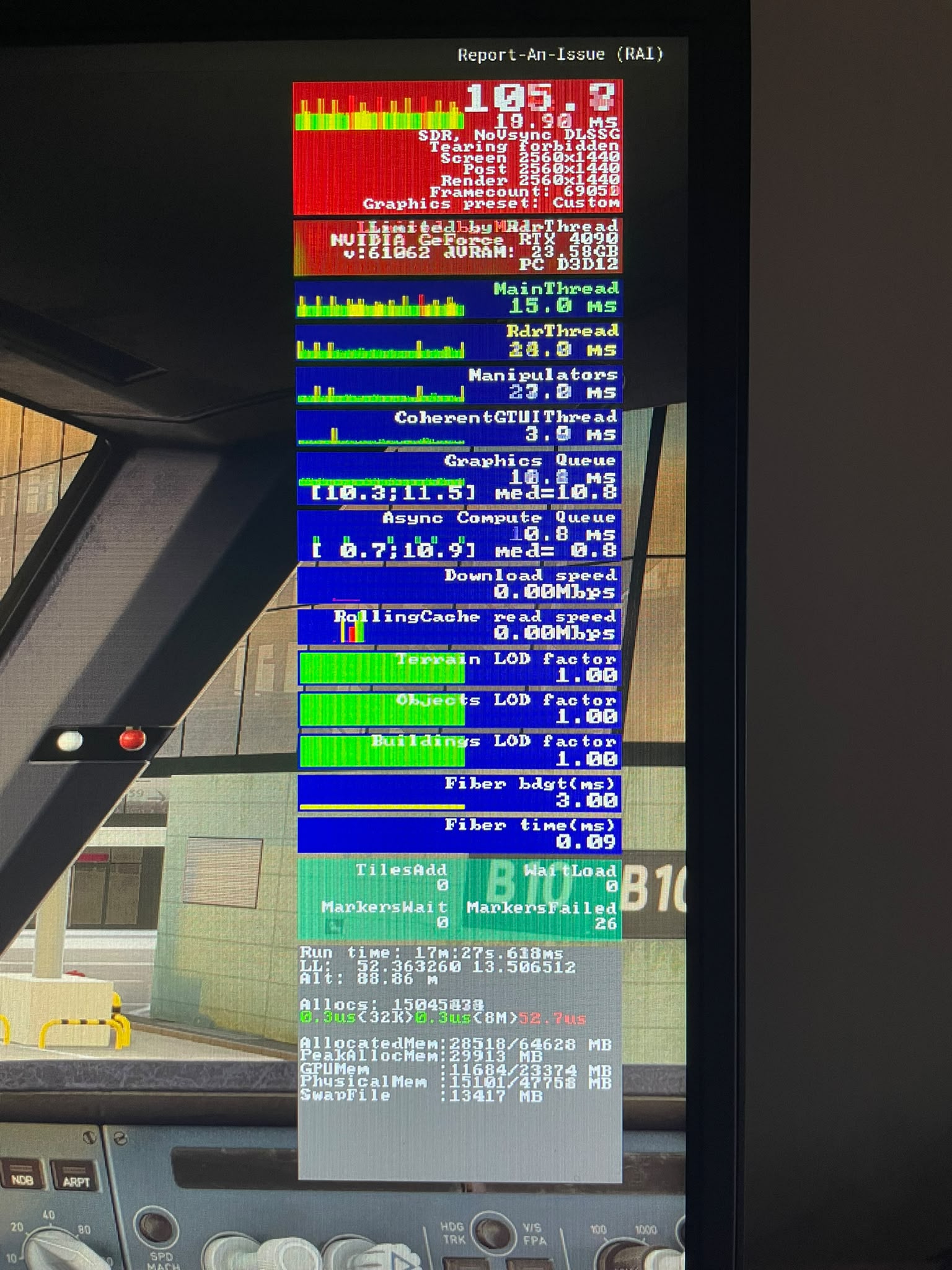
While scrolling on the second monitor (MainThread ~51 ms)

I can now reproduce the issue with an empty Community folder as well. The same MainThread and CoherentGTUIThread spikes occur simply by scrolling in another application on the second monitor. This seems to rule out Fenix, GSX and third-party add-ons.
This is usual since FG is not working anymore as soon as the app looses the focus. Depending on the other settings (VSync, G-Sync), the mainthread increases significantly close to the frame time.
Update: I noticed that enabling Chrome’s hardware acceleration significantly reduces the MainThread spikes while scrolling. The issue is still present, but much less severe. I’m continuing to investigate whether this is related to Chrome, Windows, or how MSFS handles background GPU/CPU workloads.
Turn off all virtualizations in your bios. Ever since I did that it fixed my issues. I used AI to have it give me the settings I needed to turn off for my MOBO on which options were the virtualization ones.
It has fixed all the issues.
Yeah i read this already and tried it as well. In my case it has no effect.
Why is that? I mean my FG is working…kind of i would say 
Audio stutters and pops still there on Series X. More so around busy airports and PG-heavy cities.
Audio/video stutters are EXTREME for me at the moment. I am unable to complete a single flight as after 15-20 minutes in it just becomes unplayable with latency interrupts over 100 ms every 10 secs or so. Anyone else?
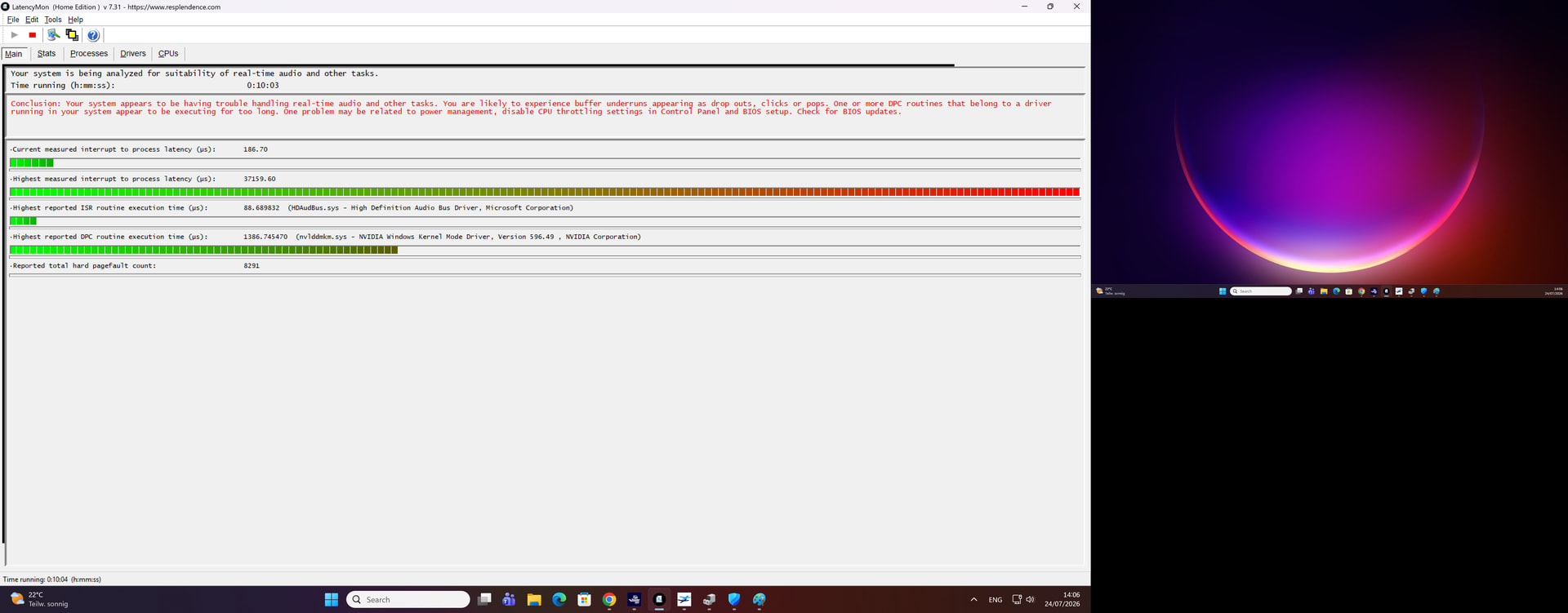
Have you found a way to fix the issue? For me, the audio stutters are so strong at the moment that I am unable to complete a single flight. And that’s with no apparent reason.
You should not run this kind of test while MSFS is running, as the results can be affected by the game itself and won’t give a clear picture of the actual system latency.
Also, you forgot to mention your full hardware configuration: CPU, GPU, RAM, storage, motherboard and other system details are extremely important in this kind of issue, as they can have a huge impact on performance and latency.
Thanks for your reply!
I am running it when running MSFS because these latency issues only occur when running MSFS. I can run my systems for hours and hours with office, Youtube, other games and I will not see a single latency spike of >1 ms when running LatencyMon. On the other hand, even when not running LatencyMon the audio and video stutters are clearly there when running MSFS and game-breaking. So clearly it is some issue that only occurs when running MSFS and LatencyMon just shows what is there already.
And sorry for not including my specs:
Gigabyte X670 Gaming X AX (BIOS up to date), AMD Ryzen 7900X, 64 GB RAM, Nvidia 3090 Ti, tried different network adapters (on-board 2.5Gbe Realtek family ethernet controller, ASIX AX179 USB Ethernet adapter, Realtek 8832CU wifi USB adapter and on-board Wifi adapter)