hello dear flight simmers, I did not look at the FS forums for a long time. just because I had no problem that I could not fix (ot that would be fixed by the next update to come).
My question is about the TBM 930 ; on most of the airplanes having an auto pilot possibilty, it is possible to use this auto pilot , even without any flight plan , I mean simply use the navigation map to check some VOR frequency, set it on the navigation system of the plane and turn on the auto pliolt to flight to this VOR. unfortunately, this do not work on the TBM 930. the auto pilot button do not have any effect, even with a flight plan activated. Is there something I missed on the dash board of this plane ? or some other particular trick I ignore ?
Tanks in advance for your help,
Top right, did you try putting Ap/Trim on?
hello, I use the AP button on the dashboard or the AP button on my joystick, no effect !
setting altitude or vertical speed seems to work as the button is activated (the vertical white bar turns on next to the button) but as the main AP do not act, nothing happens.
I believe Tony is asking if you have turned on the AP/Trim switch on the overhead panel (right side).
If you have the plane setup properly, you should be able to enter a VOR frequency in the NAV1 radio, change the CDI source to NAV1, have the course dialed in, enable NAV mode on the autopilot panel, and then engage AP. This assumes you are within range of the VOR of course.
Well, thank for this Bigcow 74, I honestly never searched for overhead panel on the TBM 930 or did not noticed this button, simply because the main dashboard is already seriously populated  … will have to check this. For the use of the nav system , I have no problem as I use it an all other aircraft, but thanks anyway.
The question is why this auto pilot do not care of he auto pilot button of my joystick ?
Thanks again for your suggestion.
time for me to leave now as it is dinner time !
Best regards,
JFC
Just for clarity, this is the switch that needs to be activated. Down is off, middle enables the electric trim, and up enables the autopilot servos.
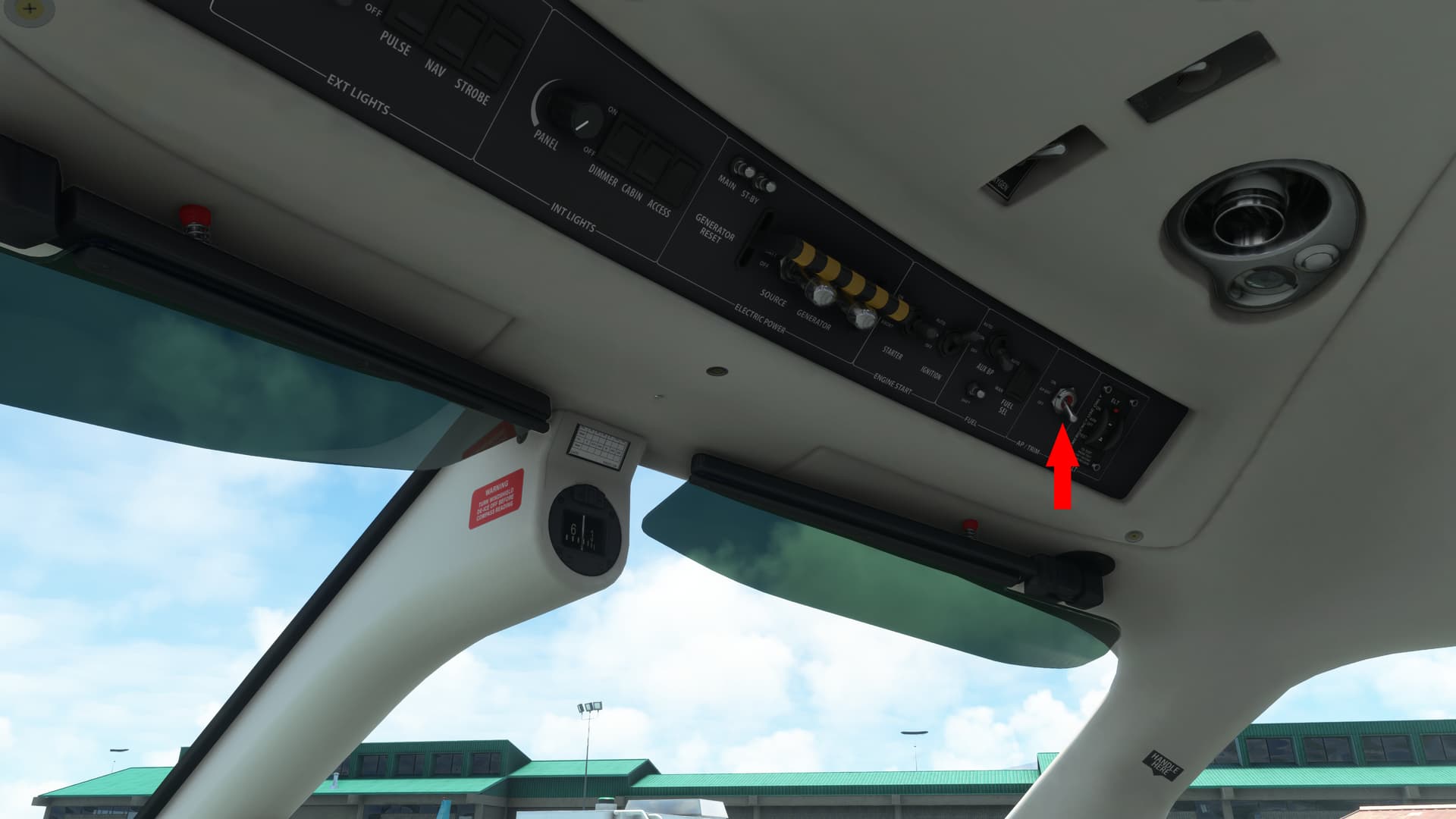
When you first get into the plane, there are several switches across the overhead that should be turned on:
- Nav lights (won’t come on until the battery is on)
- Battery and Generator
- Fuel tank auto select
- Trim/AP switch full up.
Just move left to right across that panel and you’ll have everything within about 10 seconds.
Hello tclayton2k
,
Thanks for the screenshot and explications.
To be honest I Nevers noticed this overhead cockpit, shame on me !
Flying on TBM will be far more easy now !
Regards,
JFC