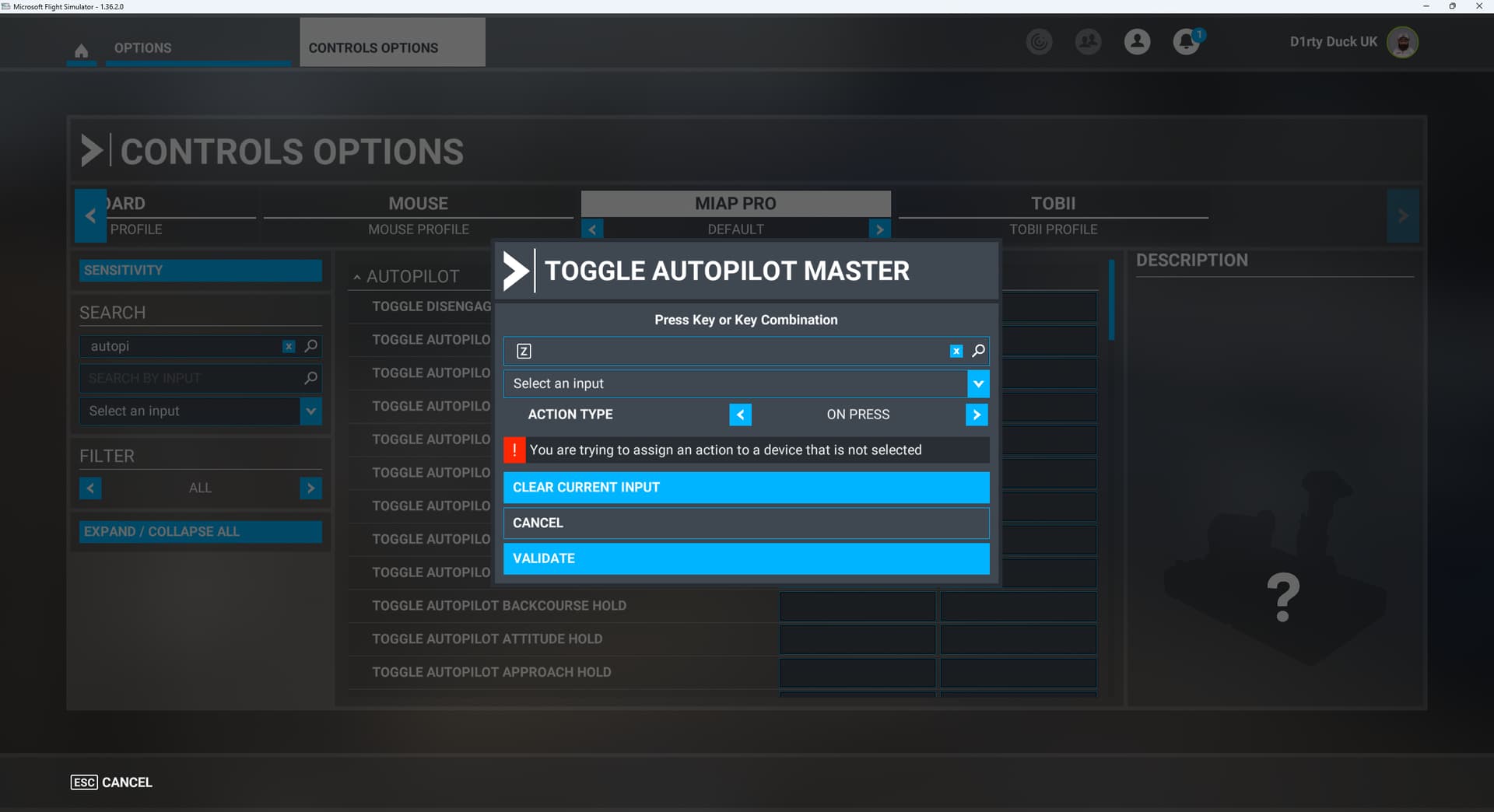
Looking for some help with an AXAIR MIAP Pro 24. My device has arrived but I’m unable to configure the device within MSFS. If I select the device to configure and then select ‘Toggle Autopilot Master’ and then click on ‘Select Scanning’ this then records the button press as key ‘Z’ and then creates an error saying ‘You are trying to assign an action to a device that is not selected’
I don’t know how to assign an action to a button on this device. I can select an input but there are 32 numbers and then a further 90+ joystick buttons that can be assigned.
Has anyone got one of these and have a way to configure the device?
Received mine yesterday and installed it this morning on Xbox Series X. Added some programming to what came preset following the instructions on their website. Made a few test flights in the C172 (both versions), the 310R and the 737-700. What can I say, it works great!
It does take some patience to add the full functionality and I did stop short of programming anything with the X1 & X2 shift keys. I don’t see myself going that far with the unit as it is fine for me as is.
I think I read someplace in the last few days that 2024 will support the legacy 2020 keyboard assignments? And since the MIAP24 PRO translates button and knob inputs into keyboard commands, it should work in 2024, perhaps after some fussing in controller options following the Axair installation directions? Thoughts?
P.S. I also have an FS specific keyboard that should fall under the same category of what ifs.
Has any of you used the flasher tool after receiving their MIAP Pro 24?
I recently received mine but it does not seem to be taken the key combinations properly. If I try one of the rotary knobs left/right it shows the same single key in FS2020 menu (LEFT SHIFT) which doesn’t seem right.
Also the buttons I need to press several times before they are actually recognized. Just seeing if anyone else had that issue but I will definitely contact AXAIR during the week.
I am having a little trouble with my AxAir Miap 24 Pro
VOR text is not lit up on the box. Anyone else have this VOR text lit up? Its just under the VOR knob.
I have programmed all the Radio Comm and Nav functions and all of them work great except NAV 1 Fractional Decrease. It keeps changing the Comm 1 Fractional Decrease at the same time. It is almost like the Nav/Com button is not working. But it works for everything else.
Example: Com is lit. I push FREQ knob and select KHZ. The KHZ numbers go up when I rotate the knob clockwise and down when I rotate the knob Counterclockwise. Thats perfect. But I push the Com/Nav button and select NAV turning the FREQ knob clockwise the Nav KHZ go up but Counterclockwise on the knob and the Com and Nav KHZ go down at the same time.
I have not been able to trick the system with actual Keyboard key combinations.
I did experiment with the X1 and X2 keys and they work great. I used X1 for Comm 2 and X2 for Nav 2
Well looks like the flash tool was creating some problems when setting it for FS2020 (maybe I should have not done it at all).
After many hours of troubleshooting I decided to flash the MIAP to FS2024 (this changes the key combinations to avoid conflict in the default keyboard bindings for FS2024, which I don’t have anyways) and now works as intended, all buttons are recognized properly as well as the rotary knobs, X1, X2, etc.
I am posting this so in case someone else in the future has the same issue you can try flash the MIAP to FS2024.
I will try to contact AXAIR, maybe the flash tool needs an update…
Not anymore. As I managed to get it to work properly in FS2020 after flashing it for FS2024.
Edit: I did got this answer but that was after I managed to get it working as per above.
“This is not known particulary, even some not only their FS2020 profile works, even in msfs2024. The main issue here is that Microsoft Flightsim handles the USB busses very poorly. If you would restart the Xbox and and game completely both profiles will likely work well. The MSFS2024 however puts less strain on the USB busses for a fact so I can imagine you have better luck with that one. I am happy to hear you got it set up well👍”
Thank you… very interesting.
My main complaints of the MIAP24 not always producing the expected codes in the MSFS Binding Control software and sometimes taking several pushes definitely happened after the 2020 firmware update. I wish I hadn’t updated and may also have to look at using the 2024 firmware.