Base content downloading over and over after marketplace updates

Using the template below will greatly help the team reproduce the issue and ease the process of fixing it. Before posting, search for an existing report. If you are not sure it’s a bug, please first report in User Support Hub.

3 tags are required - add them in the tag section next to the title above:

Feel free to delete this quote section after adding your appropriate tags.

ISSUE DESCRIPTION

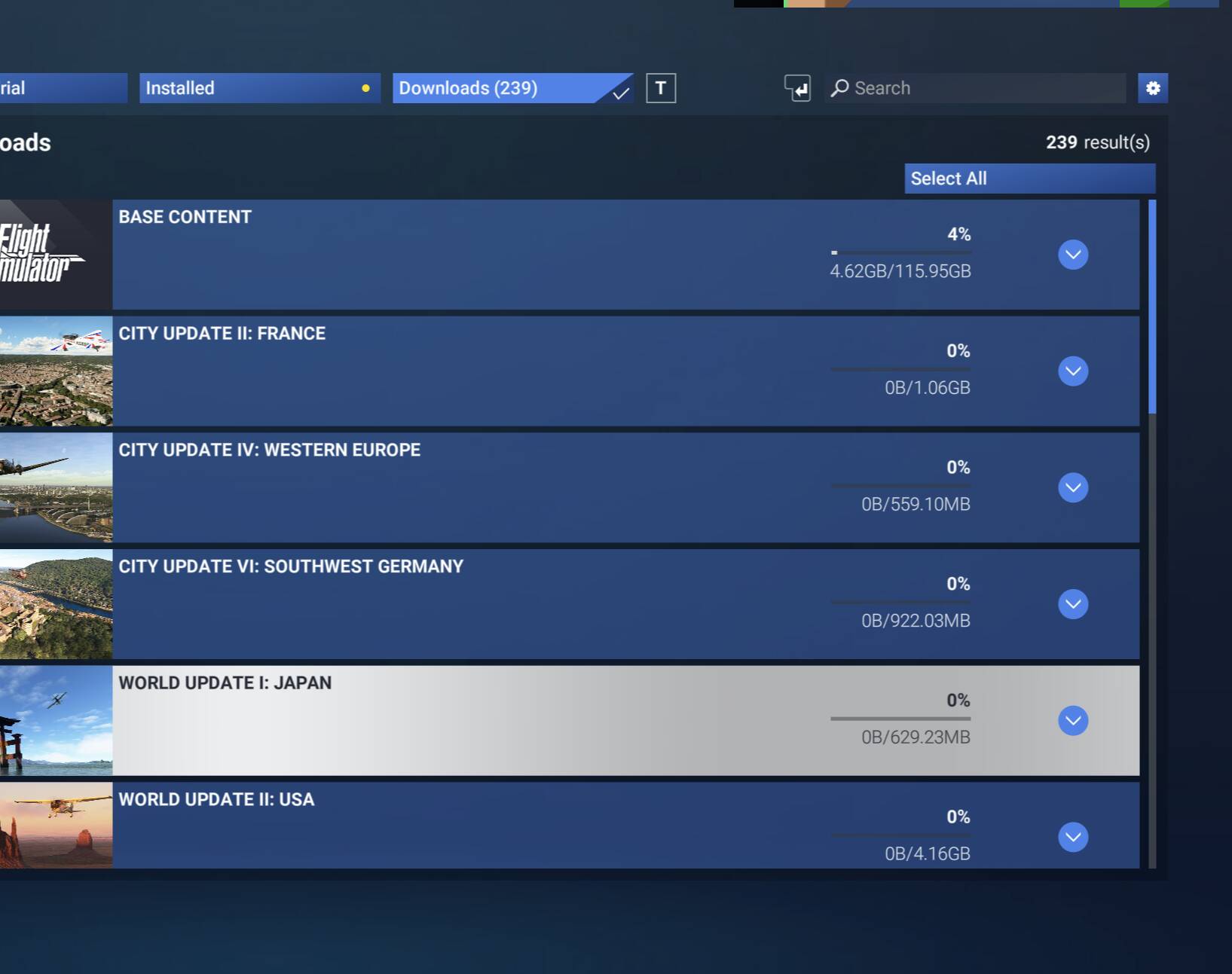
Description of the issue: After updates are pushed out, and you try to download the updates, it downloads all the base content again.

FREQUENCY OF ISSUE

How often does this occur for you (Example: Just once, every time on sim load, intermittently)? Every other update since SU3 came out and into the SU4 Beta. So roughly about once a week.

REPRODUCTION STEPS

Please list clear steps you took in order to help our test team reproduce the same issue:

  1. Go to my library.

  2. Select updates to download and download.

  3. Downloads 140gb of base content.

YOUR SETTINGS

If the issue still occurs with no mods and add-ons, please continue to report your issue. If not, please move this post to the User Support Hub.

What peripherals are you using:

[PC Only] Are you using Developer Mode or have you made any changes to it? No

[PC, MSFS 2020 Only] Are you using DX11 or DX12?

[PC Only] What GPU (Graphics Card) do you use? 9070xt

[PC Only] What other relevant PC specs can you share? This has been reported multiple times throughout the forum, and then the next update fixes it. Then the next round of updates comes out, and it is back to downloading all the base content again. I’m fortunate to have unlimited bandwidth, but I don’t have unlimited time.

MEDIA

Please add a screenshot or video of the issue occurring.
In my opinion, if you’re in the beta, you’d be better off just streaming. All of that stuff will be constantly getting updated throughout all of the beta builds. I’m sure it would be more steady and make more sense if you stayed in a public build, but it was too much of a nuisance to me to have to continually update all of my downloaded stuff manually.

I mentioned elsewhere earlier, a couple months ago I switched back to just streaming everything. At that point in time I noticed no noticeable difference between streaming and having things downloaded locally. Haven’t had any issue with anything since switching back to streaming, and this latest beta build has been stunning on Xbox Series X.

I’ll reconsider downloading locally in the future if I stay on a public build and it’s proven to be beneficial to performance and/or stability.

So is this considered a feature and not a bug???

I agree. I’ve experimented with both streaming and installed and I haven’t noticed any difference. I have 600 Mbps fiber.

1 Like

I have the same issue.
Every 2nd week I am downloading cca 100GB+ of data for MSFS2024. As far as I know I am out of beta builds.
But I do not believe that every 2nd week Asobo updated all the planes that are in BASE CONTENT folder with 110GB !! Maximum maybe 5 planes, but why they have this stupid settings that we have to download whole folder again if they updated only a few planes. Why we can not download only the files taht were fixed ?
I am sorry, but as I do not have fiber or some great connection but I am on WIfi with maximum 50Mbit connection, I can not have streaming all enabled. I had to download the most files to my SDD. But I would never imagine that I will need to re-download those files over and over again every 2nd week. WTF

1 Like

This happened to me several times as well. Lastly during the November sale on two different occasions when I bought new packages from the store. All packages get flagged for download despite being on disc after purchasing a few small 3rd party add-ons.

I’m not especially constrained on download speed but it’s a huge annoyance and surely unnecessary in terms of CDN traffic, not to mention the power draw due to having to let the sim idle for hours on end while I download 120+ GB of content again and again.

Well, I just updated MSFS2024 to the official SU4 release (I was not in the beta - updated from SU3).

After starting the updated sim, my entire library needed to re-download.

Subsequent to finishing the massive download I went to the in-game store and out of morbid curiosity bought a cheap weather preset add-on. Afterwards, I changed to the My Library tab and found all modules eligible for re-download… Which I did. Again.

According to my Unifi controller software, my Sim PC downloaded more than 820 GB of data today. The second re-download of the day is still in progress. I only turned the machine on to install SU4. I hope you get a favorable rate on Azure traffic, Asobo!

I did all my updates today and had the same thing. Downloaded everything around 200GB, and then it showed everything still needed to be updated again. I did notice that during the install, of the nearly 200GB, it only installed around 10GB. That doesn’t make any sense, but it keeps happening over and over again.

Same here today with SU4. I’ve got all WUs and CUs installed locally and the sim suddenly wanted to download around 150–200 GB again. During the process it only seemed to actually install a small part of that, and afterward everything still shows as needing an update – so it just loops.

This never happened to me with previous SU updates, they didn’t require a full re-download like this.

Does anyone know if Asobo is aware of this issue and working on a fix? I couldn’t find anything official about it.

I fixed mine.

It turned out to be an aircraft within the base package that wouldn’t install (you can open the base package in the UI to see all its components). I didn’t know this at the time. I’d spend hours downloading the base package, install it, only for FS2024 not to recognise it had been installed. Restarting FS2024 kind of forced me to download everything again**(see item 2 below)

In my case it was because the aircraft in question was the last one I flew. I could remember thinking ‘What’s the odds of all the packages working except my favourite aircraft the Cessna 400?’ - then it clicked.

To fix I simply went into the sim and picked a different aircraft. I then went back to the library manager and all of a sudden the Cessna could be installed!

For others:

  1. Open up you base content accordion UI.
  2. Find out which package/s didn’t install (**you can actually download them individually rather than the entire base package at 100+ Gb)
  3. If one of the packages is an aircraft and one that you know you fly, exit the library manager and pop into the sim. Make sure that aircraft is not currently selected. If it is select another one then go back to the library manager and install your aircraft.

I guess the simulator is somehow locking the last used aircraft which is preventing that aircraft from being installed, which in turn can lead to what looks like issues with the base content package.